
Engagement rate is a social media metric that shows what share of people interacted with your content, such as by liking, commenting, sharing or saving it. You calculate it by dividing the number of engagements by a base, such as reach, impressions or followers, then multiplying by 100. It matters because it shows whether your content actually connects with people, not just how many saw it.
Key Takeaways
- The basic formula is engagements divided by a base, multiplied by 100.
- The base can be reach, impressions, followers or views, and each gives a different number.
- Each platform counts engagements slightly differently, so compare like with like.
- Hootsuite says a good rate “generally falls between 1% and 5%,” but your own history and industry matter more.
- Google Analytics uses the same name for a different website metric: the share of engaged sessions.
What Is Engagement Rate?
Hootsuite defines it as “a social media metric that measures how much of your audience actively engages with your content.” Socialinsider puts it in similar terms: it “measures how actively people interact with the content you publish.”
An engagement is, broadly, “any action someone takes to interact with your content.” That includes likes, comments, shares, saves, poll responses, messages and link clicks. However, the exact list depends on the platform and the tool you use.
Raw numbers can mislead. For example, 500 likes sounds impressive, but not if 100,000 people saw the post. A rate solves that problem, because it compares interactions with the size of the audience. So it is one of the main measures of success in social media marketing.
How Engagement Rate Works
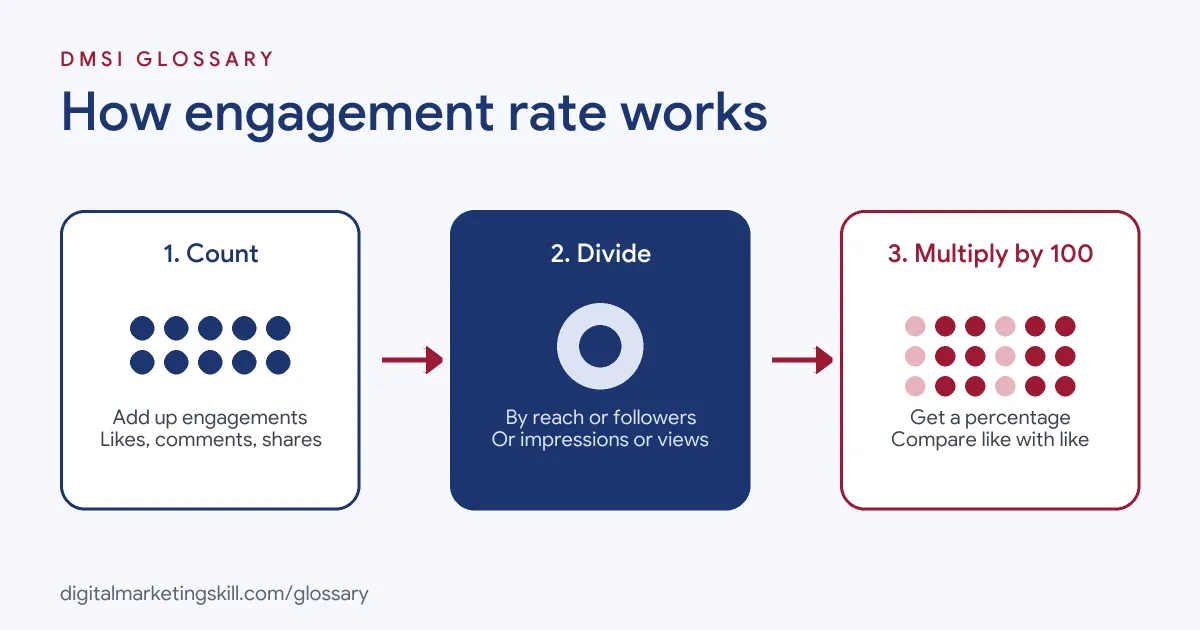
Every version follows the same three steps. First, you add up the engagements on a post or across a period. Next, you divide that total by your chosen base. Then you multiply by 100 to get a percentage.
By Reach
Hootsuite gives this formula: “ERR = total number of engagements on a post / reach of that post * 100.” Reach is the number of unique people who saw the post. As a result, this version shows how engaging the post was for the people who actually saw it. Because it ignores followers who never saw the post, it gives a fair view of the content itself.
By Impressions
Impressions count every time the post was shown, including repeat views by the same person. The formula is: “ER impressions = Total engagements on a post / Total impressions *100.” This version is useful for paid posts, where you often track impressions closely.
By Followers
The follower version divides engagements by your follower count: “ER post = Total engagements on a post / Total followers *100.” Socialinsider suggests using followers when you compare yourself with competitors, because reach figures for other accounts are only estimates. There is also a daily version, which divides a day’s engagements by your followers.
Engagement Rate Examples
Here are three worked examples:
- Instagram post by reach: A café’s post reaches 4,000 people and gets 160 likes, comments, shares and saves. So 160 divided by 4,000, times 100, gives a rate of 4%.
- LinkedIn post by impressions: A company page post gets 10,000 impressions and 250 reactions, comments, shares and clicks. That works out at 2.5%.
- TikTok video by views: A video gets 50,000 views and 3,000 likes, comments, shares and saves. The rate is 6%.
In each case, the formula is the same, but the base is different. Therefore, always say which base you used when you report the number. It also helps to show the raw totals alongside it. A 6% rate on 50 views tells a very different story from 6% on 50,000 views.
Engagement Rate by Platform
Socialinsider shows that platforms count different actions and suit different bases. Here is a summary of its approach:
| Platform | Base used | Interactions counted |
|---|---|---|
| Followers or reach | Reactions, comments, shares | |
| Followers or reach | Likes, comments | |
| Impressions | Likes, comments, shares, clicks | |
| TikTok | Views | Likes, shares, comments, saves |
| YouTube | Subscribers | Likes, comments, dislikes |
Note that each platform’s own definition can differ from a tool’s formula. For instance, Socialinsider points out that Facebook’s own post engagement figure also counts clicks.
Engagement Rate in Google Analytics
The same term means something different on websites. In Google Analytics, it is “the percentage of engaged sessions on your website or mobile app.” A session counts as engaged if it lasts longer than 10 seconds, has a key event, or has two or more page or screen views. Google also notes that “the bounce rate is the opposite of the engagement rate.” So when someone mentions this metric, check whether they mean social media or your website.
How to Calculate Engagement Rate
You can work it out in a spreadsheet in a few minutes. Follow these steps:
- Choose your base: reach, impressions, followers or views.
- Export the data for each post from the platform’s insights or your social media tool.
- Add up the engagements you want to count, such as likes, comments, shares and saves.
- Divide the total engagements by the base for each post.
- Multiply by 100 to get a percentage.
- Average the results across posts to see your typical rate for the period.
- Compare against your own past results and against similar accounts.
Keep the same base and the same list of interactions every time. Otherwise, your numbers will not be comparable. A simple sheet with one row per post and a column for each interaction makes the work quick to repeat.
Best Practices for Improving Engagement
A few habits tend to lift results over time:
- Ask a clear question. Posts that invite a reply give people an easy reason to comment.
- Reply to comments. Conversations show people that someone is listening.
- Test different formats. Compare images, carousels and short videos, then make more of what your audience responds to.
- Plan, then react. A content calendar keeps you consistent, while open slots let you join trends.
- Benchmark sensibly. Hootsuite advises comparing with your own platform and industry rather than a universal standard.
Common Mistakes to Avoid
Many beginners compare a follower-based rate with someone else’s reach-based rate. As a result, they draw the wrong conclusions. Others chase likes with giveaways or bait, which can attract people who never buy. Another error is mixing organic and paid posts in one average. Paid posts reach people chosen by your targeting rather than your followers, so mixing the two can hide what is really happening. Some also report the metric on its own, without linking it to goals such as clicks, leads or sales. Finally, many react to a single post instead of looking at the trend across several weeks. Context always matters.
Where You’ll Use Engagement Rate at Work
This metric is part of everyday reporting in social media roles. For example, a Social Media Manager tracks it weekly to see which posts and formats work best. A Paid Social Specialist uses it alongside cost per engagement, which Hootsuite defines as total spend divided by total engagements. Meanwhile, a Content Creator uses it to decide which ideas to repeat.
In job interviews, you may be asked how you would measure the success of a social campaign. Being able to explain which base you chose, and why, shows that you understand the numbers behind the posts. Clients and managers also want a clear summary, so practise explaining the result in plain language and suggesting what to try next.
Learn It in the Social Media Track
You can learn to measure and improve this metric in the AI-Powered Social Media Management and Advertising track. It covers social media marketing and analytics, content creation and paid social. For your portfolio, you plan, create and run a paid social campaign for a real brand. You also join a U.S. Project Internship from day one and get unlimited 1-on-1 mentoring.
For practical tips, read our post on social media engagement principles.
Frequently Asked Questions
What is engagement rate in simple terms?
It is the share of people who interacted with your content, shown as a percentage. You divide engagements by reach, impressions, followers or views, then multiply by 100.
What is a good engagement rate?
Hootsuite says a good rate generally falls between 1% and 5%. However, it varies by platform and industry, so compare with your own past results first.
Should I use reach or followers?
Use reach to judge how engaging a post was for the people who saw it. Use followers when you compare with competitors, because you cannot see their reach.
What counts as an engagement?
Usually likes, comments, shares and saves, and sometimes clicks or messages. Each platform and tool counts slightly different actions.
Is engagement rate the same in Google Analytics?
No. In Google Analytics, it means the percentage of website or app sessions that were engaged, which is the opposite of bounce rate.
Sources: Hootsuite: How to calculate engagement rate; Socialinsider: How to calculate engagement rate; Google Analytics Help: Engagement rate and bounce rate.