
Responsive search ads are text ads in Google Ads and Microsoft Advertising where you write several headlines and descriptions, and the platform mixes them into the best ad for each search. Over time, the system learns which combinations perform best. They matter because they are the standard text ad format on Google Search, so almost every search campaign you run will use them.
Key Takeaways
- In Google Ads, you can add up to 15 headlines and 4 descriptions to one ad. You need at least 3 headlines and 2 descriptions.
- Headlines can have up to 30 characters, and descriptions up to 90.
- Google tests combinations and learns which ones work best for different searches.
- Pinning fixes a headline or description to a set position, but it reduces the combinations Google can test.
- Ad Strength rates how varied and relevant your text is. However, it does not decide whether your ad can show.
What Are Responsive Search Ads?
A search ad is the text ad people see on a search results page. In the past, advertisers wrote each version by hand. With this format, you write the parts instead, and the platform builds the ad.
Google Ads Help describes it simply: you “enter multiple headlines and descriptions,” and “over time, Google Ads tests different combinations and learns which combinations perform best.” By matching the ad more closely to each search term, Google says the format “may improve your campaign’s performance.”
Microsoft Advertising works the same way. Its documentation says you can set “between 3-15 unique ad headlines” and “2-4 ad descriptions within a single ad.” As a result, you can reuse most of your work across both platforms.
How Responsive Search Ads Work
The process has three steps. First, you write your assets. Next, the platform assembles them into different combinations. Finally, it learns from the results and shows the best mix for each search.
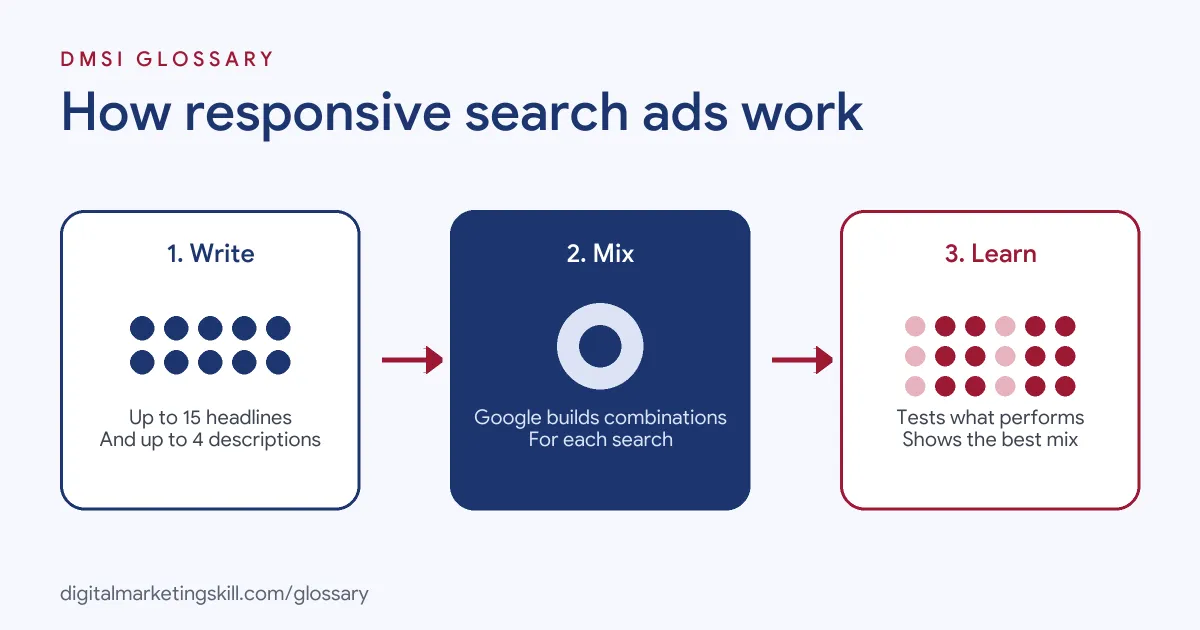
Headlines, Descriptions and Limits
Google sets clear limits. Headlines support up to 30 characters, descriptions up to 90 characters, and the two display path fields up to 15 characters each. For languages such as Chinese, Japanese and Korean, every character counts as two.
In any given ad, Google shows at least one headline and one description. It can show up to three headlines in the main headline position. Microsoft notes that its ads show up to three headlines and two descriptions, although smaller screens may drop the third headline or second description.
Pinning
Because assets can appear in any order, each one must make sense on its own. If some text must appear in every ad, such as a legal line, Google says you “must pin the text to either Headline position 1, Headline position 2 or Description position 1.” Pinning gives you control. On the other hand, it reduces the number of combinations Google can test.
Ad Strength
Ad Strength is a rating Google gives while you build the ad. It can be “Incomplete”, “Poor”, “Average”, “Good” or “Excellent”. Google says it is “a feedback tool for asset diversity and combination testing” and that “it isn’t used to calculate Ad Rank, Quality Score or auction wins.” Still, Google reports that advertisers who improve Ad Strength from Poor to Excellent see 15% more conversions on average.
Responsive Search Ads Examples
Here are three made-up examples of how to plan your assets:
- Plumber (example): Headlines cover the service (“Emergency Plumber in Leeds”), a benefit (“Here in 60 Minutes”) and trust (“Fixed Prices, No Call-Out Fee”).
- Online course (example): Headlines mix the topic (“Learn Google Ads Online”), the format (“Hands-On Projects”) and an action (“Book a Free Call”).
- Shoe shop (example): The brand pins its name to Headline position 1, then leaves the other headlines unpinned so Google can test offers and features.
In each case, the headlines say different things. That variety gives the system something real to test.
Responsive Search Ads on Google and Microsoft
Both platforms use the same idea, with small differences:
| Detail | Google Ads | Microsoft Advertising |
|---|---|---|
| Headlines per ad | 3 to 15 | 3 to 15 |
| Descriptions per ad | 2 to 4 | 2 to 4 |
| Shown at once | Up to 3 headlines in the headline position | Up to 3 headlines and 2 descriptions |
| Quality feedback | Ad Strength rating | Platform selects the best combination for each query |
In practice, you can write one strong set of assets and adapt it for both platforms.
How to Create a Responsive Search Ad in Google Ads
These steps follow Google’s own instructions. Menu names may shift slightly, but the flow stays the same.
- Go to Campaigns, then select Ads.
- Select the plus button, then choose Responsive search ad.
- Enter the final URL and the display path text.
- Add your headlines. You need at least three, and you can add up to 15.
- Add your descriptions. You need at least two, and you can add up to four.
- Check the preview and the Ad Strength rating, then select Save.
Before you save, read the headlines in random order. If any pair sounds odd or repeats itself, rewrite it.
Writing Good Headlines
Google’s tips give you a simple plan. First, write the first three headlines “as if they’ll appear together in your ad,” so the core message always reads well. Then add headlines with different angles. Google suggests “highlighting additional product or service benefits, a problem that you’re solving or delivery and returns information.” After that, create variations of lines you already have, for example with a different call to action. Also note that part of your ad text may appear in bold when it closely matches the search. So clear, keyword-led headlines can stand out more on the page.
Best Practices
- Write unique headlines. Google advises “providing as many unique headlines as you can.” Ten versions of the same line won’t help.
- Use your keywords. Include at least one of your keywords in your headlines, as Google recommends.
- Run more than one ad. Google suggests at least two ads per ad group with “Good” or “Excellent” Ad Strength. It reports that adding a second ad brings a 6.6% increase in conversions at a similar cost per conversion on average.
- Pin only when you must. Save pinning for brand or legal text.
- Judge on results. Ad Strength helps while you write, but conversions and click-through rate show what works.
Common Mistakes to Avoid
Many beginners write headlines that only make sense in a set order. As a result, the assembled ads read badly. Others pin every headline, which turns the format back into a fixed ad. Some chase an “Excellent” rating and forget about sales. Another common error is writing headlines that don’t match the keywords in the ad group. Finally, some teams change their ads every few days, before the system has enough data to learn.
Where You’ll Use Responsive Search Ads at Work
This format is a daily task in paid search roles. For example, real remote job listings ask candidates to:
- “Create and optimize Responsive Search Ads (RSAs) and other Microsoft Advertising formats to improve click-through and conversion performance” (Microsoft Bing Expert).
- “Design scalable account and campaign structures covering keyword strategy, match types, negative keywords, search-query mining, bidding, RSAs, DSA and Performance Max where appropriate” (Lead PPC Specialist).
So if you want to work as a Google Ads Specialist or PPC Specialist, employers will expect you to write, test and improve these ads. They will also want to see results from a live campaign.
Learn It in the Google Specialist Track
You can learn to write and test search ads in the AI-Powered Google Specialist track. It covers Google Ads across Search, Display, Discovery, Gmail and YouTube, plus Google Analytics. Your portfolio project is a Google Ads campaign you launch and measure with conversion tracking. You also get unlimited 1-on-1 mentoring and a U.S. Project Internship from day one.
Next, read our guide to Google Ads optimisation and the most common Google Ads mistakes to fix first.
Frequently Asked Questions
How many headlines can responsive search ads have?
Up to 15 headlines and 4 descriptions in Google Ads. You need at least 3 headlines and 2 descriptions to create one.
What is the character limit for headlines?
Each headline can have up to 30 characters, and each description up to 90. In Chinese, Japanese and Korean, each character counts as two.
Does Ad Strength affect where my ad shows?
No. Google says Ad Strength isn’t used for Ad Rank, Quality Score or auction wins. Instead, it is feedback to help you write better assets.
Should I pin headlines?
Only when you must, such as for brand names or legal text. Pinning gives you control, but it limits testing.
Do responsive search ads work on Microsoft Advertising?
Yes. Microsoft Advertising supports 3 to 15 headlines and 2 to 4 descriptions per ad, and it picks the best combination for each search.
Sources: Google Ads Help: About responsive search ads; Google Ads Help: About Ad Strength; Microsoft Learn: Responsive Search Ads; remote job listings on Himalayas.