
The click-to-open rate (CTOR) is an email metric that shows what share of the people who opened an email went on to click a link in it. You work it out by dividing clicks by opens and multiplying by 100. It matters because it isolates how well the content inside the email performed, separate from the subject line that got it opened.
Key Takeaways
- CTOR compares clicks with opens. Click rate, by contrast, compares clicks with all delivered emails.
- Tools define it slightly differently. For example, Listrak divides unique clickers by total opens.
- Open tracking relies on a hidden image, so it is never fully accurate.
- Apple Mail Privacy Protection hides whether people opened an email, which can inflate open figures.
- Use CTOR to test email content, layout and calls to action, not subject lines.
What Is Click-to-Open Rate?
An email has two jobs. First, the subject line has to get it opened. Then the content has to get people to act. The click-to-open rate measures that second job only.
Say 1,000 people open your newsletter and 80 of them click a link. Your CTOR is 80 divided by 1,000, which is 8%. In other words, 8 in every 100 openers found something worth clicking. These numbers are an example, not a benchmark.
The metric sits alongside open rate and click-through rate. Each one answers a different question, so it helps to read them together.
How Click-to-Open Rate Works
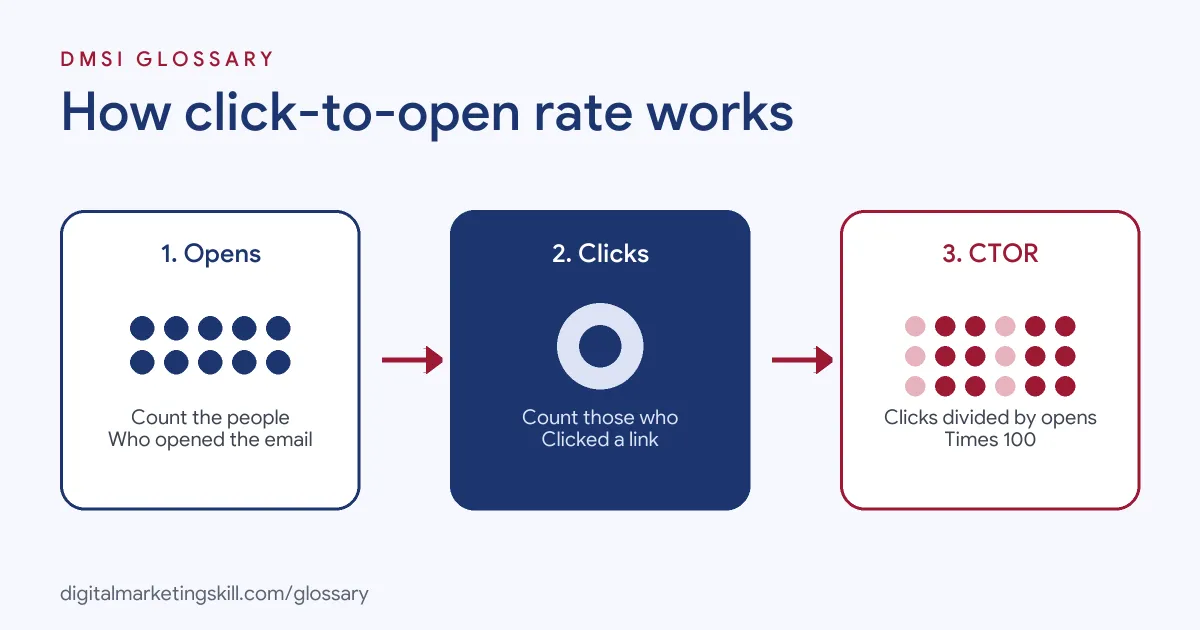
Your email platform records two events for each campaign. It logs an open when the email loads, and it logs a click when someone taps a tracked link. Then it divides one by the other.
The Formula
The basic formula is: clicks ÷ opens × 100. However, the exact inputs vary by tool. Listrak, for instance, says CTOR “is calculated by dividing the total number of unique clickers by the total number of opens.” It uses unique clickers rather than all clicks because total clicks also include repeat clicks from the same person.
Other platforms may use different inputs, such as unique opens. Neither approach is wrong. Still, you should compare results only within the same tool, so the definitions match.
How Opens Are Tracked
Opens are harder to measure than clicks. Mailchimp explains that it counts an open when a tiny, invisible image in the email downloads. As a result, it warns that open tracking “isn’t 100% accurate.” If someone blocks images, the open may not register.
Mailchimp adds that it counts a click as an open “even if the tracking image didn’t load.” In other words, every clicker also counts as an opener.
Apple Mail Privacy Protection
Apple’s privacy feature changes the picture. Apple says Mail Privacy Protection “prevents senders from seeing if you’ve opened the email message they sent you.” Mailchimp lists it as activity that “can falsely inflate open and click metrics” and suggests excluding it from reports. So if many of your readers use Apple Mail, your open count may be too high, and your CTOR may look lower than it really is.
Click-to-Open Rate Examples
Here are three made-up examples of how a team might use the metric:
- Newsletter redesign: A publisher moves its main link to the top of the email. After that, CTOR rises while the open rate stays flat, which shows the layout change worked.
- Product launch: An online shop sends two versions with the same subject line. One uses a single button, and the other lists six products. The version with the higher CTOR wins.
- List health check: A software company sees its open rate jump but its CTOR fall. It then checks for Apple privacy opens before drawing any conclusions.
Reading Click-to-Open Rate in Context
A single number rarely tells the full story. Here is a made-up comparison of two emails, each sent to 10,000 people:
- Email A: 3,000 opens and 150 clicks. That gives a CTOR of 5% and a click rate of 1.5%.
- Email B: 1,500 opens and 120 clicks. That gives a CTOR of 8% and a click rate of 1.2%.
Email B has the stronger content, because a bigger share of its readers clicked. However, Email A still brought more clicks in total, because its subject line won far more opens. So the best next test is clear: keep Email A’s subject line, and use Email B’s content. Reading both metrics together points you to the right fix, while either one alone could mislead you.
Click-to-Open Rate vs Open Rate vs Click Rate
These three metrics are easy to mix up. This table shows how they differ:
| Metric | Formula | What it tells you |
|---|---|---|
| Open rate | Opens ÷ delivered emails | How well the sender name and subject line worked |
| Click rate | Clicks ÷ delivered emails | How many recipients acted overall |
| Click-to-open rate | Clicks ÷ opens | How well the content persuaded people who opened |
Mailchimp defines open rate as the share of “successfully delivered emails” that were opened. Similarly, it defines click rate as the share of delivered emails that “registered at least 1 click.” CTOR simply swaps the bottom of the fraction from delivered emails to opens.
How to Measure and Improve Click-to-Open Rate
Follow these steps to use the metric well:
- Check your tool’s definition. Find out whether it uses unique or total clicks and opens.
- Filter out machine opens where you can. Exclude Apple privacy opens and bot activity if your platform allows it.
- Set a baseline. Average your CTOR over several recent campaigns of the same type.
- Change one thing at a time. Test the call to action, button, layout or offer, but keep the subject line the same.
- Compare like with like. A weekly newsletter and a sales email will have different results.
- Look beyond the click. Finally, check what clickers did on your site, such as sign-ups or sales.
Best Practices for Click-to-Open Rate
- Use one main call to action. A clear next step usually beats a crowded email.
- Keep the promise of the subject line. If the subject says “discount,” put the discount near the top.
- Make links easy to tap. Many people read on phones, so use large buttons.
- Segment your list. Relevant content for each group gives more reasons to click.
- Report CTOR with other metrics. On its own, it can hide a falling open rate.
Common Mistakes to Avoid
A few errors make CTOR misleading. First, teams compare figures from two tools that define it differently. Second, they use it to judge subject lines, when it measures content. Third, they ignore privacy opens, so they draw firm conclusions from inflated data. Finally, they chase clicks with misleading links, which can hurt trust and lead to more unsubscribes.
Where You’ll Use Click-to-Open Rate at Work
Job listings rarely name CTOR on its own. However, they often ask for the open and click metrics it is built from. For example, recent remote roles ask candidates to:
- “Monitor campaign performance (open rates, click rates, unsubscribes, deliverability)” (Marketing CRM Manager).
- “Track and report on lifecycle performance: open, click and conversion rates, revenue contribution, retention and reactivation outcomes” (Lifecycle Marketing Specialist).
- “Run basic A/B tests (subject lines, creatives, incentive levels) and document results” (CRM Marketing Specialist).
So in roles such as Email Marketing Specialist or Marketing Automation Specialist, you will read these numbers every week and explain what they mean.
Learn It in the Lead Generation and Email Track
You can learn to track and improve email metrics in the AI-Powered Lead Generation and Email Automation track. There, you build a lead magnet and an automated email sequence that converts, so you can show real results. You also join a U.S. Project Internship from day one, with unlimited 1-on-1 mentoring.
Want to dig into the first half of the formula? Read our guide to email open rates, or see the wider list of email marketing metrics.
Frequently Asked Questions
What is click-to-open rate in simple terms?
It is the share of people who opened your email and then clicked a link. It shows how well the content inside the email worked.
How do you calculate CTOR?
Divide clicks by opens, then multiply by 100. For example, 80 clicks from 1,000 opens gives a CTOR of 8%.
What is the difference between CTR and CTOR?
Click rate divides clicks by all delivered emails. CTOR divides clicks by opens only, so it focuses on people who actually read the email.
Why did my click-to-open rate drop?
It may be the content, or it may be the data. Privacy features such as Apple Mail Privacy Protection can inflate opens, which pushes CTOR down.
Is a higher CTOR always better?
Usually, but not always. A tiny, highly engaged audience can show a high CTOR while overall sales stay low, so read it with other metrics.
Sources: Listrak Help Center: Click to Open Rate (CTOR); Mailchimp: About open and click rates; Apple Support: Use Mail Privacy Protection on iPhone; remote job listings on Himalayas.