
An XML sitemap is a file that lists the important pages on your website so search engines can find and crawl them more easily. It is written in XML, a simple code format, and usually lives at an address such as example.com/sitemap.xml. It matters because it helps Google discover new and deep pages, especially on large or new sites.
Key Takeaways
- A sitemap tells search engines which pages you think are important. It doesn’t guarantee they will be crawled or indexed.
- Small, well-linked sites of about 500 pages or fewer may not need one. Most sites still benefit.
- Each sitemap file can hold up to 50,000 URLs or 50MB uncompressed. Larger sites split it into several files.
- Google ignores the priority and changefreq tags, but it does use lastmod.
- You can submit it in Search Console or point to it from your robots.txt file.
What Is an XML Sitemap?
Google describes a sitemap as “a file where you provide information about the pages, videos, and other files on your site, and the relationships between them.” Search engines read this file “to crawl your site more efficiently.”
Think of it as a list you hand to a visitor who has never been to your house. They could find every room by walking around. However, the list saves time and makes sure they don’t miss the room at the end of the hall.
There are other sitemap formats, such as plain text files or RSS feeds. In practice, the XML version is the most common, because it can carry extra details. For instance, it can include when a page last changed, and entries for images, videos and news articles.
For example, a recipe blog adds 20 new posts a month. Its XML sitemap lists every recipe URL with the date it last changed. As a result, Google can spot new recipes without waiting to find a link to each one.
How an XML Sitemap Works
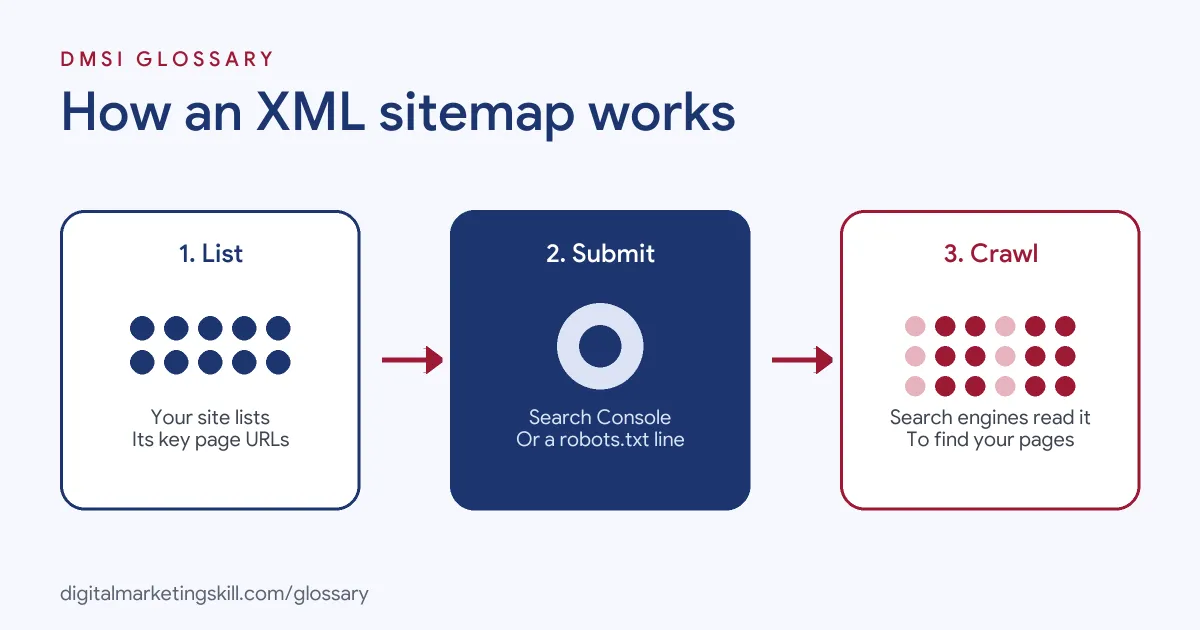
The process has three steps. First, your site creates the file. Next, you tell search engines where it is. Finally, crawlers read it and use it as one of the ways to find your pages.
What an XML Sitemap Looks Like
A basic file is short. Each page sits inside a <url> entry, with its address in a <loc> tag and, optionally, the date it last changed in a <lastmod> tag. All entries sit inside one <urlset> wrapper. Google adds that the file “must be UTF-8 encoded” and that all tag values must be entity escaped.
Extra Entries for Media and News
A sitemap can also describe special content. Google gives three examples. A video entry can list the video’s running time and its rating. An image entry can include the location of images on a page. A news entry can include the article title and publication date. These details help search engines show your content in video, image and news results.
Size Limits and Index Files
According to Google, all formats limit a single sitemap “to 50MB (uncompressed) or 50,000 URLs.” If you have more, you split your URLs across several sitemaps. You can then create a sitemap index file, which lists all of them, and submit that one file instead.
Which Tags Google Uses
Many old guides tell you to set priority and change frequency. However, Google says plainly: “Google ignores <priority> and <changefreq> values.” It does use the lastmod value. So keep lastmod accurate and skip the rest.
Do You Need an XML Sitemap?
Google lists cases where a sitemap helps most and cases where you might not need one:
| You might need one if… | You might not need one if… |
|---|---|
| Your site is large, so some pages may not be linked from others | The site is small, about 500 pages or fewer |
| Your site is new and has few links from other sites | Every important page can be reached by following links from the home page |
| You have lots of video, images or news content | You have few media files or news pages to show in search |
Even so, Google notes that “in most cases, your site will benefit from having a sitemap.” It is low effort, so most sites create one anyway. If you’re unsure, add one. There is little downside, and it gives you a useful report in Search Console.
XML Sitemap Examples
Here are three made-up examples of how different sites use them:
- Online shop: A store with 80,000 products splits its URLs into two product sitemaps, plus one for categories. A sitemap index file lists all three.
- News site: A local paper uses a news sitemap, so new articles carry their title and publication details.
- Small business: A plumber’s site has 15 pages, all linked from the menu. The sitemap is nice to have but not essential.
How to Create and Submit an XML Sitemap
- Check if you already have one. Google says that if you use a CMS such as WordPress, Wix or Blogger, it has likely made a sitemap available already.
- If not, generate one with your CMS, an SEO plugin or a crawling tool.
- Include only pages you want in search. Google advises using absolute, canonical URLs.
- Host it at the root of your site. Google recommends this, because a sitemap there can affect all files on the site.
- Submit it in Google Search Console under Sitemaps.
- Add a line to your robots.txt file, such as
Sitemap: https://example.com/sitemap.xml. Google says you can list several sitemap lines, with no limit on how many. - Check the Sitemaps report for errors and the number of URLs Google has read.
Best Practices for Your XML Sitemap
- List canonical URLs only. Leave out duplicates, redirects and pages you’ve set to noindex.
- Keep lastmod honest. Only change it when the page content really changes.
- Split large sites. Use separate sitemaps for products, posts or categories, so you can track each one in Search Console.
- Keep it automatic. Let your CMS or plugin update the file when pages are added or removed.
- Link pages too. A sitemap supports internal links. It doesn’t replace them.
Common XML Sitemap Mistakes
A common error is listing pages that redirect, return errors or carry a noindex tag. That sends mixed signals. Another is setting every lastmod to today’s date, which makes the tag useless. Some sites forget to update the sitemap after a redesign, so it still lists old URLs. Others block the sitemap itself in robots.txt. Finally, many assume that being in the sitemap means a page will rank. Google is clear that a sitemap “doesn’t guarantee that all the items in your sitemap will be crawled and indexed.”
Where You’ll Use XML Sitemaps at Work
Sitemaps appear in almost every technical SEO job ad. For example, recent remote job listings ask candidates to:
- “Maintain and optimize XML sitemaps, robots.txt configurations, and crawlability settings” (Technical SEO Specialist).
- Show “Working knowledge of HTML, JavaScript rendering, HTTP status behavior, schema.org structured data, robots directives, XML sitemaps, and web performance diagnostics” (SEO Manager).
- “Own the fundamentals with precision: title tags, meta descriptions, heading hierarchy, canonicals, redirects, XML sitemaps and robots.txt” (SEO Strategist).
So if you want to work as an SEO Specialist, WordPress Developer or Website Manager, expect to create sitemaps, submit them and fix the errors Search Console reports.
Learn It in the WordPress and SEO Track
You can learn to set up sitemaps on a live site in the AI-Powered WordPress and SEO Specialist track. It covers WordPress website and eCommerce development, search engine optimisation and content marketing. Your portfolio project is a WordPress site or store that you build and rank with an SEO content plan. You also get unlimited 1-on-1 mentoring and a U.S. Project Internship from day one.
Next, work through our on-page SEO checklist and our guide to mobile-first indexing. You may also like our glossary entries on technical SEO and canonical tags.
Frequently Asked Questions
What is an XML sitemap in simple terms?
It is a file that lists the pages on your site you want search engines to find, written in a format they can read quickly.
Where do I find my site’s sitemap?
Try example.com/sitemap.xml, or check your SEO plugin’s settings. Your robots.txt file may also list its address.
How many URLs can a sitemap hold?
Up to 50,000 URLs or 50MB uncompressed per file. If you have more, split them and use a sitemap index file.
Does a sitemap improve rankings?
Not directly. It helps search engines find your pages, but it doesn’t guarantee they will be indexed or rank well.
Should I set priority and changefreq?
There’s no need for Google. It ignores both values, though it does use lastmod.
Sources: Google Search Central: Learn about sitemaps; Google Search Central: Build and submit a sitemap; Google Search Central: Canonical URLs; remote job listings on Himalayas.