
An attribution model is the rule or method that decides how much credit each marketing touchpoint gets when someone converts, such as when they buy or fill in a form. Because people often click several ads or links before they act, the model splits the credit between them, or gives it all to one. It matters because the model you choose changes which campaigns look successful, and that shapes where you spend your budget.
Key Takeaways
- An attribution model decides which ads, keywords or channels get credit for a conversion.
- Google Ads now offers two models: last click and data-driven. Data-driven is the default for most conversion actions.
- Google no longer supports first click, linear, time decay and position-based models. It upgraded actions that used them to data-driven.
- In Google Analytics 4, you pick a reporting attribution model and a lookback window in the property’s attribution settings.
- Different models can tell very different stories, so always check which one a report uses.
What Is an Attribution Model?
Think of a football goal. The striker scores, but the midfielder made the pass and the defender started the move. If you only credit the striker, you miss how the goal really happened. An attribution model is how you decide who gets the credit.
In marketing, the “players” are your touchpoints. Google Ads Help puts it simply: “Attribution models let you choose how much credit each ad interaction gets for your conversions.” Google Analytics adds that a model “can be a rule, a set of rules, or a data-driven algorithm.”
For example, a customer might find you through a search ad, return through an email, and then buy after a remarketing ad. A last-click model gives all the credit to the final ad. A data-driven model shares it based on how much each step seems to help.
How an Attribution Model Works
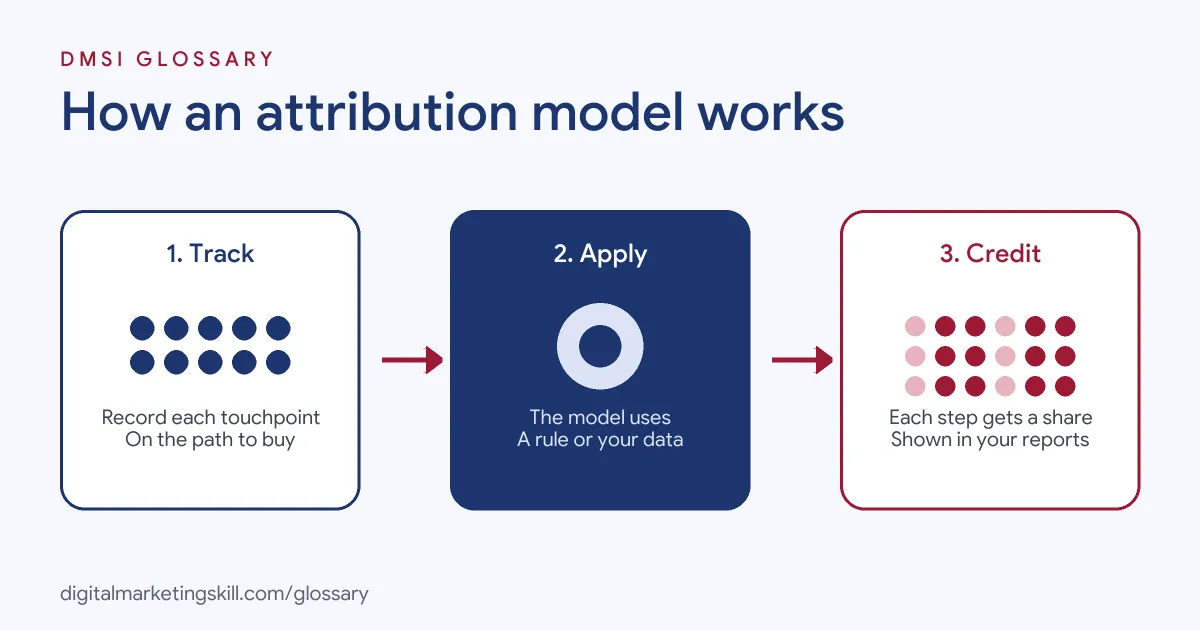
Every attribution model follows three steps. First, your tracking records each interaction on the path to a conversion. Next, the model applies its rule or algorithm to that path. Finally, it assigns credit to each touchpoint, and your reports show the result.
Rules-Based Models
A rules-based model uses a fixed rule. The best-known one is last click, which Google says “Gives all credit for the conversion to the last-clicked ad and corresponding keyword.” It is easy to understand, but it ignores everything that happened earlier.
Other rules once spread credit in set ways, such as giving it all to the first click or splitting it evenly. However, Google Ads Help states that “The first click, linear, time decay and position-based attribution models are no longer supported by Google.”
Data-Driven Models
A data-driven model learns from your own results instead. According to Google, it “Distributes credit for the conversion based on your past data for this conversion action.” It does this by comparing the paths of people who convert with the paths of people who don’t. Google calls data-driven “the default attribution model for most conversion actions.”
Lookback Windows
Models also need a time limit. Google Analytics explains that the lookback window “determines how far back in time a touchpoint is eligible for attribution credit.” For example, with a 30-day window, a click from 40 days ago gets no credit. Changing the window applies going forward, not to past data.
Attribution Model Examples
Here are three made-up examples of how the model changes the story:
- Online shop (example): Under last click, brand search ads look like the star. Under data-driven, a share of the credit moves to the YouTube ads that first introduced the brand.
- Software company (example): A free trial often starts after a blog visit, an email and a search ad. Data-driven shows the email deserves more credit than last click suggested.
- Local service (example): Most customers search and book on the same day. In this case, last click and data-driven give similar results.
In each case, the model doesn’t change what customers did. It only changes how you read it.
A Worked Example
Here is a made-up example with simple numbers. A customer clicks a YouTube ad, then a search ad, and then buys for £100. Last click gives the search ad all £100 of value. A data-driven model might give the YouTube ad £40 and the search ad £60. The total is still £100. Only the split changes, but that split can change where you spend next month.
Attribution Models Compared
Here is a quick comparison of the two models you can choose in Google Ads:
| Model | How it gives credit | Good to know |
|---|---|---|
| Last click | All credit to the last-clicked ad and keyword | Simple, but ignores earlier steps |
| Data-driven | Shares credit based on your past conversion data | The default for most conversion actions |
| Older rules (first click, linear, time decay, position-based) | Fixed splits by position or time | No longer supported in Google Ads |
In short, last click is a simple rule, while data-driven tries to reflect what actually helped.
How to Choose and Set an Attribution Model
- Set up conversion tracking. No model can work without accurate data on sales or leads.
- List your key conversions. Decide which actions matter, such as purchases or booked calls.
- Check the current model. In Google Ads, open each conversion action’s settings to see which model it uses.
- Choose the model. For most advertisers, data-driven is the default. Use last click only if you have a clear reason.
- Set GA4’s model. In Admin, open Attribution settings and choose the reporting attribution model and lookback window.
- Tag your campaigns. Use auto-tagging and UTM parameters, so you track each step.
- Compare over time. Review results for a few weeks before you move budget based on the new view.
What Changes in Your Reports
Google Analytics notes that changing the reporting attribution model “applies to historical and future data.” It also warns that with data-driven attribution, you may see decimals, or “fractional credit”, for the first time. For instance, if two keywords share a conversion, each might show 0.5. That’s normal, because the credit adds up to one conversion in total.
Best Practices for Your Attribution Model
- Use the same model when comparing. Otherwise, you’ll compare apples with oranges.
- Pair it with Smart Bidding. Google says automated bid strategies use this credit to help get more conversions. See our entry on Smart Bidding.
- Look at the full path. Upper-funnel campaigns may look weak under last click but still help sales.
- Keep tracking clean. Duplicate or missing conversions will mislead any model.
- Explain the model in reports. Tell your client or manager which model you used and why.
Common Mistakes to Avoid
A common mistake is cutting a campaign because it looks poor under last click, even though it starts many journeys. Another is comparing Google Ads and GA4 numbers without checking that both use the same model and window. Some teams also switch models and then panic when the numbers change overnight. Others forget that offline steps, such as phone calls, may not be tracked at all. Finally, many never tell stakeholders which model the report uses.
Where You’ll Use Attribution Models at Work
Attribution is a core skill in paid media and analytics roles. For example, real remote job listings ask for:
- “Solid understanding of conversion tracking, attribution models, and data quality tradeoffs.” (Performance Marketing Specialist).
- A “Deep understanding of marketing attribution models and demand generation tech stacks.” (Head of Revenue Operations).
So if you want to work as a Google Ads Specialist, PPC Specialist or Web Analytics Specialist, employers will expect you to explain what a model shows and what it hides.
Learn It in the Google Specialist Track
You can learn to track and read conversions in the AI-Powered Google Specialist track. It covers Google Ads across Search, Display, Discovery, Gmail and YouTube, plus Google Analytics. Your portfolio project is a Google Ads campaign that you launch and measure with conversion tracking. You also get unlimited 1-on-1 mentoring and a U.S. Project Internship from day one.
Next, read our guide to marketing analytics to see how attribution fits into wider reporting.
Frequently Asked Questions
What is an attribution model in simple terms?
It is the rule that decides which ad or channel gets credit for a sale or lead. Some give all the credit to one step, while others share it.
Which attribution models does Google Ads offer?
Google Ads offers last click and data-driven. The older first click, linear, time decay and position-based models are no longer supported.
What is the default model in Google Ads?
Google says data-driven is the default attribution model for most conversion actions.
Why do Google Ads and GA4 show different numbers?
They may use different models, lookback windows or counting rules. Check the settings in both before you compare.
Does changing the model change past data?
In GA4, changing the reporting attribution model applies to both historical and future data. Changing the lookback window applies only going forward.
Sources: Google Ads Help: About attribution models; Google Ads Help: About data-driven attribution; Google Analytics Help: Select attribution settings; remote job listings on Himalayas.