
Rich results are Google search listings that show extra information beyond the usual blue link, title and description, such as review stars, prices, event dates or recipe images. Google creates them from structured data on your page, when it decides the extra detail will help searchers. They matter because a richer listing takes up more space and can earn more clicks than a plain one.
Key Takeaways
- Rich results come from structured data, usually written with the Schema.org vocabulary.
- Google’s search gallery lists features such as Product, Recipe, Event, Review snippet, Video and Local business.
- Valid markup makes a page eligible, but Google says the actual appearance in search “might be different.”
- Google’s Rich Results Test checks a URL or a code snippet and tests as a smartphone by default.
- Misleading or hidden markup can cost a page its eligibility through a manual action.
What Are Rich Results?
A standard search result shows a page title, a URL and a short description. A rich result adds more. For example, a recipe might show a photo, a star rating and the cooking time. A product might show its price and whether it’s in stock.
These extras come from code on your page called structured data. Google describes structured data as “a standardized format for providing information about a page and classifying the page content.” Most sites write it with schema markup, which uses the shared Schema.org vocabulary.
Google doesn’t show these extras for every page with markup. Instead, the markup makes a page eligible, and Google’s systems decide whether to show the richer listing for each search. That’s why you’ll sometimes see your stars or prices, and sometimes not.
This work is part of technical SEO. Rich results don’t change your content. Instead, they change how clearly Google can read it and how your listing looks.
How Rich Results Work
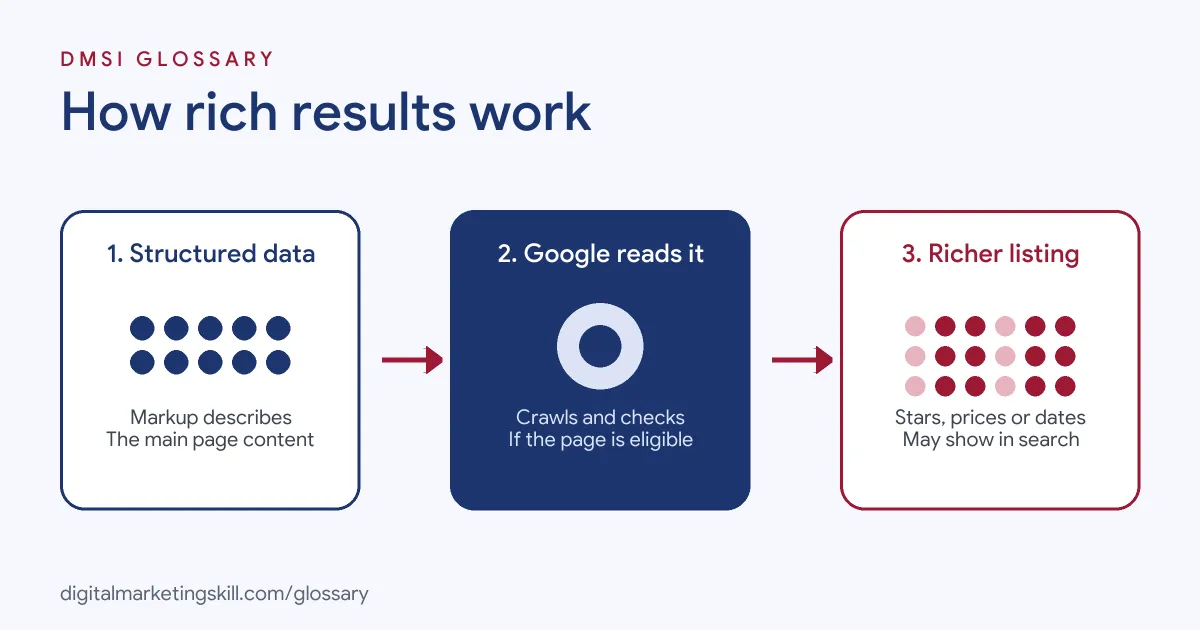
The process has three steps. First, you add structured data that describes the main content of a page. Next, Google crawls the page and reads that data. Finally, if the page is eligible and Google thinks it will help, it shows a richer listing.
Supported Features
Google keeps a search gallery of the features it supports. The gallery includes Article, Breadcrumb, Course list, Event, Job posting, Local business, Organization, Product, Recipe, Review snippet, Software app and Video, among others. Each feature has its own required and recommended properties.
Some features depend on others. For instance, the gallery says the Carousel feature “must be combined with one of the following features,” such as Recipe or Course list.
Eligibility, Not a Guarantee
Google is clear that markup alone doesn’t secure a listing. The gallery describes markup as a way “to make your site eligible.” It also warns that “the actual appearance in search results might be different.” Google’s structured data guidelines add that Google “does not guarantee that your structured data will show up in search results.”
Quality Rules
Google also sets quality rules. Its guidelines say: “Don’t mark up content that is not visible to readers of the page.” They also ban “irrelevant or misleading content, such as fake reviews.” If you break these rules, Google says “a page loses eligibility for appearance as a rich result” through a manual action.
Rich Results Examples
Here are three made-up examples:
- Example 1, online shop: A shop adds Product markup with price and stock. In search, its listing may show “£49, In stock” under the title.
- Example 2, cookery blog: A blog adds Recipe markup with an image, rating and cooking time. As a result, the recipe can appear with a photo and stars.
- Example 3, training provider: A school adds Event markup to its free webinar page, with the date and location. Its listing may then show the event details.
Google’s own case studies show why this matters. It reports that Rotten Tomatoes measured a 25% higher click-through rate on pages with structured data. Nestlé found that pages shown as rich results had an 82% higher click-through rate than other pages. These are single-company results, not promises.
Rich Results vs Featured Snippets vs Standard Results
These are three different kinds of listing:
| Listing type | What it shows | How you influence it |
|---|---|---|
| Standard result | Title, URL and description | Page title, meta description and content |
| Rich result | Extra details such as stars, prices, dates or images | Valid structured data for a supported feature |
| Featured snippet | A highlighted extract at the top of results | Clear answers in your content; no markup can request it |
In short, richer listings depend on structured data, while featured snippets depend on how well your text answers the question.
How to Get Rich Results for Your Pages
- Pick the right feature. Check Google’s search gallery and match each page type to a supported feature, such as Product or Event.
- Read the feature guide. Note the required and recommended properties for that feature.
- Add the markup. Use JSON-LD, which Google recommends, or a trusted SEO plugin. Include only facts that visitors can see.
- Test the page. Run the URL or code through the Rich Results Test. It shows which rich result types it found and any errors or suggestions.
- Fix and retest. Clear every error. Then review warnings for missing recommended properties.
- Ask Google to recrawl. Use the URL Inspection tool in Search Console to request indexing.
- Monitor reports. Finally, check the rich result reports in Search Console for errors across the whole site.
Using the Rich Results Test
The Rich Results Test is Google’s main checking tool. You can submit a full URL, or paste “an arbitrary code snippet” instead. It supports JSON-LD, RDFa and Microdata. According to Google, “the default user agent is smartphone,” though you can switch to desktop. The tool also keeps your test history for about 90 days and gives you shareable result links, which helps when you work with a developer.
Best Practices for Rich Results
- Mark up the main content only. Describe what the page is really about.
- Keep markup and page in sync. If a price or date changes, update both at once.
- Fill recommended properties too. Extra details can give Google more to work with.
- Test after every template change. One theme update can break markup on hundreds of pages.
- Judge results by clicks. Compare click-through rates in Search Console before and after you add markup.
Common Mistakes to Avoid
A common mistake is adding review markup for reviews that don’t appear on the page. Another is copying the same markup to every page, so each one claims to be the same product. Some sites also mark up features Google doesn’t list in its gallery, then wonder why nothing shows. Others leave out required properties. Finally, many treat a valid test as a promise, even though Google says appearance may differ.
Where You’ll Use Rich Results at Work
Job listings rarely use the phrase itself. Instead, they ask for the structured data skills behind it. For example, remote SEO roles mention:
- Owning “structured data across Purple.com: Product, Offer, Review, FAQ, Organization, and LocalBusiness schema in JSON-LD. Write, validate, and audit it.” (Sr. Manager, AI Search Visibility).
- A “Working knowledge of schema markup and structured data for AEO” (Remote SEO Content Editor, AI Search and AEO).
- The need to “Implement and maintain local technical SEO initiatives, including schema markup” (Sr Digital Marketing Manager SEO).
So if you want to work as an SEO Specialist, WordPress Developer or Website Manager, expect to add, test and monitor markup that makes pages eligible for richer listings.
Learn It in the WordPress and SEO Track
You can practise this in the AI-Powered WordPress and SEO Specialist track. There, you build a WordPress site or store and rank it with an SEO content plan. You also get unlimited 1-on-1 mentoring and a U.S. Project Internship from day one.
For related reading, see our guide to blog SEO and our on-page SEO checklist.
Frequently Asked Questions
What are rich results in simple terms?
They are Google listings with extra details, such as stars, prices or dates, created from structured data on your page.
Are rich results and rich snippets the same?
People often use the terms to mean the same thing. Google’s own documentation uses the term rich results.
Why doesn’t my richer listing show up?
Valid markup only makes a page eligible. Google decides when to show the feature, and it says appearance in search may differ.
How do I test my markup?
Use Google’s Rich Results Test with a URL or a code snippet. Then check Search Console’s rich result reports after launch.
Do rich results improve rankings?
Google presents them as a way to change how your listing looks, not as a ranking boost. However, a richer listing may attract more clicks.
Sources: Google Search Central: Structured data search gallery; Search Console Help: Rich Results Test; Google Search Central: Introduction to structured data; Google Search Central: General structured data guidelines; remote job listings on Himalayas.