
Data-driven attribution is an attribution model that uses your own conversion data to work out how much each ad interaction contributed to a sale or lead, then shares the credit to match. Instead of following a fixed rule, such as giving all the credit to the last click, it compares the paths of people who convert with the paths of people who don’t. It matters because it gives a fairer view of which ads, keywords and campaigns really help, and Google uses it as the default model for most conversion actions.
Key Takeaways
- Data-driven attribution (DDA) shares credit for each conversion based on your account’s past data.
- Google says it is “the default attribution model for most conversion actions” in Google Ads.
- It works across Search (including Shopping), YouTube, Display and Demand Gen ads, and it looks at clicks and video engagements.
- All conversion actions are eligible. However, Google says the model is most precise with at least 200 conversions and 2,000 ad interactions in 30 days.
- Older rule-based models, such as first click and linear, are no longer supported, and Google upgraded them to DDA.
What Is Data-Driven Attribution?
Think of data-driven attribution as a coach who studies match footage. Instead of praising whoever scored, the coach looks at every pass and asks which ones actually made goals more likely. Then the credit goes where it is earned.
Google Ads Help explains that the model “Distributes credit for the conversion based on your past data for this conversion action.” It also says, “Each data-driven model is specific to each advertiser.” In other words, your model learns from your customers, not from a general average.
That makes it different from a rule such as last click, which always gives every bit of credit to the final ad. For the bigger picture of how models work, see our entry on the attribution model.
How Data-Driven Attribution Works
The model works in three steps. First, it collects the paths people take, including every ad click and video engagement. Next, it compares paths that end in a conversion with paths that don’t. Finally, it gives more credit to the interactions that make a conversion more likely.
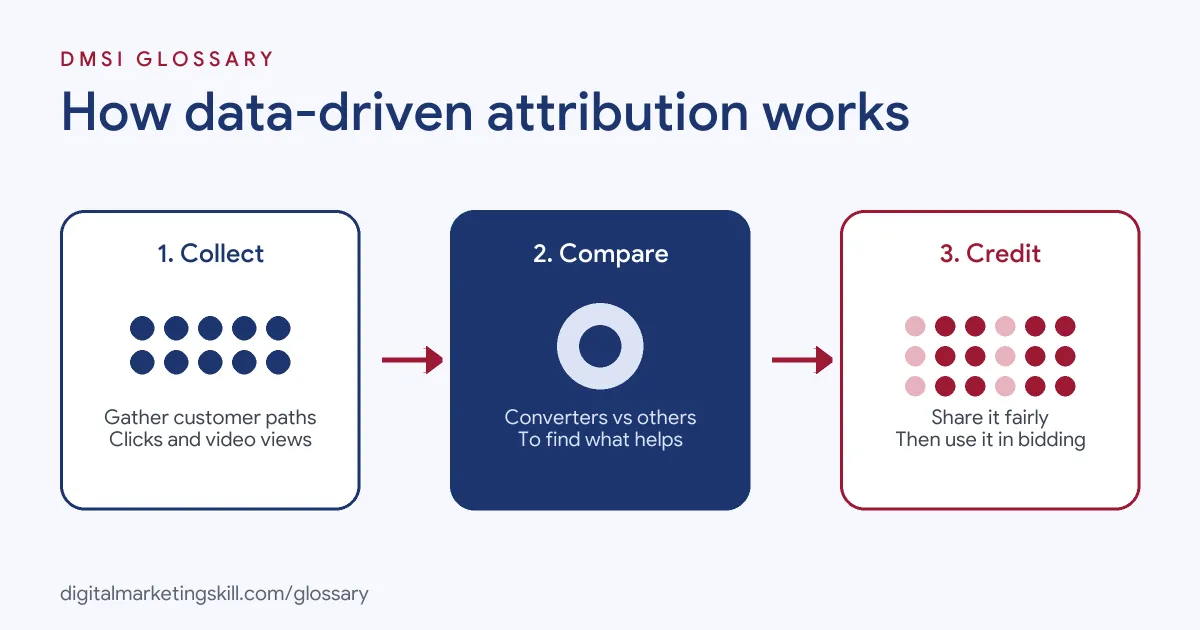
Comparing Paths
Google says, “By comparing the paths of customers who convert to the paths of customers who don’t, the model identifies patterns” among those ad interactions. As a result, an ad that often appears early in successful journeys can earn credit, even if it is never the last click.
Google’s Own Example
Google gives a clear example. A tour company in London finds that people who first click a “Bike tour London” ad and later click “Bike tour Covent Garden” are more likely to buy than people who only click the Covent Garden ad. So the model gives more credit to the “Bike tour London” ad and its keywords, ad groups and campaigns.
What Data It Needs
Google says, “All conversion actions are eligible for data-driven attribution (DDA), regardless of conversion or interaction volume.” However, it recommends “at least 200 conversions and 2,000 ad interactions in supported networks within a 30-day period” for the best results. With less data, the model still works but assigns credit less precisely.
So if an account gets only a few conversions a month, the model has little to learn from. In that case, focus first on tracking more of the right actions, such as qualified leads as well as sales. Then the model has more signals to compare, and its view of each campaign becomes clearer.
The Link to Automated Bidding
The credit doesn’t only change your reports. Google notes that if you use an automated bid strategy to drive more conversions, “your bidding will use this important information to help you get more conversions.” So better attribution can lead to better bids, which is why it pairs well with Smart Bidding.
Data-Driven Attribution Examples
Here are three made-up examples of what the model can reveal:
- Online shop (example): Generic search ads, such as “running shoes”, get more credit than they did under last click, because they often start journeys that end with a brand search.
- Software company (example): YouTube ads earn a share of credit for free trials, even though trial sign-ups rarely follow a video click directly.
- Local service (example): Most customers click one ad and book. Here, the model gives results very close to last click.
In each case, the model shows where earlier ads helped. That helps you avoid cutting campaigns that quietly drive sales, and it shows where extra budget may work hardest.
Data-Driven Attribution vs Last Click
Here is how the two models in Google Ads compare:
| Feature | Data-driven | Last click |
|---|---|---|
| How credit is shared | Across interactions, based on your data | All to the last-clicked ad and keyword |
| Learns from your account | Yes, each model is specific to the advertiser | No, it follows a fixed rule |
| Values early ads | Yes, if they make conversions more likely | No |
| Default in Google Ads | Yes, for most conversion actions | No |
In short, last click is simple but blind to earlier steps, while data-driven attribution tries to measure their real effect.
How to Use Data-Driven Attribution
- Set up accurate conversion tracking. The model can only learn from data you record.
- Open your conversion actions. In Google Ads, find your conversion settings and open each conversion action.
- Check the attribution model. Make sure it is set to data-driven, unless you have a strong reason not to.
- Use automated bidding. Pair the model with a conversion-based bid strategy, so bids use the new credit.
- Give it volume. Combine similar conversion actions where it makes sense, so the model has more data.
- Review the paths. Look at which campaigns gain or lose credit compared with last click.
- Adjust budgets slowly. Move budget step by step, then watch total conversions, not just one campaign.
Data-Driven Attribution in GA4
Google Analytics 4 also offers a paid and organic data-driven model. When you switch to it, Google warns you may see decimals, or “fractional credit”, in key event columns. That’s normal. For example, two channels might each get 0.5 of one conversion.
Best Practices for Data-Driven Attribution
- Track what really matters. Count sales or qualified leads, not page views.
- Tag every campaign. Use auto-tagging and UTM parameters for clean paths.
- Compare models side by side. Look at how credit shifts before you make big changes.
- Explain it to stakeholders. Show why a campaign’s numbers changed, so nobody panics.
- Judge the whole account. The goal is more total conversions, not a better score for one campaign.
Common Mistakes to Avoid
A common mistake is switching to data-driven attribution and then cutting campaigns that suddenly look weaker, without checking total results. Another is feeding the model poor data, such as counting page views as conversions. Some advertisers also compare Google Ads and GA4 numbers without checking that both use the same model. Others expect the model to be precise with only a handful of conversions. Finally, many never look at which campaigns gained credit, so they miss the main insight.
Where You’ll Use Data-Driven Attribution at Work
Few job listings name data-driven attribution directly. Instead, it sits inside wider attribution and tracking work. A Google Ads Specialist or PPC Specialist checks conversion settings, chooses bid strategies and explains why credit moves between campaigns. Meanwhile, a Web Analytics Specialist sets up GA4 attribution settings and builds reports that compare models. In each role, you need to turn the model’s output into clear budget decisions.
Learn It in the Google Specialist Track
You can learn to track and measure campaigns in the AI-Powered Google Specialist track. It covers Google Ads across Search, Display, Discovery, Gmail and YouTube, plus Google Analytics. Your portfolio project is a Google Ads campaign that you launch and measure with conversion tracking. You also get unlimited 1-on-1 mentoring and a U.S. Project Internship from day one.
Next, read our guide to Google Ads strategy to see how measurement shapes planning.
Frequently Asked Questions
What is data-driven attribution in simple terms?
It is a model that uses your own data to decide how much each ad helped a sale. It shares the credit instead of giving it all to one click.
Is data-driven attribution the default in Google Ads?
Yes. Google says it is the default attribution model for most conversion actions.
How much data does it need?
Every conversion action is eligible. However, Google recommends at least 200 conversions and 2,000 ad interactions in 30 days for the best results.
Which campaigns does it cover?
Google lists Search, including Shopping, plus YouTube, Display and Demand Gen ads.
Why did my campaign numbers change?
The model moves credit between ads based on their real effect. Some campaigns gain credit and others lose it, but total conversions stay the same.
Sources: Google Ads Help: About data-driven attribution; Google Ads Help: About attribution models; Google Analytics Help: Select attribution settings.