
A caption is the text that goes with a social media post, such as the words under an Instagram photo, or the on-screen text that shows what is being said in a video. A good caption adds context, personality and a clear next step. It matters because the caption often decides whether people stop, understand the post and act on it, especially when they scroll fast or watch without sound.
Key Takeaways
- The word covers two things: post captions (the text under a post) and video captions (on-screen text of what is said).
- Sendible says Instagram allows up to 2,200 characters per caption, but only about the first 125 show before “more.”
- So the first line of every caption needs to work hard, much like a hook.
- TikTok recommends captions or text overlays to give context in videos.
- YouTube notes that captions help you reach a larger audience, including deaf and hard-of-hearing viewers.
What Is a Caption?
On social media, a caption is usually the written part of a post. Instagram shows it under the photo or reel, while LinkedIn and Facebook show it above. Either way, it tells people what the post is about and why they should care.
In video, the word has a second meaning. Video captions are the words on screen that match what people say. YouTube explains that subtitles and captions “allow you to share your videos with a larger audience, including hearing-impaired or hard-of-hearing viewers and those who speak another language.”
Both kinds share one goal: helping people understand your content quickly. So this page covers both, starting with the post caption most marketers write every day.
How a Caption Works
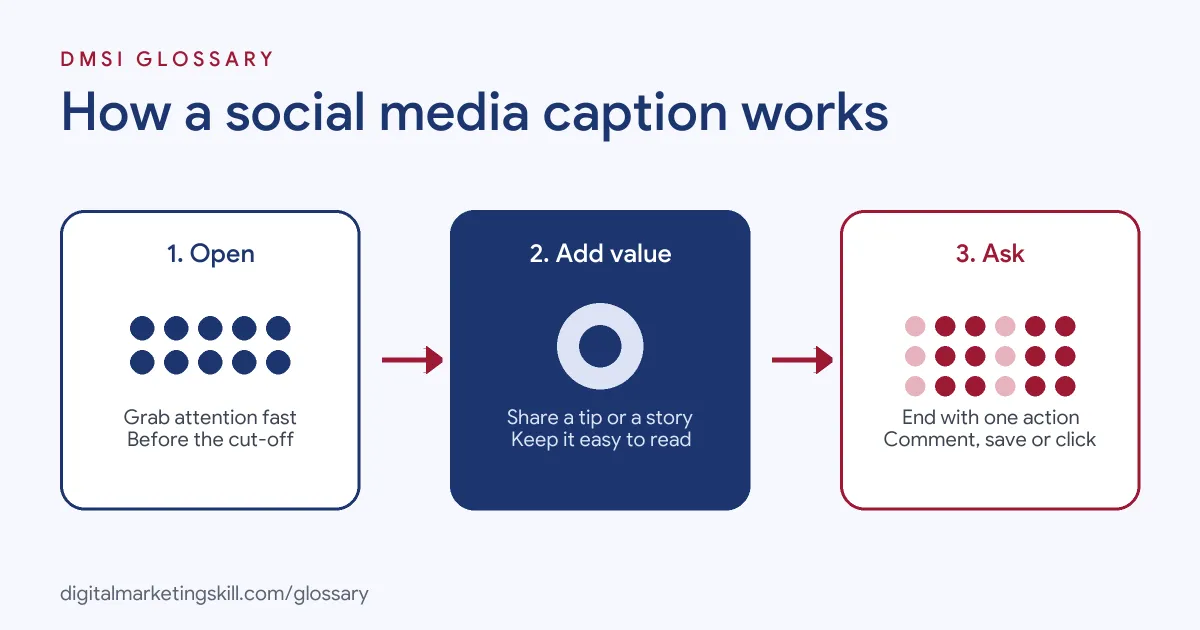
A strong post caption usually has three parts. First, an opening line grabs attention in the short preview. Next, the body adds value, such as a tip, a story or useful detail. Finally, a call to action tells people what to do next, such as comment, save or tap the link.
The Opening Line
Space before the cut-off is tight. Sendible notes that on Instagram “only the first 125 characters appear before the users have to tap ‘more’ to see the rest.” It advises you to “make the first 125 characters count” and to lead with “a hook, stat, or clear call-to-action.”
The Body
The body is where you add depth. Sendible suggests using line breaks so a long caption doesn’t become a wall of text, and says longer captions can work well for personal stories, behind-the-scenes moments or educational posts. However, it adds that “clarity always wins over length.”
The Call to Action
End with one clear step. Sendible’s advice is to “always include a CTA,” whether it is a question, a prompt or a pointer to the link in your bio. Keep it to one request, so the next step is obvious.
Caption Examples
Here are three made-up captions for different goals:
- Engagement (café): “Oat or whole milk in your flat white? Tell us below and we’ll make the winner our weekend special.”
- Education (accountant): “Three receipts freelancers forget to keep. Save this post before your next tax return.”
- Sales (online shop): “Our best-selling backpack is back in green. Tap the link in our bio before it sells out again.”
Each one opens with something useful, stays short and ends with a single action.
Caption Limits Compared
Sendible lists these Instagram limits:
| Item | Limit | Tip |
|---|---|---|
| Post caption | 2,200 characters | Only the first 125 show before “more” |
| Reels caption | 2,200 characters | Cuts off sooner on mobile, so front-load key information |
| Hashtags per post | 30 maximum | Instagram recommends just three to five relevant ones |
| Bio | 150 characters | Use it to explain what you offer |
Limits can change, so check each platform’s own settings before you post.
Captions in Video
On-screen text matters just as much in video. TikTok recommends using “captions or text overlays to provide context to your ad,” and suggests showing 5 to 10 words per second when you use text. Google’s guidance for YouTube ads also advises supporting the story “with audio and supers,” meaning on-screen text.
For full subtitles, YouTube Studio lets you upload a caption file, use auto-sync with a transcript or type captions manually. YouTube also suggests adding sound labels such as [applause], so viewers know what’s happening.
How to Write a Caption
- Decide the goal. Choose one aim, such as comments, saves, clicks or sales.
- Write the first line first. Make it work on its own in the short preview.
- Add the value. Next, give the tip, story or detail that earns attention.
- Break it up. Use short lines and paragraphs so it’s easy to read on a phone.
- Add hashtags carefully. Pick a few relevant ones rather than as many as possible.
- End with one call to action. Ask for the single step that matches your goal.
- Read it on a phone. Finally, check the preview cut-off and fix any typos before you post.
A Worked Example: Rewriting a Caption
Here is a made-up example. A plant shop posts a photo of a fern with this caption: “New stock available now. We have lots of lovely plants in store this week, so come and visit us soon! #plants #plantshop #ferns #green #home.” It gets few likes and no visits.
So the team rewrites it. The new caption opens with: “This fern survives a dark bathroom. Here’s how.” Then it gives three short care tips, one per line. It ends with: “Save this for later, and pop in to pick one up.” It also cuts the hashtags down to three relevant ones. The photo stays the same, but the post now earns more saves and comments, because the first line gives people a reason to read on.
Best Practices
- Write like you speak. A natural tone reads better than corporate language.
- Match the platform. For instance, a LinkedIn caption can be more detailed than a quick Instagram one.
- Use captions on every video. They help anyone watching on mute, and YouTube notes they help hearing-impaired viewers too.
- Test different openings. Try a question one week and a bold statement the next, then compare.
- Keep a swipe file. Save captions that performed well, so you can learn from them.
Common Mistakes
A common mistake is burying the main point after the cut-off, so most people never see it. Another is stuffing the caption with hashtags, even though Instagram recommends only a handful. Some brands also ask for too many actions at once, such as like, share, comment and click. Others paste the same caption on every platform, even though each one shows text differently. Instead, adapt it each time. Finally, many skip video captions entirely, which shuts out viewers who can’t or won’t turn the sound on.
Where You’ll Use Captions at Work
Caption writing is a daily task in social media roles. For example, real remote job listings include lines like these:
- “Strong writing skills for captions and hashtags” (Social Media Manager Intern).
- “Write and edit marketing copy: emails, ads, landing pages, social captions, blog posts, all with SEO best practices in mind.” (Marketing Specialist).
- “Create marketing visuals and write engaging captions, promotional copy, and advertising content.” (Social Media and Customer Engagement Executive).
So whether you aim to be a Social Media Manager, a Content Creator or a Paid Social Specialist, you will write captions for posts, reels and ads every week.
Learn It in the Social Media Track
The AI-Powered Social Media Management and Advertising track covers content creation, social media marketing and analytics, and advertising. You plan, create and run a paid social campaign for a real brand, so you can test which caption styles work best. You also get unlimited 1-on-1 mentoring and a U.S. Project Internship from day one.
To sharpen your opening lines, read our glossary entry on the hook. For hashtags, see our guide to Instagram hashtags.
Frequently Asked Questions
What is a caption on social media?
It is the text that goes with a post. It explains the post, adds personality and usually ends with a call to action.
How long can an Instagram caption be?
Sendible says up to 2,200 characters. However, only about the first 125 show before people tap “more.”
Are long or short captions better?
It depends on the post. Short captions suit quick visuals, while longer ones can work for stories and tips, as long as they stay clear.
What is the difference between captions and subtitles?
Both show spoken words on screen. YouTube groups them together and notes they help hearing-impaired viewers and people who speak another language.
Should every caption include a call to action?
Usually, yes. One clear request, such as “save this” or “tap the link,” gives people an easy next step.
Sources: Sendible: Instagram character limits explained; TikTok Ads Help: Creative best practices for performance ads; YouTube Help: Add subtitles and captions; Google Ads Help: About the ABCDs of effective video ads; remote job listings on Himalayas.