
An abandoned cart email is an automated message sent to a shopper who added items to their basket or started checkout, then left without buying. It reminds them what they left behind and links them straight back to finish the order. It matters because most online baskets are never completed, so even a small share of recovered orders can add real revenue.
Key Takeaways
- Baymard Institute calculates an average cart abandonment rate of 70.22%, based on 50 studies.
- The top reason US shoppers give is extra costs, such as delivery, tax or fees, cited by 40%.
- In Shopify, a checkout counts as abandoned once it stays incomplete for more than ten minutes after the shopper enters their email.
- Most abandoned cart emails are part of an automated flow of one to three messages.
- Fixing the reasons people leave, such as surprise costs, works best alongside the emails.
What Is an Abandoned Cart Email?
Online shoppers often fill a basket and then wander off. Maybe they got distracted, wanted to compare prices or were shocked by the delivery cost. An abandoned cart email gives them a simple nudge to come back.
The email usually shows the items left in the basket, with images and prices, plus a button that returns the shopper to checkout. Some versions add reviews, answers to common questions or a small incentive.
Technically, there are two slightly different triggers. “Cart abandonment” usually means items were added to the basket. “Checkout abandonment” means the shopper started checkout and gave their email. Shopify, for example, describes an abandoned checkout as “a checkout process that remains incomplete,” after the customer has provided their email.
These messages are a classic example of email automation. Once you set them up, they run on their own for every shopper who leaves.
How an Abandoned Cart Email Works
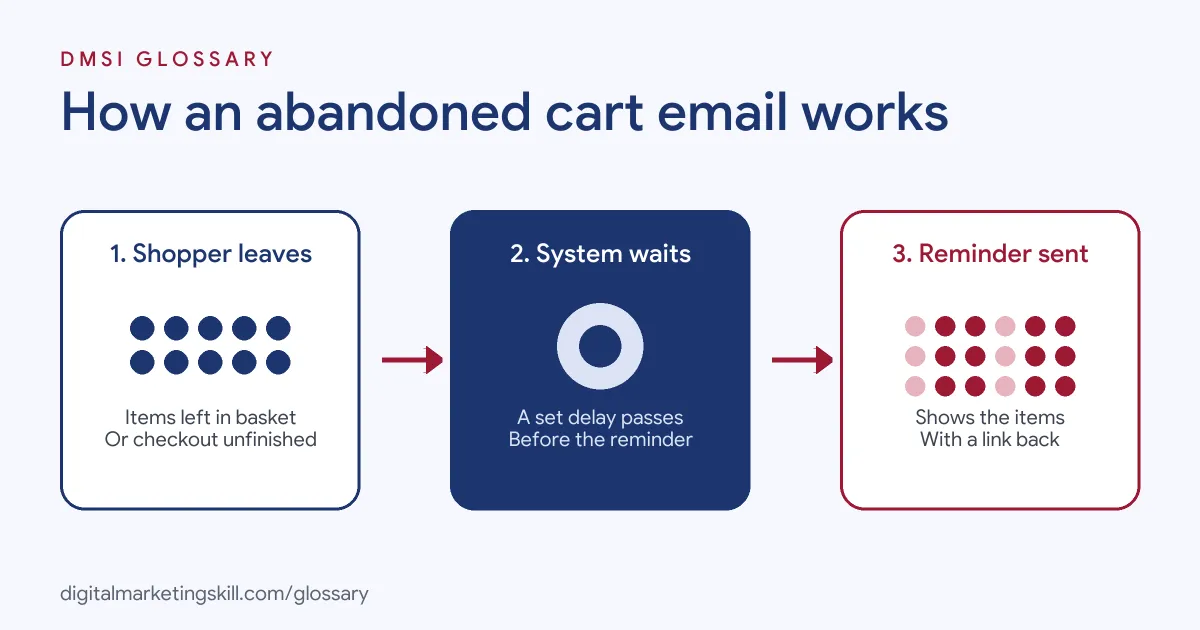
The flow has three steps. First, a shopper adds items or starts checkout, then leaves. Next, your store or email platform waits for a set delay. Finally, it sends one or more reminders with a link back to the basket.
Why Shoppers Leave
Baymard Institute’s research explains much of the problem. Excluding people who were just browsing, US shoppers gave these top reasons for leaving during checkout:
- 40% said extra costs, such as shipping, tax or fees, were too high.
- 20% said delivery was too slow.
- 19% didn’t trust the site with their card details.
- 18% said the site wanted them to create an account.
- 17% said the checkout was too long or complicated.
Other reasons included website errors or crashes (17%), an unsatisfactory return policy (13%) and a total order cost that wasn’t visible upfront (12%). Notice how many of these are about cost and trust, which a good reminder email can address directly.
Baymard also found that 42% of US online shoppers had abandoned a cart because they were just browsing or not ready to buy. Emails can help with that group, but they can’t fix a checkout that drives people away.
When It Triggers
Each platform sets its own rules. In Shopify, a checkout is “considered abandoned if it remains incomplete for more than ten minutes” after the customer enters their email. You then choose the delay before the first email in the “Send after” setting.
Shopify also lists cases where no recovery email is sent. These include when the customer completes the sale first, when none of the products are available, or when the customer entered a phone number instead of an email.
Abandoned Cart Email Examples
Here are three made-up examples:
- Fashion shop: A shopper leaves a jacket in her basket. One hour later, she gets an email with a photo of the jacket and “Still thinking it over?” Then a second email the next day adds reviews from other buyers.
- Electronics store: A customer abandons checkout at the delivery step. The store’s reminder clearly shows delivery costs and times, which answers the question that stopped him.
- Skincare brand: A shopper leaves two products. As a result, a final reminder a few days later offers free delivery for a short time.
Abandoned Cart Email Sequence Compared
Many stores send a short series. Here is a typical structure:
| Typical timing | Main job | |
|---|---|---|
| First reminder | Within a few hours | Show the items and link back to the basket |
| Second email | Around a day later | Answer doubts with reviews, delivery details or returns information |
| Final email | A few days later | Create gentle urgency, sometimes with a small incentive |
These timings are a common starting point, not a rule. Test them against your own results, and keep the subject lines short and clear, such as “You left something behind”.
How to Set Up an Abandoned Cart Email
- Turn on tracking. Make sure your store passes basket or checkout events to your email platform.
- Choose the trigger. Decide whether to send after cart or checkout abandonment.
- Set the delay. Pick how long to wait before the first email, using your platform’s “send after” setting.
- Design the email. Show product images, names and prices, with one clear button back to the basket.
- Answer common doubts. Add delivery costs, return terms and short reviews, since these match the top reasons for leaving.
- Add follow-ups. Create one or two more emails, and stop the flow as soon as the shopper buys.
- Check your consent rules. In the UK, the ICO says you “must not send marketing emails or texts to individuals without specific consent,” unless the soft opt-in applies. So check how your reminders fit.
- Measure and improve. Finally, track recovered orders and revenue, then test subject lines, timing and content.
What to Measure
Start with the number of orders the flow recovers and the revenue they bring. Then look at clicks on each email, because they show which reminder brings people back. Also, watch unsubscribes, since too many reminders can annoy shoppers. Finally, compare recovered orders with and without an incentive. That way, you’ll know whether a discount is really needed or just giving away margin.
Best Practices for an Abandoned Cart Email
- Keep it simple. One clear message and one button work better than a cluttered layout.
- Show the actual products. Pictures remind shoppers why they wanted the items.
- Be clear about costs. Since extra costs are the top reason for leaving, show delivery and totals upfront.
- Use incentives carefully. Save discounts for the last email, so you don’t train shoppers to wait.
- Fix the checkout too. For example, offer guest checkout, since 18% of shoppers in Baymard’s research left over account creation.
Common Mistakes to Avoid
A common mistake is sending only one reminder, then giving up. Another is the opposite: sending too many emails, which pushes people to unsubscribe. Some stores also offer a big discount in the first email, which cuts profit on orders that would have happened anyway. Others forget to stop the flow after a purchase. Lastly, many ignore the checkout problems that caused the drop-off in the first place.
Where You’ll Use Abandoned Cart Emails at Work
Ecommerce email roles mention this flow often. For example, remote job listings ask candidates to:
- “Run Klaviyo retention: welcome, abandoned cart, post-purchase and win-back flows, plus weekly sends” (Growth Marketing Manager, Paid Media and Klaviyo).
- Show “Proficiency in designing cart abandonment emails and understanding email marketing flows” (Email Designer).
- Handle tasks such as “an abandoned cart flow that needs testing” (Klaviyo Specialist).
So if you want to work as an Email Marketing Specialist or Marketing Automation Specialist, expect to build, test and improve this flow.
Learn It in the Lead Generation and Email Track
You can learn to build automated flows in the AI-Powered Lead Generation and Email Automation track. There, you build a lead magnet and an automated email sequence that converts. You also get unlimited 1-on-1 mentoring and a U.S. Project Internship from day one.
For more, read our guide to cart abandonment and our article on building an email automation workflow.
Frequently Asked Questions
What is an abandoned cart email in simple terms?
It is an automatic reminder sent to a shopper who left items in their basket, with a link to finish buying.
When should I send an abandoned cart email?
Many stores send the first one within a few hours, then one or two follow-ups. Test the timing against your own results.
Should I include a discount?
Not always. Many stores save an incentive for the final email, so they don’t give away margin on orders that would happen anyway.
What is the average cart abandonment rate?
Baymard Institute calculates an average of 70.22%, based on 50 studies.
Is an abandoned cart email a marketing email?
It can be, especially if it promotes products or offers. In the UK, check the ICO’s rules on consent and the soft opt-in before you send.
Sources: Baymard Institute: Cart abandonment rate statistics; Shopify Help Centre: Abandoned checkouts; ICO: Electronic mail marketing; remote job listings on Himalayas.