
A soft bounce is an email that fails to deliver for a temporary reason, such as a full inbox or a receiving server that is briefly down. The address itself is still valid, so a later send may get through. It matters because a few are normal. But repeated ones can point to a dead mailbox, or to a sending problem that harms your reputation.
Key Takeaways
- Mailchimp says soft bounces “typically indicate a temporary delivery issue.”
- Mail servers use status codes starting with 4 for these temporary failures.
- Common causes include a full mailbox, a server that is down, or a message that is too large.
- Repeated soft bounces turn into a hard bounce. Mailchimp converts them after 7 or 15, depending on past activity.
- Monitor soft bounces alongside hard bounces, because both affect list health.
What Is a Soft Bounce?
Sometimes an email reaches a real address but cannot be delivered right now. That is a temporary failure. Mailchimp explains that soft bounces “typically indicate a temporary delivery issue and are handled differently than hard bounces.”
For example, imagine a customer whose inbox is full while they are on holiday. Your newsletter bounces. However, once they clear space, your next email arrives as normal. Nothing was wrong with the address, only with the moment. That is why platforms try again rather than removing the contact.
This is the key difference from a hard bounce, which is permanent. With a temporary failure, the platform keeps the address for now and tries again on future sends.
How a Soft Bounce Works
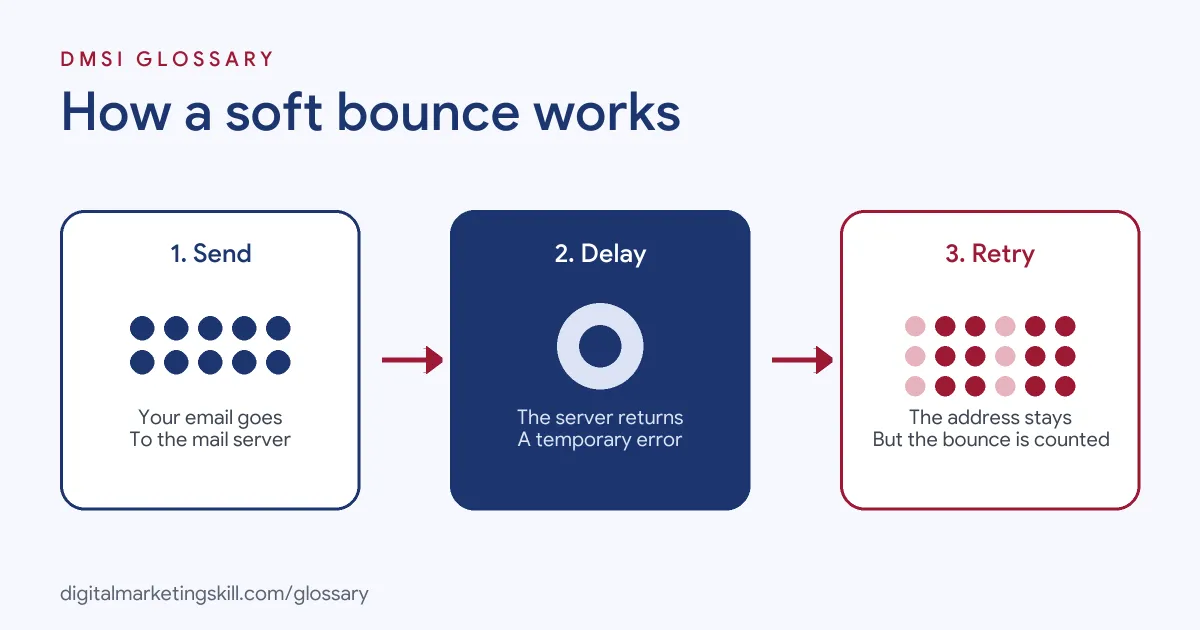
The process happens quickly. First, your platform sends the email. Next, the receiving server replies with a temporary error code. Finally, your platform records the bounce, keeps the address, and counts it towards a limit in case the problem continues.
Status Codes
Mail servers describe failures with codes set out in RFC 3463. Codes that start with 4 mean a “Persistent Transient Failure.” The standard explains that in this case “the message as sent is valid, but persistence of some temporary condition has caused abandonment or delay.” It adds that “sending in the future may be successful.” For instance, the code for a full mailbox “should be used as a persistent transient failure.”
Common Causes
Mailchimp lists several reasons for a temporary failure:
- Full inbox: the mailbox has no space left.
- Inactive inbox: the mailbox is set up wrongly or not in use.
- Server down: the receiving server is not working.
- Message problems: the email is too big, or fails content, DMARC or spam checks.
Infobip adds that this can happen when “the mailbox provider suspects legitimacy issues or lack of opt-in.” So some soft bounces point to problems on your side, not the reader’s.
When Soft Becomes Hard
Temporary failures cannot last forever. Mailchimp turns a repeat offender into a hard bounce after 7 soft bounces if the contact has never been active. For contacts who have been active, the limit is 15. After that, the address is removed. Similarly, Google’s sender guidelines tell bulk senders to “automatically unsubscribe recipients who have multiple bounced messages.”
A Simple Weekly Bounce Routine
You do not need to check every bounce by hand. Instead, set up a short routine and stick to it.
- Look at the totals. Note how many emails bounced on each send this week.
- Split by type. See how many were temporary and how many were permanent.
- Check the top reasons. Most tools group bounces by error, such as “mailbox full.”
- Look for one provider. If most bounces come from one inbox provider, check your setup for that provider.
- Write down one action. For example, “compress images” or “fix DMARC record.”
Here is a made-up example. A charity sees bounces jump on one newsletter. The report shows most errors say the message was too large. So the team shrinks its header image, and the next send bounces far less. A ten-minute check each week is often enough to catch problems like this early.
Soft Bounce Examples
Here are three made-up situations:
- Full inbox: A subscriber’s mailbox is full for a week. Two emails soft bounce, then the next one is delivered once they clear space.
- Large email: A shop sends a newsletter packed with heavy images. Some servers reject it for size. As a result, the team compresses the images and the bounces stop.
- Authentication issue: A business changes its sending tool but forgets to update DMARC. Many messages soft bounce until the records are fixed.
Soft Bounce vs Hard Bounce
This table compares the two types:
| Feature | Soft bounce | Hard bounce |
|---|---|---|
| Cause | Temporary, such as a full mailbox or a server that is down | Permanent, such as an address that does not exist |
| Status code class | 4.X.X (Persistent Transient Failure) | 5.X.X (Permanent Failure) |
| Will a later send work? | It may | No |
| What Mailchimp does | Keeps the address, then converts it after 7 or 15 soft bounces | Removes the address automatically |
How to Reduce Soft Bounces
Follow these steps to keep soft bounces low:
- Check your authentication. Make sure SPF, DKIM and DMARC are set up correctly for your sending domain.
- Keep emails a sensible size. Compress images and avoid very heavy attachments.
- Review bounce reasons. Read the error messages in your platform’s report, not just the totals.
- Watch repeat offenders. Flag addresses that soft bounce on several sends in a row.
- Re-engage quiet contacts. Send a short check-in to inactive subscribers, then remove those who never respond.
- Build your list with consent. A clear opt-in process reduces addresses that providers treat with suspicion.
- Track the trend. After that, compare bounce rates across sends to spot sudden changes.
Best Practices for Handling a Soft Bounce
- Don’t panic over one. An occasional temporary failure is a normal part of email.
- Act on patterns. Many soft bounces to one provider can point to a reputation or authentication issue.
- Let the platform retry. Most tools handle temporary failures and conversion rules for you.
- Monitor both bounce types. Yahoo recommends watching “hard and soft bounces as well as inactive recipients.”
- Keep content clean. Messages that fail anti-spam checks may bounce, so avoid misleading subject lines and broken code.
Common Soft Bounce Mistakes
A few habits make soft bounces worse. First, teams ignore them because they are “only temporary,” even when the same addresses bounce for months. Second, they never read the bounce reason, so they miss authentication or size problems. Third, they manually re-add addresses that the platform has already converted to hard bounces. Finally, they blame the reader’s inbox when the cause is their own setup. A quick look at the error reasons usually shows which of these is happening.
Where You’ll Handle a Soft Bounce at Work
Bounce monitoring is a regular task in email roles. For example, recent remote job listings ask candidates to:
- “Identify and flag bounces, errors, or deliverability concerns” (Email Marketing and eNewsletter Operations Specialist).
- “Monitor inbox placement, sender reputation, bounces, complaints, and other deliverability metrics to identify issues and implement corrective actions” (Email Infrastructure and Deliverability Specialist).
- “Monitor email deliverability, bounce trends, and communication limits” (Marketing Automation and Campaign Operations Manager).
So in email roles, you will read bounce reports, spot patterns and fix the causes. This is true for both Email Marketing Specialists and Marketing Automation Specialists. It is a small task, but it keeps every campaign working.
Learn It in the Lead Generation and Email Track
You can learn to keep lists healthy and emails landing in the inbox in the AI-Powered Lead Generation and Email Automation track. There, you build a lead magnet and an automated email sequence that converts. You also join a U.S. Project Internship from day one, with unlimited 1-on-1 mentoring.
For a wider view of inbox placement, read our guide to email deliverability.
Frequently Asked Questions
What is a soft bounce in simple terms?
It is an email that could not be delivered for a temporary reason, such as a full inbox. A later email to the same address may work.
What causes a soft bounce?
Common causes include a full or inactive inbox and a server that is down. A message that is too big, or that fails DMARC or spam checks, can also bounce.
Should I remove soft-bounced emails?
Not straight away. Most platforms keep them and retry. However, addresses that keep soft bouncing are eventually converted to hard bounces and removed.
How many soft bounces before an address is removed?
It depends on the platform. Mailchimp converts an address after 7 soft bounces with no activity, or 15 if the contact has been active before.
Can a soft bounce be my fault?
Yes. Large messages, failed authentication or content that triggers anti-spam checks can all cause soft bounces.
Sources: Mailchimp: Soft vs hard bounces; IETF: RFC 3463 Enhanced Mail System Status Codes; Infobip: Email metrics reference; Yahoo Sender Hub: Sender best practices; Google: Email sender guidelines; remote job listings on Himalayas.