
Optimised targeting is a Google Ads feature that looks beyond the audiences you choose to find other people who are likely to convert. It uses signals such as your landing page, your ad assets and real-time conversion data to decide who should see your ads. It matters because it can bring in new customers you would never have picked by hand, as long as you give it the right goals and enough time to learn.
Key Takeaways
- Google says it is turned on automatically for Display, Demand Gen and some video campaigns, and you can switch it off at ad group level.
- The audiences or keywords you add act as “targeting signals”, which are a starting point, not a hard limit.
- If it finds better traffic, Google may reduce or stop serving on your signals.
- It still respects your location, language, device and exclusion settings.
- Google advises waiting for 50 conversions or at least two weeks before you judge new campaigns.
What Is Optimised Targeting?
With manual targeting, you tell Google exactly who to reach, such as an in-market segment or a list of keywords. This feature gives the system more freedom. In Google’s words, it “looks beyond manually selected audience segments” to find people “that you may have missed”.
Google also positions it as the replacement for similar segments. Instead of targeting a similar segment, it suggests you “turn on optimised targeting in the ad group” and add your first-party data segments as hints.
For example, a gaming PC shop might target people interested in “PC gaming”. With this feature on, Google may also find buyers it spots through searches for specific parts or visits to gaming sites. As a result, the shop reaches converters outside its chosen segment.
How Optimised Targeting Works
The system works in three stages. First, it reads your campaign, including keywords on your landing page and in your assets. Next, it uses any signals you add as a starting point. Finally, it learns from live conversion data and shifts your budget towards the people most likely to convert.
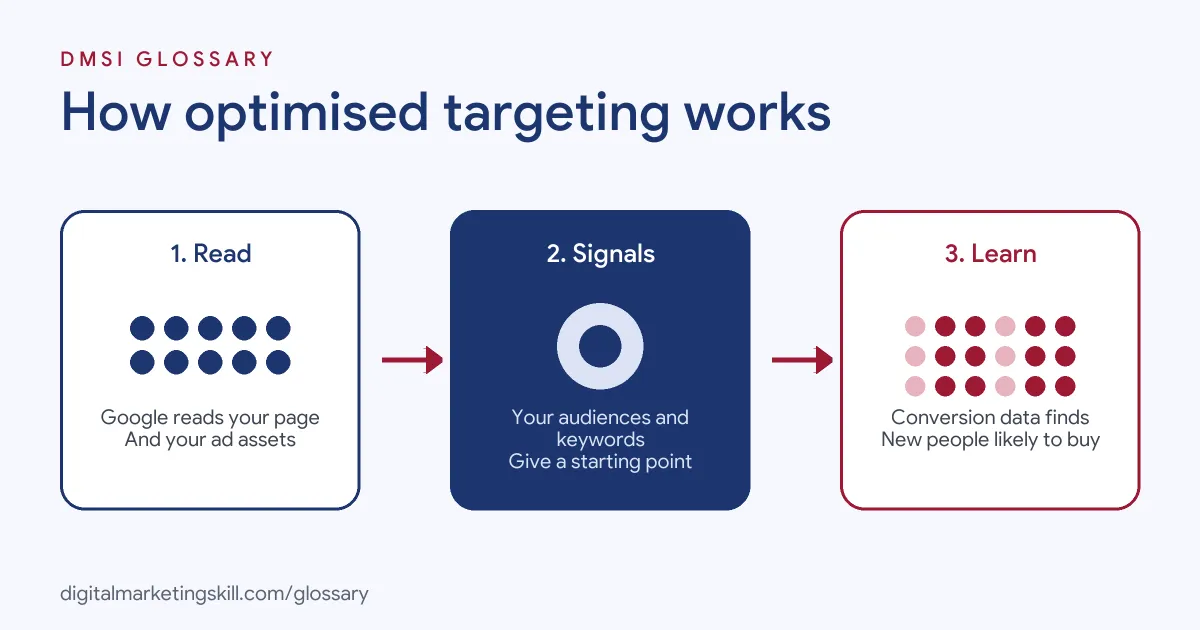
Targeting Signals
You can add audience segments, custom segments, customer data segments, keywords and topics as signals in Display campaigns. These give the model “an informed starting point”. However, they do not fence it in. Google says that if optimised targeting “finds better performing traffic, it may reduce or stop serving traffic on your signals”.
Your choice of signals is wide. Google’s audience segments include in-market, custom segments, website visitors and Customer Match lists. Google even offers lookalike segments built from a seed list, but only in Demand Gen campaigns.
What Stays Fixed
Some settings always hold. Google says the system respects your chosen locations, languages and devices. It also honours exclusions, such as Customer Match lists you want to avoid, plus placement and brand safety exclusions. In addition, if you pick specific placements, ads serve only on those placements.
Audience Insights
Because the system picks people for you, Google offers audience insights to show what it found. These highlight “the top Google audience segments that have been targeted and are performing well”. So you can still learn who your best customers are.
Optimised Targeting Examples
Google’s help centre gives three useful cases, summarised here:
- New customers, no set audience: A computer parts seller launches pre-built gaming PCs. It relies on optimised targeting alone, so Google uses the landing page and ad assets to find likely buyers.
- New customers, with signals: A rafting tour company adds keywords about outdoor families. The system finds that keywords about white water rafting perform better. So it adds those and stops serving on a weak signal.
- Past customers only: An agency runs a video campaign for a fashion label’s existing buyers. Here, it turns the feature off, so the ads stay focused on that customer list.
In short, use it to find new people, and switch it off when you only want to reach people you already know.
Optimised Targeting vs Audience Expansion
Google offers two ways to widen reach, and they work differently:
| Feature | How it widens reach | Based on |
|---|---|---|
| Audience expansion | Adds segments similar to the ones you chose | Your selected audience segments |
| Optimised targeting | Finds people most likely to convert, wherever they are | Real-time campaign conversion data |
| Manual targeting only | Does not widen reach | Only the segments and keywords you pick |
For instance, if you target “running shoe sale”, audience expansion might add a similar “trainers sale” segment. The other feature, by contrast, might reach people who searched for specific running shoe brands.
How to Use Optimised Targeting
Follow these steps to set it up well:
- Check the campaign type. It is available for Display, Demand Gen and video campaigns that use the Sales, Leads or Website traffic goals.
- Set up conversion tracking. The system learns from conversions, so it needs clean data.
- Choose a conversion-based bid strategy. Google recommends Maximise conversions or Target CPA.
- Add strong signals. Your own customer data and best keywords make a good starting point.
- Set your exclusions. For example, exclude current customers if you only want new ones.
- Give it time. Wait for 50 conversions or at least two weeks on a new campaign before you judge it.
- Review audience insights. See which segments it found, then use that learning elsewhere.
How to Measure the Results
Since the system chooses who sees your ads, you need a clear way to judge it. Start with cost per conversion and conversion volume, not clicks. Then compare a period with the feature on against a similar period with it off, using the same budget and bid strategy.
Next, open the Insights page. Google offers two kinds of audience insights. Persona insights are available for Search, Shopping, Performance Max and Display, which is in beta. Asset insights are available for Search, Performance Max and Video. Together, they show which kinds of people your ads reached and which assets they responded to. As a result, you can reuse what you learn in other campaigns, such as new custom segments.
Best Practices
- Make your landing page clear. Google reads keywords on the page, so a focused page helps it find the right people.
- Use first-party data as hints. Customer lists tell the system what a good customer looks like.
- Match the bid strategy to your goal. For traffic, Google suggests Maximise conversions with site visits as the conversion type.
- Change one thing at a time. Otherwise, you will not know which change made the difference.
Common Mistakes to Avoid
A common mistake is leaving it on by accident. Because it is on by default in eligible campaigns, some advertisers think their ads only reach their chosen segments. Another mistake is judging results after a few days. Google says the system “needs time to learn”. Some teams also feed it poor conversion data, such as page views counted as sales. Finally, many forget exclusions, so they pay to reach people who have already bought.
Where You’ll Use Optimised Targeting at Work
We did not find recent remote job listings that name this exact feature. Even so, it sits at the heart of daily work for a Google Ads Specialist or PPC Specialist. These roles set up Display, Demand Gen and video campaigns. They choose signals, set exclusions and report on who the system found. Employers also expect you to explain, in plain words, why reach grew beyond the audiences you picked. So knowing when to turn this setting on or off is a practical skill.
Learn It in the Google Ads Track
You can learn to use optimised targeting in the AI-Powered Google Specialist track. It covers Google Ads across Search, Display, Discovery, Gmail and YouTube, plus Google Analytics. You launch and measure a Google Ads campaign with conversion tracking, with unlimited 1-on-1 mentoring and a U.S. Project Internship from day one.
For more on campaign set-up, read our guides to Google Ads optimisation and Google Ads strategy. You can also compare this feature with a lookalike audience and Customer Match.
Frequently Asked Questions
Is optimised targeting on by default?
Yes. Google says it is automatically turned on for eligible campaigns. You can turn it off in your ad group settings.
Which campaigns use optimised targeting?
Display, Demand Gen and video campaigns with the Sales, Leads or Website traffic goals. Google says it is always on for App and Performance Max campaigns.
Will my ads show outside my chosen locations?
No. Google says the system respects your location, language and device settings, as well as your exclusions.
How long should I wait before judging results?
For new campaigns, wait for at least 50 conversions or two weeks. For existing campaigns, wait at least two weeks.
Did optimised targeting replace similar audiences?
Google’s help centre suggests using it instead of similar segments, with your first-party data added as hints.
Sources: Google Ads Help: About optimised targeting; Google Ads Help: Use optimised targeting; Google Ads Help: About audience segments.