
Upselling is a sales technique where you encourage a customer to choose a better, bigger or more complete version of the product they are already considering. A classic example is offering a larger size, a premium model or an annual plan instead of a monthly one. Done well, upselling helps customers get more value while raising your average order value, so both sides gain.
Key Takeaways
- Upselling offers an upgrade to the item a customer is looking at. Cross-selling, by contrast, offers extra items that go with it.
- WooCommerce describes upsells as products “you recommend instead of the product a customer is viewing.”
- Upgrades work best when they solve a real need, not just raise the price.
- Under UK consumer contract rules, a pre-ticked box does not count as consent to an extra payment.
- Upselling applies to new and existing customers, online and in person.
What Is Upselling?
Picture a coffee shop. You order a small latte, and the barista asks, “Would you like a large for a little more?” That is upselling. You still get a latte, but a bigger, more valuable one.
Online, it works the same way. A shopper looks at a basic pair of headphones. The product page shows a premium model with noise cancelling and longer battery life. If the shopper chooses the premium pair, the shop has made a successful upsell.
It is often confused with cross-selling. Upselling replaces the item with a better version. Cross-selling adds a related item, such as a case for the headphones. Many stores use both, at different moments in the journey.
How Upselling Works
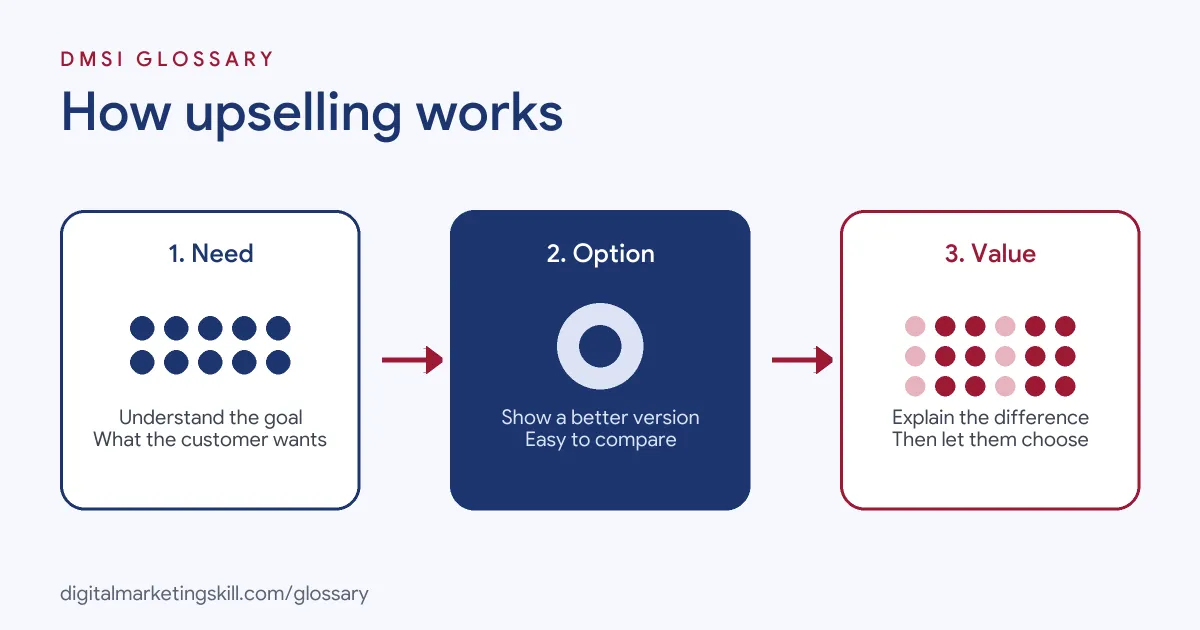
Every upsell follows three steps. First, you understand what the customer wants. Next, you show a better option that meets that need more fully. Finally, you make the benefit and the price difference clear, so the choice is easy.
Understand the Need
Effective upselling starts with the customer, not the margin. What are they trying to achieve? A runner training for a marathon may truly need better shoes. Someone walking the dog may not. So use what you know, such as the product viewed, past orders or the plan they chose, to judge what would genuinely help.
Show a Better Option
Next, place the upgrade where it is easy to compare. In WooCommerce, upsells appear on the product page, usually below the product details. Its documentation gives the example of recommending a cashmere cardigan as an alternative to an alpaca wrap. Likewise, Shopify’s Search and Discovery app lets merchants customise recommended products on product pages, if the theme includes those sections.
Explain the Value
Finally, make the difference obvious. Show what the extra money buys, such as more storage, longer warranty or extra features. A short comparison table helps. Also show the price difference, not just the new total, so the step up feels small and fair.
Upselling Examples
Here are three made-up examples of upselling in action:
- Software subscription: A design tool shows monthly and annual plans side by side. The annual plan includes two free months, so many users choose it.
- Online shop: A kitchen store’s product page for a basic blender shows a stronger model with a larger jug. A simple table explains the difference.
- Service business: A web designer offers a basic site package and a premium one that adds SEO set-up and three months of support.
In each case, the better option solves the customer’s problem more completely.
Upselling vs Cross-Selling
| Factor | Upselling | Cross-selling |
|---|---|---|
| What you offer | A better version of the same item | An extra item that goes with it |
| Example | Premium headphones instead of basic | A case to go with the headphones |
| Where in WooCommerce | Product page | Cart page |
| Goal | Raise the value of one purchase | Add more items to the order |
The two work well together. For example, a shop might upsell on the product page, then cross-sell in the cart.
How to Set Up Upselling Online
- Pick your pairs. For each popular product, choose one clear upgrade.
- Keep the gap sensible. Offer an option that is a modest step up, not double the price.
- Write the benefit. Explain in one line what the upgrade does better.
- Add it to the product page. In WooCommerce, assign upsells in the product editor’s linked products settings.
- Use plan comparisons. For services and software, show tiers side by side with the key differences.
- Follow up by email. After a purchase, offer relevant upgrades to existing customers.
- Measure. Track upgrade rate, average order value and refund rate.
Best Practices for Upselling
- Lead with the customer’s goal. Recommend what helps them, and they will trust your next suggestion too.
- Offer one or two options. Too many choices can stall the decision.
- Be honest about the difference. Never overstate what the upgrade does.
- Get clear consent for extras. UK rules say a default option, “such as a pre-ticked box on a website,” is not express consent to an additional payment.
- Look after retention. Happy customers are more open to upgrades, so strong customer retention supports upselling.
Helpful vs Pushy Offers
The line between a helpful upgrade and a pushy one is usually clear to customers. A helpful offer is relevant, honest and easy to decline. A pushy one appears at every step, hides the price or makes the cheaper option hard to find.
Here is a made-up example. Two phone shops sell the same handset. The first asks how you use your phone, then suggests more storage because you take lots of videos. The second simply tells everyone to buy the biggest model. Both may make the same sale today. However, the first shop is far more likely to win your next purchase and your recommendation.
So test your offers from the customer’s side. Ask whether you would feel well advised or pressured. If the answer is pressured, change the offer.
Upselling in Services and Subscriptions
Upgrades are not only for physical products. Software firms often show plans side by side, with the most popular tier highlighted. Agencies offer a basic package and a fuller one with extra reporting or support. Meanwhile, membership sites offer annual plans that cost less per month than paying monthly. In each case, the logic is the same: show a clear step up and explain what it adds.
Common Mistakes to Avoid
First, sellers push the most expensive option to everyone, which feels pushy. Second, they hide the price difference until checkout. Third, they use pre-ticked boxes for add-ons, which breaks UK consumer rules. Finally, they upsell before the customer trusts them, so the offer feels like a trick. Each of these damages trust and can increase refunds.
How to Measure Upselling
Start with the upgrade rate: of all the people who saw an upgrade, how many chose it? Next, watch average order value over time. Then check refunds and complaints, because a rise can mean customers felt pushed. Finally, look at customer lifetime value. In short, good upselling should lift revenue without hurting satisfaction.
Where You’ll Use Upselling at Work
Upselling skills appear in sales, account management and marketing roles. For example, remote job listings ask candidates to:
- “Identify opportunities for upselling, cross-selling, and product/service enhancements based on customer feedback.” (Customer Success Manager).
- Handle “Cross-Selling and Upselling: Identify opportunities for selling additional products or services to existing clients.” (Sales Representative for a Marketing Company).
- “Expand accounts through upsells, additional acreage, and new products and features.” (Account Manager, AgriBusiness and AgTech).
So if you aim to be a Growth Marketer, Digital Marketing Manager or Agency Owner, upselling will shape your offers and your email campaigns. Agency owners also use it when they offer clients bigger service packages.
Learn It in the Full Stack Programme
Upselling ties together e-commerce pages, email automation and analytics, so the best fit is the Full Stack programme (all four tracks). You take all ten courses and complete one portfolio project from each track. You also get unlimited 1-on-1 mentoring and a U.S. Project Internship from day one.
For more ways to grow revenue, read our guide on how to increase online sales.
Frequently Asked Questions
What is upselling in simple terms?
It means offering a customer a better or bigger version of what they are buying. For example, a large coffee instead of a small one.
What is the difference between upselling and cross-selling?
Upselling offers an upgrade to the same item. Cross-selling offers extra items that go with it, such as accessories.
Is upselling pushy?
It does not have to be. When the upgrade genuinely helps the customer and the price is clear, it feels like good advice.
Where should upsells appear on a website?
Usually on the product page, near the item the customer is viewing. WooCommerce shows upsells there by default, depending on the theme.
Can I upsell to existing customers?
Yes. Email and account pages are good places to offer upgrades, such as a higher plan or a longer subscription.
Sources: WooCommerce: Related products, up-sells and cross-sells; Shopify Help: Product recommendations; legislation.gov.uk: Consumer Contracts Regulations, regulation 40; remote job listings on Himalayas.