
JavaScript SEO is the part of technical SEO that makes sure search engines can crawl, render and index content that a website builds with JavaScript. Many modern sites load text, links and products with scripts, so a page can look perfect to you but almost empty to a search bot. As a result, good JavaScript SEO decides whether that content can rank at all. It also helps you spot problems before they cost you traffic.
Key Takeaways
- JavaScript SEO helps search engines see content that scripts add to a page.
- Google handles JavaScript pages in three phases: crawling, rendering and indexing.
- Links only count for discovery when they are real
<a>tags with anhref. - Server-side rendering, static rendering and hydration are the safest set-ups for search.
- You can test what Google sees with the URL Inspection tool in Google Search Console.
What Is JavaScript SEO?
JavaScript is the code that makes web pages interactive. For example, it can load a menu, filter a product list or show reviews without a full page reload. Also, frameworks such as React, Vue and Angular use it to build whole pages in the browser.
This is great for users. However, search engines need to read the content first. So if the main text only appears after a script runs, a crawler has to run that script too. JavaScript SEO is the work of making that step easy and reliable.
Think of a shop window. If the shop puts its products out only when someone knocks, a passer-by may walk past and see nothing. In the same way, a page that waits for scripts to show its content risks looking empty to a search bot.
Google is clear that bots can handle scripts, but with limits. In its own words on web.dev, “Crawlers can understand JavaScript, but there are often limitations to how they render.” So your job is to remove those limits where you can. It sits inside wider technical SEO work, next to speed, sitemaps and site structure.
Why it matters
Why does this matter so much? Because Google can only rank what it can see. For instance, if a product grid never renders for the bot, those products may never appear in search. Likewise, if your links are hidden inside scripts, whole sections of your site can stay undiscovered. On the other hand, a site that sends clear HTML is quick to crawl and easy to understand. That is why JavaScript SEO often brings fast wins on large sites.
You don’t need to be a developer to do this work well. Still, you do need to understand how pages are built. Most of the time, you find the problem, show the evidence and then agree the fix with the people who write the code.
How JavaScript SEO Works
Google processes JavaScript pages in three main phases. First it crawls the page, then it renders it, and finally it indexes the result. Each phase can fail in its own way, so it helps to know what happens at each step.
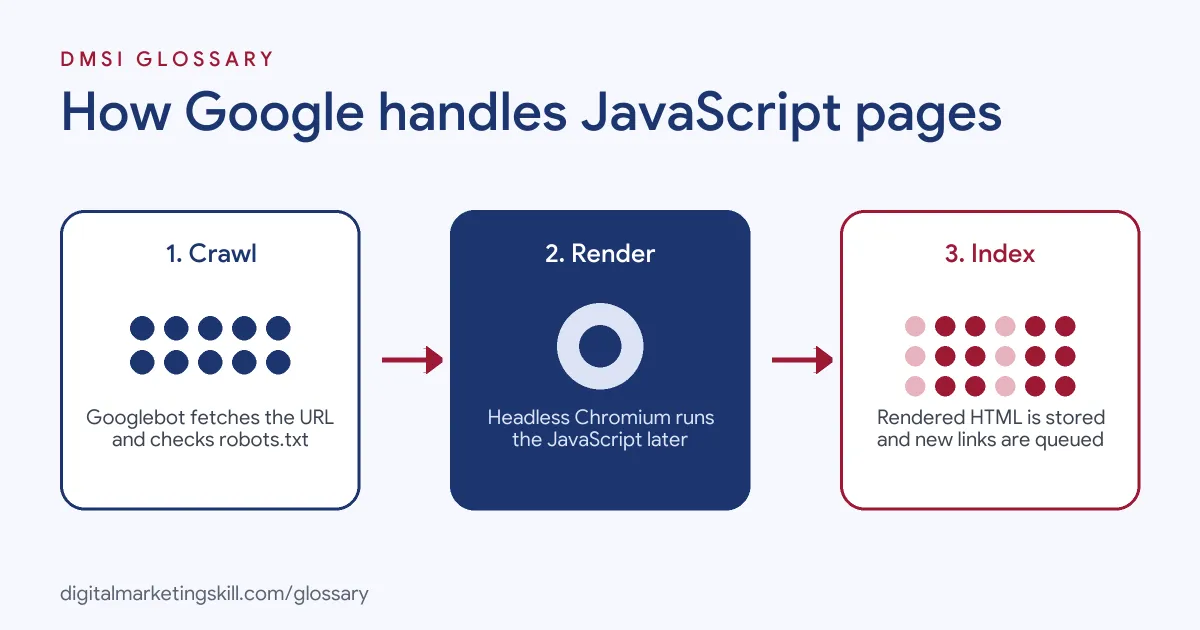
Phase 1: Crawling
Crawling is when Googlebot fetches a URL. Before it does, it checks your robots.txt file. If you block a script file there, Google can’t use it. Google states that it “won’t render JavaScript from blocked files or on blocked pages.” So never block the scripts your content needs.
Phase 2: Rendering
Next, the page waits in a render queue. Google says it “queues all pages with a 200 HTTP status code for rendering.” When it has spare resources, a headless Chromium browser runs your JavaScript. Only then do your script-built text, links and images appear. Because rendering can be delayed, content that depends on it may be found later than plain HTML.
Phase 3: Indexing
Finally, Google reads the rendered HTML. Then it stores the content for indexing and looks for new links. Google says Googlebot “parses the rendered HTML for links again and queues the URLs it finds for crawling.” In short, a link that only exists after a click event may never be found.
Rendering choices
How your site builds pages changes how easy this is. With client-side rendering, the browser builds the page from scripts. By contrast, with server-side rendering, the server sends finished HTML. Similarly, static rendering builds pages ahead of time. Hydration then adds interactivity to that server HTML. Google recommends “server-side rendering, static rendering, or hydration” as solutions for script-heavy sites.
Examples of JavaScript SEO
- An online shop with filters. The category page loads products with JavaScript. The SEO team checks the rendered HTML and finds that product links are buttons, not
<a>tags. After that, they switch to real links, so Google can now reach every product page. - A single-page app for a software company. At first, each view used a URL with a
#fragment. Google advises against using fragments to load different content. So the developers move to the History API, and each view gets its own clean URL. - A blog on a headless set-up. The page title and meta description are added by a script. So the team checks with URL Inspection and confirms the rendered page shows the right meta title for each post.
JavaScript SEO vs Traditional HTML SEO
| Point | JavaScript SEO | Traditional HTML SEO |
|---|---|---|
| Where content lives | Often added by scripts in the browser | Already in the HTML the server sends |
| Extra step for Google | Needs rendering before indexing | Can be read straight away |
| Main risks | Hidden links, blocked scripts, slow rendering | Thin content, poor structure |
| Key tools | URL Inspection, rendered HTML checks | Crawlers, on-page audits |
| Who fixes it | SEO and developers together | Often the SEO or content team alone |
How to Do JavaScript SEO
- Find your rendering type. Ask your developers if the site uses client-side, server-side or static rendering. As a result, you know how much risk you face.
- Compare source and rendered HTML. View the page source, then inspect the live page. If key text is missing from the source, it depends on JavaScript.
- Test with URL Inspection. Open Google Search Console and run a live test. After that, check the rendered HTML and the screenshot.
- Check robots.txt. Make sure you don’t block script or style files that the page needs.
- Fix your links. Use
<a href="...">for every link you want Google to follow. Avoid links that only work through click events. - Set clean URLs. Use the History API for routing, not
#fragments. - Return real status codes. Send a 404 for missing pages, rather than a “not found” message on a 200 page.
- Plan a better set-up. For key pages, work with developers on server-side rendering, static rendering or hydration.
Best Practices for JavaScript SEO
- Put key content in the HTML. Main text, titles and links should be in the first HTML response when possible.
- Use real links. Every link for discovery needs an
<a>tag with anhref, which also helps your internal linking. - Give each page a unique title. Make sure each view has its own title and meta description, even if JavaScript sets them.
- Lazy-load with care. Use lazy loading for images, but follow Google’s guidance so content still loads for the bot.
- Watch performance. Heavy scripts slow pages down and can hurt Core Web Vitals.
- Test after each release. Even small new code can break rendering, so check key templates after every update.
Common Mistakes to Avoid
- Blocking scripts in robots.txt. If Google can’t fetch them, it can’t render your content.
- Using buttons as links. A click event alone is not a link Google can follow.
- Relying on fragments. URLs with
#often can’t be crawled as separate pages. - Soft 404 errors. A missing page that returns a 200 code confuses search engines.
- Treating dynamic rendering as a fix. Google calls it “a workaround and not a recommended solution.”
- Only testing in your own browser. Your browser runs every script. However, a bot may not, so test what Google sees too.
Where You’ll Use JavaScript SEO at Work
JavaScript SEO shows up in senior and specialist SEO roles, often next to crawling and indexing skills. For example, real remote job listings ask for:
- “Strong technical SEO expertise: crawling, indexing, Core Web Vitals, JavaScript SEO, sitemaps, canonicals, and technical audits.” (Head of SEO).
- “Experience with structured data, JavaScript SEO, international SEO, website migrations, or large content inventories.” (SEO Specialist).
- “Own the technical SEO health of the platform, with a strong focus on crawling, indexing, Core Web Vitals, JavaScript SEO, and dynamic Sportsbook pages.” (Head of SEO).
Learn It in the WordPress and SEO Track
You can learn JavaScript SEO and wider technical SEO in the AI-Powered WordPress and SEO Specialist track. Every track includes a U.S. Project Internship from day one, with unlimited 1-on-1 mentoring.
Frequently Asked Questions
Can Google read JavaScript?
Yes. Google renders pages with a headless Chromium browser. However, rendering can be delayed, and blocked or broken scripts can stop content from showing.
Is JavaScript bad for SEO?
No, but it adds risk. If key content and links depend on scripts, you need to test that search engines can see them.
What is the best rendering type for SEO?
Google recommends server-side rendering, static rendering or hydration. Because these send ready HTML, bots don’t have to wait for scripts.
How do I check what Google sees?
Use the URL Inspection tool in Google Search Console. Run a live test, then look at the rendered HTML and the screenshot.
Do I need to code to do JavaScript SEO?
Not much. Instead, you need to read HTML and spot problems. Then you explain the fix clearly to developers, who make the code changes.
Sources: Google Search Central: Understand JavaScript SEO Basics; Google Search Central: Dynamic Rendering as a workaround; web.dev: Rendering on the Web; remote job listings on Himalayas.