
App Campaigns are a Google Ads campaign type that promotes mobile apps across Google Search, Google Play, YouTube, Discover and the Google Display Network from one set-up. You supply text, images, videos, a budget and a bid, and Google builds and places the ads for you. As a result, one campaign can reach people across many Google surfaces at once. So if you market an app, this is often the main way to win installs and in-app actions on Google.
Key Takeaways
- App Campaigns promote Android and iOS apps across Google’s largest properties from one campaign.
- You don’t design each ad. Instead, Google mixes your assets and serves the best-performing combinations.
- There are three subtypes: installs, engagement and pre-registration.
- Bidding can focus on install volume, in-app actions or return on ad spend.
- Good conversion tracking and a wide set of assets are key to strong results.
What Are App Campaigns?
App Campaigns are part of Google Ads. Above all, they exist for one job: getting more people to install and use your app. In job ads, you may also see the older name “Google UAC”, short for Universal App Campaigns.
Google describes the goal simply: “App campaigns help you promote your apps across Google’s largest properties.” In other words, these include Search, Google Play, YouTube, Discover and the Display Network. So one budget can reach a person searching on Google Play and, later, the same person watching a YouTube video.
Here is an everyday example. Say you run a recipe app. First, you upload a few short headlines, some food photos and a 15-second video. Then you set a daily budget and a target cost per install. After that, Google shows your ads to people who are likely to install a cooking app.
Still, what makes App Campaigns different is how little you control by hand. For example, you can’t pick single keywords or placements. Instead, Google’s systems decide where and how to show your ads. As a result, your job is to feed them good assets, clear goals and accurate data.
Why It Matters
Mobile apps live or die on new users. That is because an app with no new users slowly fades away. However, app stores are crowded, and organic discovery is hard. Thankfully, App Campaigns give you a direct way to buy that growth across Google. In addition, they can optimise for users who take valuable actions, not just any install. So you can grow your user base and your revenue at the same time.
App Campaigns also save time. For example, you don’t need to build separate ads for YouTube, Play and Search. Instead, one set of assets covers them all. However, that convenience comes with less control. So you need to watch your data closely and judge results by real business outcomes, such as purchases or subscriptions.
How App Campaigns Work
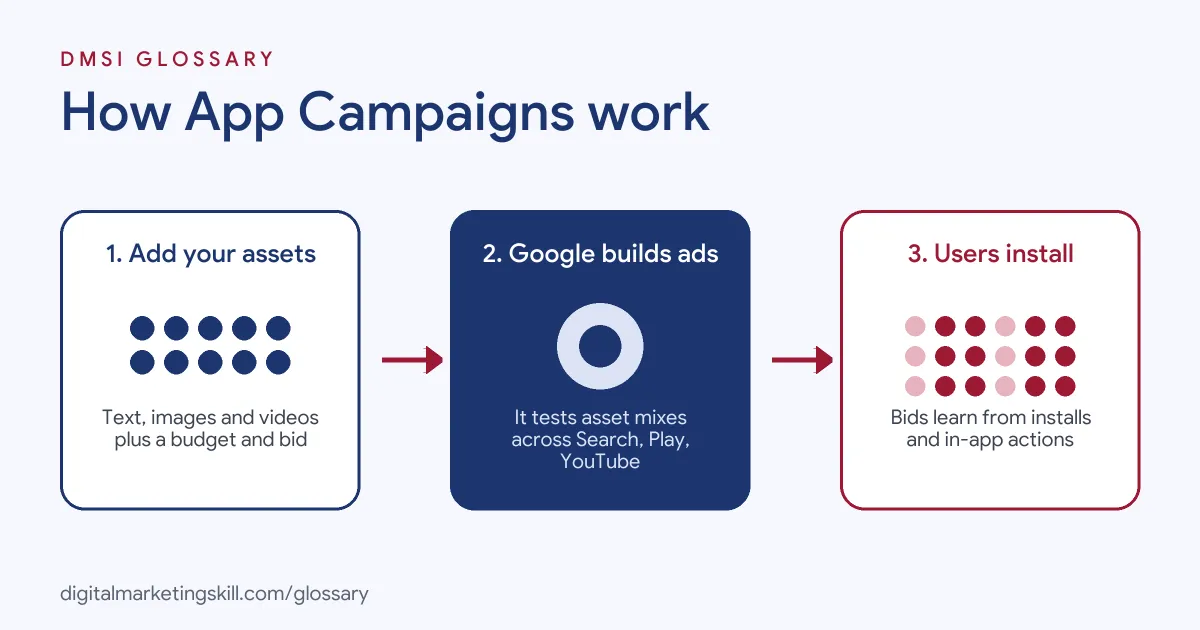
App Campaigns rely on automation. First, you give Google the inputs, and its systems handle ad building, placement and bidding. Then you review the results and improve your assets and targets over time.
Step 1: Choose a Subtype
Google lists three subtypes: “App campaigns for installs”, “App campaigns for engagement (ACe)” and “App campaigns for pre-registration”. For instance, installs campaigns win new users. By contrast, engagement campaigns bring back people who already have your app. Finally, pre-registration campaigns build interest in an Android app before launch.
Step 2: Add Your Assets
Next, you add text, images, videos and, if relevant, HTML5 assets. In addition, Google uses your store listing. Then, in Google’s words, “Google Ads will test different ad combinations and serve the best-performing ads.” So more variety gives the system more to test. This is why strong ad creative matters so much here.
Step 3: Set Bids and Budget
After that, you choose what to focus on. For example, you can aim for install volume, selected in-app actions or a return on ad spend. A target cost per install lets you set “how much you’re willing to pay to acquire a new user for your app.” Similarly, you can use target CPA for in-app actions or target ROAS for value.
Step 4: Learn and Optimise
Finally, Google’s Smart Bidding learns from your conversion data. Then it adjusts bids in each auction. Meanwhile, you check the asset reports, replace weak assets and adjust targets with care. Because big, sudden changes can reset the learning, small steps work best.
Examples of App Campaigns
- A fitness app looking for new users. The team runs an installs campaign with a target cost per install. Also, they upload several workout videos and short headlines. Then they swap out the weakest videos each month based on the asset report.
- A mobile game with lapsed players. Many players installed the game but stopped playing. So the studio runs an engagement campaign to bring them back with a new level. Then it tracks a “level completed” event to judge success.
- A shopping app focused on sales. The app tracks purchase values through Firebase. As a result, the team can bid with target ROAS and focus spend on users who are likely to buy, not just install.
App Campaigns vs Performance Max vs Search Campaigns
| Point | App Campaigns | Performance Max | Search campaigns |
|---|---|---|---|
| Main goal | App installs and in-app actions | Online sales, leads or store visits | Clicks from search results |
| Where ads show | Search, Play, YouTube, Discover, Display | Across Google channels | Google Search and partners |
| Who builds the ads | Google, from your assets | Google, from your assets | You write each ad |
| Keyword control | None | Limited | Full |
| Key data source | App conversion tracking | Website or offline conversions | Website conversions |
In short, Performance Max suits websites and shops, while App Campaigns are built for apps.
How to Set Up App Campaigns
- Set up conversion tracking. Track installs and key in-app events first. For Android, Google says download conversions are “automatically created and tracked through Google Play.” For iOS and in-app events, you’ll usually use Firebase or a measurement partner.
- Create a new campaign. In Google Ads, choose the app promotion goal and pick App as the campaign type.
- Pick your subtype. Choose installs, engagement or pre-registration.
- Find your app. Select your platform and search for your app in the store.
- Choose your bidding focus. Pick installs, in-app actions or value. Then set a realistic target and a daily budget.
- Add assets. Upload headlines, descriptions, images and videos in several sizes and formats.
- Set languages and locations. Pick where your users are and what languages they speak.
- Launch and wait. Give the system time to learn before you judge results or make big changes.
Best Practices for App Campaigns
- Track the right event. Optimise for an in-app action that links to real value, such as a purchase or sign-up.
- Use many asset types. Also, add images, videos and text, so your ads can show in more places.
- Make vertical and horizontal videos. Different placements need different shapes, so cover both.
- Set targets you can afford. Base your target on real data, such as your past cost per acquisition.
- Change one thing at a time. Small, steady changes help the system keep learning.
- Refresh weak assets. Use asset reports to replace low performers with new ideas.
Common Mistakes to Avoid
- Broken tracking. If conversions don’t record, the system can’t learn who to target.
- Too few assets. For example, one image and one headline limit where your ads can appear.
- Chasing cheap installs only. Low-cost installs can bring users who never open the app again.
- Budgets that are too small. Google warns that with small budgets, “the optimal bid per conversion may be higher than your budget.”
- Constant edits. Similarly, changing targets every day makes results unstable.
- Ignoring the store listing. However good the ad, a weak store page can still lose the install.
Where You’ll Use App Campaigns at Work
App Campaigns show up in mobile user acquisition, media buying and performance marketing roles. Also, job ads often use the older name “Google UAC”. For example, real remote job listings ask you to:
- “Take ownership of mobile user acquisition campaigns across platforms like Google UAC, Facebook, Applovin, Liftoff, and more.” (User Acquisition / PPC Specialist).
- “Deep expertise in Meta and Google UAC (app acquisition), and any other relevant performance marketing channel” (Principal Performance Marketing Specialist).
- “Deep-dive expertise in Meta Ads, along with a strong understanding of Google UAC, TikTok, and other UA sources.” (Head of Marketing (Mobile Apps)).
Learn It in the Google Ads and Analytics Track
You can learn App Campaigns, bidding and conversion tracking in the AI-Powered Google Specialist track. Every track includes a U.S. Project Internship from day one, with unlimited 1-on-1 mentoring.
Frequently Asked Questions
Where do App Campaign ads appear?
They can appear on Google Search, Google Play, YouTube, Discover and the Google Display Network. Google picks the placements based on your assets and goals.
Can I choose keywords for App Campaigns?
No. Instead, Google uses your assets, store listing and conversion data to find the right people.
What is the difference between installs and engagement campaigns?
Installs campaigns find new users. By contrast, engagement campaigns bring back people who already have your app.
Do App Campaigns work for iOS apps?
Yes. In fact, they support both Android and iOS apps, though tracking set-up differs between the two platforms.
What is Google UAC?
UAC stands for Universal App Campaigns. It is the older name for App Campaigns. Even so, many job ads still use it.
Sources: Google Ads Help: About App campaigns; Google Ads Help: About bidding in App campaigns; Google Ads Help: Choose a bid strategy for your App campaign; remote job listings on Himalayas, Himalayas and Himalayas.