A martech stack is the set of marketing tools a business uses to capture data, create content, reach people and learn what worked. The best one is small. Gartner surveys found marketers use only a third of the features they pay for, so choose tools by job, not by list.
Key Takeaways
- Choice is not the problem. The Marketing Technology Landscape counts 15,505 marketing products, and it grew only 0.79% in its latest edition, so the real challenge is picking and using a few well.
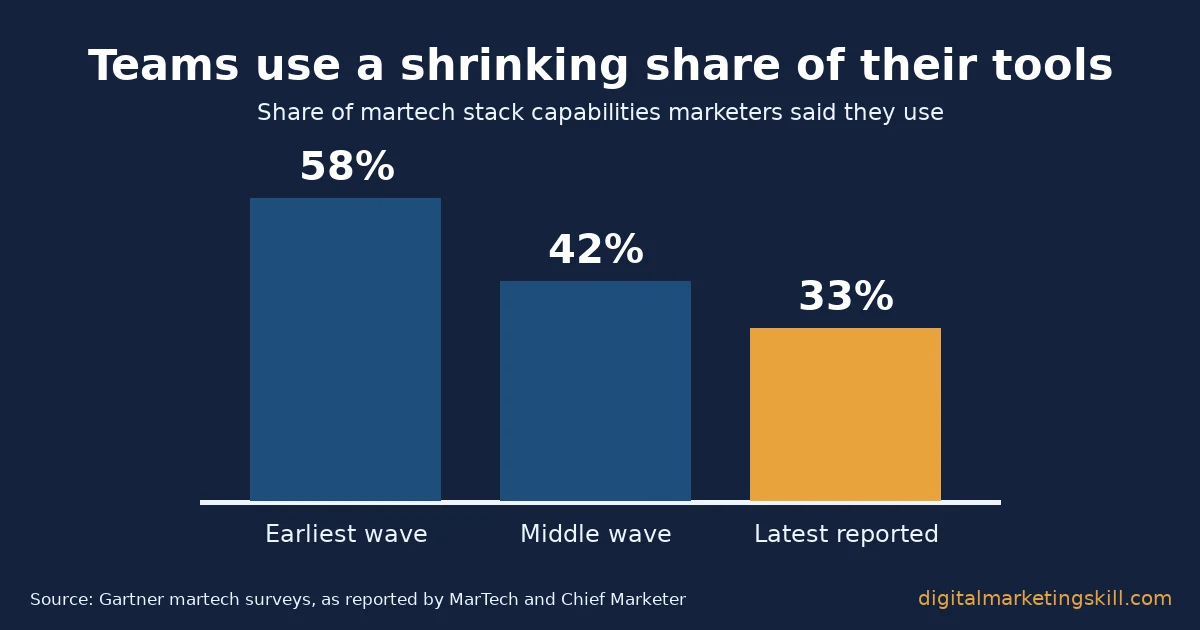
- Most paid features sit idle. Gartner’s martech survey found that marketers used 33% of their stack’s capabilities, down from 42% and 58% in two earlier waves, as reported by MarTech.
- Overlap is the top blocker. In Gartner’s survey of 324 marketers, 30% named overlapping tools as the main barrier, ahead of talent (28%) and complexity (27%).
- The free layer is strong. W3Techs finds Google Analytics on 47.3% of all websites, while 43.0% of sites run no traffic analysis tool at all.
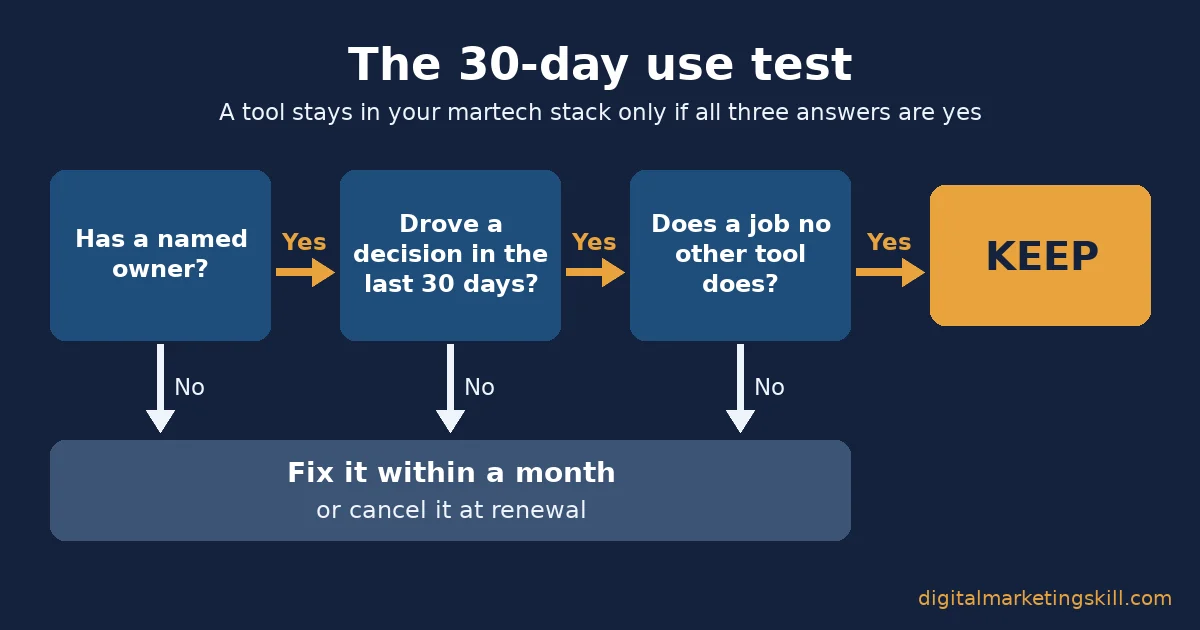
- A lean martech stack follows one rule: keep a tool only if it has an owner, drove a decision in the last 30 days, and does a job no other tool does.
In this guide
- Why Most Tool Lists Leave You With a Martech Stack Nobody Uses
- How a Martech Stack Creates Value: Data In, Decision Out
- What Differs by Job: Five Jobs, Five Different Tool Needs
- How to Choose for Each Job: Lead With the Free Layer
- How to Measure Your Martech Stack: Four KPIs
- The One Rule: Keep a Tool Only If It Passes the 30-Day Use Test
- What a Lean Stack Looks Like in Practice: One Job, One Offer
- Frequently Asked Questions About Martech Stacks
- Build Your Martech Stack Skills With Expert Guidance
Why Most Tool Lists Leave You With a Martech Stack Nobody Uses
Search for marketing tools and you get lists of 17, 22 or 40 products. Those lists answer “what exists”, but they skip the harder question: which few tools will your team actually use, and how will you know? That gap is what this guide fills.
The scale of the choice explains why lists fail. Scott Brinker’s Marketing Technology Landscape counts 15,505 products, up from about 150 in its first edition. In its latest edition, 1,488 products were added and 1,367 were removed. So even a perfect list goes stale quickly, while the method for choosing does not.
Lists still have a place. Our own roundup of digital marketing tools works well as a catalogue once you know which job you are filling. This guide is the step before that: how to decide what belongs in your martech stack at all.
Here are the ground rules. Every figure below comes from a named source that we opened, and we state its scope and limits. Gartner’s own pages block automated readers, so its figures come from trade press that reported them with attribution. Survey results are a snapshot, not a permanent ranking. When we draw a conclusion from them, we call it an informed inference, not a settled fact.
How a Martech Stack Creates Value: Data In, Decision Out
A martech stack earns its cost in only one way. It turns customer signals into better decisions faster than you could make them by hand. If a tool does not feed that loop, it is a subscription, not an asset.
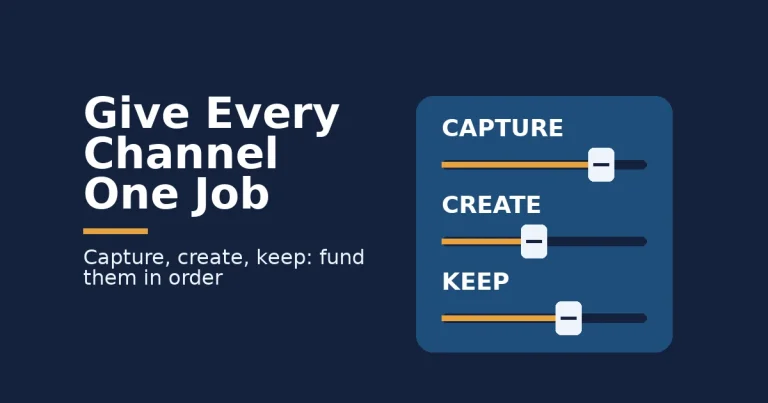
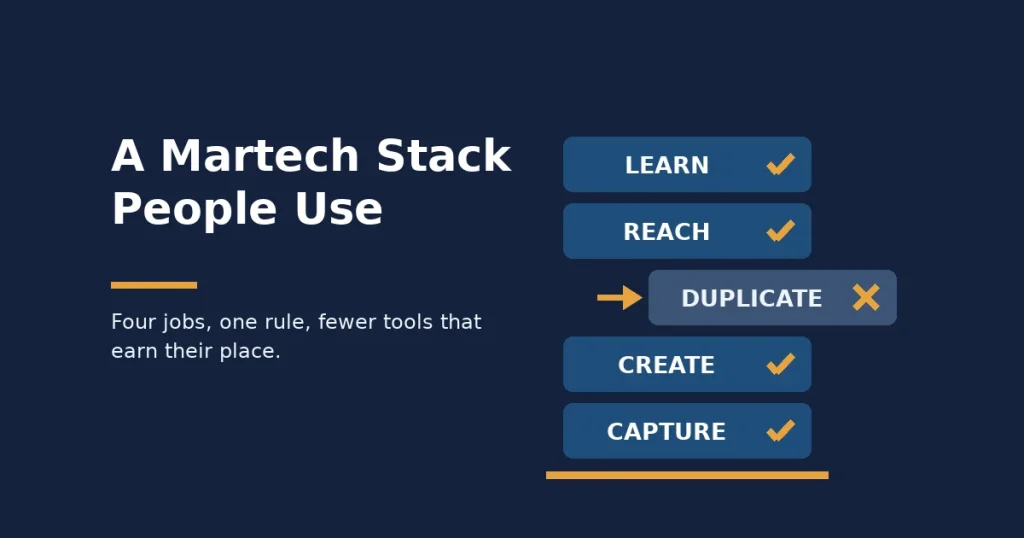
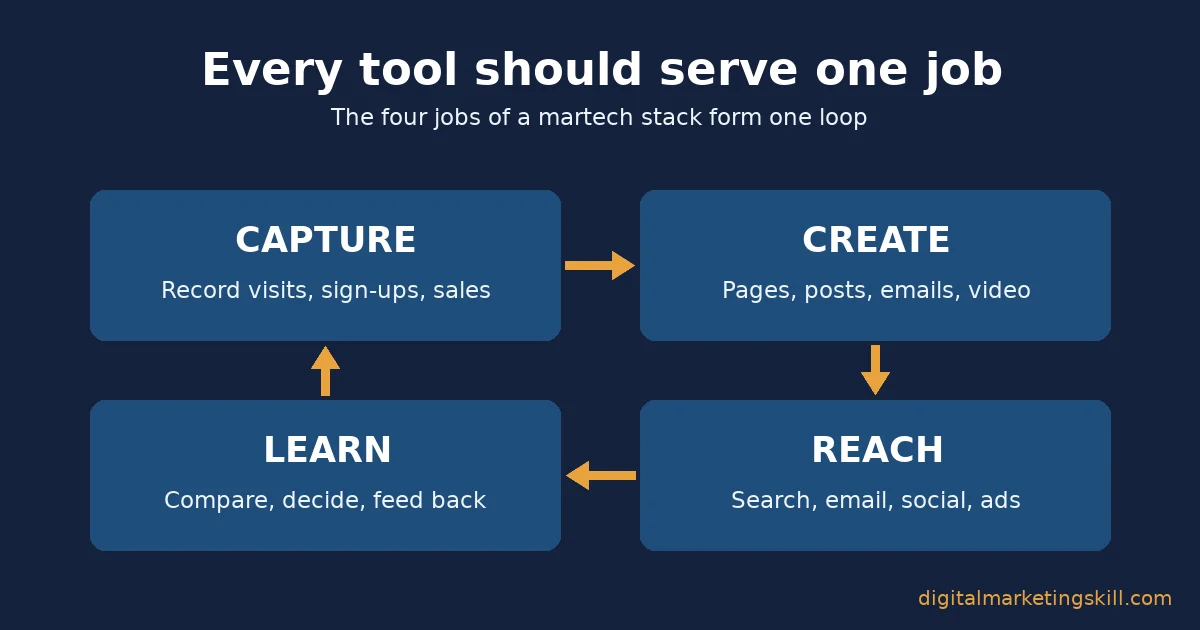
The loop has four jobs, and every tool you own should map to at least one of them:
- Capture: record what people do, such as visits, sign-ups and purchases, so you have facts instead of guesses.
- Create: produce the pages, posts, emails, images and videos that people see.
- Reach: put that content in front of people through search, email, social media and ads.
- Learn: compare results, decide what to change, and feed the answer back into what you create next.
Where the Loop Breaks: Overlap, Ownership and Complexity
The loop breaks in predictable places. According to Chief Marketer’s report on the Gartner survey, 30% of 324 marketers named overlap among tools as their biggest barrier. Another 28% named finding people to drive adoption, and 27% named the complexity of the tools themselves. In plain words, teams buy two tools for one job, nobody owns them, and the data never reaches the learn step.
Spending keeps rising anyway. MarTech’s summary of Gartner’s research reports that utilisation fell to 33% while martech took 25.4% of marketing budgets. Utilisation here means the share of a tool’s capabilities a team actually uses. My reading is simple: most teams do not need more tools, they need fewer tools used fully.
Large companies show the same pattern at scale. Zylo, which sells software to manage subscriptions, reports in its SaaS Management Index that organisations in its data hold 305 applications on average. It also found that 78% of IT leaders reported unexpected charges tied to AI features or usage-based pricing. Zylo’s customers skew large, so treat this as a warning sign, not a small-business benchmark.
What Differs by Job: Five Jobs, Five Different Tool Needs
A martech stack is not one purchase. It is five small decisions, and each job rewards a different kind of tool. Here is what each one is built for, before we cover what to lead with.
Measurement Tools: Built For Proof, Not Dashboards
Measurement tools exist to prove what caused a result. W3Techs’ traffic analysis survey finds Google Analytics on 47.3% of all websites and on 82.9% of sites that use any analysis tool. Meta Pixel follows at 8.6% and Microsoft Clarity at 4.1%. Yet 43.0% of websites use no traffic analysis tool at all, which means many businesses cannot measure anything else they buy.
The trap is the pretty dashboard. A chart of page views looks useful, but it rarely tells you what to change. So judge a measurement tool by one test: can it tell you which source brought the people who bought?
Search Tools: Built For Demand You Can See
Search tools show you what people already want. Google describes Search Console as “a free service offered by Google” that helps you monitor and fix your presence in its results. It reports the queries, clicks and pages that bring you search traffic, straight from Google’s own data.
Paid keyword suites add competitor data and larger keyword databases. That helps agencies and bigger sites. However, a small business with no search traffic yet gains more from fixing what Search Console already reports than from studying a rival’s keywords.
Content and Design Tools: Built For Speed, Where AI Now Sits
Content tools exist to cut the time from idea to published asset. This is where AI has spread fastest. HubSpot’s State of Marketing report, a survey of more than 1,500 marketers, found that 86.4% of teams use AI in at least a few areas. Content creation led extensive use at 42.5%.
The trap here is overlap. Your design tool, writing tool, email platform and social scheduler now all offer AI writing. Therefore you might be paying for the same feature four times, which is exactly the overlap Gartner’s respondents complained about.
Email and Automation Tools: Built For Owned Audiences
Email and automation tools serve people who have already said yes to hearing from you. That list is an audience you own, because no platform can change the rules on who sees your message. For that reason, the email platform often becomes the hub that other tools connect to.
The job is not sending newsletters. It is triggering the right message when someone acts, such as a welcome series after a sign-up or a reminder after an abandoned cart. So the key feature to test is automation, not template count.
Social and Ads Tools: Built For Reach You Rent
Social and advertising tools buy or borrow attention on platforms you do not control. The platforms’ own apps already include scheduling, audience insights and ad reporting. Third-party suites add one inbox and one calendar across many accounts.
That is valuable when you run five or more profiles or serve several clients. For one business on two platforms, however, a suite often duplicates what the native tools do for free.
How to Choose for Each Job: Lead With the Free Layer
Now turn each job into a buying rule for your martech stack. The pattern is the same every time: start with the free tool that the platform owner provides, and pay only when you hit a limit you can name.
Measurement Tools: Lead With One Source of Truth
Pick one analytics tool and make it the source of truth for results. Then define what counts as a success inside it. Google Analytics, for example, counts an engaged session as one that lasts longer than 10 seconds, includes a key event, or has two or more page views.
Next, tag every link you share with UTM parameters, which are short labels added to a URL that tell analytics where a visit came from. Without them, email and social visits blur into “direct” traffic. Add a second tool, such as a heatmap, only when you have a question that the first tool cannot answer.
Once tagging is in place, your reports will show which channels bring visitors who stay and buy. Our guide to growing website traffic explains how to read those channel reports and what to do with each source.
Search Tools: Lead With Google’s Free Diagnostics
Start with Search Console for demand and with PageSpeed Insights for speed. Google’s PageSpeed Insights documentation explains that its field data comes from real Chrome users over a trailing 28-day period. It also sets clear “good” thresholds, such as a Largest Contentful Paint of 2.5 seconds or less.
Because both tools are free, you can run them for a month before buying anything. Only then decide whether a paid SEO suite would change a decision you cannot make today. For a starting kit, see our guide to free SEO tools that grow website traffic.
Content and Design Tools: Lead With One Editor and One AI Assistant
Choose one design editor and one AI writing assistant, and switch off the duplicate AI features elsewhere. This keeps your brand voice and templates in one place. It also gives you one bill to review instead of four.
Set a simple quality check before anything goes live. A person reads it, checks every fact against a source, and edits it for your audience. AI speeds up the draft, but it does not replace the judgement that makes content worth reading.
Email and Automation Tools: Lead With the List, Then the Flow
Choose the email platform that fits your list size today and that connects to your website and store. Then build two automations before anything else: a welcome series and one behaviour-based message. Those two flows usually do more work than a year of one-off newsletters.
Before you scale sending, make sure your domain is set up correctly, or your messages will land in spam. Our guide to email deliverability explains what Gmail, Yahoo, Outlook and Apple check before they accept your mail.
Social and Ads Tools: Lead With Native Schedulers Before Suites
Use each platform’s own scheduler and ads manager first. They give you the most accurate reporting, because the data comes straight from the source. Move to a third-party suite only when managing profiles one by one costs you more time than the suite costs in money.
Also decide which platforms deserve your effort before choosing any tool for them. Our guide to building a marketing channel mix shows how to test channels before you commit budget to them.
How to Measure Your Martech Stack: Four KPIs
You cannot manage a martech stack you do not measure. Track these four numbers once a quarter, in a simple spreadsheet with one row for each tool in your martech stack.
- Seat utilisation: the share of paid seats that someone used in the last 30 days. Below 70% means you are paying for people who do not log in, so remove seats at renewal.
- Cost per active user: the monthly cost of a tool divided by the people who actually used it. It rises quietly as usage drops, so compare it between tools that do similar jobs.
- Overlap count: the number of jobs covered by two or more tools. Anything above zero is a candidate for cutting, because overlap was the top barrier in Gartner’s survey.
- Decision coverage: the share of your recent marketing decisions that used data from the stack. If most decisions still come from gut feel, the learn step is broken, whatever the dashboards show.
Read these four together with the numbers you already track, such as leads, sales and cost per sale. A stack that gets cheaper while decision coverage rises is getting healthier. By contrast, a stack whose cost climbs while results stay flat needs the decision rule below.
The One Rule: Keep a Tool Only If It Passes the 30-Day Use Test
If you remember one thing from this guide, make it this rule. Keep a tool only if it has a named owner, drove at least one decision you can name in the last 30 days, and does a job that no other tool in your stack already does. Any tool that fails one test gets fixed within a month or cancelled at renewal.
Worked Example: A Shop Cuts Nine Tools to Six
Here is how it works in practice, using illustrative, invented numbers. A small online shop pays for nine tools at a total of $610 a month. The audit finds two AI writing tools, two schedulers and an SEO suite nobody has opened in six weeks. It also finds a heatmap tool with no owner.
So the shop cancels one writing tool, one scheduler and the SEO suite, and it assigns the heatmap to the person who runs the website. The stack drops to six tools and, in this example, to $380 a month. More importantly, every remaining tool now has a person who uses it and a decision it supports.
Run the Martech Stack Audit in One Afternoon
You can run this audit on your own tools in one afternoon, in five steps:
- List every tool: check your card statements and invoices, because forgotten subscriptions rarely show up in memory.
- Map each tool to one job: capture, create, reach or learn. Any job with two tools is an overlap to resolve.
- Name an owner: write one person’s name next to each tool. A tool without a name is a tool without a user.
- Name the last decision: ask each owner which choice the tool informed in the last 30 days. Silence is your answer.
- Set the renewal action: keep, fix or cancel, and put each renewal date in a shared calendar.
The rule works because it tests use, not features. Feature lists always grow, while your team’s attention does not. As a result, a tool that nobody opens delivers nothing, however good its demo looked.
What a Lean Stack Looks Like in Practice: One Job, One Offer
Real results rarely come from owning many tools. They usually come from mastering one job well enough that someone will pay for it. One Digital Marketing Skill Institute graduate shows this pattern clearly.
Olajire Jacob wrote in a Google review, published on our student reviews page, that after the course they charged “an average of $500 to set up email marketing flows” for clients in the US, UK and Canada. They added that the Institute’s resources, templates and support helped them expand their services “and scale to $5K/mo”.
The lesson for your martech stack is focus. The offer was built on one job, email automation, and one core tool category, which kept learning time short and quality high. It also made the result easy for clients to see.
Know the limits of this case. It is one person’s self-reported result, not an audited figure or a typical outcome. Individual results vary with effort, market and skill, as our earnings disclaimer explains, and no course can guarantee income or a job.
Frequently Asked Questions About Martech Stacks
What is a martech stack?
A martech stack is the group of software tools a business uses for marketing, from analytics and email to design, social media and ads. “Martech” is short for marketing technology. A good stack covers four jobs: capturing data, creating content, reaching people and learning from results.
How many tools should a small business martech stack have?
There is no fixed number, but most small businesses can cover the four core jobs with five to eight tools. Count tools by job, not by feature. If two tools do the same job, one of them is probably waste.
What free tools belong in a starter martech stack?
Google Search Console, Google Analytics and PageSpeed Insights are free and cover search demand, measurement and site speed. Most social platforms also include free schedulers and insights. Start with these, then pay only when you hit a limit you can name.
How often should you audit your marketing tools?
Review the four KPIs once a quarter and run a full audit before each renewal date. Renewals are when cancelling is easiest, so put every renewal date in your calendar.
Should you buy an all-in-one platform or separate tools?
An all-in-one platform reduces overlap and keeps data in one place, which suits small teams. Separate tools can be stronger at each job but need more work to connect. Choose all-in-one if you have no one to manage integrations.
Will AI tools replace a marketing tool stack?
No. AI is being built into most existing tools rather than replacing them. The bigger risk is paying for the same AI feature in several tools, so check for overlap before adding a standalone AI product.
Build Your Martech Stack Skills With Expert Guidance
Tools only pay off when someone knows how to use them. Start with one job, apply the 30-day use test, measure it, then expand. If you want structured support while you do that, the Master Diploma in Digital & AI Marketing from the Digital Marketing Skill Institute teaches the core tools through nine practical courses.
Those courses include AI-Powered Google Analytics, AI-Powered Search Engine Optimisation and Content Marketing, email marketing and automation, and AI-Powered Social Media Marketing and Analytics. Each one ends with a hands-on project that an expert reviews. You also get unlimited one-on-one coaching and mentoring, plus real project work inside a U.S. company.
The programme is 100% online, dual accredited in the US and the UK, and recognised in more than 100 countries, so you can study from anywhere in your country. Wherever you live, you can read the full details on the Digital Marketing Skill Institute homepage, browse more guides on our digital marketing blog, or apply for the Master Diploma today.
Every figure in this guide was checked against its original source before publication. Figures marked as illustrative are invented examples, not real results.
![9 Amazing Digital Marketing Skills to Make Money Online [With Proof]](https://digitalmarketingskill.com/wp-content/uploads/2019/07/9-Amazing-Digital-Marketing-Skills-to-Make-Money-Online-With-Proof-17.png)