
A landing page builder is software for designing, publishing and testing a standalone campaign page without code. Most marketers judge one on three things. How fast the published page loads. How easily you can run an A/B test. How well it handles forms. This guide compares the main builder types. It gives you one decision rule. It shows what the data says about speed, forms and testing, with plain examples along the way.
Key Takeaways
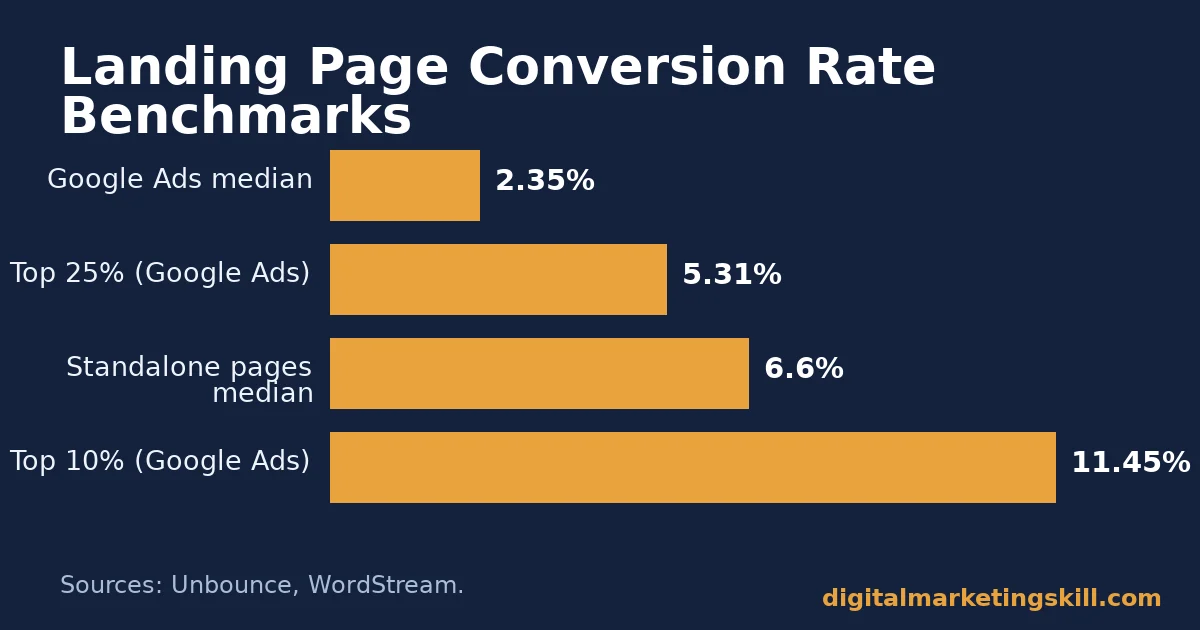
- Standalone landing page builders host pages built for a single offer. Unbounce’s Conversion Benchmark Report puts the median conversion rate at 6.6% for these pages. That figure comes from 41,000 pages and 464 million pageviews.
- Google Ads destination pages convert lower on average. WordStream’s account-level analysis of its advertiser base found a median of 2.35%, with the top 25% of advertisers at 5.31% or higher.
- Portent’s analysis covered over 100 million pageviews. It found conversion rates drop by about 4.42% for every extra second of load time, between zero and five seconds.
- HubSpot’s review of roughly 40,000 landing pages found 3-field forms convert near 25%. Each added field tends to cost several points of conversion.
- Travel-deal company Going changed one landing page button from “Sign up for free” to “Trial for free” and reported, through Unbounce’s case study program, a 104% increase in conversions month over month.
In this guide
- What Most Landing Page Builder Comparisons Leave Out
- How a Landing Page Builder Actually Works
- What Differs Between Landing Page Builder Types
- Mobile Traffic Raises the Stakes on Load Time
- How to Lead With Each Landing Page Builder Type
- How to Measure a Landing Page Builder’s Performance
- How Long to Trust a Test Before You Act on It
- The One Decision Rule for Choosing a Landing Page Builder
- A Real Case: What One Three-Word Headline Test Changed
- Frequently Asked Questions About Landing Page Builders
- Where to Learn This Properly
What Most Landing Page Builder Comparisons Leave Out
Most roundups rank landing page builders by template count or drag-and-drop feel. That misses two factors the data says matter most. How fast the page is served. How much friction sits between a click and a finished form. A builder with 500 templates and a three-second load time will still lose visitors before they see one template.
Two ground rules come first. Every conversion figure below is a benchmark, not a guarantee. Your own traffic source, offer and audience will move the number up or down. “Best” also depends on what you already use. A team inside WordPress faces different constraints than an agency running paid campaigns for a dozen clients.
Pricing structure is part of the decision too, not an afterthought. Most standalone builders charge by monthly visitor volume, so a successful campaign can push you into a higher tier mid-month. Most CMS plugin builders charge a flat annual licence instead. That caps cost, but it caps features too. Decide which trade-off fits your volume before you compare templates.
One more rule: who maintains the page after launch matters as much as who builds it. A marketer who can edit copy and swap an image, without a developer, keeps a page current. A page that needs a developer for every small change tends to go stale. That quietly erodes the conversion rate, even when nothing about the market changed.
How a Landing Page Builder Actually Works
A landing page builder does four jobs. It gives you a visual editor instead of a code editor. It hosts, or exports, the finished page. It captures form submissions and routes them into a follow-up sequence, the kind covered in this guide to the benefits of email marketing.
It also lets you split traffic between page variations to test what converts better. The editor is the part most people judge first, but hosting and testing decide how the page performs once it is live.
Hosting matters because a landing page builder usually serves pages from its own content delivery network, separate from your main site. That can make pages faster than ones built inside a slow website theme. Or slower, depending on how much script the builder’s editor injects into the published page.
Testing matters too. A builder that only runs simple split tests cannot isolate which single element, a headline or a button colour, actually moved the number. The DMSI guide to fixing landing page friction before testing covers that sequencing in more depth.
What Differs Between Landing Page Builder Types
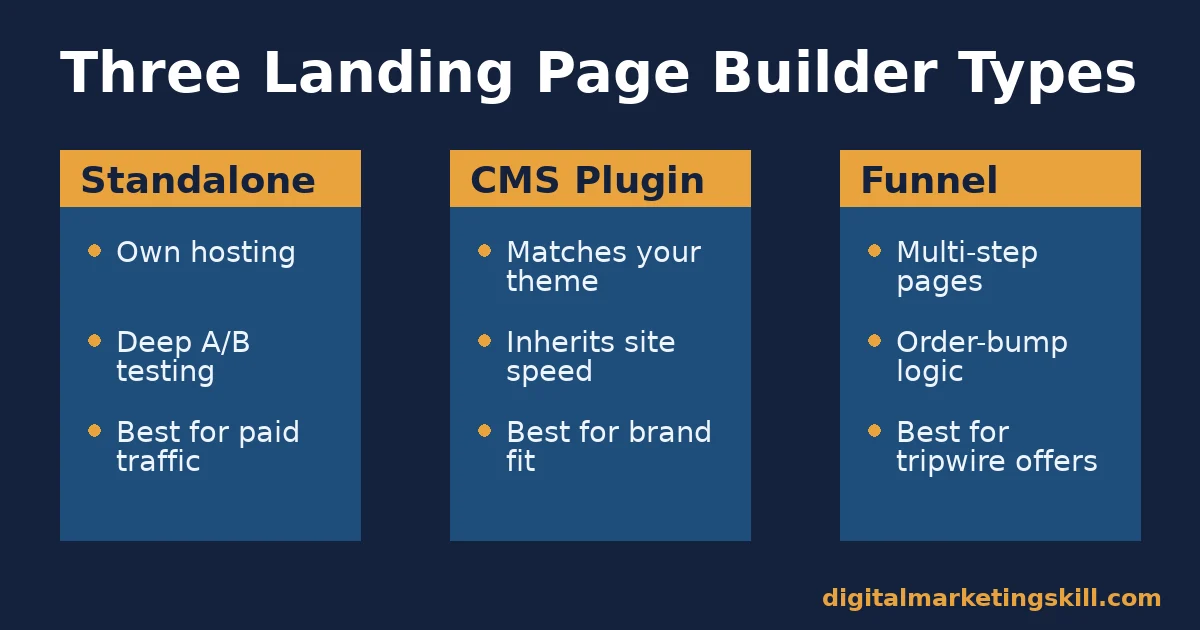
Three categories cover most tools on the market: standalone SaaS builders, CMS plugin builders, and funnel builders for multi-step offers. Each one optimises for a different job. The right choice depends on where the page needs to live, and how complex the offer is.
Standalone Builders: Built for Speed and Split-Testing
Standalone landing page builders publish pages on their own hosting, separate from your website’s theme or plugins. That isolation is their main advantage. A bloated WordPress theme cannot slow down a page hosted elsewhere. These tools also tend to ship the most mature split-testing and heatmap features, because testing is their core product, not an add-on.
CMS Plugin Builders: Built for Teams Already Inside a CMS
CMS plugin builders work inside the website you already run. They use the same theme, login and media library as the rest of the site. The page inherits your design system automatically, which keeps branding consistent. But it also inherits your site’s performance problems. A slow host or a heavy plugin stack will slow the landing page too.
Funnel Builders: Built for Multi-Step Offers
Funnel builders chain several pages together: an opt-in page, an order page, an upsell page, a confirmation page. They exist because one landing page cannot easily present the steps a proper sales funnel needs, such as an order-form bump and a one-click upsell, in sequence.
The trade-off is complexity. A funnel builder has a steeper learning curve than a single-page tool. Most first-time users underestimate how much logic setup the upsell step alone requires, so budget extra time for that one page before launch.
Mobile Traffic Raises the Stakes on Load Time
Mobile phones generated 59% of global web page views in a recent monthly snapshot from StatCounter’s traffic panel. Desktop took 39.3%, and tablets took 1.8%. Most visitors reaching a landing page now do it on a phone. That connection is often slower than a laptop on office Wi-Fi. A builder’s desktop preview can look fast while the mobile version, loaded over a mobile network, crosses the three-to-four-second mark where abandonment climbs.
This is why load time belongs at the top of the checklist, not the bottom. Test the published page on an actual phone, on a throttled connection, not just the builder’s in-editor preview. The preview usually runs on a fast office connection. It will not show you the real number your visitors experience.
Image weight is the most common cause of a slow mobile landing page. Builders that auto-compress and lazy-load images below the fold protect your load time by default. Builders that upload images at full resolution push that work back onto you. Check this setting before you judge a builder’s speed from a single test page.
A quick manual check helps here. Open the published page on your own phone, on mobile data rather than Wi-Fi, and time how long it takes before the headline and the form are both usable. If that takes more than three seconds, fix the images before you touch anything else on the page.
How to Lead With Each Landing Page Builder Type
Knowing the category is only half the decision. The other half is which feature to lead with, once you have picked a tool, because every builder type has one feature that matters most for its job.
Standalone Builders: Lead With Load Time and Variant Testing
If you chose a standalone builder, your first pass should be load time, not design. Portent’s data links each extra second of load time to roughly a 4.42% conversion drop. A page that looks great but loads in four seconds is already giving away conversions before a visitor reads a word.
This matters most for paid traffic. The same friction that slows a Facebook ad’s landing page wastes spend you have already paid for. Run your first A/B test on the headline, not the layout. Headline tests usually move the number fastest, because they change what the visitor reads first.
CMS Plugin Builders: Lead With Caching and Form Friction
If you chose a CMS plugin builder, your first lever is server-side caching, because the plugin inherits your site’s hosting limits. A caching layer serves a pre-built version of the page to each new visitor, instead of rebuilding it from the database every time.
That is usually the biggest speed gain available without changing hosts. Check that your caching plugin or host is not excluding the landing page by default; dynamic form widgets trigger that exclusion more often than they should.
After caching, cut form fields. HubSpot’s review of landing page data found that shorter forms consistently out-convert longer ones, with 3-field forms performing best among the set it studied. Ask only for what the next step genuinely needs. If sales wants more fields to qualify a lead, move those questions to a second step. Put them after the first opt-in. Do not put them all on the page a visitor sees first.
Maintenance is the other recurring cost worth planning for. A seasonal offer, a new testimonial, or an updated price all need a fast edit path. If updating the page takes a developer ticket and a two-week wait, the page will usually fall behind the offer it is meant to sell.
Funnel Builders: Lead With One Offer Per Step
If you chose a funnel builder, resist adding a second decision to any one step. Each extra choice on a page, a second product or a second CTA, measurably raises the chance a visitor leaves without deciding at all. Keep one page, one offer, one button.
How to Measure a Landing Page Builder’s Performance
Four KPIs cover most of what you need to know. Each one answers a different question.
- Conversion rate: completed goals divided by total visitors. It tells you whether the page persuades. It says nothing about whether the traffic reaching it was qualified in the first place.
- Load time: the time from click to a usable page, usually measured as Largest Contentful Paint. Google’s Web Vitals documentation treats it as a core usability signal. A slow load time predicts a lower conversion rate before you have enough traffic to measure conversion directly.
- Cost per lead: ad spend divided by completed form submissions. It connects the page’s performance back to the traffic source, so you can tell whether a conversion rate gain actually lowered what you pay per lead. Track it weekly alongside conversion rate, since a tool switch can move one number without moving the other.
- Form completion rate: people who start the form divided by people who finish it. A low number here, even with decent traffic, usually points to too many fields or an unclear next step, not a messaging problem.
Read these together. A page can have a high conversion rate and a high cost per lead at the same time, if the traffic source itself is expensive. The KPI that matters to your budget is cost per lead, not conversion rate alone. For more levers beyond the builder itself, see this DMSI guide on ways to increase conversion rate.
How Long to Trust a Test Before You Act on It
A builder’s split-test dashboard often shows a “winner” within days. Acting that early is one of the most common mistakes in this work. Testing guidance compiled by Convert.com recommends running a test for at least one full business cycle, commonly two weeks, so the result captures weekday and weekend behaviour, not one unusually good or bad day.
Sample size matters as much as duration. With a 3% baseline conversion rate and a realistic 10% relative lift to detect, published sample-size guidance puts the requirement near 38,000 visitors per variation. That is far more traffic than most single-offer campaigns see in a week. If your builder declares a winner on a few hundred visits, treat that as a lead worth re-testing, not a settled result.
The One Decision Rule for Choosing a Landing Page Builder
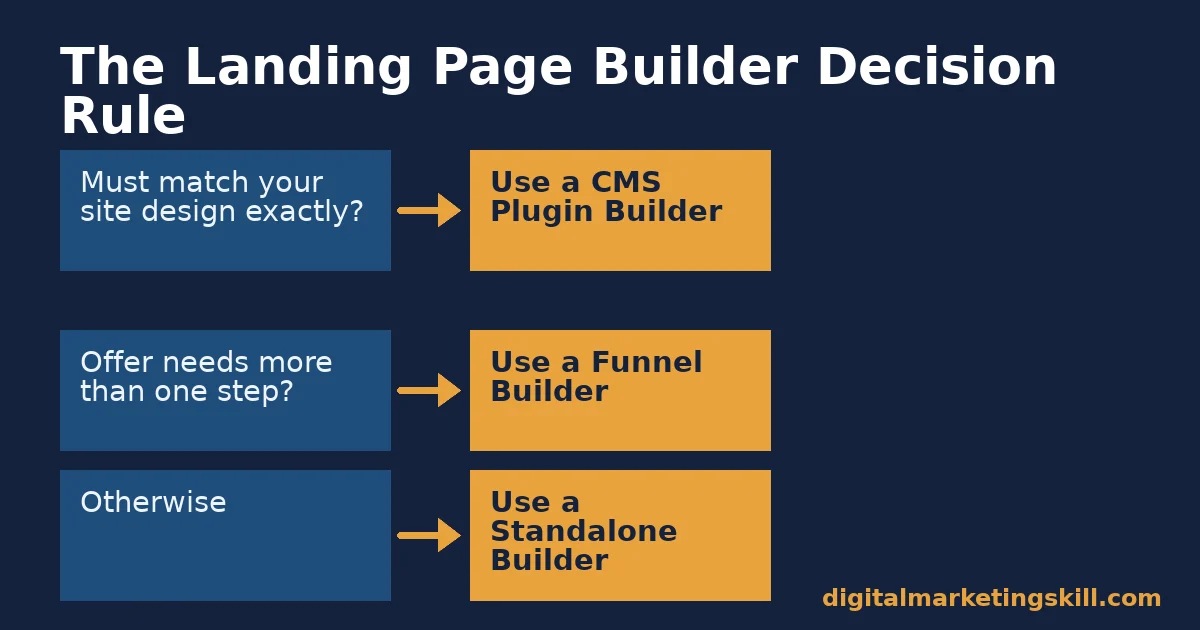
Pick the category by where the page needs to live. Then pick the specific tool by its testing and speed features, in that order. If the page must match an existing site’s design exactly, use a CMS plugin builder. If the offer needs more than one step, use a funnel builder. Everything else defaults to a standalone builder, because that category has the deepest testing and the most hosting independence.
Apply the rule before you compare feature lists, not after. Most buying mistakes happen when a team shortlists tools by template style first, and only checks hosting and testing depth once it is already attached to a design it likes. Reverse that order. Confirm the category fits the job, then let design preference decide between what remains.
Illustrative, invented numbers: a small agency running paid traffic to five client offers might expect roughly 500 monthly visitors per offer. At a 2.35% baseline, WordStream’s median for Google Ads destination pages, that is about 12 leads a month per offer. At a 5.3% top-quartile rate, that becomes roughly 27 leads for the same spend. This is a worked example to show the arithmetic, not a promised outcome.
A Real Case: What One Three-Word Headline Test Changed
Going, a travel-deal subscription company, published its own account of an A/B test run on its landing page’s call-to-action through Unbounce’s case study program. The team tested “Sign up for free” against “Trial for free”, a three-word change to the button copy, nothing else on the page.
The company reported a 104% increase in conversions, month over month, after the change. Going’s own growth lead said the result changed how much the company was willing to spend on paid media, because for the first time its paid conversion rate beat its organic rate.
Treat that figure with its limits in view. It is one company’s self-reported month-over-month number, not an independently audited test, and the case study does not state the underlying traffic volume or test duration. What it does show is a pattern worth testing on your own page: a small, specific wording change to a button can matter more than a redesign.
Notice what the case does not credit: a new builder, a new template, or a faster host. The lift came from one line of copy, tested properly, on a tool the company already had. That is a useful check on the instinct to assume a tool switch will fix a problem that a simple test could answer first.
Frequently Asked Questions About Landing Page Builders
What is a landing page builder?
A landing page builder is software for designing, publishing and often A/B testing a standalone page built around one offer, without needing a developer to write its code.
What is a good conversion rate for a landing page?
Unbounce’s Conversion Benchmark Report puts the cross-industry median at 6.6%. Treat any single published number as a comparison point, not a universal pass mark, since your industry, offer and traffic source all move it.
Does a landing page builder slow down my website?
A standalone builder hosts pages separately from your main site, so it should not slow your website down. A CMS plugin builder runs inside your existing site, so it inherits whatever performance limits your hosting and theme already have.
How many form fields should a landing page have?
Start with the fewest fields your next step genuinely requires. HubSpot’s review of landing page data found shorter forms, such as three fields, tend to out-convert longer ones. The right number still depends on how qualified the lead needs to be before your team follows up.
Do I need A/B testing built into the builder, or can I use a separate tool?
Either works. Built-in testing is usually faster to set up, because it skips installing a second script on the page, something that can itself add load time and undercut the gain from the test.
Can a free landing page builder work for a small business?
Often yes, for a single offer with modest traffic. The limits usually show up in testing features, template flexibility or visitor caps, which matter more once traffic or the number of active campaigns grows.
Is a funnel builder the same thing as a landing page builder?
No. A landing page builder typically publishes one page per offer. A funnel builder chains several pages together, opt-in, order, upsell, confirmation, for offers that need more than one step to complete.
How long should I run an A/B test before trusting the result?
Plan for at least one full business cycle, commonly two weeks. Check whether you have reached the visitor count your baseline conversion rate and target lift actually require. A short test on low traffic can show a false winner more often than a real one.
Does mobile traffic change which landing page builder I should pick?
Yes. Most visits now arrive on phones, so prioritise a builder that compresses and lazy-loads images by default. Test the published mobile page on a real device and a throttled connection, not only the desktop editor preview.
Where to Learn This Properly
Picking the right landing page builder is one tactic inside a bigger skill set: planning the offer, writing the page, measuring the result, and running the next test. That is what the Digital Marketing Skill Institute’s Master Diploma in Digital & AI Marketing teaches, through its AI-Powered Lead Generation and Email Automation track and its AI-Powered Google Specialist track.
Those are two of the four AI-powered tracks built from ten courses in the program, with a Full Stack option if you want all four.
Every track pairs the coursework with unlimited 1-on-1 coaching and mentoring, a U.S. Project Internship with a verified U.S. Work Reference Letter, and a diploma with dual US and UK accreditation, recognised in more than 100 countries, 100% online. You can build and test real landing pages for a real project no matter where in your country you are working from.
See the full track breakdown on the Master Diploma program page, read outcomes on the student reviews page, and browse more guides on the blog. When you are ready, apply here.
Wherever you live, the training and the U.S. internship travel with you online, starting at digitalmarketingskill.com. If you cite a graduate’s income result, check the earnings disclaimer first; this program makes no income or job guarantees, and results vary by effort and market. Learn more at digitalmarketingskill.com.
Every figure in this guide was checked against its original source before publication. Figures marked as illustrative are invented examples, not real results.
![9 Amazing Digital Marketing Skills to Make Money Online [With Proof]](https://digitalmarketingskill.com/wp-content/uploads/2019/07/9-Amazing-Digital-Marketing-Skills-to-Make-Money-Online-With-Proof-17.png)





