
Keyword rank tracking tells you whether a page is gaining or losing visibility in search. But only if you read it the right way. A single position number can swing for reasons that have nothing to do with your content. This guide explains what actually moved, how often to check, and which numbers to trust before you react.
Key Takeaways
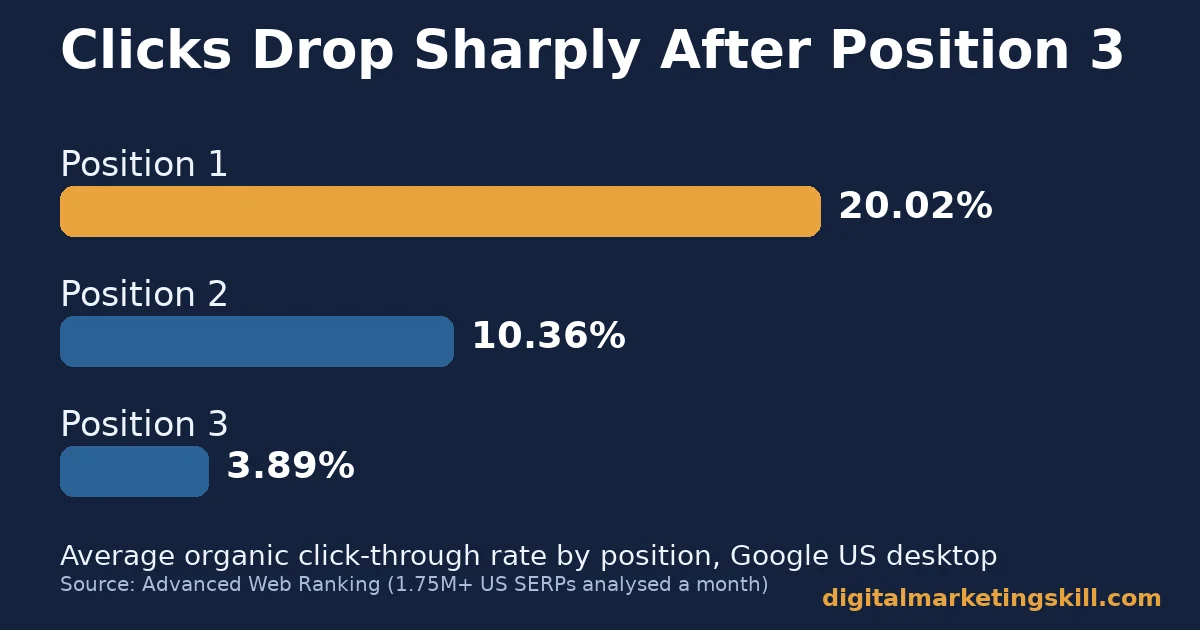
- Clicks fall fast after position 3. In a recent Advanced Web Ranking analysis of over 1.75 million US search results pages a month, the average organic result earned a 20.02% click-through rate at position 1, 10.36% at position 2 and 3.89% at position 3 on Google US desktop.
- Most pages never earn a ranking worth tracking. Ahrefs studied about 14 billion pages in its own index. It found that 96.55% get zero organic traffic from Google.
- One page usually ranks for far more than its target keyword. Ahrefs also found that the average top-ranking page ranks in the top 10 for nearly 1,000 other relevant keywords. So keyword rank tracking of a single phrase tells you little on its own.
- Search Console’s own position number gets shakier on small queries. SEOTesting’s review of Search Console data found that average position is “really misleading” for low-impression queries, because it blends in personalised and localised results. Accuracy improves as impressions rise.
- Dedicated trackers work at a different scale than a dashboard glance. Mangools reports that its SERPWatcher keyword rank tracking tool tracks around 900,000 keyword SERP positions across roughly 45,000 users’ domains, covering more than 65,000 locations.
In this guide
- What Most Keyword Rank Tracking Advice Skips
- How Keyword Rank Tracking Actually Works
- What Differs Between Keyword Rank Tracking Methods
- How to Get Reliable Numbers From Each Method
- How to Measure Keyword Rank Tracking Correctly
- The One Rule: Compare Trend, Not Snapshot
- A Real Example: What One Tracking Tool Actually Reports
- Signals Worth Watching Beyond the Raw Position
- A Simple Keyword Rank Tracking Routine
- Frequently Asked Questions About Keyword Rank Tracking
- Turn Tracking Into a Skill, Not Just a Habit
What Most Keyword Rank Tracking Advice Skips
Most advice on keyword rank tracking stops at “check your rankings weekly.” That’s a fine habit. But it skips the part that actually matters: deciding whether a number that moved is a real signal or normal noise.
Treat every figure below as a snapshot, not a permanent ranking. Read the limit next to each one before you quote it elsewhere.
The ground rules are simple. Vendor numbers, like the tracking scale Mangools reports for its SERPWatcher tool, are self-reported. So they are worth citing by name, not treating as independent proof.
Observational studies, like Advanced Web Ranking’s click-through-rate study, describe a pattern across many sites. However, they are not a guarantee for your page. And Google has never published an official count of how often it changes ranking signals. So any update tally you read is an outside tracker’s estimate, not Google’s own figure.
How Keyword Rank Tracking Actually Works
A rank tracker is a scheduled search. It sends your keyword to Google from a chosen location and device. It strips out personalisation and records where your URL lands on that specific results page. Repeat that daily or weekly, store the result, and you get a position history instead of a single guess.
How a Tracker Checks a Position
Under the hood, most tools query Google through a clean, logged-out browser profile. That profile is tied to a specific country, city or postcode. This matters because Google personalises results by location, device and recent search history. Two people searching the same phrase at the same moment can see different pages in a different order.
A tracker removes that variable by holding location and device constant on every check. That’s also why a rank tracker and your own private search almost never agree. They answer different questions. Yours is personal. The tracker’s is standardised.
Why the Same Keyword Shows a Different Number Twice
Three separate things usually explain a jump. Your page genuinely earned a better position. Google re-ordered the page for reasons unrelated to you. Or the SERP itself changed shape, for example when a featured snippet or image pack pushed every organic link down a slot.
None of these show up in the number alone. A careful competitor analysis of the page that overtook you usually matters more than the single reading did.
Treat any move of one or two positions as expected variation. Only investigate moves past that, especially sudden multi-position drops that line up with a wider algorithm change.
Independent trackers like SimilarWeb’s update log count roughly three to four confirmed Google core updates in a typical year. Each one is capable of reshuffling many rankings at once. That figure comes from an SEO publisher’s own tracking, though, not an official Google tally.
Many of the ranking factors an update reweighs apply sitewide, not to one page. That’s another reason a single keyword’s drop is rarely the full story. So widen your view before you draw a conclusion from one line on one chart.
What Differs Between Keyword Rank Tracking Methods
Most sites end up choosing between two tools. Google Search Console is free and built into every site. A dedicated rank tracker checks specific keywords on a schedule you control. They are not interchangeable. Each is built for a different job.
Search Console: Built for Aggregates, Not Single Checks
Search Console reports an “average position” inside its own Performance report. That figure is calculated from every impression Google logged for a query, across every device, location and SERP feature that triggered it. This makes it genuinely useful for spotting broad trends across hundreds of queries at once. A standalone rank tracker cannot do that job for free.
Its weakness shows up at the single-keyword level. SEOTesting’s review of the data found that the metric becomes unreliable once a query gets few impressions. It folds in results your own team saw while signed in, plus personalised and localised variants nobody else sees. The same page can show an average position of 2 in Search Console and never appear near position 2 for an outside searcher.
Dedicated Trackers: Built for Repeated, Comparable Checks
A dedicated tracker, like Mangools’ SERPWatcher, checks one keyword from one fixed location and device, on a schedule. Every reading is directly comparable to the last. That consistency is the entire value: the same question, asked the same way, repeatedly.
Choosing which keywords belong in that schedule starts with the same groundwork as any keyword research. Pick terms tied to a page and a business goal. Don’t just pick ones that sound important.
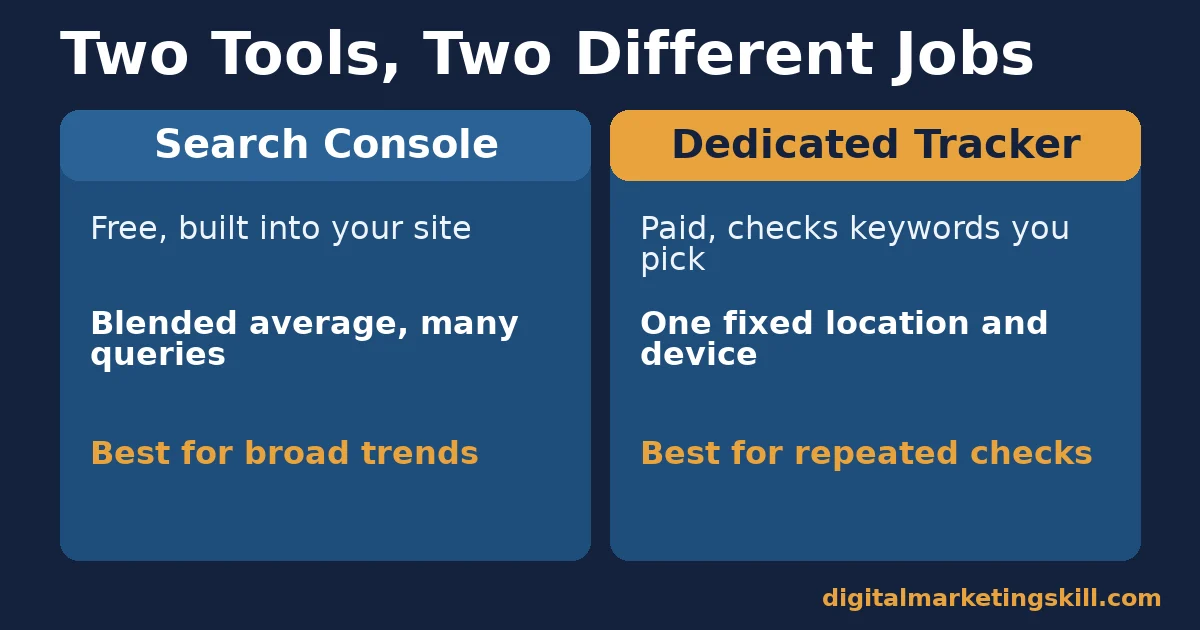
The trade-off is coverage and cost. You choose which keywords to track, so anything outside that list stays invisible until you add it. Most tools charge by how many keywords you track and how often you check them. Mangools, for example, offers weekly checks on its standard plans and daily checks on its Agency plan. That is a cost-versus-freshness decision every team has to make on purpose.
How to Get Reliable Numbers From Each Method
Search Console: Pair It With Filters, Not Raw Averages
Fix Search Console by filtering before you read it, not after. Segment by country and device inside the Performance report. Look only at queries with enough impressions to be stable, generally dozens rather than single digits. Compare the same filtered view across equal time ranges. Never compare an arbitrary short window against a longer one; that mixes different sample sizes.
Use Search Console for what it’s good at. It can show which of your hundreds of ranking queries gained or lost the most impressions over time. Then move your highest-value candidates into a dedicated tracker. That gives you the detailed, comparable view Search Console cannot give a single keyword.
Dedicated Trackers: Set the Right Location and Device First
Fix a dedicated tracker by matching its settings to your real audience, before you look at a single result. If most customers search on mobile from a specific country, track mobile positions from that country. Don’t use a generic desktop default; the two can show meaningfully different rankings for the same phrase.
Group your tracked keywords by the page they target, not alphabetically. That way, a swing in one page’s visibility is easy to spot across its whole keyword set, instead of buried in a long flat list. Re-check your location and device settings every few months, since audiences and devices shift over time.
Tracking Across Several Countries or Languages
If your site serves more than one country, set up a separate tracked group for each one. A single global average hides real problems. A page can rank well in one country and poorly in another, for the exact same keyword.
Keep each country’s keywords in its own list, with the right language and location settings. Then review each list on its own. Don’t blend them into one number; that number would mean almost nothing.
How to Measure Keyword Rank Tracking Correctly
Five KPIs Worth Defining Before You Panic
Each of these answers a different question. Read them together, rather than picking one favourite number.
- Position. Where a URL sits in organic results for one keyword, from one location and device, on one day. Read it as a single data point, never a trend on its own.
- Position trend. The same keyword’s position plotted over several weeks. This is what actually shows improvement or decline. A single day’s position cannot.
- Visibility or performance index. A blended score some tools, including Mangools’ SERPWatcher, calculate from current position combined with that keyword’s search volume. It’s meant to estimate traffic potential, not rank alone. Read it as that vendor’s own formula, not a universal standard.
- SERP feature ownership. Whether your result also holds a featured snippet or image pack slot. Those features change the click-through rate a given position actually earns.
- Volatility. How often a keyword’s position changes over a set period, separate from direction. A high-volatility keyword needs a longer observation window before any single swing means something.
The One Rule: Compare Trend, Not Snapshot
If you remember one rule from this guide, make it this one: never act on a single day’s position change. Act only on a trend confirmed across at least three consecutive checks.
Here is an illustrative, invented example to show the rule in practice. Say a page tracked weekly moves from position 6 to position 9, then back to position 7, then to position 10. A single reading would have looked like noise, or a one-off drop. The three-check trend shows a real decline. That is the signal worth investigating, not any one number in isolation.
Apply the same rule before celebrating a win, too. One good reading after a content update is encouraging. But it is not proof the update worked until the position holds, or improves further, across the next few checks.
A Real Example: What One Tracking Tool Actually Reports
Mangools publishes specific figures for its own SERPWatcher tool. They are useful as a concrete example of what keyword rank tracking looks like at scale. The clear limit: these are the vendor’s self-reported numbers, not an independently audited figure.
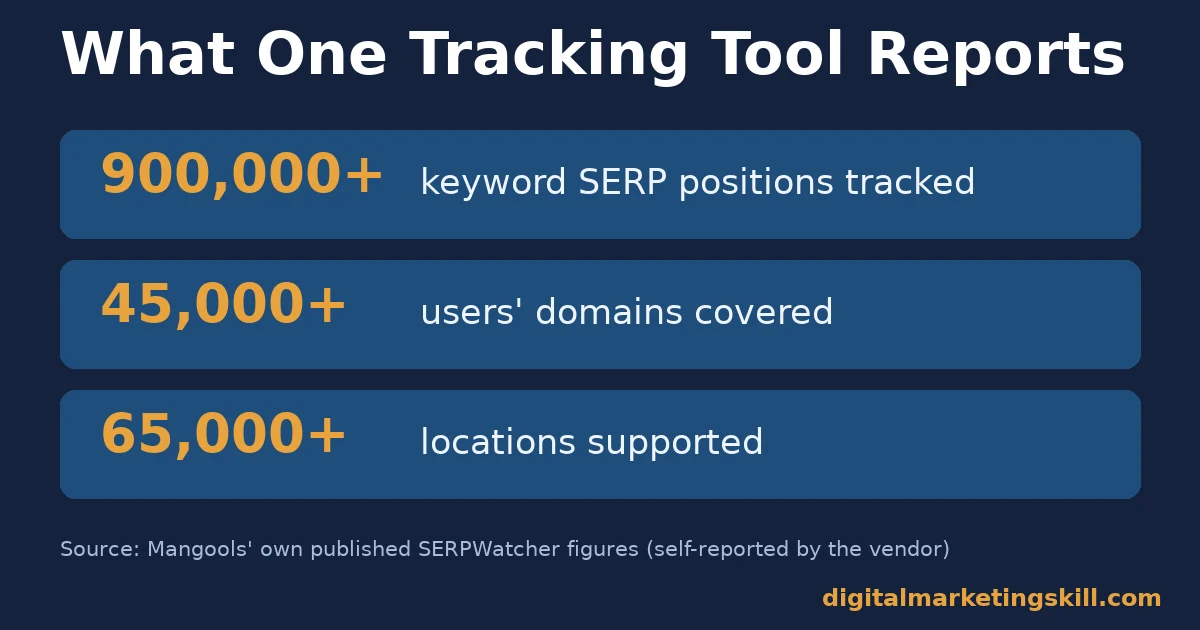
The company states that SERPWatcher tracks roughly 900,000 keyword SERP positions across about 45,000 users’ domains. Coverage spans more than 65,000 locations, down to states, counties, cities and metro areas, on both desktop and mobile.
It checks positions weekly on standard plans and daily on its Agency plan. It also reports a proprietary Performance Index. That index combines a keyword’s current position with its search volume, to estimate organic traffic potential rather than rank alone.
The lesson generalises beyond this one tool. Any rank tracker’s headline numbers describe its own tracked sample, at its own checking frequency, using its own formulas.
For example, a figure like Ahrefs’ finding that 96.55% of pages get no Google traffic cannot be directly compared to a different vendor’s visibility index. Each one counted something different.
The same caution applies to a single page’s reach. Ahrefs separately found, in its own SEO statistics roundup, that an average top-ranking page ranks for almost 1,000 other keywords. So one tool’s “900,000 positions tracked” and another’s “ranks for 1,000 keywords” measure entirely different things.
Signals Worth Watching Beyond the Raw Position
Keyword rank tracking gets more useful once you widen what you look at past the raw number. A position holding steady while its SERP feature ownership changes can mean your click-through rate shifted even though the rank did not.
Watch for a competitor consistently appearing one or two slots above yours across several of your tracked keywords, not just one. That pattern suggests a sitewide gap, not a single-page problem, and is worth a broader review rather than a quick content tweak.
Also watch for a keyword that never moves at all over months of checks. That can mean the page is stable, or it can mean nothing you are doing is changing anything, good or bad. Either way, a flat line is information too, not something to ignore just because it isn’t dramatic.
Finally, watch the gap between position and actual clicks over time. A page can hold a steady position while its real click-through rate quietly drops, usually because a new SERP feature is now sitting above it. The position chart alone would never show you that; only a click number next to it would.
A Simple Keyword Rank Tracking Routine
You don’t need a complicated system to do keyword rank tracking well. A short, repeatable routine beats an elaborate one you abandon after a month.
Four Steps That Cover Most Sites
First, pick 10 to 30 keywords tied directly to your most important pages. So resist the urge to track everything; a shorter list is easier to actually read every week.
Second, set the correct location and device for each keyword group before your first check. Otherwise every later reading will quietly compare the wrong audience to the wrong result.
Third, check on a fixed schedule, usually weekly, and log the number somewhere you will actually revisit. A spreadsheet works as well as a dashboard if you are consistent with it.
Fourth, review the trend monthly, not daily. Ask which keywords moved for three checks in a row, and only then decide what, if anything, to change on the page.
Two Mistakes That Undo a Good Routine
The first mistake is reacting to a single day’s number. A one-day swing is usually noise, not news, so wait for the trend to confirm it before you touch the page.
The second mistake is tracking so many keywords that nobody ever reviews the data. A tight list you check every week beats a huge list you open twice a year.
Frequently Asked Questions About Keyword Rank Tracking
How often should I check keyword rankings?
Weekly is enough for most keywords. A trend needs at least three checks to mean anything, and daily readings mostly show noise. Check daily only for a small set of high-value keywords during a launch, or right after a major site change, where you specifically want to catch a fast swing.
Why does my rank tracker show a different position than my own search?
Your own search is personalised by your location, device, search history and sign-in state. A tracker standardises all four, so every check is comparable. The two are answering different questions. Disagreement between them is expected, not a bug.
Is a free tool like Search Console enough, or do I need a paid tracker?
Search Console is enough for spotting broad trends across many queries at once, because it’s free and already connected to your site. A dedicated tracker earns its cost once you need a comparable, repeated reading for specific priority keywords. That blended average inside Search Console cannot give you that.
Should I track mobile and desktop rankings separately?
Yes. Google can rank the same page differently by device, and most sites now get more traffic from mobile searches than desktop ones. Track whichever device matches where your real audience searches, and add the other if the split is close.
What does a sudden ranking drop actually mean?
It can mean a genuine ranking change, a reshuffled SERP from a new feature, an algorithm update, or ordinary short-term volatility that recovers on its own. Confirm it across at least three checks. Compare it against any known update dates before assuming your page did something wrong.
Which single metric matters most for keyword rank tracking?
None of them alone. Position trend shows direction. SERP feature ownership shows why clicks may differ from what position alone predicts. A visibility index shows traffic potential. Read position trend first, then check the other two before deciding whether to act.
How many keywords should I actively track?
Start with the keywords tied directly to your most important pages, usually a few per page rather than hundreds site-wide. A smaller, well-chosen list is easier to read correctly than a huge list you never actually review.
Does keyword rank tracking work the same way for local businesses?
Mostly yes, but location matters even more. Track from the city, or even the specific postcode, where your customers actually search. A national average can hide a real local ranking problem, so always set the narrowest location your tool allows.
Turn Tracking Into a Skill, Not Just a Habit
Reading keyword rank tracking data well is one small part of a much larger AI and search marketing skill set. It’s exactly the kind of practical, data-first thinking taught across the Digital Marketing Skill Institute’s Master Diploma in Digital & AI Marketing.
The program is built from four AI-powered tracks totalling ten courses: AI-Powered Social Media Management and Advertising, AI-Powered Lead Generation and Email Automation, AI-Powered Google Specialist, and AI-Powered WordPress and SEO Specialist. A Full Stack option covers all four.
Every track includes unlimited 1-on-1 coaching and mentoring, plus a U.S. Project Internship with a verified U.S. Work Reference Letter. The program carries dual US and UK accreditation, recognised in more than 100 countries.
It’s 100% online, so you can study and apply it anywhere in your country. Everything starts from the DMSI homepage. See the full curriculum on the Master Diploma program page, browse more practical guides on the digital marketing blog, read real outcomes on the reviews page, and when you’re ready, apply here to start, wherever you live.
Every figure in this guide was checked against its original source before publication. Figures marked as illustrative are invented examples, not real results.
![9 Amazing Digital Marketing Skills to Make Money Online [With Proof]](https://digitalmarketingskill.com/wp-content/uploads/2019/07/9-Amazing-Digital-Marketing-Skills-to-Make-Money-Online-With-Proof-17.png)





