
Most email automation workflow builders get used for one thing: a single welcome email. The real value sits in the triggers, waits and branches that follow it. Map the right sequence once, and it keeps converting subscribers long after you stop thinking about it.
Key Takeaways
- Automated flows make up just 5.3% of total email sends but drive 41% of total email revenue (Klaviyo).
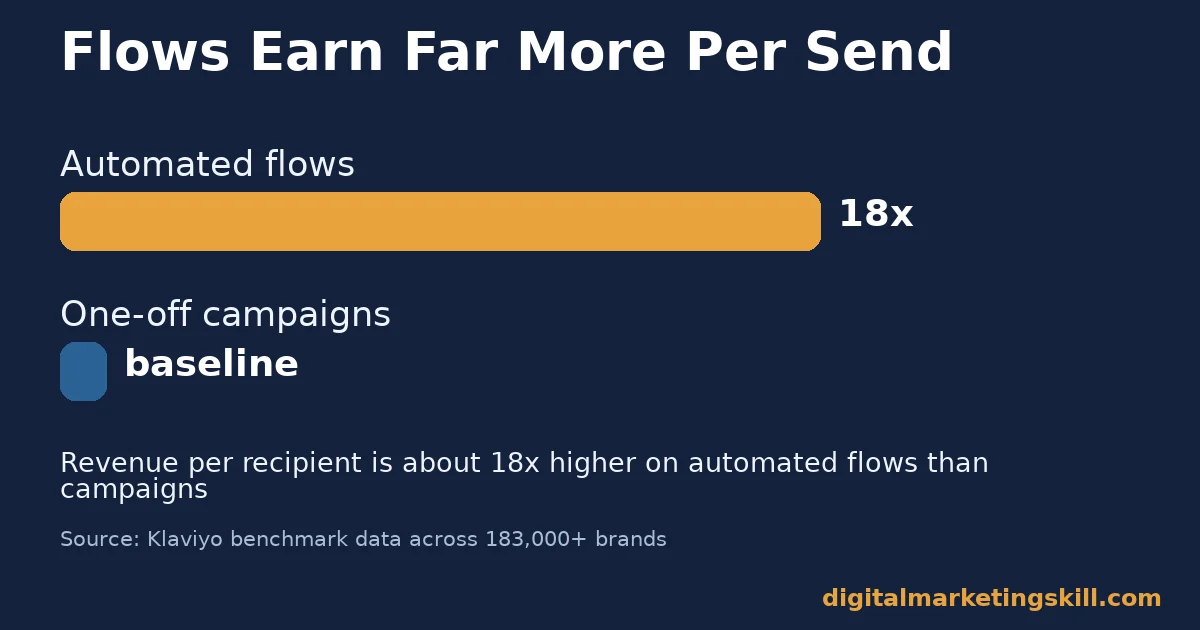
- Revenue per recipient on automated flows runs about 18 times higher than on one-off campaigns (Klaviyo).
- Flow-based emails earn roughly 3 times the click rate of broadcast campaigns: 5.58% versus 1.69% (Klaviyo).
- Welcome emails open at 63.91%, against 27.9% for a regular newsletter, in GetResponse’s own benchmark data.
- The average abandoned cart email converts at 10.7%, based on Klaviyo’s analysis across more than 183,000 brands.
In this guide
- Why Most Automation Setups Stop at One Email
- How an Email Automation Workflow Actually Runs
- What Differs Across the Core Workflow Types
- How to Lead With Each Workflow Type
- How to Measure Whether a Workflow Is Working
- The One Decision Rule Worth Following
- Tools for Building an Email Automation Workflow
- Common Mistakes in Building an Email Automation Workflow
- A Real Case: What Klaviyo’s Benchmark Data Shows
- Frequently Asked Questions About Email Automation Workflows
- Where to Go From Here
Why Most Automation Setups Stop at One Email
Most businesses set up a single automated email, call it “automation,” and move on. That single email is usually a welcome message, built on the same foundational email automation strategy most teams start with. It is a start, not a workflow.
A real email automation workflow is a sequence: a trigger starts it, waits and conditions shape it, and multiple emails carry it forward. Klaviyo’s benchmark data across more than 183,000 brands found automated flows generate 41% of total email revenue from just 5.3% of sends. That gap exists because flows react to behaviour. A single broadcast email does not.
One ground rule before the detail: benchmarks here mostly come from e-commerce and B2C datasets. A B2B sales cycle behaves differently, so treat every figure as a directional guide, not a guarantee for your exact business.
This guide walks through building an email automation workflow in order: the mechanism behind it, the three core flow types, how to sequence them, how to measure each one, and the single rule worth following before adding a fourth or fifth flow.
How an Email Automation Workflow Actually Runs
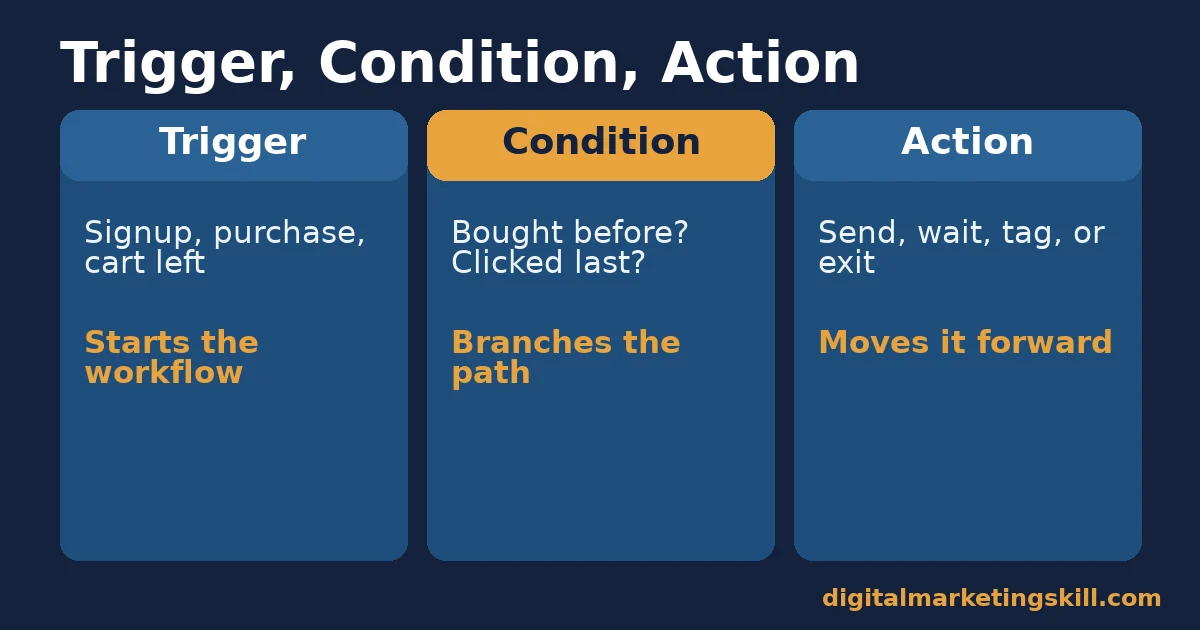
Every workflow has three parts. A trigger starts it: a signup, a purchase, an abandoned cart, or a date like a subscription anniversary. A condition branches it. Has this person bought before? Did they click the last email? Are they in a specific segment? An action moves it forward: send an email, wait a set time, add a tag, or exit the flow entirely.
Automation tools, including GetResponse, represent this visually as a flowchart. That visual layout matters more than it looks. A workflow you can trace with your eyes is a workflow you can actually debug when something breaks. Without that visual map, a broken branch can run unnoticed for months.
Most failed automations fail at the condition step, not the trigger or the action. A workflow with no branches treats every subscriber identically. It sends the same five emails to a brand-new lead and a five-time customer alike. That mismatch is what turns a promising flow into one people unsubscribe from.
Building the branch logic takes longer than writing the emails themselves. That extra time is worth it. A workflow with two or three well-placed conditions does more work than five separate workflows with none.
Think of each condition as a question the workflow asks before it decides what to send next. The fewer irrelevant emails a subscriber receives, the more trust that email automation workflow earns over time, and trust is what keeps people opening months later.
What Differs Across the Core Workflow Types
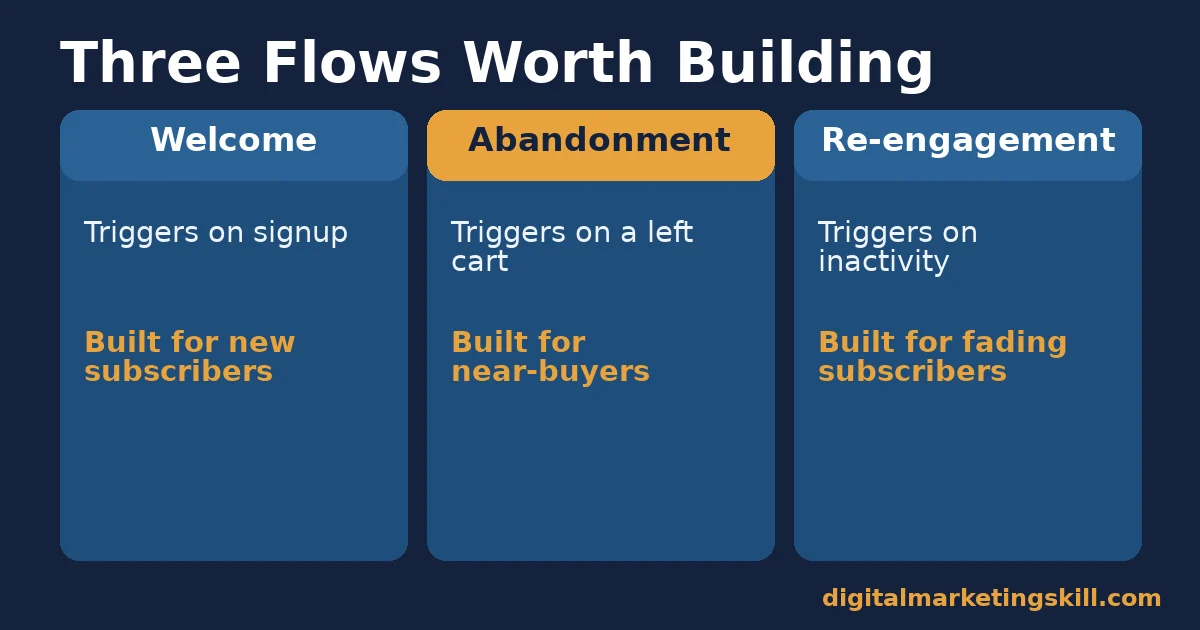
Welcome Flows: Built for New Subscribers
A welcome flow triggers the moment someone joins your list. It works because attention is highest right after signup. GetResponse’s own benchmark data puts welcome email open rates at 63.91%, against 27.9% for a standard newsletter. That gap closes fast, so the first email should go out within minutes, not days.
Abandonment Flows: Built for Near-Buyers
An abandonment flow triggers when someone adds a product or starts checkout and leaves without finishing. It works because the person already showed real intent. The Baymard Institute’s analysis of 50 studies puts average cart abandonment at over 70%, so the opportunity is large.
Klaviyo’s data puts the average abandoned cart email conversion rate at 10.7%, far above a typical broadcast send. That single flow often pays for the entire automation setup on its own.
Re-engagement Flows: Built for Fading Subscribers
A re-engagement flow triggers after a set period of inactivity, such as 60 or 90 days without an open or click. It works because it protects deliverability.
Sending to disengaged subscribers drags down your sender reputation for everyone else on the list, not just the people who stopped opening. Tools like Google’s own Postmaster Tools track this signal directly, and the same discipline underpins our wider guide to email deliverability.
How to Lead With Each Workflow Type
When You’re Starting From Zero
Build the welcome flow first. Keep it to three or four emails: a confirmation and introduction, a best-content or best-seller highlight, and a soft call to action. Trigger it immediately on signup, since the open-rate advantage fades within the first day or two. Waiting even a day to send the first email gives up most of that advantage for free.
When You Already Have Traffic but Weak Conversion
Build the abandonment flow next. A simple three-email sequence works for most stores. Send a reminder an hour after abandonment. Follow with a helpful nudge, such as reviews or FAQs, a day later. Close with a final message two to three days out.
Resist adding a discount to every email in the sequence. Save it for the last message, if you use one at all. The same patience applies in cold email marketing, where leading with value tends to outperform leading with a discount.
When Your List Is Growing but Engagement Is Dropping
Build the re-engagement flow once your list is large enough that inactive subscribers are dragging down your average open rate. Give fading subscribers one clear, low-pressure email asking if they still want to hear from you. Then remove non-responders from regular sends. A smaller, engaged list consistently outperforms a larger, stale one, and it costs less to send to as well.
How to Measure Whether a Workflow Is Working
Four metrics show whether an email automation workflow is pulling its weight.
- Revenue per recipient: total revenue from the flow divided by the number of people who entered it. This is the clearest read on whether a flow justifies the time spent building it.
- Click rate by email position: the click rate for email one, two, three and so on, measured separately against a general baseline such as Mailchimp’s all-industry average of 2.62%. A sharp drop at one position usually means that specific email needs a rewrite, not the whole flow.
- Completion rate: the share of people who reach the final email without exiting early (unsubscribing, converting, or hitting a goal). A low completion rate on an early email often means the trigger is firing on the wrong audience.
- Unsubscribe rate inside the flow: tracked separately from your general list unsubscribe rate. A flow with an unusually high unsubscribe rate is actively damaging your list, not just underperforming.
Review these monthly for high-volume flows like welcome and abandonment, and quarterly for lower-volume ones like re-engagement. A flow with few entries needs more time to produce a reliable number.
Write the numbers down somewhere you’ll actually look again, such as a shared spreadsheet or a dashboard inside your email platform. A metric nobody revisits might as well not be tracked at all.
The One Decision Rule Worth Following
Add a workflow only after the one before it is converting, not before. A fourth or fifth automated flow added to a weak welcome sequence just multiplies a problem instead of fixing it.
Illustrative, invented numbers: a welcome flow converts 2% of entrants, well below a realistic 5-8% range for a simple three-email sequence. Adding a browse-abandonment flow on top won’t fix that; it adds a second underperforming flow to manage. Fixing the welcome flow first, before building the next one, is the higher-leverage move.
The same rule runs in reverse. A welcome flow converting at 7% and an abandonment flow barely getting built has clear room for a second flow. Match the next move to where the real gap sits, not to whichever flow is easiest to copy from a template.
Tools for Building an Email Automation Workflow
Most email platforms now include a visual workflow builder, GetResponse among them, with drag-and-drop triggers, conditions and actions. The exact interface varies, but the underlying logic doesn’t: every tool needs a trigger, a way to branch, and a way to act.
Before committing to a tool, check three things. Can it branch on behaviour, not just demographics? Can you see a visual map of the whole flow, not just a list of emails? Does it report revenue per flow, not just opens and clicks? A tool missing any of these three makes measurement, and therefore improvement, much harder.
Switching tools later is possible, but exporting and rebuilding a working flow takes real time. Pick a platform with room to grow into multi-step branching before you invest heavily in a single welcome email.
Price shouldn’t be the only factor either. A cheaper tool that can’t branch on behaviour will cap how sophisticated any email automation workflow can become, no matter how well you design the emails inside it.
Weigh the monthly cost against the revenue a working abandonment or welcome flow is likely to generate. The best email automation workflow is the one that keeps earning its place in a subscriber’s inbox, not the one that was hardest to build.
Common Mistakes in Building an Email Automation Workflow
Stacking Too Many Triggers at Once
The first mistake is launching five workflows in the same week. When open rates change, there is no way to tell which flow caused it. Launch one flow, let it run for a few weeks, then add the next.
The second mistake is copying someone else’s exact email count and timing without testing it. A three-email abandonment sequence that performs well for one store’s audience and price point may need just one email, or five, for a different one.
A high-ticket purchase usually tolerates a longer, slower sequence than a low-cost impulse buy. Treat any published example, including the ones in this guide, as a starting point to test, not a fixed formula to copy exactly.
Forgetting Exit Conditions
The third mistake is forgetting to add an exit condition. Without one, someone who already bought keeps receiving an abandoned-cart sequence for a cart they no longer have. That mismatch reads as careless, and it is one of the fastest ways to earn an unsubscribe.
The fourth mistake is never revisiting a flow after launch. A workflow built a year ago on an old product catalogue or an old offer quietly keeps running on outdated assumptions unless someone checks it periodically.
The fifth mistake is writing every email in a flow with the same urgency. A welcome flow and an abandonment flow serve different moments, and emails that read identically across both miss the chance to match tone to intent. A new subscriber wants to be informed; someone with a cart waiting wants a reason to finish.
The sixth mistake is leaving the subject line as an afterthought inside a flow. A subject line inside a workflow still competes for attention in a crowded inbox exactly like a broadcast send does, so it deserves the same care, not a quick label typed in after the email body is finished.
A Real Case: What Klaviyo’s Benchmark Data Shows
Klaviyo analysed more than 325 billion emails sent across over 183,000 brands to compare automated flows against one-off campaigns. The headline finding: flows produced an 18 times higher revenue per recipient than campaigns, and nearly half of flow-driven revenue came from new customers, compared to a much smaller share for campaigns.
The limits matter. This dataset leans heavily towards e-commerce brands using one specific platform, so the exact multiples won’t transfer precisely to every industry or tool. Treat the finding as strong evidence that automation outperforms one-off sending in general, not as a guaranteed multiplier for any specific business.
What makes the case worth citing is its scale, not any single brand’s result. A sample of over 183,000 accounts, spanning many product categories, smooths out the noise that a single case study can’t avoid. That is why the direction of the finding, automation beating broadcast, holds up even where the exact numbers won’t.
Frequently Asked Questions About Email Automation Workflows
What is the difference between an email automation workflow and a drip campaign?
A drip campaign is usually a fixed, linear sequence sent on a schedule. A full workflow can branch based on subscriber behaviour, such as whether someone clicked, bought, or stayed inactive, so it adapts instead of running the same path for everyone.
How many emails should a welcome workflow have?
Three to four is a reasonable starting point: a confirmation, a value or best-seller highlight, and a soft call to action. Add more only once you can measure whether each additional email is still earning opens and clicks.
Do small businesses need a full email automation workflow?
Yes, even a simple one helps. A single welcome flow and a single abandonment flow cover most of the revenue opportunity most small lists will see, without needing a complex, multi-branch setup. If you are still building that list, our guide to free email marketing services covers low-cost tools to start with.
How long should an abandoned cart flow wait before the first email?
About an hour is a common starting point. Waiting too long lets intent fade; sending instantly can feel intrusive. Test a one-hour delay first, then adjust based on your own click and conversion data.
Should every automation include a discount?
No. A discount in every email trains subscribers to wait for one before buying. Save a discount, if used at all, for the final message in a sequence, after value-based emails have made their case first.
How do I know when a workflow needs a rewrite instead of a rebuild?
Check click rate by email position. If only one specific email underperforms while the others hold steady, rewrite that email. If every email in the flow underperforms, the trigger or audience targeting is the likelier problem.
Can an email automation workflow hurt deliverability?
Yes, if it keeps sending to people who never engage. A re-engagement flow that removes consistently inactive subscribers protects the sending reputation that every other flow depends on.
What’s a realistic first flow to build with limited time?
A three-email welcome flow is the fastest to set up and usually the highest-impact first project, since open rates are already elevated right after signup. Most platforms, including GetResponse, offer a pre-built welcome flow template to start from.
Should B2B businesses build the same flows as e-commerce stores?
Not exactly. A B2B buying cycle is longer, so a lead-nurture flow built around content and demos usually replaces the cart-abandonment flow that drives most e-commerce automation.
How do I write emails that feel personal inside an automated flow?
Use the subscriber’s own actions as the content, not just their first name. Referencing the exact product someone viewed or the page they visited feels far more personal than a generic greeting, and it signals the email automation workflow is actually responding to them.
Where to Go From Here
Pick the single workflow your list is missing most, usually the welcome flow if you have none yet. Build three to four emails, set exit conditions, and measure revenue per recipient for a month before adding a second flow. Most lists get more value from one well-built workflow than from five half-finished ones.
If you want structured, mentor-led training in building an email automation workflow alongside the rest of digital marketing, the Digital Marketing Skill Institute’s Master Diploma in Digital & AI Marketing covers this inside its AI-Powered Lead Generation and Email Automation track. That is one of four AI-powered tracks built from ten courses in total, with a Full Stack option for learners who want all four.
The programme includes unlimited one-on-one coaching and mentoring, a U.S. Project Internship with a verified U.S. Work Reference Letter, and dual US and UK accreditation recognised in more than 100 countries. It is delivered 100% online, so you can study anywhere in your country.
Explore the full curriculum on the Master Diploma page, browse more guides on the blog, or go straight to the application page to get started.
You can also read real outcomes on the reviews page; our earnings disclaimer applies to any income figures mentioned there. Learn more at digitalmarketingskill.com, or start your application from the homepage wherever you live.
Every figure in this guide was checked against its original source before publication. Figures marked as illustrative are invented examples, not real results.
![9 Amazing Digital Marketing Skills to Make Money Online [With Proof]](https://digitalmarketingskill.com/wp-content/uploads/2019/07/9-Amazing-Digital-Marketing-Skills-to-Make-Money-Online-With-Proof-17.png)





