
An email automation strategy is a plan for which triggered email each subscriber gets, when, and why. It replaces one newsletter sent to everyone. A good email automation strategy turns a list into a system. Welcome messages, cart reminders and lifecycle emails fire automatically on real customer behaviour. The sections below show how it works, what differs by flow, and how to measure it honestly.
Key Takeaways
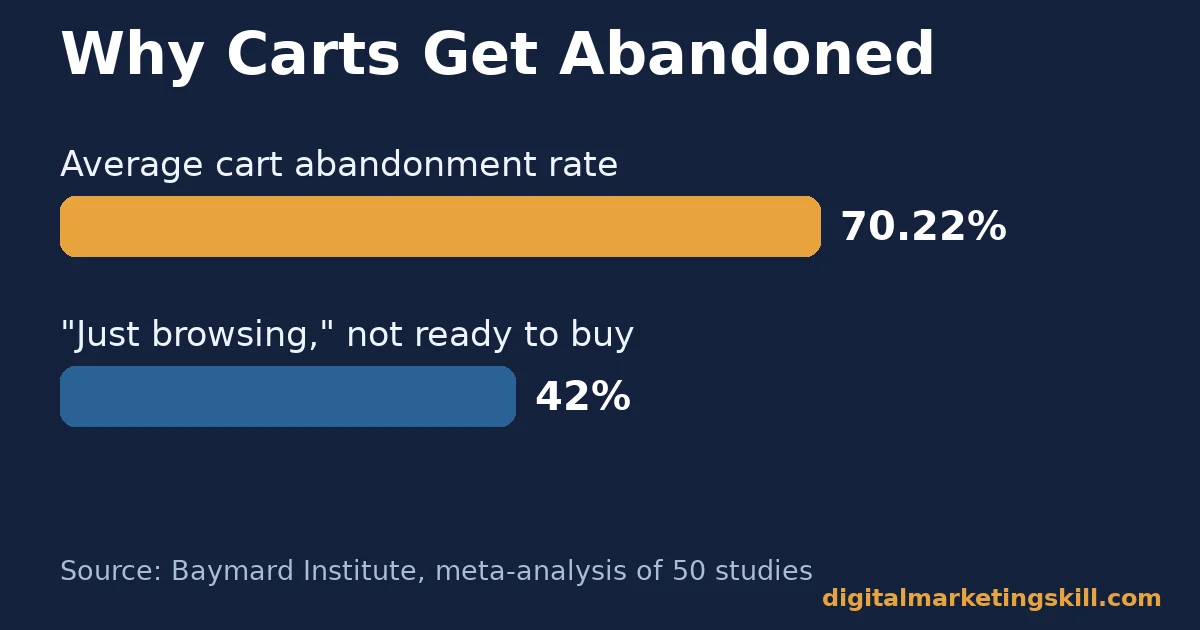
- Carts outnumber completed sales. Baymard Institute studied cart abandonment across 50 separate studies. It found an average online cart abandonment rate of 70.22%.
- Most of that is not lost intent. In the same Baymard research, 42% of US shoppers who abandoned a cart said they were “just browsing, not ready to buy.” That calls for a nurture sequence, not a discount code.
- Checkout friction is fixable money. Baymard estimates that better checkout design alone could recover about $260 billion in lost orders. That figure covers US and EU ecommerce only, not the whole world.
- Self-reported ROI varies widely. Litmus surveyed around 500 marketing professionals for its State of Email report. 35% said they earn $10 to $36 back for every $1 spent on email. Only 5% said more than $50. These numbers are self-reported, not audited.
- One welcome-flow case, not a universal number. In one published Omnisend case study, a single brand’s welcome automation reached a 53.5% open rate and an 8.3% click rate across roughly 450,000 recipients.
In this guide
- What Most Email Automation Strategy Advice Skips
- How an Email Automation Strategy Actually Works
- What Differs by Automation Flow
- How to Lead With Each Flow
- How to Measure an Email Automation Strategy
- The One Decision Rule: Fix the Trigger Before You Fix the Copy
- A Real Case: What One Welcome Automation Rebuild Showed
- Frequently Asked Questions About Email Automation Strategy
- Build Your Email Automation Skills With a Structured Program
What Most Email Automation Strategy Advice Skips
Most guides to an email automation strategy list the same flows. Welcome, abandoned cart, post-purchase, win-back. That list is correct. But it treats every flow the same way, using one trigger logic and one success metric for all of them.
That advice does not say what to measure differently for each flow. It also skips when a “good” open rate on one flow is a warning sign on another. This guide treats that gap directly: a workable email automation strategy separates flows by what each one is trying to recover or build. Each flow gets its own fix below, and each measurement is defined in plain language.
Read the Evidence With Limits in Mind
Read the cited figures for what they are. Baymard Institute’s cart-abandonment number comes from a meta-analysis of 50 independent studies. Treat it as a stable pattern, not a one-off survey result. Litmus’s ROI figures are self-reported by survey respondents. Treat them as a range, not a guarantee for your own program.
The Omnisend case studies below describe one brand each. They show what good execution can achieve, not what is typical everywhere.
An effective email automation strategy is also judged over months, not days. For example, a new welcome flow needs enough new subscribers to pass through it first. A lifecycle flow triggered by 90 days of inactivity cannot be judged until three months have passed. So resist the urge to rewrite a flow after just one week of data.
This guide assumes you already have one working list and one connected automation platform. If you have not worked out how to identify your target audience, start there first. An automation strategy built on an undefined audience will segment the wrong things well.
How an Email Automation Strategy Actually Works
Every automated email shares the same three-part structure. A trigger is an event, such as a signup, a cart abandonment, or a purchase anniversary. A condition narrows who the trigger applies to, such as only contacts in one segment. The action is the email, or series of emails, that fires once both are met.
Segmentation keeps that action relevant. You split contacts by signals such as purchase history or engagement level. A manufacturing lead and a first-time retail shopper should never see the same message. Platforms such as SendPulse and Mailchimp build this segmentation into their workflow editors directly. The rule lives with the trigger, not in a separate spreadsheet.
A connected CRM that tracks every customer interaction strengthens an email automation strategy further. It feeds the automation platform real behavioural data: what a contact viewed, bought, or ignored. That data makes a condition like “opened the last three emails but has not purchased in 60 days” possible to build at all.
Automated emails are also identifiable at the protocol level. The Internet Engineering Task Force’s RFC 3834 defines an “Auto-Submitted” header. Mail systems use it to mark a message as automatically generated. Inbox providers often handle these messages differently from a one-to-one reply.
Automation Needs Clean, Compliant Data
An email automation strategy also has to work inside consent rules, not around them. The US Federal Trade Commission’s CAN-SPAM guide requires a working unsubscribe link in every commercial email. It also requires honest sender and subject-line information, plus a physical postal address. Build these rules into your platform’s default template once. You avoid an entire category of mistakes.
None of this works without clean data. Your lead conversion process must capture a reliable trigger event: a real signup timestamp, a real cart ID, a real purchase date. A badly designed flow fires on bad information and produces bad numbers. Audit the event data feeding your automation platform before you audit the emails themselves.
What Differs by Automation Flow
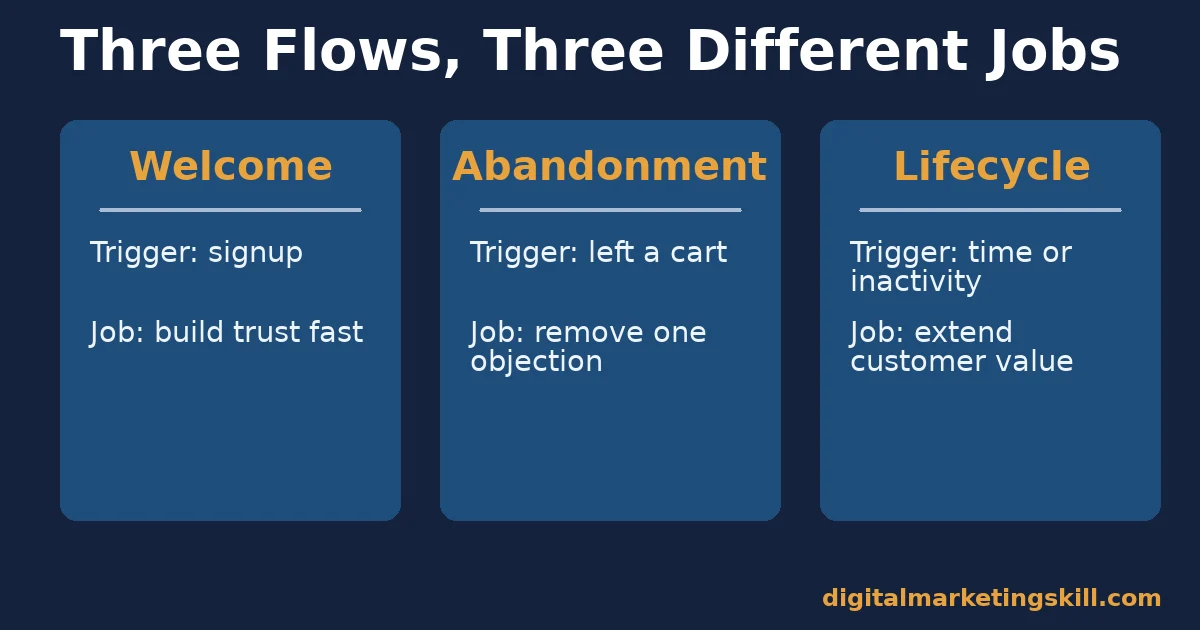
Not every flow solves the same problem. So it should not be judged by the same number. The three sections below separate welcome, abandonment and lifecycle flows by what each one is built to do.
Welcome Flows: Built to Convert Attention Into Trust
A welcome flow fires once, right after signup. Attention is at its highest then. Its job is not to sell right away. Its job is to confirm the relationship: what the subscriber will get, and how often. This confirms the deal before interest fades. Subscribers also open this flow more, simply because they just took an action.
In the Omnisend case study named above, this kind of welcome email automation strategy reached a 53.5% open rate for one brand. Its click rate reached 8.3% across about 450,000 recipients, and the flow generated roughly $29,634 in attributed revenue.
That is one brand’s documented result. A vendor shared it as a case study, not an industry average. So treat it as a ceiling worth aiming toward, not a baseline you should expect on day one.
Abandonment Flows: Built to Recover a Specific Loss
An abandonment flow triggers on a specific negative event. A cart, a browse session, or an unfinished form all count. Unlike a welcome flow, it competes with a moment of hesitation. Its job is to remove one objection: price, shipping cost, or simple distraction. It is not trying to introduce the brand.
Baymard’s cart-abandonment number, 70.22% across 50 studies, makes this flow’s ceiling look huge. But the same research found that 42% of abandoners were “just browsing.” So urgency language alone will not convert that group.
In one Omnisend case study of a single European retailer, a rebuilt cart automation flow lifted open rate by 46.4% and recovered €25,000 from 147 orders. That figure uses euros, comes from one business, and is not a global or dollar benchmark.
Lifecycle Flows: Built to Extend Customer Value
Lifecycle flows cover post-purchase, win-back, anniversary and re-engagement messages. Time or inactivity triggers them, not one single event. Their job is retention: keeping an existing customer buying, not converting a brand-new one. These emails can carry more context too, because the recipient already has a relationship with the brand.
This matters most for ecommerce businesses selling directly online. A returning customer usually costs less to keep than a new one costs to acquire. The same logic applies to service businesses running renewal or re-booking reminders. A clock starts at the last meaningful action. The flow fires once that clock passes a threshold you set from your own purchase-cycle data.
These flows go stale easily. A win-back sequence written two product cycles ago still fires on old logic, unless someone audits it. Treat lifecycle flows as inventory. Schedule a recurring review; do not set them once and walk away.
How to Lead With Each Flow
Each flow type needs a different first fix. These sections mirror the three descriptions above. Start with whichever flow drives the most volume in your account today. A fix there compounds fastest.
Welcome Flows: Lead With a Fast, Honest First Email
Send the first welcome email within minutes of signup, not hours. State plainly what the subscriber will receive, and how often. The relationship then starts on an accurate expectation, not a vague promise. Save the sales pitch for message two or three. Give the subscriber one genuinely useful email first.
Segment new subscribers by how they joined: a lead magnet, a product waitlist, or a general newsletter form. Branch the welcome flow to match. A subscriber who downloaded one specific guide expects follow-up tied to that guide. A generic “welcome to our list” message will not meet that expectation.
Abandonment Flows: Lead With Timing, Not Just a Discount
Klaviyo’s guidance on cart-recovery sequences notes a simple pattern. If a shopper has not responded after two or three emails, they likely bought elsewhere or gave up entirely. That argues for a short, front-loaded sequence in your email automation strategy, not a long drip.
So send the first reminder within a few hours, while the product is still fresh in the shopper’s mind. Keep the message focused on removing friction first, and add an incentive only after that.
Baymard found that 42% of abandoners were “just browsing.” So do not assume urgency language works on everyone. Segment repeat abandoners differently from first-time ones. A shopper who has abandoned the same item three times may need a direct question, such as “still interested?” A countdown timer will not reach that person.
Lifecycle Flows: Lead With Segment-Specific Triggers
Build lifecycle triggers around real inactivity windows from your own data. Try 30, 60 or 90 days without a purchase or an open, not a generic template’s numbers. A business with a long purchase cycle needs a much longer “win-back” window than one selling a weekly consumable.
Put a recurring review date on your calendar, not just in the automation platform. Review lifecycle flows against current products and pricing. Pick the right automation tool for your stack, and you can usually surface stale flows through a simple “last edited” report. You will not need to read every workflow by hand.
How to Measure an Email Automation Strategy
Each KPI below means something different depending on which flow it measures. Define it before you compare it across flows.
Five KPIs Defined in One Sentence
- Open rate is the share of delivered emails a mail client marked as opened. Apple Mail inflates this figure through automatic image loading.
- Click rate is the share of delivered emails that got at least one click. It signals real interest more reliably than open rate does.
- Conversion rate is the share of recipients who completed the flow’s goal action: a purchase, a booking, or a form.
- Revenue per recipient is total attributed revenue divided by the number of people who entered the flow. It lets you compare flows of different sizes fairly.
- Unsubscribe or complaint rate is the share of recipients who opted out or marked an email as spam. A rising rate usually points to the trigger or frequency, not the subject line.
How to Read These Numbers Together
Never read one KPI alone. A high open rate paired with a low click rate on a welcome email usually means the subject line works, but the email’s content does not deliver on it. A high click rate paired with a low conversion rate on an abandonment flow usually points elsewhere. Something in checkout (price, shipping, trust) is stopping the sale. That is a product problem, not an email problem.
Compare each flow only against its own history. Never compare it to a different flow’s numbers. A lifecycle win-back flow will almost always score a lower open rate than a welcome flow. The recipient’s attention and intent differ completely. That gap is expected, not a sign of failure.
The One Decision Rule: Fix the Trigger Before You Fix the Copy
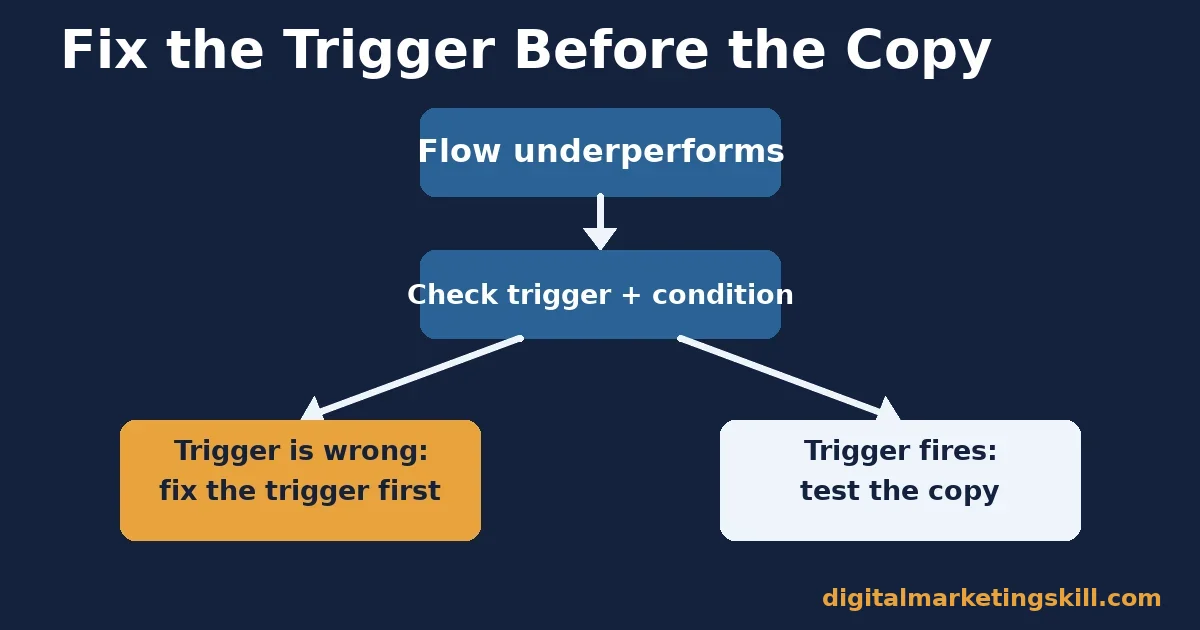
If a flow underperforms, check the trigger and the condition first. Do this before you rewrite a single word of the email. A perfectly written email sent at the wrong moment, to the wrong segment, will still underperform. A condition that lets in the wrong people breaks a good email too.
Illustrative, invented numbers: imagine an abandonment flow with a healthy 40% open rate but a conversion rate near zero. Before touching the subject line, check the trigger first.
Is it firing on carts that were actually completed through a different channel, such as a phone order? That would explain why engaged recipients still are not converting on that link. So confirm the trigger fires only on genuinely abandoned carts. Only then should you test the email’s copy or offer.
The same order applies in reverse. If a welcome flow shows a weak open rate, check the condition first.
Is it only firing for contacts who completed a double-confirmation step? That could mean it reaches far fewer people than you think. Or is it excluding an entire signup source because of an old tagging mistake?
A trigger problem makes a strong email look like a failure. A genuine copy problem on a correctly firing flow, by contrast, shows up consistently across every segment it reaches. So tell the two apart before you act; that step saves a rewrite that would not have fixed anything.
A Real Case: What One Welcome Automation Rebuild Showed
The Omnisend-documented Flextail welcome automation, cited above, shows a cause-and-effect sequence. That makes it more useful than a single number. The brand moved from a generic post-signup email to a structured welcome series. It added clearer segmentation by signup source. The brand then reported a 53.5% open rate, an 8.3% click rate, and roughly $29,634 in attributed revenue across about 450,000 recipients.
The limits matter as much as the result. This is one brand, in one vendor’s own case-study library, over one measured period. It shows this approach can work at this scale, for this type of product, but it does not prove every welcome flow will reach the same numbers.
Instead, use it as directional proof that a structured, segmented email automation strategy beats a generic one. Then set your own baseline from your own account’s history before you compare against it.
Frequently Asked Questions About Email Automation Strategy
What is an email automation strategy?
An email automation strategy is the plan behind which emails a platform sends automatically. It defines the segment and the trigger for each one. A clear strategy sets goals first, instead of adding workflows one at a time.
How is email automation different from a regular email campaign?
A regular campaign goes out once, to a chosen list, at a chosen time. An automated email fires repeatedly. It reaches each individual contact whenever that person meets the trigger and condition.
How can you tell if an email you received was automated?
Many automated systems add a header called “Auto-Submitted: auto-replied.” The official IETF standard RFC 3834 defines this header. Some senders also add a visible note stating the message was generated automatically.
How many emails should an abandoned-cart sequence contain?
Klaviyo’s own cart-recovery research suggests two to three emails is the useful range. Most shoppers who were going to return do so by the second or third message. Extra emails beyond that mostly reach people who already decided not to buy.
What does an email automation specialist actually do day to day?
An email automation specialist builds and maintains the trigger logic for each flow. They write segmentation rules and email content, then review KPI reports flow by flow. Older lifecycle flows get audited too, so none of them run on stale product or pricing information.
Does personalization always improve automated email performance?
Personalization based on real behaviour tends to help. It uses what a contact actually did. Personalization that only inserts a first name rarely moves conversion on its own, because it changes nothing about the offer.
What do automated emails legally need to include?
In the United States, the FTC’s CAN-SPAM rules apply to every commercial email, manual or automated. They require a clear unsubscribe option, accurate sender information, and a valid postal address. Other regions set their own consent rules, so check what applies where your subscribers live.
Is a higher open rate always a good sign?
Not on its own. Apple Mail’s automatic image loading distorts open-rate data on many flows. A rising open rate paired with a flat click rate usually reflects measurement noise, not real engagement.
Build Your Email Automation Skills With a Structured Program
Trigger logic, segmentation and flow-specific KPIs are core skills inside one program. The AI-Powered Lead Generation and Email Automation track sits inside the Digital Marketing Skill Institute’s Master Diploma in Digital & AI Marketing. The full program spans four AI-powered tracks and ten execution-first courses in total, with a Full Stack option for learners who complete all four.
You also get unlimited one-on-one coaching and mentoring, a U.S. Project Internship, and a verified U.S. Work Reference Letter. The diploma carries dual US and UK accreditation, recognised in more than 100 countries. The program runs 100% online, so you can build and audit real automation flows wherever you live.
Read more of our work on the Digital Marketing Skill Institute blog. See outcomes on our reviews page. When you’re ready, apply here. Visit Digital Marketing Skill Institute to see the full email automation strategy curriculum, or start building your own list today at digitalmarketingskill.com.
Every figure in this guide was checked against its original source before publication. Figures marked as illustrative are invented examples, not real results.
