Email marketing tools only help if they match the job they are doing. A sending platform cannot fix a dirty list, and a popup builder cannot fix a spam complaint. This guide sorts email marketing tools into five real categories. It shows what each one actually does, what it cannot do, and gives you a way to check whether your current stack is working.
Key Takeaways
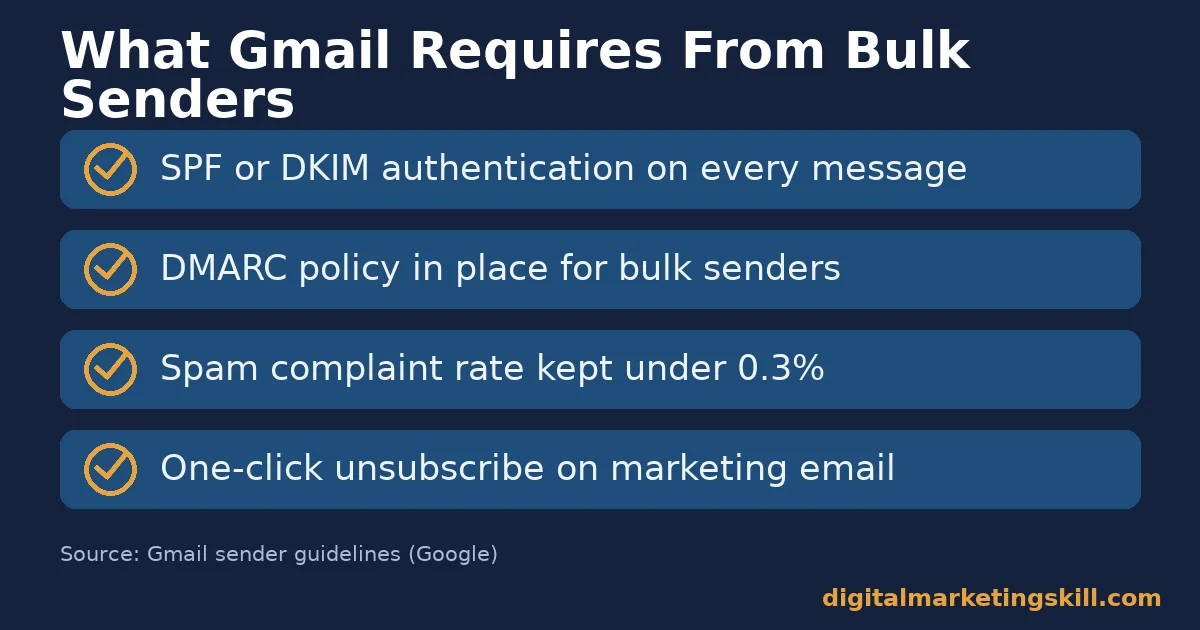
- Authentication comes before any tool. Gmail requires every sender to use SPF or DKIM, and bulk senders must add DMARC and keep spam rates under 0.3%.
- Clicks beat opens as a metric. Mailchimp’s own benchmarks put the average click rate at 2.62%, while Apple’s privacy features now distort open-rate data.
- Five tool categories do five different jobs. Sending, list capture, deliverability testing, list cleaning and subject line testing each solve a separate problem.
- A high spam rate gets you blocked, not warned. Gmail requires bulk senders to stay below 0.3% spam complaints, and above that threshold delivery suffers directly.
- Google blocks billions of bad emails daily. Google says Gmail stops more than 99.9% of spam, phishing and malware, which shows how much your sending reputation matters.
In this guide
- What Most Email Marketing Tools Lists Get Wrong
- How Email Marketing Tools Actually Affect Delivery
- The Five Categories of Email Marketing Tools
- How to Choose the Right Tool in Each Category
- Sending Platforms: Match the Plan to Your List Size
- List Capture Tools: Lead With Timing, Not Volume
- Deliverability Testers: Test Before Every Big Send
- List Cleaning Tools: Clean on a Schedule, Not Just Once
- Subject Line Testers: Use Them as a Second Opinion
- Putting Your Email Marketing Tools Together
- How to Measure Whether Your Email Stack Is Working
- The One Rule: Fix Authentication and Deliverability Before You Add Tools
- A Real Case: Why One Business Runs Three Capture Points, Not One
- Frequently Asked Questions About Email Marketing Tools
- Build This Stack as Part of a Real Marketing Skill Set
What Most Email Marketing Tools Lists Get Wrong
Most lists of email marketing tools mix categories together. A sending platform sits next to a subject line tester, as if they compete for the same job. They do not. Each tool solves one specific problem, and picking the wrong one wastes money without fixing anything.
This guide groups tools by job instead of by brand. It explains what each category actually does and how to judge a tool inside it. Then it shows how to measure whether the whole stack is working together.
A quick note on the evidence. The authentication figures come from Gmail, Yahoo and Microsoft’s own sender guidelines, so treat them as current policy, not marketing claims. Benchmark figures such as click rate are industry averages; your own numbers will always matter more.
None of this means email marketing itself is losing value. It means the tools around it carry more responsibility than most people realise. If you are still weighing whether to invest in email at all, start with our guide to the benefits of email marketing. It covers the wider case before you pick a single tool.
How Email Marketing Tools Actually Affect Delivery
An email only helps your business if it reaches an inbox. Before content or design matters, your message passes through authentication checks. Gmail’s sender guidelines require all senders to use SPF or DKIM, valid forward and reverse DNS, and TLS. Fail these checks, and no tool further down the funnel can rescue the email.
Once authentication passes, your sending reputation takes over. Gmail’s guidance is specific on this point. Bulk senders, meaning anyone sending 5,000 or more messages a day to personal accounts, must add DMARC and keep their spam rate under 0.3%. Gmail’s own FAQ says a sender should actually aim to “keep your spam rate below 0.1%.”
Other major providers set similar bars. Yahoo’s sender best practices ask bulk senders for SPF and DKIM, a DMARC policy of at least p=none, and a spam rate under 0.3%. Microsoft’s requirements for Outlook ask high-volume senders for SPF and DKIM too, with DMARC aligned to one or the other. None of these three providers will tell you why a message failed; it simply stops arriving.
Every email marketing tool sits somewhere in this chain. Sending platforms handle authentication and reputation directly. List capture, cleaning and testing tools exist to protect that reputation, by keeping your list engaged, clean and compatible before you hit send.
The Five Categories of Email Marketing Tools
These five categories of email marketing tools cover almost every need a small or growing business has. Each one is a claim about the job that category does, not a ranking of brands.
Sending Platforms: The Engine Behind Every Campaign
A sending platform, often called an ESP, is the tool that actually delivers your email marketing campaigns. It handles authentication, list storage, templates and automation in one place. Everything else in this guide supports or tests what the sending platform does.
Price and plan size usually scale with your subscriber count, not with features. A small list on a modern platform can access most of the same automation tools as a large one. The real differentiator is how well the platform protects your sender reputation by default.
Look closely at how a platform handles unsubscribes too. Gmail’s bulk sender rules require a one-click unsubscribe for marketing and subscribed messages, and senders must honour unsubscribe requests within 48 hours. A platform that automates this well protects you from a slow, manual process that risks missing the deadline.
List Capture Tools: Built to Grow Your Audience
List capture tools turn website visitors into subscribers. They include popups, embedded forms, exit-intent triggers and landing page builders. None of them send email directly; they feed new contacts into your sending platform.
The best list capture tools target behaviour, not just page location. Exit-intent, scroll depth and time-on-page triggers collect more engaged subscribers than a form that fires on every visit, because they catch someone at a moment of real interest.
If your list is growing fast, pair your capture tools with a sending setup built for volume. Our guide to bulk email services covers what changes once you outgrow a basic plan, from deliverability infrastructure to dedicated IP options.
Deliverability Testers: Built to Catch Problems Before Send
Deliverability testers preview how your email renders across dozens of real email clients. They also show whether it lands in the inbox, the spam folder, or gets blocked entirely, before you send to your full list. They exist because an email that looks perfect in one inbox can break completely in another.
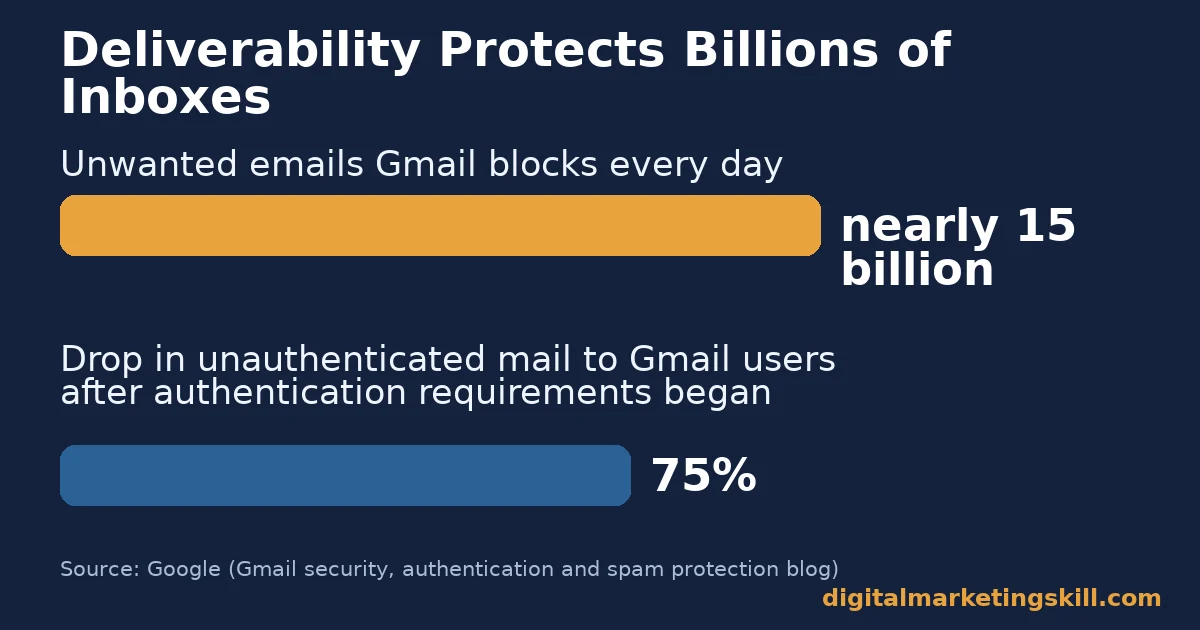
This category matters more than most marketers assume. Google’s own blog says Gmail blocks nearly 15 billion unwanted emails every day. A message with weak authentication or spam-like formatting has a real chance of never being seen. The same post reports that after Gmail started requiring authentication, unauthenticated messages to Gmail users fell by 75%.
List Cleaning Tools: Built to Protect Your Sender Reputation
List cleaning tools verify and remove invalid, risky or inactive email addresses before you send to them. An address that bounces every time hurts your reputation with every provider that notices the pattern, so the fix is prevention, not reaction.
This category directly supports the 0.3% spam-rate threshold described above. A cleaner list produces fewer bounces and fewer spam complaints, which keeps your sending platform’s reputation intact with every major provider.
Cleaning matters most right after a slow period. A list you have not emailed in months contains more dead addresses than one you email every week. A cleaning pass before you restart sending protects the reputation you still have left.
Subject Line Testers: Built to Win the First Glance
Subject line testers score your subject line against readability and word-choice patterns before you send. A subject line is the only part of your email most recipients see before deciding whether to open it, so small wording changes can shift results.
These tools are a second opinion, not a guarantee. Treat the score as a signal to test against your own audience, because what works for one list will not always work for another. Our full email marketing strategy guide covers how subject lines fit into a wider campaign plan.
How to Choose the Right Tool in Each Category
Each section below mirrors the category above it. Pick one tool per category, not several that overlap, because redundant tools add cost without adding protection.
Sending Platforms: Match the Plan to Your List Size
Choose a sending platform based on your current list size and the automations you will genuinely use, not the ones that sound impressive. Most platforms let you upgrade as your list grows, so starting small rarely locks you out of future features.
Check how the platform handles authentication by default. A platform that makes SPF, DKIM and DMARC setup simple protects you from the single biggest cause of poor email marketing results: messages that never reach the inbox.
List Capture Tools: Lead With Timing, Not Volume
Set up one well-timed trigger, such as exit-intent or a scroll-based popup, before adding several competing forms. One relevant offer at the right moment converts better than five generic ones shown too early.
Connect the capture tool directly to your sending platform so new subscribers land in a welcome sequence immediately. A delayed or manual import loses the moment when interest is highest.
Deliverability Testers: Test Before Every Big Send
Run a deliverability test before any campaign going to your full list, not just your newsletter template once a year. Email clients update their rendering engines often, so what worked last quarter can break without warning.
Treat a failed test as a stop sign, not a suggestion. Our guide to email deliverability covers the authentication and content checks worth running before every send.
Keep a short record of what each test flags over time. If the same rendering or spam-trigger issue keeps appearing, the fix belongs in your template or sending platform, not in a one-off edit you repeat before every campaign.
List Cleaning Tools: Clean on a Schedule, Not Just Once
Run a list cleaning pass on a fixed schedule, such as quarterly, rather than only after a problem appears. Email addresses go stale constantly as people change jobs and providers, so a list that was clean a year ago is not clean today.
Pair list cleaning with a sunset policy for subscribers who never open your emails. Removing truly inactive contacts protects your reputation more than any single cleaning tool can on its own.
Subject Line Testers: Use Them as a Second Opinion
Run your top two or three subject line options through a tester, then pick the stronger score as your starting point. Follow up with a genuine A/B test inside your sending platform, since real recipient behaviour outranks any prediction tool.
Keep a simple log of what wins over time. Patterns in your own audience’s preferences become more useful than any generic scoring model after a few months of real data.
Putting Your Email Marketing Tools Together
Once each category has one tool doing its job, the stack should feel almost invisible. New subscribers flow from your capture tool into your sending platform automatically. Deliverability tests run before big sends as a habit, not an afterthought, and list cleaning happens on a calendar rather than in a panic after a bad week.
Resist the urge to add a second tool in a category you have already covered. Two sending platforms, or two list cleaning services, rarely produce better results than one well-configured tool used consistently. Overlap usually just adds cost and one more login to manage, which is the opposite of what good email marketing tools should do for you.
How to Measure Whether Your Email Stack Is Working
A good tool stack shows up in your numbers, not just in your workflow. Each metric below is defined in one sentence, with a note on how to read it.
None of these metrics matter in isolation. Read them together, in the order below, because a problem in one often explains a change in another further down the list.
Five Metrics That Show a Healthy Email Program
- Spam complaint rate. This is the share of recipients who mark your email as spam. Gmail asks senders to keep this under 0.3%, and ideally under 0.1%, or delivery suffers across the board.
- Bounce rate. This is the share of emails that fail to deliver at all. A rising bounce rate usually points directly to a list cleaning problem, not a content problem.
- Click rate. This is the share of recipients who click a link inside your email. Mailchimp’s own benchmarks put the all-industry average at 2.62%, a more reliable signal than opens.
- Open rate, read with caution. Apple’s Mail Privacy Protection now inflates open-rate data for a large share of recipients, because it pre-loads images for many Apple Mail users regardless of whether they actually open the message. Treat open rate as a rough trend, not an exact number.
- List growth rate. This is the net change in subscribers over a period, after removing cleaned or unsubscribed contacts. Steady growth shows your capture tools are still working.
Read a sudden drop in any one metric as a signal to check the category behind it, not a reason to replace your whole stack at once. Most problems trace back to a single weak link.
The One Rule: Fix Authentication and Deliverability Before You Add Tools
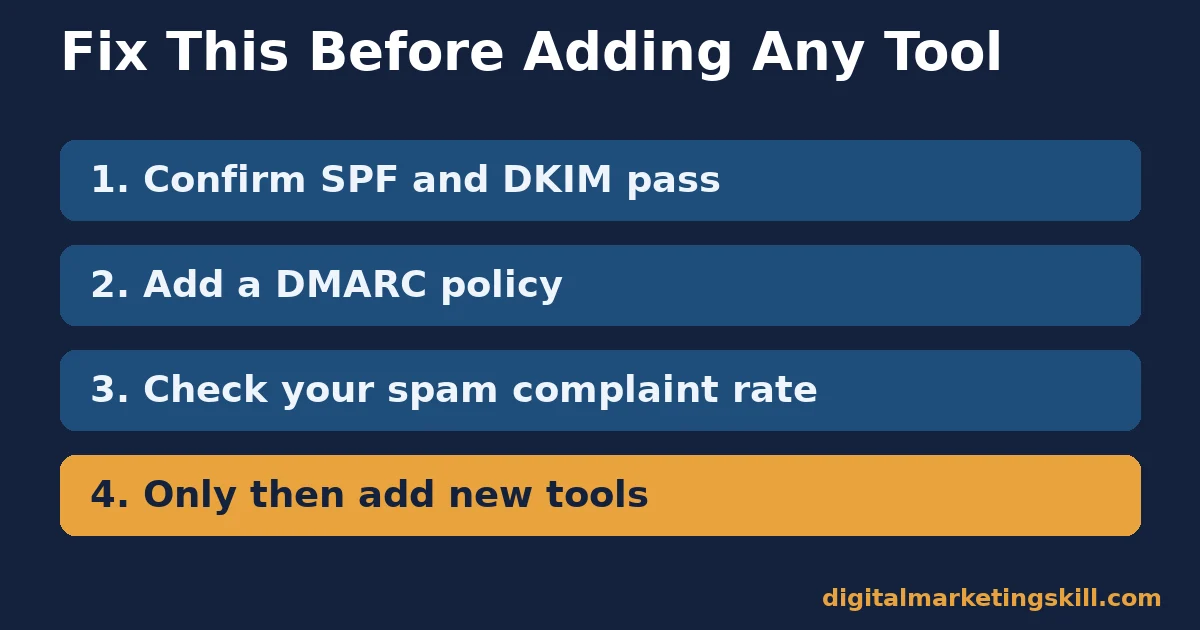
If you only fix one thing in your email marketing tool stack, fix authentication first. A popup builder or subject line tester cannot help an email that Gmail already treats as unauthenticated, no matter how well it is written.
Here is an illustrative example, with invented numbers. A business adds three new email tools in one month but skips checking its SPF and DKIM setup. Its spam complaint rate creeps to 0.6%, well above Gmail’s threshold, and inbox placement drops even though every new tool is working exactly as designed.
The fix, in this illustrative case, is not another tool. It is a 30-minute authentication check against Gmail, Yahoo and Microsoft’s published requirements. Only after that check passes does adding a new list capture or testing tool make sense, because every tool downstream depends on mail actually arriving.
A Real Case: Why One Business Runs Three Capture Points, Not One
Digital Marketing Skill Institute runs an arrival popup, a sidebar form and an exit-intent popup on its own site, rather than relying on a single capture point. Each one targets a different moment in a visitor’s behaviour, from first impression to the moment they are about to leave.
That is one documented approach, not a universal rule for every site. Treat it as evidence that multiple, well-timed capture points can coexist without feeling repetitive, provided each one targets a genuinely different trigger rather than repeating the same offer.
The deeper lesson is about matching tools to moments, not stacking tools for their own sake. An arrival popup meets a visitor’s first impression, a sidebar form stays available throughout the visit, and an exit popup catches the moment someone is about to leave. Each does a distinct job, which is the same principle behind picking one tool per category in the rest of this guide.
Frequently Asked Questions About Email Marketing Tools
What are email marketing tools?
Email marketing tools are the software a business uses to create, send, test, clean and measure email campaigns. The category ranges from sending platforms to list capture forms, deliverability testers, list cleaning services and subject line scorers, and most businesses need a mix of email marketing tools rather than just one.
Do I need a separate deliverability tester if my sending platform already tests emails?
Often yes, because a sending platform’s built-in preview rarely covers as many real email clients as a dedicated deliverability tester. Use the dedicated tool before any high-stakes send, such as a product launch, a sale announcement or your first email to a newly imported list.
How often should I clean my email list?
A quarterly schedule works for most lists, though a fast-growing list benefits from more frequent cleaning. Clean immediately if your bounce rate or spam complaint rate rises suddenly.
Is open rate still a useful metric?
Treat it as a rough trend only. Apple’s Mail Privacy Protection inflates opens for a large share of recipients, so click rate and spam complaint rate are more reliable signals. Watch the direction of the trend over months rather than the exact number on any single campaign.
What spam complaint rate is considered safe?
Gmail asks senders to stay under 0.3%, with 0.1% as the safer target. Above 0.3%, a sender becomes ineligible for mitigation until the rate drops and stays low for about a week.
Do I need all five tool categories to start?
No. Start with a sending platform that handles authentication well, add one list capture tool, then layer in testing and cleaning tools as your list and sending volume grow. Most new senders only need the first two categories for their first few months.
Can a subject line tester guarantee a better open rate?
No single tool can guarantee that. Use it as a second opinion alongside real A/B testing inside your own sending platform, since your specific audience is the only true test. Treat every score as a starting hypothesis, not a finished answer.
Build This Stack as Part of a Real Marketing Skill Set
Choosing the right email marketing tools is one piece of a much larger skill. If you want to build that full skill set properly, Digital Marketing Skill Institute teaches it hands-on inside the Master Diploma in Digital & AI Marketing.
The program runs four AI-powered tracks built from ten execution-first courses in total, including AI-Powered Lead Generation and Email Automation. A Full Stack option covers all four tracks. It comes with unlimited 1-on-1 coaching and mentoring, plus a U.S. Project Internship that ends with a verified U.S. Work Reference Letter.
The diploma is dual US and UK accredited and recognised in more than 100 countries. The whole program runs 100% online, so you can build and test your own email marketing tools wherever you live, anywhere in your country.
Browse more guides like this one on the Digital Marketing Skill Institute blog, and read our checklist on email marketing campaigns. See real outcomes on the reviews page. When you are ready, apply for the Master Diploma or start from the Digital Marketing Skill Institute homepage.
Every figure in this guide was checked against its original source before publication. Figures marked as illustrative are invented examples, not real results.