
Facebook ad setup decides what Meta’s delivery system learns before a single person sees your ad. The objective, audience, budget, creative and tracking you choose tell the auction what a good result looks like. So get those five choices right first, then judge results only after the system has had enough data to learn.
Key Takeaways
- The audience is huge, so setup matters more than reach. Meta reports 3.60 billion daily active people across its apps, which means your ad competes for attention rather than for access.
- Your setup feeds the auction. Meta’s developer documentation says it combines your bid strategy, your bid amount and the probability of getting your optimisation goal into an “effective bid”.
- Ads keep getting more expensive. In a recent quarterly report, Meta said ad impressions rose 14% and the average price per ad rose 12% year over year, so wasted spend costs more.
- Tracking is the most skipped step. W3Techs finds Meta Pixel on 8.6% of all websites, against 47.3% for Google Analytics, so many advertisers optimise without conversion data.
- Creative still carries the result. Nielsen’s analysis of about 500 consumer goods campaigns called creative “the most important element” in sales lift, while media’s share rose to 36%.
In this guide
- What Most Facebook Ad Setup Guides Miss
- How Meta Turns Your Facebook Ad Setup Into Delivery
- Five Facebook Ad Setup Choices and What Each One Controls
- How to Lead With Each Facebook Ad Setup Choice
- How to Measure Your Facebook Ad Setup
- The One Decision Rule: Fund the Test Before You Judge It
- Facebook Ad Setup Mistakes That Waste a First Budget
- A Real Case: $14 in Ads and $878 in Sales
- Frequently Asked Questions About Facebook Ad Setup
- Your Next Step: Practise Facebook Ad Setup With Expert Support
What Most Facebook Ad Setup Guides Miss
Most guides treat Facebook ad setup as a clicking exercise. They walk you through Ads Manager screens, then stop at the publish button. That is useful once, but it hides the real job. Every field you fill in is an instruction to a machine that will spend your money for you.
The gap is the link between each setting and what the delivery system does with it. So this guide explains that link for the five choices that matter, then shows what to do with each one. It also gives you the measures to watch and one decision rule for your first budget.
Some ground rules keep this honest. Meta does not publish the full weights inside its auction, so parts of this guide are an informed inference, not a settled fact. Menu names also change often, so treat any screen description as a snapshot, not a permanent map. The principles behind the menus change far more slowly.
Finally, this guide is written for a worldwide audience. Where a figure covers only the United States, it says so. Where a number comes from Meta itself, it says that too, because a platform reporting on its own product is not an independent source.
How Meta Turns Your Facebook Ad Setup Into Delivery
Meta runs an auction each time someone could see an ad. According to Meta’s developer documentation on bidding, it evaluates your bid strategy, your bid amount and the probability of getting your optimisation goal. It then turns those into an “effective bid”. In plain words, the system asks how much you will pay and how likely this person is to do what you asked for.
That second part is where your Facebook ad setup does most of its work. If you ask for link clicks, the system finds people who click. If you ask for purchases, it looks for people who buy. As a result, two ads with the same budget and the same image can reach very different people.
The Scale Is Huge, and So Is the Competition
Meta reported 3.60 billion daily active people across its family of apps in its quarterly results. DataReportal’s analysis of Meta’s own ad planning tools put Facebook’s ad reach at about 2.28 billion users. That second figure is a snapshot, and it counts reachable accounts rather than unique people.
However, more reach does not mean cheaper results. Meta said ad impressions rose 14% and the average price per ad rose 12% year over year in the same report. So every impression you buy costs more, which makes a careless setup more expensive than it once was.
The Learning Stage Makes Early Results Noisy
New ad sets start in a learning stage. Meta’s ad set documentation says this field shows whether the delivery system “is still learning”, and warns that delivery can be unstable while it does. In other words, the first days of a campaign tell you less than they seem to.
Because of this, frequent edits hurt. Each big change gives the system a new problem to solve, so it starts learning again. That is why the decision rule later in this guide asks you to set a test budget first and leave the ad set alone until it is spent.
Five Facebook Ad Setup Choices and What Each One Controls
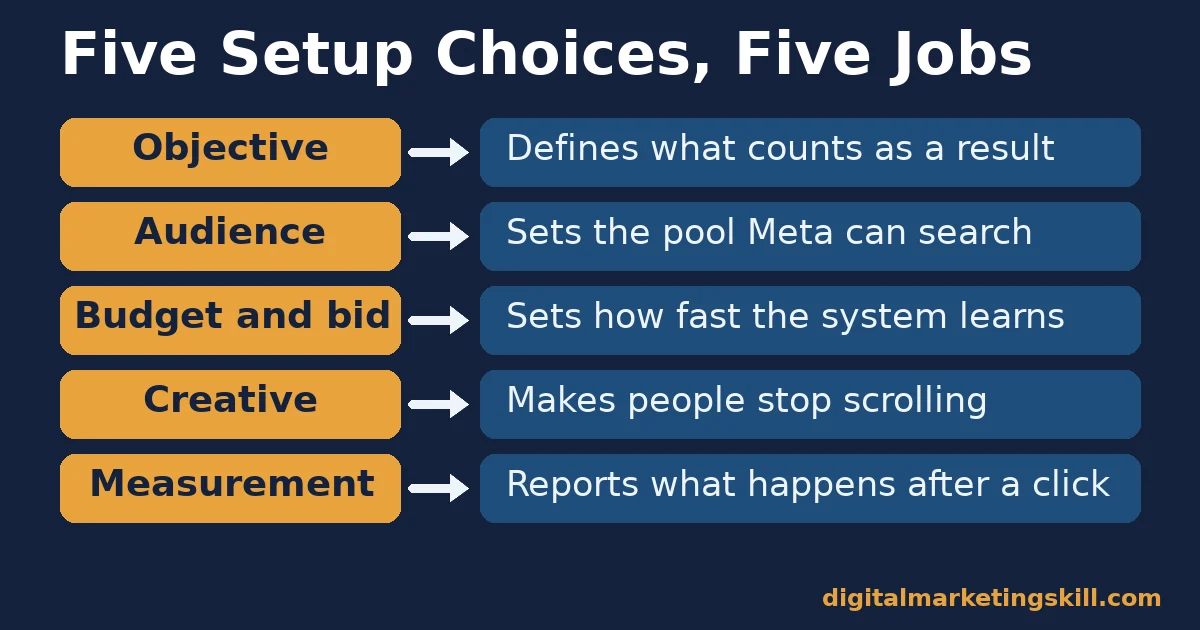
A good Facebook ad setup comes down to five choices. Each one controls a different part of how the system spends your budget. The headings below state what each choice is built to do.
Objective: Built to Tell Meta What a Result Is
The objective defines what counts as success. Meta’s campaign documentation lists six outcome-based objectives: awareness, traffic, engagement, leads, app promotion and sales. Each one points the system at a different kind of person, because people who watch videos are not always the people who buy.
So in a Facebook ad setup, the objective is not a label for your report. Instead, it is the target the auction aims at. If you choose traffic when you want sales, you will get cheap clicks from people who rarely buy.
Audience: Built to Set the Pool, Not Pick the Buyer
Your audience settings define the pool the system can search. They do not choose the buyer for you. Inside that pool, delivery still favours the people most likely to complete your objective.
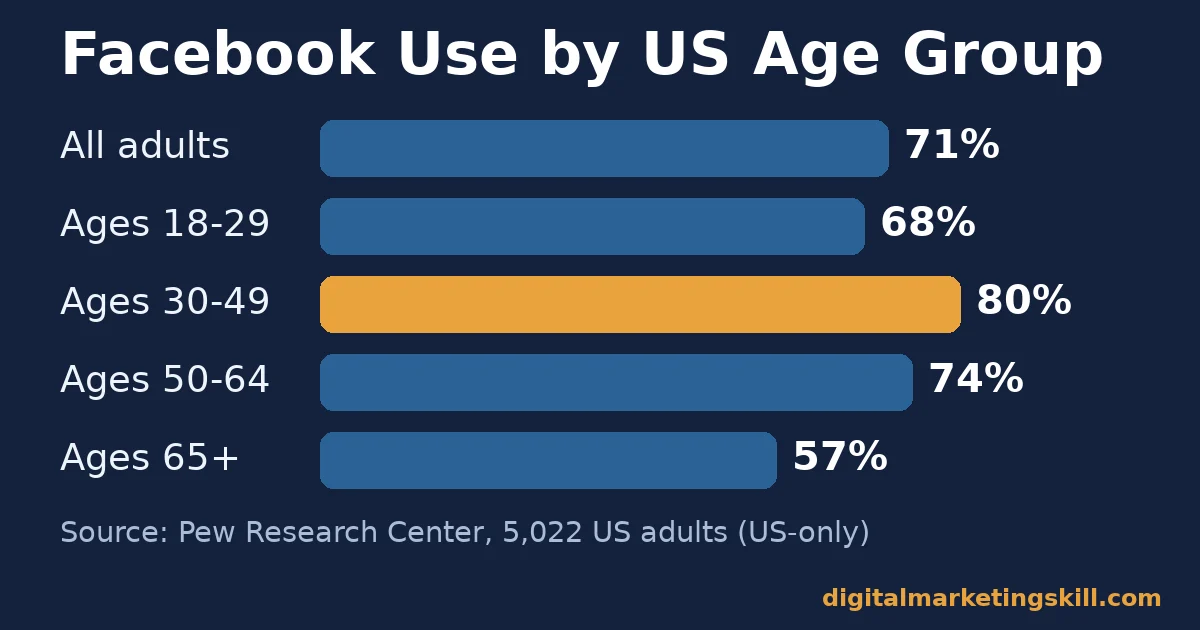
Audience size also varies by country and age. For example, Pew Research Center’s social media fact sheet, based on a survey of 5,022 US adults, found that 71% use Facebook, rising to 80% of those aged 30 to 49. That is US-only data, but it shows why a narrow age filter can cut out the people most likely to respond.
Budget and Bid: Built to Set the Pace
Your budget sets how fast the system can learn, while your bid strategy sets the limits it works within. Meta’s ad set documentation describes the default as designed to get the most results for your budget “without limiting your bid amount”. A bid cap, by contrast, limits the actual bid to an amount you set.
So in any Facebook ad setup, a tiny budget slows learning, and a tight cap can stop delivery altogether. Start with the default strategy unless you already know your target cost per result from past data.
Creative and Placement: Built to Win the Scroll
Creative is the image, video and words people see. Nielsen studied about 500 consumer goods campaigns across TV, digital video, mobile, magazines and radio. It called creative “the most important element” in sales lift, although media’s share of the effect rose to 36%.
That study did not cover Facebook alone, so read it as a general lesson. Still, the lesson holds in a feed: targeting gets your ad in front of people, but only the creative makes them stop. Placements then decide where it appears, such as feeds, stories or reels.
Measurement: Built to Feed the System Signals
Measurement is how the system learns what worked after the click. The Meta Pixel records actions on your website, and the Conversions API sends the same events from your server. Meta’s Conversions API documentation says it helps advertisers “optimize ad targeting, decrease cost per result and measure outcomes”.
Without these signals, a sales objective has little to learn from. Yet W3Techs finds the Meta Pixel on only 8.6% of all websites, compared with 47.3% for Google Analytics. Its data covers websites in general, not only advertisers, but the gap is still striking.
How to Lead With Each Facebook Ad Setup Choice
Understanding each choice is half the job. The other half is a default move for each one. These headings mirror the five choices above, so you can apply them in order during your next Facebook ad setup.
Objective: Lead With the Result You Can Count
Pick the objective that matches the action you can actually measure. Choose sales when your website tracks purchases. Collect enquiries through a form? Then choose leads. If you cannot track either yet, choose traffic for now, but treat it as a step towards a better setup.
Also check whether your ad falls into a special category. Meta’s campaign documentation requires every campaign to declare one, such as housing, employment, credit, or social issues and politics. These categories carry targeting restrictions, so declare them honestly or your ads may be rejected.
Audience: Lead With Broad Reach Plus One Exclusion
Start wider than feels comfortable. Set the location, age range and language you truly serve, then let delivery find buyers inside that pool. Add one exclusion, such as existing customers, so you do not pay to reach people who already bought.
Next, keep detailed interests for later tests. Once you have a working baseline, you can compare a narrower audience against it. Our guide to how Facebook ad targeting works covers those options in more depth.
Budget and Bid: Lead With Enough Money to Learn
Set the budget at the ad set level so it matches the test you want to run. Then use the default bid strategy for your first campaign. Caps help only when you know what a result is worth, and new advertisers rarely know that yet.
Most importantly, size the budget against your target cost per result, not against a round number. The decision rule below shows how. A budget that cannot buy enough results simply buys noise.
Creative and Placement: Lead With Three Distinct Ideas
Launch with three genuinely different creative ideas, not three colours of the same image. For instance, try one product demo, one customer problem and one clear offer. Different ideas teach you something, while small tweaks rarely do.
Leave automatic placements on at first, then check which placements deliver results. Design for a phone screen, because most people scroll feeds on mobile. Keep the main message readable without sound and without the caption.
Measurement: Lead With Pixel Plus Conversions API
Install the Meta Pixel before you spend anything, then confirm that your key events fire. Our step-by-step guide to setting up a Meta Pixel walks through it. If your platform supports the Conversions API, connect it too, so events still arrive when browsers block tracking.
Then add tagged links so Google Analytics can confirm what Meta reports. Two sources that broadly agree give you more confidence than one. If they disagree sharply, fix tracking before you change the ads.
How to Measure Your Facebook Ad Setup
Ads Manager shows dozens of columns, but five numbers tell you whether your Facebook ad setup is working. Read them in this order, from the top of the funnel to the money.
- CPM (cost per thousand impressions): what you pay for 1,000 views of your ad. A rising CPM with flat results usually means the audience is too narrow or the creative is tired.
- Link click-through rate: the share of people who saw the ad and clicked its link. A low rate points to the creative or the offer, not the audience.
- Cost per result: your spend divided by the results your objective counts. This is the main number for judging an ad set against your target.
- Landing page conversion rate: the share of visitors who complete the action on your site. If clicks are healthy but this is weak, fix the page, not the ad.
- Frequency: the average number of times each person saw your ad. When it climbs and results fall, people have seen it enough, so refresh the creative.
If you sell online, add return on ad spend, which is revenue divided by ad spend. Read it alongside your margins, because a high return on a low-margin product can still lose money. Our guide to the ecommerce sales funnel shows how to find the stage losing sales after the click.
The One Decision Rule: Fund the Test Before You Judge It
If you remember one thing from this guide, make it this rule. Give each new ad set a test budget of at least ten times your target cost per result, and make no major edits until it has spent that budget. Then judge it on cost per result, not on its first day.
This rule is our own rule of thumb, not a Meta requirement. It follows from the learning stage described above. Ten results is a small sample, but it is enough to separate a clear winner from a clear loser.
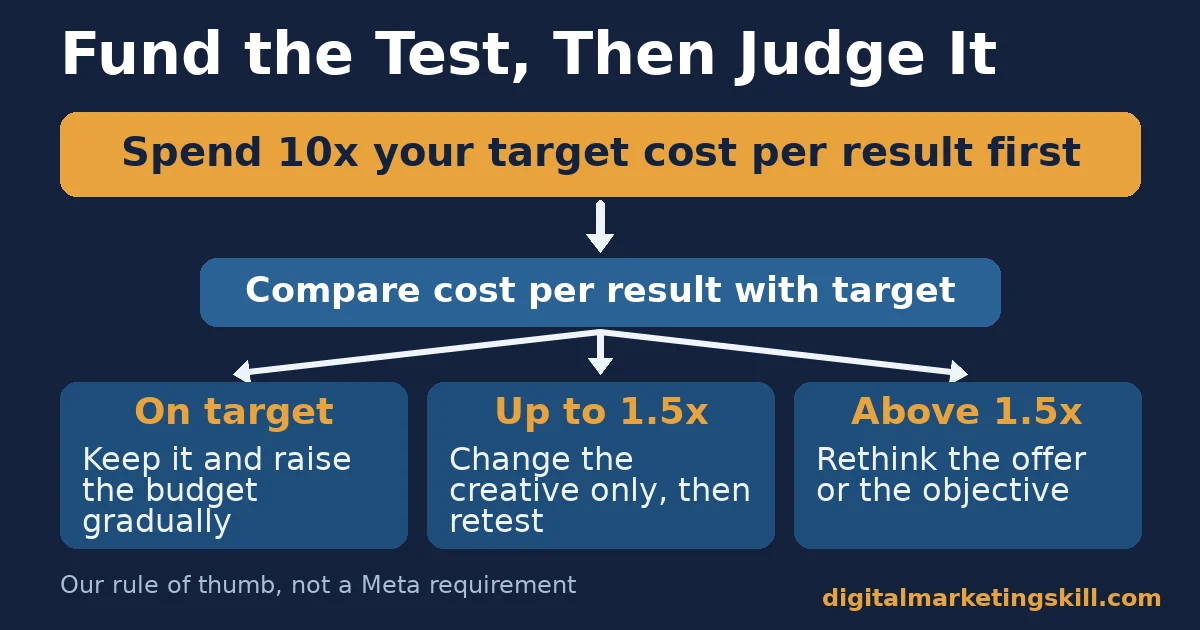
Here is an illustrative example with invented numbers. A shop decides a sale is worth up to $20 in ad spend. So its test budget is at least $200, spread over about a week at roughly $30 a day.
After the budget is spent, the shop compares results with its target. At $16 per sale, it keeps the ad set and raises the budget gradually. A result of $26, still under one and a half times the target, means it changes only the creative and tests again. Above $30, it rethinks the offer or the objective instead.
This rule protects you from two common mistakes. One is killing an ad set after one bad day. The second is pouring money into one that never reaches its target.
Facebook Ad Setup Mistakes That Waste a First Budget
Most wasted budgets trace back to a handful of Facebook ad setup errors. Each one below breaks a link between the five choices and what the system learns.
- Choosing traffic when you want sales. The system will deliver cheap clicks, because that is what you asked for. Instead, match the objective to the action you can measure.
- Launching without tracking. With no pixel events, a sales objective cannot learn who buys. So install and test the pixel before launch.
- Editing every day. Frequent changes keep the ad set learning, so results never settle. Instead, follow the decision rule and wait.
- Stacking narrow interests. Several layered filters can shrink the pool until delivery stalls. Start broad, then test one narrower audience at a time.
- Testing tiny creative tweaks. A new button colour rarely changes results enough to measure. Test different ideas, then refine the winner.
Account problems can also stop a campaign before it starts. If Meta restricts your ad account, our guide on recovering a disabled Facebook ad account explains the appeal steps.
A Real Case: $14 in Ads and $878 in Sales
Digital Marketing Skill Institute student Ayooluwa Osemi reported spending $14 on Facebook and Instagram ads and making $878, as published on the Institute’s reviews page. That is about 63 times the ad spend in revenue, by our arithmetic.
The case has clear limits. It is one self-reported result, and it shows revenue, not profit. It does not tell us the product, the margin or how long the ads ran. So read it as proof that a small, well-set-up test can pay, not as a typical outcome. Individual results vary, as our earnings disclaimer explains.
Even so, the case fits the logic of this guide. A small budget can work when the Facebook ad setup lines up the objective, the offer and the audience. The same small budget fails when they do not, because the system has nothing useful to learn from.
Frequently Asked Questions About Facebook Ad Setup
Do I need a Facebook Page to run ads?
Yes, in most cases you need a Facebook Page, because ads run in the name of a Page. You also need an ad account in Meta Ads Manager with a payment method, and you need admin or advertiser access to the Page you promote.
Which objective should I choose for my first campaign?
Choose the objective that matches the action you can measure. Pick sales if your website tracks purchases, leads if you collect enquiries, and traffic only when you cannot yet track either. The objective tells Meta’s delivery system what a result is, so it shapes who sees your ad.
How much should I spend on a first Facebook ad test?
Our rule of thumb is at least ten times your target cost per result for each ad set. So if a lead is worth $5 to you, budget at least $50 for the test. Smaller budgets often end before the delivery system has enough data to learn.
How long should I wait before changing an ad set?
Wait until the ad set has spent its test budget, which is often about a week. Meta’s documentation warns that delivery can be unstable while an ad set is still learning. Major edits restart that learning, so early changes usually make results harder to read.
Is the Meta Pixel enough, or do I need the Conversions API?
The Meta Pixel is the minimum, because it records actions on your website. The Conversions API adds a second route that sends events from your server, which helps when browsers block tracking. Meta says it can help decrease cost per result and measure outcomes.
Is boosting a post the same as a full ad setup?
No, boosting a post is a simpler option with fewer settings. A full Facebook ad setup in Ads Manager lets you choose the objective, placements, budget type and tracking events. Use boosting for quick reach, and use Ads Manager when you want measurable results.
Your Next Step: Practise Facebook Ad Setup With Expert Support
Start with one campaign, one objective and three creative ideas. Fund the test properly, measure cost per result, and change one thing at a time. That cycle builds skill faster than reading another menu walkthrough.
If you want guided practice, Digital Marketing Skill Institute teaches paid social hands-on. The Master Diploma in Digital & AI Marketing includes a Social Media track with courses in AI-powered social media advertising, social media marketing and analytics, and content creation.
Every track comes with unlimited 1-on-1 coaching and mentoring and real project work for a U.S. partner company. The diploma is dual US and UK accredited and recognised in more than 100 countries.
The programme is 100% online, so you can study from anywhere in your country. You can find more guides on the Digital Marketing Skill Institute blog, and when you are ready, apply for the Master Diploma or start from the Digital Marketing Skill Institute homepage.
Every figure in this guide was checked against its original source before publication. Figures marked as illustrative are invented examples, not real results.
![9 Amazing Digital Marketing Skills to Make Money Online [With Proof]](https://digitalmarketingskill.com/wp-content/uploads/2019/07/9-Amazing-Digital-Marketing-Skills-to-Make-Money-Online-With-Proof-17.png)






