
A disabled Facebook ad account almost always has one of two causes. Either Meta’s systems flagged a policy violation, or your account activity looked unusual. Knowing which one happened changes your whole recovery plan. Most guides skip that first diagnostic step entirely.
Key Takeaways
- Meta restricts an account “for repeated violations of the Meta Advertising Standards, or if we detect unusual activity on your account.” Those are two separate triggers, and each one needs a different appeal (Meta Business Help Centre).
- Meta says a review is “typically completed in 48 hours although it may take longer in some cases.” An appeal that drags past that window usually needs more documentation, not more waiting.
- Meta’s developer documentation lists four special ad categories. Housing, Employment, Financial Products and Services, and Issues, Elections or Politics all trigger fixed targeting rules and extra review.
- Meta reported average price per ad up 12% year over year, alongside ad impressions up 14%. A disabled account now costs more in lost reach than it did a year earlier (Meta Q2 results).
- Opening a second ad account while the first sits under review often gets both flagged. Meta builds its enforcement systems to catch exactly that pattern.
In this guide
- The Gap Most Disabled Facebook Ad Account Guides Leave Out
- Why Meta Disables a Facebook Ad Account
- Why Automated Enforcement Catches Real Businesses Too
- What Differs Between a Policy Flag and a Security Flag
- Fixing Each Flag Type
- What to Include When You Appeal
- How to Measure Ad Account Health Before It Gets Disabled
- The One Decision Rule for Appealing a Disabled Account
- Who a Disabled Facebook Ad Account Actually Affects
- What a Clean Recovery Looks Like in Practice
- A Quick Checklist Before Your Account Ever Gets Disabled
- Common Reasons a Facebook Ad Account Gets Disabled
- Frequently Asked Questions About a Disabled Facebook Ad Account
- Your Next Step With a Disabled Facebook Ad Account
The Gap Most Disabled Facebook Ad Account Guides Leave Out
Most articles jump straight to “click here to appeal.” They skip the step that actually decides whether the appeal works: reading the specific reason Meta gave you.
A policy violation and a security flag need different evidence, sent through the same form but read completely differently by Meta’s reviewers. This guide treats every recovery step as a snapshot of Meta’s current process, since review systems change often and no single tactic works every time.
Why Meta Disables a Facebook Ad Account
Policy Violations: What Actually Trips the System
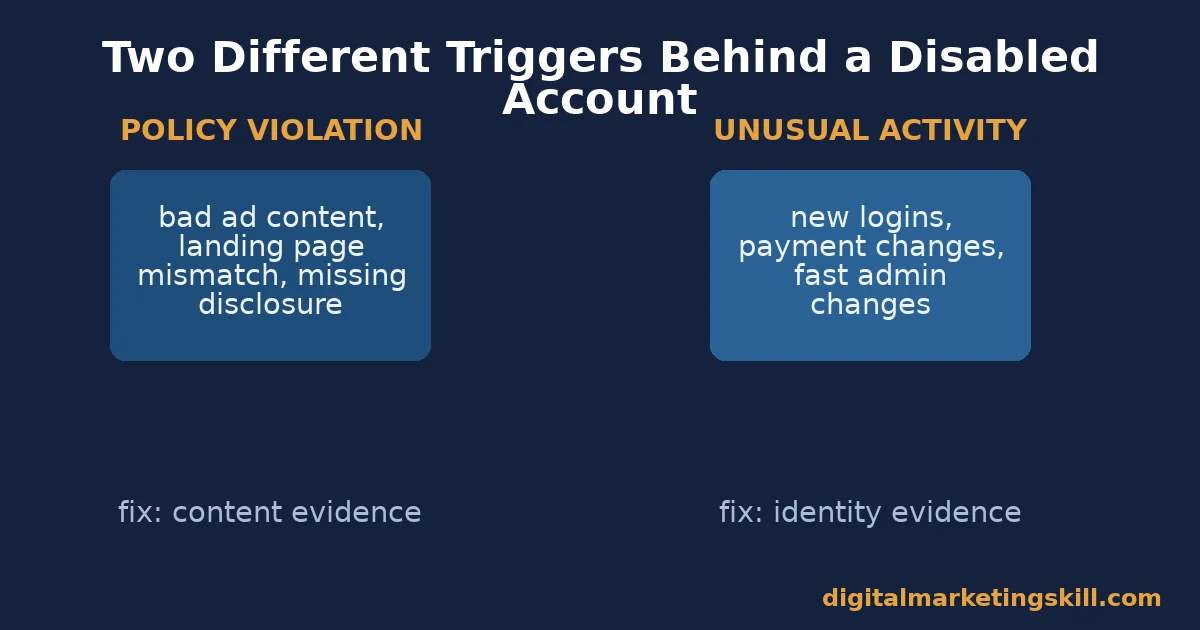
Meta’s own Business Help Centre states an account may be restricted “for repeated violations of the Meta Advertising Standards, or if we detect unusual activity on your account.” Those are two separate triggers, not one.
Policy violations usually come from the ad content itself. A landing page that does not match the ad, a restricted product, or a missing disclosure can all trip the system.
Meta’s own developer documentation lists four special ad categories that face extra scrutiny: Housing, Employment, Financial Products and Services, and Issues, Elections or Politics. Every campaign must declare one of these, or state “none.” Ads in the first three face fixed targeting rules, including a mandatory 18-to-65-plus age range and no gender-specific targeting. That exists because of a documented history of discriminatory targeting in housing, jobs, and credit.
Unusual Activity: What Looks Suspicious to Meta
The second trigger is behavioural, not content-based. A new payment method added right before a spending spike can read as fraud. So can logins from several new locations in one day, or rapid changes to a Business Manager’s admin list.
None of that has to mean anything is actually wrong. It just looks that way to an automated system trained to catch account takeovers.
This is why two advertisers can submit the exact same ad and get two different outcomes. One account has a clean activity history behind it. The other just changed its payment method and its admin list in the same week.
The stakes for getting this right keep rising. DataReportal’s essential Facebook stats put Facebook’s ad reach at 2.28 billion people.
Meta’s own results show average price per ad climbing faster than impressions. A disabled account does not just pause activity. It removes access to that reach while competitors keep bidding. For the setup steps that prevent most of these flags from the start, see this guide to Facebook ad account setup.
Why Automated Enforcement Catches Real Businesses Too
A disabled Facebook ad account rarely comes from a single human reviewer making a judgment call. Meta’s scale makes that impossible. Its own Community Standards Enforcement Report estimates fake accounts at under 5% of worldwide monthly active Facebook users, and Meta has said its detection systems block or catch millions of fake-account attempts every day, often within minutes of creation.
That volume forces automation. A system built to catch millions of fraudulent signups a day cannot pause for nuance on every legitimate account that happens to trip a similar pattern. A real business that changes its payment method and adds a new admin in the same week looks statistically similar to an account takeover, even though nothing is wrong.
This is not a flaw unique to Meta. Any platform operating at that scale trades some false positives for speed. Knowing that going in changes how you appeal: you are not trying to convince a person you were wronged. You are giving an automated review enough clean signal to reclassify your account correctly.
What Differs Between a Policy Flag and a Security Flag
Both show the same word, “disabled,” on your dashboard. The evidence that reverses each one is completely different.
A Policy Flag Needs Content Evidence
If the notification names a specific policy, address that policy directly. Name the exact ad, the exact claim, and what you changed. Meta’s reviewers reject a generic appeal that just says “please review my account” far more often than one that cites the specific rule and shows the fix already made.
A Security Flag Needs Identity Evidence
If Meta flagged the account for unusual activity, the appeal needs to prove you are the legitimate owner. Turn on two-factor authentication. Show a consistent login location. Use a payment method that has been on the account for a while, not one added the same day spending increased.
Fixing Each Flag Type
Lead With the Specific Policy Named in Your Notice
Open the notice. Copy the exact policy name or number it cites. Fix every ad that could plausibly trigger that same rule, not just the one named.
Then file the review through Business Support Home. Reference the fix directly in your appeal text, instead of describing your business in general terms. If targeting itself was the issue, this guide to Facebook ad targeting covers the rules worth rechecking before you resubmit.
Lead With Account Stability Before You Appeal
Turn on two-factor authentication first. Remove any admin you do not recognise from the Business Manager. Wait a few days of normal, quiet activity before filing the review.
Appealing in the middle of more unusual activity tends to extend the review instead of shortening it. This walkthrough on Facebook Ads Manager covers where to check admin access and account settings.
What to Include When You Appeal
A thin appeal is the single biggest reason a disabled Facebook ad account stays disabled longer than it should. Reviewers, human or automated, act on specifics. They cannot act on a vague complaint.
Treat the appeal the same way you would treat evidence for any formal review: specific, dated, and tied directly to the stated reason. A disabled Facebook ad account with a well-documented appeal usually moves through the queue faster than one with a longer but vaguer explanation.
Documents for a Policy Appeal
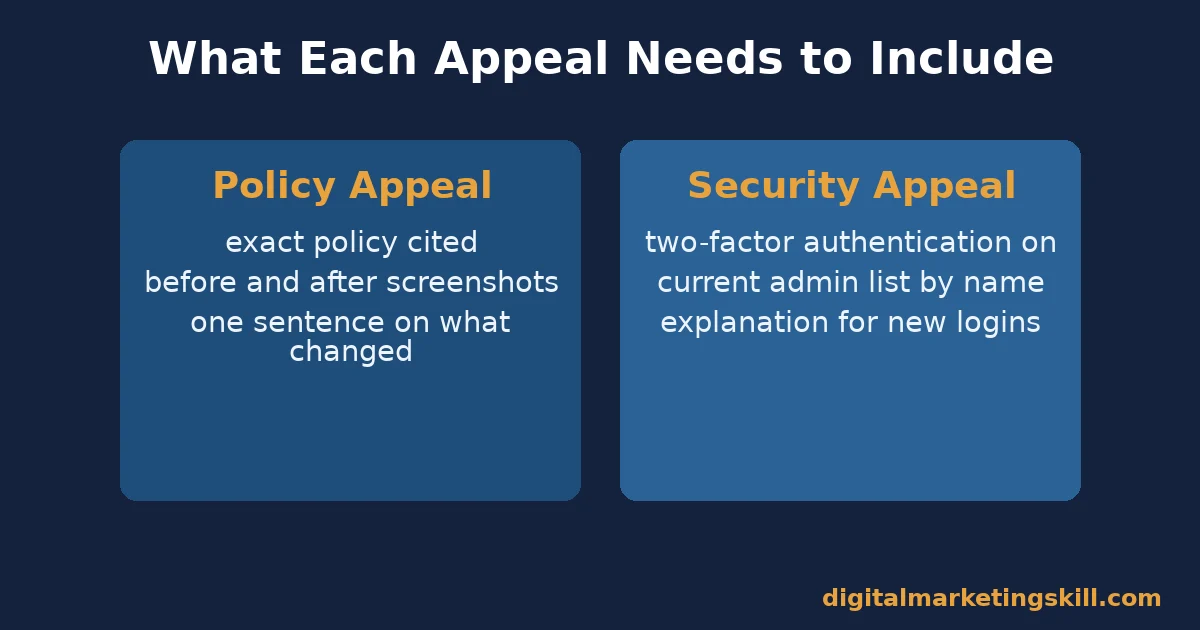
Include the exact policy name or number from the notice. Attach a screenshot of the original ad and a screenshot of the corrected version. State, in one sentence, what specifically changed. If the issue was a special ad category, confirm you have now declared the correct category, Housing, Employment, Financial Products and Services, or Issues, Elections or Politics, on every affected campaign.
Documents for a Security Appeal
Confirm two-factor authentication is active, with a timestamp if your settings page shows one. List every current admin by name and role. Note any recent travel, new device, or new browser that could explain an unfamiliar login, since this is exactly the kind of detail an automated system is built to weigh.
Timing Still Matters, Even With Good Documents
File a policy appeal as soon as the fix is live; waiting does not help a content issue. File a security appeal only after a few days of quiet, normal activity, since appealing during a second wave of unusual signals can restart the clock on the review.
A disabled Facebook ad account that sits untouched for weeks is not automatically safer to appeal later. Meta’s reviewers judge the appeal on the evidence it carries, not on how long you waited before sending it.
How to Measure Ad Account Health Before It Gets Disabled
Most teams only check these signals after a disable notice arrives. Checking them weekly catches a problem while it is still a warning, not a shutdown. Meta’s own Account Quality dashboard is the fastest place to see all five at once, including any open warning before it escalates.
- Policy warnings: Ads Manager logs a warning before most disables. A rising warning count on one ad account is an early signal, not noise to ignore.
- Login locations: a sudden jump in new countries or devices accessing the Business Manager is one of the clearest unusual-activity triggers.
- Admin changes: every new or removed admin should be one you can explain immediately. Unexplained changes are a security flag waiting to happen.
- Payment method age: a payment method used consistently for months carries more trust than one added the same week spend increases sharply.
- Review turnaround: track how long your past appeals took against Meta’s stated 48-hour baseline. Slower reviews usually mean thin documentation, not an unfair reviewer.
Review all five together monthly. An account with rising policy warnings but a stable login pattern needs a content fix, not a security fix. Mixing up which one you need wastes your one appeal attempt.
The One Decision Rule for Appealing a Disabled Account
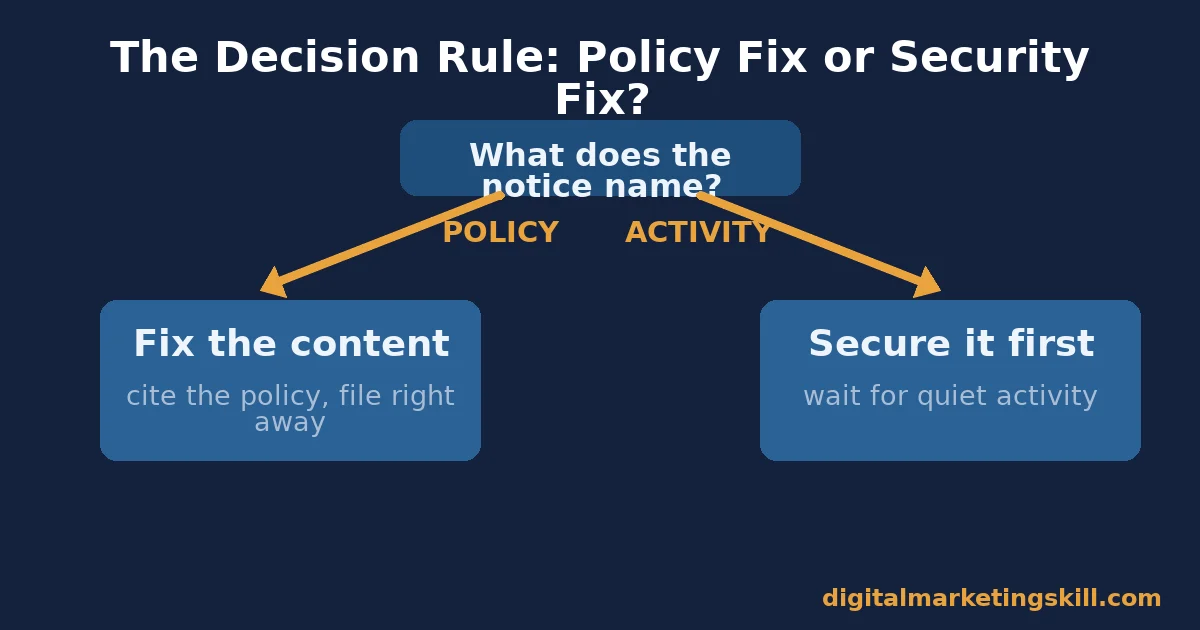
Read the specific reason Meta gave before you do anything else. If it names a policy, fix the content and cite that exact policy in your appeal. If it mentions unusual or suspicious activity, secure the account first and wait a few quiet days before you file anything.
Illustrative, invented numbers: picture two agencies, each managing ten client ad accounts. Agency A files every appeal within the hour, quoting the policy number and describing the fix made.
Agency B files a generic appeal the moment any account gets flagged, regardless of the stated reason. Under this rule, Agency A’s appeals usually clear inside Meta’s 48-hour baseline. Agency B’s appeals take noticeably longer and get rejected more often, because a generic appeal gives reviewers nothing specific to check against.
Who a Disabled Facebook Ad Account Actually Affects
A solo business owner managing one account feels this differently than an agency managing many. The underlying causes stay the same, but the stakes and the process around them change.
A solo owner usually has one clear story to tell: one business, one set of ads, one explanation. That simplicity can make the appeal faster, since there is less to untangle for a reviewer.
An agency managing several client accounts needs cleaner separation between them from the start. Shared devices, shared payment methods, or shared admin logins across unrelated client accounts are exactly the pattern that can turn one disabled account into several.
Treat each client’s Business Manager as its own isolated environment wherever the platform allows it. Document which team member holds which admin role, so a review never stalls on a question you could have answered in advance.
What a Clean Recovery Looks Like in Practice
Illustrative, invented numbers: a small ecommerce brand gets a policy disable notice citing a misleading health claim on one ad. The team pulls every ad using similar language and rewrites the claims to match what the product page actually states.
They screenshot the before and after as evidence. They file the appeal referencing the exact policy cited, attach the screenshots, and confirm the Business Manager has no unexplained admins. The account is reinstated within Meta’s stated review window.
Three months later, a second notice arrives. This time it is for unusual login activity from a new country during a team member’s trip. Because the team already had two-factor authentication on every admin account, that appeal clears even faster than the first one. There was nothing suspicious left to investigate once the travel was confirmed.
The limit of this illustration: not every policy appeal succeeds on the first attempt, and some security flags take longer to clear when the unusual activity cannot be fully explained. Real timelines vary with how complete the account’s documentation already was before anything went wrong.
A Quick Checklist Before Your Account Ever Gets Disabled
Most of this work takes minutes and prevents the entire problem. Run through it once per Business Manager, then revisit it quarterly.
- Turn on two-factor authentication for every admin, not just the main account owner.
- Remove admins who no longer work on the account the same week they leave, not months later.
- Keep one stable payment method rather than switching cards every time spend rises.
- Read every policy warning in Ads Manager the week it appears, instead of after a full disable notice.
- Check any ad in a special ad category, such as employment or housing, against Meta’s extra targeting rules before you launch, not after rejection.
None of these steps guarantee an account never gets disabled. They do remove the most common, entirely avoidable causes before Meta’s systems ever need to flag anything. A disabled Facebook ad account is far easier to prevent than to appeal.
Common Reasons a Facebook Ad Account Gets Disabled
Patterns repeat across most disabled Facebook ad account cases. Recognising which one applies to you speeds up every step that follows.
- Landing page mismatch: the ad promises one thing, the page delivers another. This is one of the most common policy triggers, and one of the easiest to fix before you even appeal.
- Undeclared special category: running a housing, employment, or credit-related offer without declaring the category Meta requires. The fix is a settings change, not a content rewrite.
- Payment disputes: a chargeback or a declined card can read as account instability, especially if it happens alongside other changes the same week.
- Shared device or IP flags: managing several unrelated ad accounts from the same device or network can trigger a coordinated-activity flag, even when each account is legitimate.
- Rapid spend increases: a sudden jump in daily budget, with no matching history, looks like either fraud or a compromised payment method to an automated system.
None of these triggers are rare edge cases. They are the ordinary, avoidable reasons behind most disabled Facebook ad account notices, which is exactly why the prevention checklist earlier in this guide matters as much as the appeal steps. A disabled Facebook ad account caused by one of these five patterns is also, usually, one of the fastest to recover, because the fix is clear and easy to document.
Frequently Asked Questions About a Disabled Facebook Ad Account
How long does it take to recover a disabled Facebook ad account?
Meta states a review is typically completed in 48 hours, though it can take longer. A clear appeal that names the specific policy, or confirms account security, tends to land on the faster end of that range. An appeal with no documentation at all tends to sit much longer, since reviewers have nothing concrete to act on.
Can I just create a new ad account instead of appealing?
You can, but it rarely fixes the underlying problem. A new account created right after a disable is exactly the pattern Meta’s enforcement systems are built to catch. The new account often gets flagged faster than the original appeal would have taken. A disabled Facebook ad account recovered through a documented appeal keeps your ad history and audience data intact, which a brand-new account does not.
Does a disabled personal Facebook account also disable my ad account?
It can, if the ad account’s admin access depends on that personal profile. Business Manager setups with several confirmed admins recover faster, since the account is not dependent on one person’s profile status.
Why was my ad account disabled with no ads running yet?
This usually points to a security flag rather than a policy flag, since there was no ad content to violate a policy. Check login locations, payment method changes, and admin changes first.
Does appealing multiple times in a row help?
No. Submitting several appeals back to back with no new evidence usually just resets the queue. It adds nothing reviewers can act on. One well-documented appeal beats several rushed ones.
Will a disabled ad account affect my Instagram ads too?
Yes, if both run through the same Business Manager and ad account. Meta manages Facebook and Instagram advertising through shared infrastructure, so check both placements when you review what the disable actually affected.
Your Next Step With a Disabled Facebook Ad Account
Open the actual notice Meta sent you. Identify whether it names a policy or describes unusual activity. Then follow the matching fix in this guide before you file anything. That one diagnostic step is what separates a 48-hour recovery from a weeks-long one for a disabled Facebook ad account.
Want to build these account-management skills properly, instead of learning them one disabled account at a time? The Digital Marketing Skill Institute’s Master Diploma in Digital & AI Marketing includes an AI-Powered Social Media Management and Advertising track, inside four AI-powered tracks built from ten courses in total, with a Full Stack option covering all four.
Every track pairs unlimited 1-on-1 coaching and mentoring with a U.S. Project Internship and a verified U.S. Work Reference Letter. The diploma itself is dual US and UK accredited, recognised in more than 100 countries, and delivered 100% online from anywhere in your country.
Read more on the Master Diploma programme page, browse real outcomes on the reviews page, or explore more guides on the digital marketing blog. Wherever you live, you can start at https://digitalmarketingskill.com/ today: apply here, or come back to https://digitalmarketingskill.com/ once your account is secure.
Every figure in this guide was checked against its original source before publication. Figures marked as illustrative are invented examples, not real results.
![9 Amazing Digital Marketing Skills to Make Money Online [With Proof]](https://digitalmarketingskill.com/wp-content/uploads/2019/07/9-Amazing-Digital-Marketing-Skills-to-Make-Money-Online-With-Proof-17.png)





