
Advantage+ audience is Meta’s automated targeting setting for Facebook and Instagram ads, where Meta’s AI decides who sees your ads instead of you building a fixed audience by hand. You can give it suggestions, such as a custom audience or an age range, but Meta can go beyond them if it predicts better results. It matters because it changes the targeting job from picking people to guiding a system, which is now a core skill in paid social.
Key Takeaways
- Meta’s developer documentation says the setting creates “the broadest possible audience to search within”.
- Audience suggestions, such as lookalikes, interests, age and gender, are a starting point. Meta can show ads to people outside them.
- Audience controls are hard limits. They cover location, minimum age, language and excluded custom audiences.
- When the setting is on, you can set the minimum age only between 18 and 25.
- Meta has reported lower costs from this setting in its own tests, but you should still test it against your current setup.
What Is Advantage+ Audience?
For years, advertisers built audiences by hand. They picked ages, interests and behaviours, then hoped the mix was right. Meta’s automated option flips that process. Instead of drawing a tight box, you let Meta search widely and find the people most likely to act.
Jon Loomer, a long-time Meta ads educator, describes how it learns from your pixel data, conversion history and past engagement with your ads. If you add no suggestions at all, Meta builds the audience from those signals alone.
You still have some control, though. Suggestions let you point Meta in the right direction. You can also set firm rules, called audience controls, that Meta must respect.
How Advantage+ Audience Works
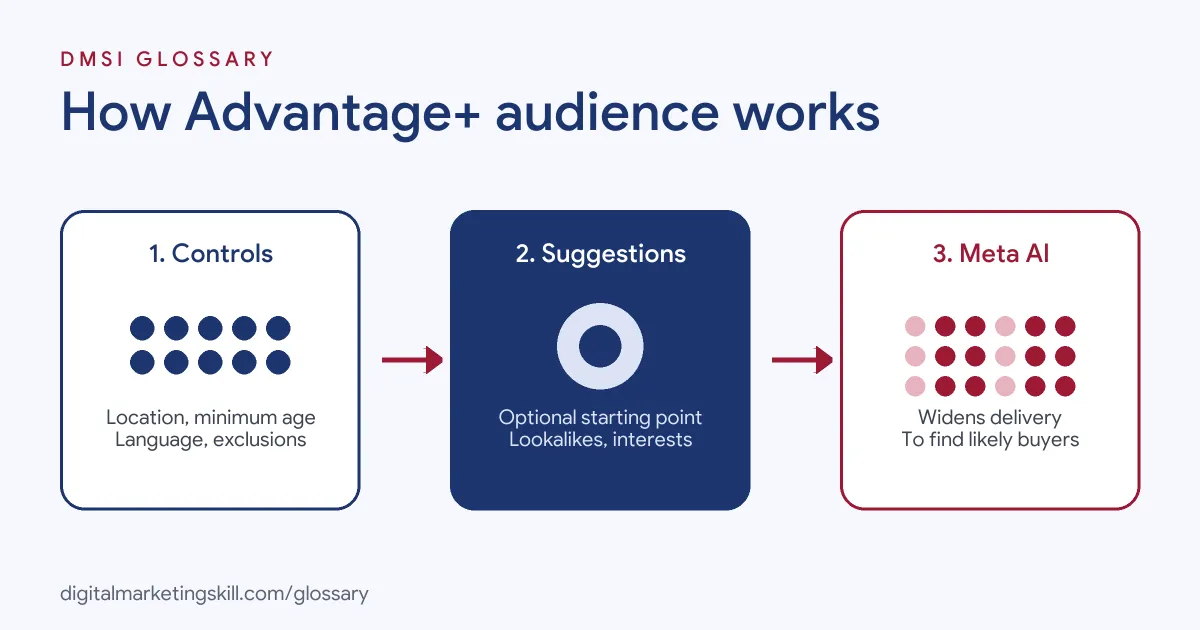
The setting works in three layers. First, you set audience controls, which are the hard limits. Next, you can add optional suggestions. Finally, Meta’s AI looks for the best people within your controls, starting with your suggestions and widening from there.
Audience Controls
Meta’s documentation states that “non-negotiable business constraints are NOT expanded.” These constraints are location, minimum age, language and custom audience exclusions. So if you only ship to the UK, or you must exclude existing customers, put that in your controls.
Audience Suggestions
Suggestions are optional hints. According to Jon Loomer, they can include custom audiences, lookalike audiences, an age range, a gender and detailed targeting. Meta prioritises people who match your suggestions before it expands more broadly. However, it isn’t limited to them.
Age Rules
Age works differently once the setting is on. Meta’s developer documentation says you can set a minimum age only between 18 and 25, while Meta fixes the maximum age at 65. If you need a tighter age range, you may have to use the original audience options instead.
Advantage+ Audience Examples
- Online store: A skincare brand adds its past buyers as a suggestion and sets the UK as its location control. Meta starts with people like those buyers, then widens out to others it predicts will purchase.
- Local service: A dental clinic sets a 15-mile location control and a minimum age of 21. It adds no suggestions and lets Meta find people likely to book.
- Lead generation: A training provider excludes current students through a custom audience exclusion. As a result, its ads reach new prospects only, while Meta handles the rest of the targeting.
In each case, the business sets the firm rules first. Then it gives Meta room to search.
Advantage+ Audience vs Original Audience Options
| Feature | Automated (Advantage+) | Original audience options |
|---|---|---|
| Who decides the audience | Meta’s AI, guided by your suggestions | You, through fixed targeting choices |
| Age and gender | Suggestions only; you can set a minimum age from 18 to 25 | Firm targeting settings |
| Custom audiences and lookalikes | Treated as suggestions | Used as fixed targeting |
| Exclusions and location | Hard limits through audience controls | Hard limits |
| Best for | Finding new customers at scale | Tight targeting, such as remarketing to a known list |
In short, the automated option trades control for reach. The original options give you precision, but they may limit how far your budget can go.
How to Set Up Advantage+ Audience
- Open Meta Ads Manager and create or edit an ad set.
- In the audience section, check whether the automated setting is on. Loomer notes that you’ll see “Audience controls” and “Advantage+ audience” if you have it.
- Set your audience controls first: location, minimum age, language and any custom audiences to exclude.
- Add suggestions if you have strong data, such as a list of past buyers or a lookalike.
- Check that your pixel and conversion events are working, because Meta learns from them.
- Publish, then give the ad set enough time and budget to learn before you judge it.
Menu names can change, but the order of these steps stays useful. Controls come first, because they are the only firm limits.
Measuring Results
Judge the setting on the outcome you care about, such as cost per purchase or cost per lead. A lower cost per click looks good, but it doesn’t always lead to cheaper sales. So run a fair test: same budget, same creative, one ad set with the automated setting and one with your usual targeting. Then check the breakdown reports, so you can see which ages, placements and regions drove the results.
When to Use the Original Options
Automation isn’t the right choice for every ad set. Loomer notes that you can switch back to the original audience options. That route makes sense when you must reach one exact group, such as people on a customer list for a loyalty offer. It also helps when you need a strict age band that the automated setting can’t hold. For broad prospecting, though, you can test automation and keep a manual ad set running as a benchmark.
Best Practices for Advantage+ Audience
- Use controls for real rules only. Add locations, ages and exclusions you truly need, then let Meta work.
- Feed it good data. Strong pixel and conversion tracking give the AI better signals to learn from.
- Test suggestions both ways. Loomer advises testing with and without them, since they don’t act as hard limits.
- Read Meta’s figures with care. According to Loomer, Meta reported about 28% lower cost per click or landing page view, 13% lower cost per catalogue sale and 7% lower cost per website conversion in its own testing. Your results may differ.
- Keep remarketing separate. Loomer notes that Meta recommends not using it generally for remarketing.
Common Mistakes to Avoid
A common mistake is to treat suggestions as limits and then wonder why ads reach other people. Another is to forget exclusions, so existing customers see sign-up ads. Some advertisers judge results after a day or two. Finally, many turn the setting on with weak tracking, which leaves Meta with little to learn from.
Where You’ll Use Advantage+ Audience at Work
Meta’s automated campaign tools now appear in paid media job listings. For example, one remote listing asks for “Experience with Meta campaign structures, dynamic product ads, and Advantage+ campaign types” (Paid Media Strategist). Another asks candidates to “Use custom audiences, lookalikes, and interest-based targeting to improve reach and relevance” (Facebook Ads Specialist).
So if you aim to be a Paid Social Specialist or Social Media Manager, you’ll need to know when to trust automation and when to hold on to control. You’ll also need to explain the results clearly to clients or managers.
Learn It in the Social Media Track
You can practise with Advantage+ audience in the AI-Powered Social Media Management and Advertising track. There, you plan, create and run a paid social campaign for a real brand. You also work on a U.S. Project Internship from day one, with unlimited 1-on-1 mentoring.
For related reading, see our guides to Facebook ad setup and the Facebook ad auction. You can also learn how a custom audience and a lookalike audience work as suggestions.
Frequently Asked Questions
What is Advantage+ audience in simple terms?
It is a Meta ads setting that lets Meta’s AI choose who sees your ads, using your suggestions as a starting point and your controls as firm limits.
Can I still exclude people with Advantage+ audience?
Yes. Meta treats custom audience exclusions as hard limits, along with location, minimum age and language.
Does Advantage+ audience ignore my lookalike audience?
No, but it treats it as a suggestion. Meta prioritises people who match it, then may widen delivery to others.
Can I target a narrow age range?
Not fully. With the setting on, you can set a minimum age between 18 and 25, and Meta fixes the maximum at 65.
Should I use Advantage+ audience for remarketing?
Usually not. According to Jon Loomer, Meta recommends against using it generally for remarketing, where you want to reach a known list only.
Sources: Meta for Developers: Advantage+ audience; Jon Loomer: How Advantage+ Audience works; Jon Loomer: What is Advantage+ audience?; remote job listings on Himalayas.