
AI guardrails are the rules, filters and checks that keep an AI tool’s inputs and outputs safe, accurate and on-topic for the job it is meant to do. Without them, a chatbot or content tool can say things that are wrong, off-brand or even harmful. As a result, guardrails protect your customers, your data and your reputation. They also make it easier to trust AI with real marketing work.
Key Takeaways
- AI guardrails control what goes into an AI model and what comes out of it.
- They can block harmful content, off-topic requests and private data.
- Some guardrails check if answers are grounded in your own source content.
- Guardrails mix technical filters, clear instructions and human review.
- No guardrail is perfect, so you still need testing and monitoring.
What Are AI Guardrails?
AI models are flexible. However, that flexibility is also a risk. A large language model will try to answer almost anything. So if you put one on your website, you need limits on what it will discuss and say.
AI guardrails are those limits. For example, they can stop a support bot from giving legal advice, sharing a customer’s phone number or talking about a rival’s prices. Also, they can catch rude language before it reaches a customer.
Think of the barriers on a motorway. You can still drive freely. Yet the barriers stop you from going off the road. In the same way, guardrails let an AI tool work freely while keeping it inside safe bounds.
Major AI platforms build these features in. For instance, Amazon describes its Bedrock Guardrails as “configurable safeguards to help you build safe generative AI applications.” Similarly, NVIDIA offers NeMo Guardrails, “an open-source Python package for adding programmable guardrails to LLM-based applications.”
Why It Matters
Why should marketers care? Because AI now writes ads, answers customers and drafts emails. One bad answer can spread fast on social media. For example, a bot that invents a refund policy could create real costs and complaints. In addition, AI can produce an AI hallucination, which is a confident but false answer. Guardrails reduce these risks. On top of that, they help you meet privacy rules such as GDPR by stopping personal data from leaking.
So guardrails are not about slowing AI down. Instead, they are what make it safe to use AI at scale.
Types of Guardrails in Marketing
Guardrails come in a few main types. First, safety guardrails block harmful, hateful or violent content. Second, topic guardrails keep the AI focused on your business. Third, privacy guardrails stop personal data from going in or coming out. In addition, accuracy guardrails check facts against trusted sources. Finally, brand guardrails keep tone, words and claims in line with your style guide. Most marketing teams need a mix of all five. For example, an email tool may need brand and accuracy rules, while a public chatbot needs every type. So start by asking where your biggest risk sits.
How AI Guardrails Work
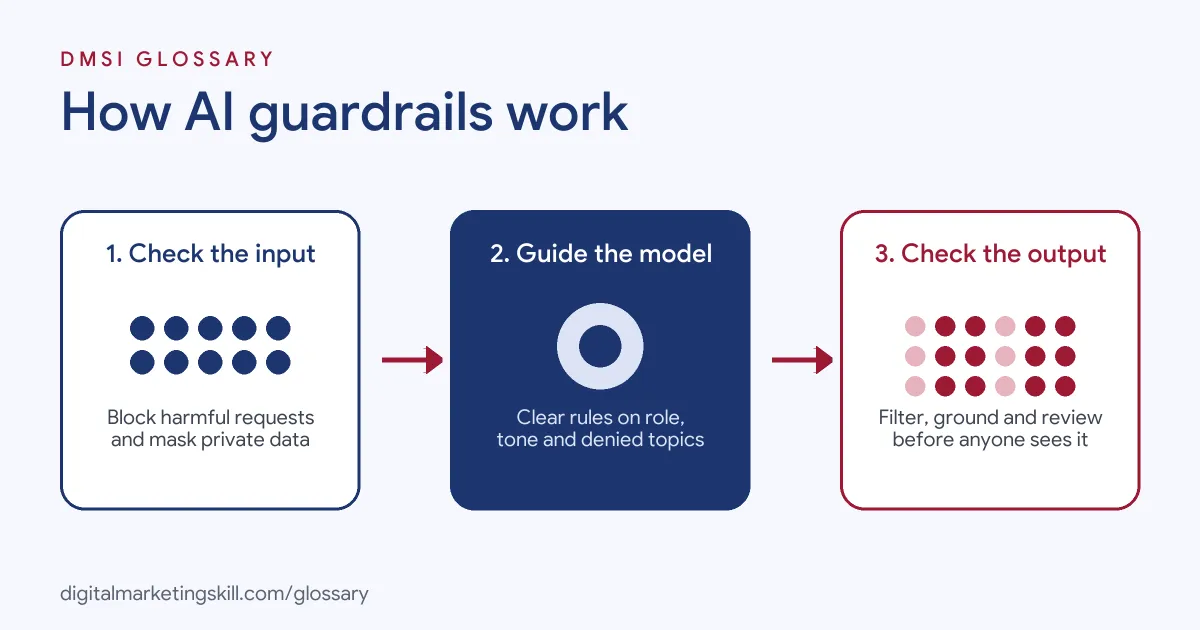
AI guardrails work at three points. First they check the user’s input, then they shape how the model behaves, and finally they check the output before anyone sees it. Each layer catches different problems.
Input Guardrails
First, input guardrails screen what users type. They can block harmful requests, off-topic questions or attempts to trick the model. Anthropic’s docs explain that “Jailbreaking and prompt injection are attempts to make Claude ignore its guidelines or your instructions.” So input checks are a key defence. Also, they can mask private details before the model ever sees them.
Instructions and Behaviour
Next, the model gets clear rules about its role. These usually sit in a system prompt. For example, you might tell a bot to only discuss your products and to hand off to a human for complaints. In addition, some tools let you list “denied topics.” Amazon describes this as a way to “define a set of topics that are undesirable in the context of your application.”
Output Guardrails
Then output guardrails check the answer before it reaches the user. They can filter harmful words, block sensitive data or flag claims that need review. Amazon’s sensitive information filter can “block or mask sensitive information, such as personally identifiable information (PII), in user inputs and model responses.”
Grounding Checks
Finally, some guardrails test whether an answer is backed by your source content. This matters when a bot uses retrieval-augmented generation to answer from your help pages. Amazon says its contextual grounding check helps “detect hallucinations in model responses if they are not grounded” in the source. As a result, made-up answers are less likely to slip through.
Examples of AI Guardrails
- An online shop’s support chatbot. The bot can answer questions about orders and returns. However, a denied-topic rule stops it from giving medical advice about skincare products. Instead, it points users to a pharmacist.
- A marketing team using AI for ad copy. The team adds a word filter for banned claims, such as “guaranteed results.” Then a human reviews every ad before it goes live.
- A software firm’s help assistant. The assistant answers only from the company’s help centre. So a grounding check flags any answer that isn’t supported by those pages.
AI Guardrails vs AI Governance
| Point | AI Guardrails | AI Governance |
|---|---|---|
| What it is | Technical and process controls on an AI tool | The wider policies for how a company uses AI |
| Scope | One tool or workflow | The whole organisation |
| Examples | Content filters, denied topics, PII masking | Approved tools list, risk reviews, roles |
| Who owns it | Product, marketing ops and developers | Leaders, legal and compliance teams |
| When it acts | Every time the AI runs | When decisions about AI are made |
In short, AI governance sets the rules, while guardrails enforce many of them in practice.
How to Set Up AI Guardrails
- Define the job. Write down what the AI tool should do and, just as clearly, what it must not do.
- List your risks. Think about harmful content, false claims, private data and off-brand tone.
- Write clear instructions. Set the role, tone and limits in the system prompt.
- Turn on built-in filters. Use the content, topic and data filters your AI platform offers.
- Add human review. Decide which outputs need a person to approve them, such as ads or legal claims.
- Test with tricky prompts. Try to break your own tool. Then fix the gaps you find.
- Monitor and update. Review logs often. Also, update rules as new risks appear.
Best Practices for AI Guardrails
- Layer your defences. Combine input checks, instructions and output filters, because no single layer catches everything.
- Keep humans in the loop. Let people approve high-risk outputs, such as public ads or pricing.
- Protect personal data. Mask or block private details in both prompts and answers.
- Ground answers in your content. Point the AI at approved sources, then check it sticks to them.
- Match your brand rules. Add tone and wording rules that reflect your brand voice.
- Red-team regularly. Test your tool with hostile prompts, as attackers keep finding new tricks.
Common Mistakes to Avoid
- Relying on one prompt. Instructions alone can be bypassed, so add filters too.
- Setting filters too strict. Over-blocking frustrates users. So test for false alarms as well.
- Forgetting third-party content. Web pages and emails the AI reads can hide harmful instructions.
- Skipping monitoring. Without logs, you won’t spot new problems until customers complain.
- Treating guardrails as a one-off. Risks change, so your rules need regular updates.
- Removing human checks too soon. Keep review in place until you trust the results.
Where You’ll Use AI Guardrails at Work
AI guardrails show up in AI product, AI engineering and AI security roles. Marketers meet them too when they run chatbots or AI content workflows. For example, real remote job listings mention:
- “Ensure appropriate guardrails and expected behaviors are considered before release.” (Senior AI Product Owner).
- “AI Guardrails – Advising or implementing guardrails and controls to minimize data loss risks and use of insecure or unapproved methods of AI use.” (Staff AI Security Engineer).
- “Oversee the design, development, testing, deployment, and support AI software components including foundation model training, large language model inference, similarity search, guardrails, model evaluation” (Director, AI Engineer).
Learn It in the Full Stack Programme
You can learn to use AI safely across marketing channels in the Full Stack option, which covers all four tracks. Every track includes a U.S. Project Internship from day one, with unlimited 1-on-1 mentoring.
Frequently Asked Questions
What is an example of an AI guardrail?
A filter that blocks a chatbot from sharing customer phone numbers is one example. Another is a rule that stops it from discussing topics outside your business.
Do AI guardrails stop all mistakes?
No. They lower the risk, but no guardrail is perfect. So you still need testing, monitoring and human review.
Are guardrails only for developers?
No. Developers build many technical guardrails. However, marketers set brand rules, review outputs and decide what the AI should avoid.
How are guardrails different from a system prompt?
A system prompt is one type of guardrail. Still, strong set-ups also use filters and checks outside the prompt.
Do guardrails help with data privacy?
Yes. Many tools can mask or block personal data in prompts and answers, which supports privacy compliance.
Sources: AWS: Detect and filter harmful content by using Amazon Bedrock Guardrails; NVIDIA: NeMo Guardrails Library Developer Guide; Anthropic: Mitigate jailbreaks and prompt injections; remote job listings on Himalayas, Himalayas and Himalayas.