
BigQuery is Google Cloud’s fully managed data warehouse, where you store large datasets and analyse them with SQL. Marketers use it to work with raw data that standard reports can’t show, such as every single event from a website. As a result, you can answer deeper questions about customers, campaigns and revenue. It also links with Google Analytics 4, Google Ads and Looker Studio, so it often sits at the centre of a marketing data set-up.
Key Takeaways
- BigQuery is a serverless data warehouse on Google Cloud, so you don’t manage any servers.
- You ask questions of your data with SQL, the standard language for databases.
- Google Analytics 4 can export raw, unsampled event data into BigQuery.
- On-demand pricing charges for the data each query processes, so efficient queries save money.
- Marketers use it for custom attribution, audience building, dashboards and joining data from many tools.
What Is BigQuery?
Google describes it simply. In its own words, “BigQuery is a fully managed, AI-ready data platform that helps you manage and analyze your data.” In plain terms, it is a very large, very fast database that lives in the cloud.
Most marketing tools show you summaries. For example, a report might tell you how many users came from paid search last week. However, it may not let you follow one user across many visits. BigQuery stores the raw rows behind those reports. So you can slice them any way you like.
Think of a library. A normal report is like reading the summary on the back of a book. BigQuery, by contrast, lets you open every page and search for exact words. That takes more skill, but you see everything.
Also, you don’t have to buy or run hardware. Google says its “serverless infrastructure lets you focus on your data instead of resource management.” Instead of fixing servers, you spend your time on questions and answers.
Why It Matters
Marketing data is spread across many tools. Your ad platforms, your CRM and your website analytics all hold part of the picture. BigQuery lets you bring those pieces into one place. Then you can join them, for instance to see which campaigns bring in customers with the highest value. In addition, GA4’s interface has limits on how far back and how deep you can explore. The BigQuery export removes many of those limits, because you keep your own copy of the raw data.
What Marketers Do With It
So what does this look like day to day? First, many teams build their own attribution model from raw GA4 events. That way, they can credit channels in a way that fits their business. Second, they work out customer lifetime value by joining orders with marketing data. Also, they build audience lists, such as people who viewed a product three times but never bought. In addition, they feed clean tables into dashboards, so managers see one version of the truth. Finally, some teams use the data for forecasting and machine learning. For example, BigQuery ML lets you build simple models with SQL. In short, BigQuery turns scattered numbers into answers you can act on. Even so, you don’t need to do all of this at once. Most people start with one clear question and grow from there.
How BigQuery Works
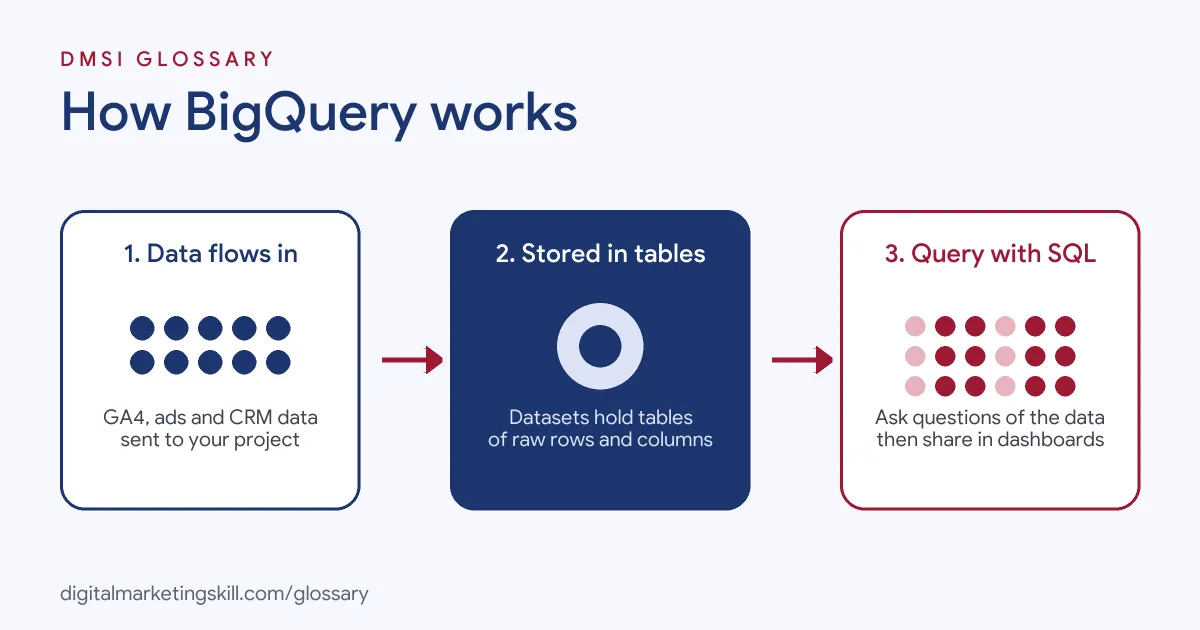
BigQuery works in three simple stages. First, data flows in from your tools. Then it is stored in tables. Finally, you run SQL queries to get answers, which you can send on to reports or other tools.
Storage and Compute Are Separate
Google explains that BigQuery has two parts: a storage layer and a compute layer. The storage layer holds your data. Meanwhile, the compute layer runs your queries. Because the two scale on their own, you can store a lot of data without paying for idle computing power.
Projects, Datasets and Tables
Your data sits inside a structure. At the top is a Google Cloud project. Inside it, you create datasets, which are like folders. Each dataset then holds tables, and each table has rows and columns. For example, a GA4 export creates a dataset with one events table per day. Also, each table has a schema, which lists its columns and their data types. In GA4 exports, some fields are nested, so one row can hold a list of event details. As a result, you often use a function called UNNEST to read them. It feels odd at first. However, after a few queries it becomes routine.
Querying with SQL
Next, you write SQL to ask questions. A simple query might count purchases by traffic source. BigQuery supports joins, nested fields and analytic functions. Also, it uses a columnar format. So the columns you select decide how much data a query reads.
Pricing in Brief
BigQuery offers on-demand pricing and capacity-based pricing. With on-demand pricing, Google says “you are charged for the number of bytes processed by each query.” There is also a free monthly allowance for storage and queries. However, a careless query on a big table can still cost money. So it pays to learn how to write lean queries.
Examples of BigQuery in Marketing
- An online shop. The team links Google Analytics 4 to BigQuery. Then they build a custom report of the full path users take before their first purchase.
- A software company. The marketing team joins ad cost data with sign-up data from its product database. As a result, it can see the real cost of each paying customer by channel.
- A media publisher. The analysts group readers by how often they visit and what they read. After that, they send those segments to email and ad tools for better targeting.
BigQuery vs GA4 Reports and Spreadsheets
| Point | BigQuery | GA4 reports | Spreadsheets |
|---|---|---|---|
| Data type | Raw rows from many sources | Summaries of website and app data | Small tables you paste in |
| Size limit | Built for very large datasets | Limits on depth and history | Struggles with large files |
| Skill needed | SQL | Point and click | Formulas |
| Joins data from other tools | Yes | Limited | By hand |
| Best for | Deep custom analysis | Quick daily checks | Small one-off tasks |
How to Set Up BigQuery for Marketing
- Create a Google Cloud project. Sign in to the Google Cloud console and start a new project for your marketing data.
- Turn on the BigQuery API. Most new projects have it on already. If not, enable it in the console.
- Decide on billing. You can start in the free sandbox. However, some features, such as streaming export, need billing turned on.
- Link Google Analytics 4. In GA4, go to Admin, then Product links, then BigQuery links. Choose your project and pick daily or streaming export.
- Add other sources. Next, use the BigQuery Data Transfer Service or a connector to bring in ads and CRM data.
- Write your first queries. Start with simple counts, such as events by day. Then check them against your GA4 reports.
- Build a dashboard. Finally, connect Looker Studio to your tables, so your team can see results without writing SQL.
Best Practices for BigQuery
- Select only the columns you need. Avoid
SELECT *, because BigQuery charges by the data each query reads. - Filter by date early. Use date filters on daily or partitioned tables to scan less data.
- Preview before you run. The query editor shows an estimate of how much data a query will process.
- Set cost controls. Add budgets and alerts in Google Cloud billing, so nothing runs away.
- Save useful queries. Store tested queries and share them with your team to stay consistent.
- Respect privacy. Handle personal data in line with GDPR and your consent rules.
Common Mistakes to Avoid
- Expecting history from before the link. The GA4 export only starts from the day you connect it, so link early.
- Thinking LIMIT saves money. Google notes you are charged for data processed “even if you set an explicit LIMIT on the results.”
- Comparing numbers without context. Raw export data and GA4 reports can differ, so learn why before you panic.
- Ignoring the event limit. Google states that “Standard properties have a daily BigQuery Export limit of 1 million events.”
- Leaving access wide open. Give people only the permissions they need.
Where You’ll Use BigQuery at Work
BigQuery shows up in data analyst, marketing analytics and data engineering roles. For example, real remote job listings ask for:
- “Work extensively with BigQuery and Google Cloud Platform (GCP) for data processing and analytics.” (Senior Data Analyst – GCP/ BigQuery).
- “We are seeking a skilled Data Analyst with expertise in Google BigQuery and Generative AI to join our growing team.” (Data Analyst, Google BigQuery and Generative AI Specialist).
- “Deep BigQuery expertise – slots, reservations, pricing models, INFORMATION_SCHEMA, query optimization.” (Customer Engineer, BigQuery).
Learn It in the Google Ads and Analytics Track
You can learn BigQuery, GA4 and marketing dashboards in the AI-Powered Google Specialist track. Every track includes a U.S. Project Internship from day one, with unlimited 1-on-1 mentoring.
Frequently Asked Questions
Is BigQuery free?
Partly. Google offers a free monthly allowance for storage and queries, plus a free sandbox. Beyond that, you pay for storage and the data your queries process.
Do I need to know SQL to use BigQuery?
Yes, for most tasks. However, basic SQL is quick to learn, and tools like Looker Studio let others view results without it.
How does GA4 connect to BigQuery?
You link them in GA4 Admin under BigQuery links. Then GA4 sends raw event data daily, or in near real time with streaming export.
Is BigQuery only for big companies?
No. Small teams use it too, especially for GA4 data. Because you pay for what you use, small datasets often cost little.
What is the difference between BigQuery and Looker Studio?
BigQuery stores and processes your data. Looker Studio, on the other hand, turns that data into charts and dashboards.
Sources: Google Cloud: BigQuery overview; Google Cloud: BigQuery pricing; Google Analytics Help: BigQuery Export; remote job listings on Himalayas, Himalayas and Himalayas.