
A Child Theme is a WordPress theme that takes its design and features from another theme, called the parent, so you can change the site without editing the parent’s files. This matters because theme updates replace the parent’s files. So if you edit the parent directly, your changes can vanish after the next update. A child theme keeps your work safe and makes it easy to see what you changed.
Key Takeaways
- A child theme sits on top of a parent theme and inherits its design and features.
- It lets you update the parent theme without losing your own changes.
- The only file a child theme must have is
style.csswith aTemplateline. - Files in the child theme replace matching files in the parent.
- Both classic themes and block themes can have child themes.
What Is a Child Theme?
Every WordPress site uses a theme to control how it looks. A child theme is a small extra theme that points to a main theme. The main theme is the parent. Then the child borrows everything from it and only adds or changes what you choose.
The official WordPress handbook says it simply: “Child themes are extensions of a parent theme.” It also lists the main benefit. In its words, child themes “Allow parent themes to be updated without losing your modifications.”
Think of a rented flat. The landlord owns the walls, the kitchen and the wiring. However, you can still add your own curtains, pictures and lamps. When the landlord repaints the hallway, your things stay where they are. In the same way, the parent theme is the flat and the child theme holds your personal touches.
So a child theme is not a new design from scratch. Instead, it is a safe layer for custom code, styles and template changes. For example, you might change a font, add a script or adjust the footer layout.
Who uses child themes? Mostly developers, web designers and technical marketers. Still, site owners meet them too. For instance, some theme sellers ship a ready-made child theme with their product. That way, you can start customising on day one without any risk to the parent. In addition, agencies often use one parent theme across many client sites. Then each client gets its own child theme with its own brand colours, fonts and tweaks.
Why It Matters
Theme authors release updates to fix bugs, close security holes and support new WordPress features. Therefore, you want to install those updates quickly. But if you edited the parent’s files, an update overwrites them. As a result, your custom work disappears. A child theme removes that risk. It also keeps your changes in one place, so another developer can find them fast.
How a Child Theme Works
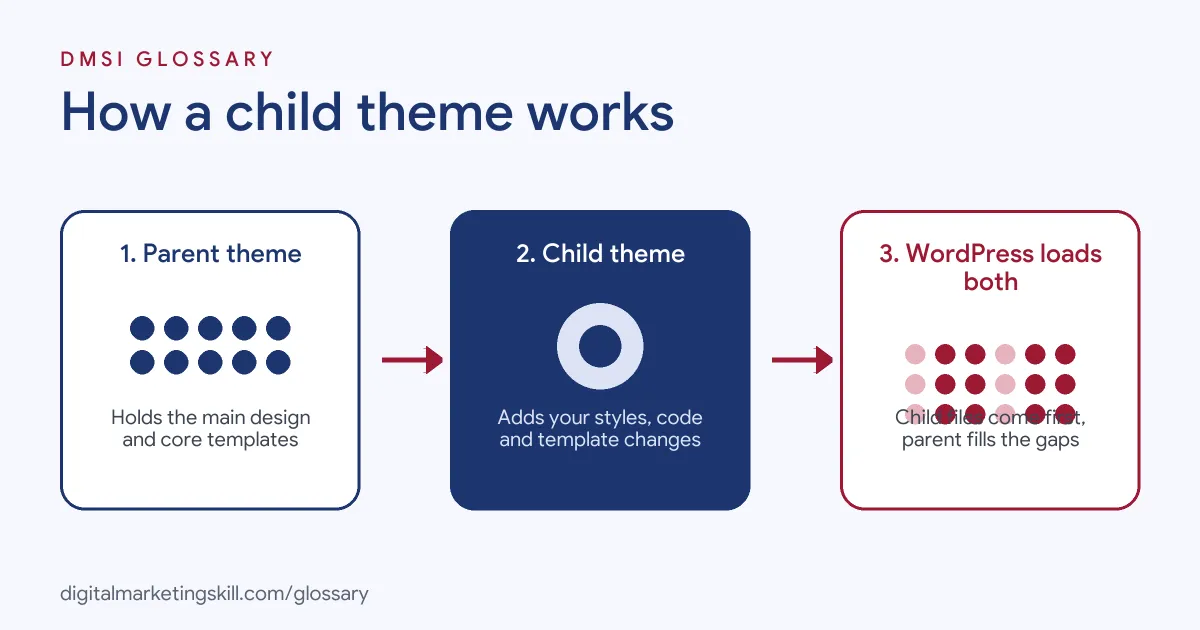
A child theme works by telling WordPress which parent to use, and then loading its own files first. If the child has a file, WordPress uses it. If not, WordPress falls back to the parent’s version.
The style.css File and the Template Line
The handbook calls style.css “the one absolutely necessary file for a child theme to exist.” At the top of this file sits a short header. It includes the theme’s name and a Template field. This field must match the parent theme’s folder name exactly. For example, a child of Twenty Twenty-Four uses Template: twentytwentyfour. If the name is wrong, WordPress can’t link the two themes.
The functions.php File
A child theme can also have its own functions.php file. However, it does not replace the parent’s file. Instead, both files load. According to the handbook, child themes “are loaded before their parent themes.” So you can add new features, such as a custom menu area or a tracking script, without touching the parent’s code.
Template Overrides
Next, you can replace any template from the parent. To do that, copy the file into the child theme with the same name and edit the copy. Then WordPress uses the child’s version. In addition, you can add new templates, template parts and patterns that the parent doesn’t have.
Stylesheets and Block Themes
In a classic theme, you may need to load the stylesheets in functions.php. That depends on how the parent loads its own CSS. By contrast, block themes mostly handle styles through a theme.json file. So a block child theme can include its own theme.json to change colours, fonts and spacing. Also, WordPress’s own guidance explains that the child’s directory functions point to the child, while template functions point to the parent. For instance, it says to “Use get_template_directory_uri() to avoid being overridden by a child theme.”
Examples of a Child Theme
- A small charity site. The charity uses a popular free theme. Its web volunteer creates a child theme to change the header colour and add a donation button. Later, the parent theme updates, and the changes stay in place.
- An online shop. The developer needs a custom product page layout. So they copy one template file into the child theme and edit it there. As a result, the shop keeps the new layout through every parent update.
- A marketing agency. The agency adds tracking code and custom fonts for a client. Instead of using the parent’s files, it puts the code in the child’s
functions.php. Then the next developer can see every change in one folder.
Child Theme vs Parent Theme vs Custom Theme
| Point | Child Theme | Parent Theme | Custom Theme |
|---|---|---|---|
| What it is | A layer on top of another theme | A complete theme in its own right | Full theme built for one site |
| Needs another theme? | Yes, it needs a parent | No | No |
| Who updates it | You | The theme author | You or your developer |
| Effort to build | Low | High | High |
| Best for | Safe tweaks to an existing design | Ready-made design and features | Unique sites with special needs |
In short, a child theme is the light option. It keeps the parent’s strengths and adds only what you need. For a broader look at themes, see our WordPress theme page.
How to Create a Child Theme
- Back up your site. Take a full website backup before you change any theme files.
- Work on a copy first. Use a staging site, so mistakes don’t affect live visitors.
- Find the parent’s folder name. Look in
wp-content/themesand note the exact folder name. - Create a new folder. Name it clearly, for example
yourtheme-child. - Add style.css. Include a header with
Theme NameandTemplate, using the parent’s folder name. - Add functions.php if needed. Load stylesheets here for classic themes, or add your own small features.
- Or use a plugin for block themes. The free Create Block Theme plugin, listed “By WordPress.org”, can “Create a child theme of the active parent theme.”
- Activate and test. Go to Appearance, then Themes, and activate the child. After that, check key pages on desktop and mobile.
Best Practices for Child Themes
- Change only what you need. Copy a template into the child only when you plan to edit it.
- Keep notes. Add short comments in your files, so others know why each change exists.
- Update the parent often. Then check any templates you copied, because the parent’s version may have changed.
- Use version control. Store the child theme in Git, so you can roll back a bad change.
- Test on staging. Try updates and edits on a copy before they reach live visitors.
- Prefer plugins for features. If a feature should survive a theme change, a WordPress plugin is often the better home.
Common Mistakes to Avoid
- Editing the parent directly. The next update will wipe your changes.
- Getting the Template name wrong. It must match the parent’s folder name, not its display name.
- Copying the whole parent. Extra files make updates harder and hide what you actually changed.
- Loading styles twice. This can slow the page and cause odd layout bugs.
- Forgetting old overrides. A copied template can fall behind the parent and miss fixes.
- Skipping backups. One typo in
functions.phpcan break the whole site.
Where You’ll Use a Child Theme at Work
Child themes come up in WordPress developer, web designer and technical marketing roles. Some employers expect you to go beyond them, too. For example, real remote job listings say:
- “At least 1-2 years of concentrated WordPress experience (NOT) using child themes.” (Web Developer).
- “Develop custom WordPress themes and plugins to meet project specifications.” (WordPress Developer).
So knowing child themes is a strong first step. Then you can build on it with custom theme and plugin work.
Learn It in the WordPress and SEO Track
You can learn to set up and customise WordPress themes safely in the AI-Powered WordPress and SEO Specialist track. Every track includes a U.S. Project Internship from day one, with unlimited 1-on-1 mentoring.
Frequently Asked Questions
Do I always need a child theme?
No. If you only use the theme’s built-in settings or the Site Editor, you may not need one. However, if you edit theme code, a child theme is the safe choice.
Will a child theme slow down my site?
Usually not. A well-built child theme adds very little. Problems mostly come from loading the same stylesheet twice.
Can I make a child theme of a block theme?
Yes. Block themes support child themes, and the Create Block Theme plugin can make one for you.
What happens if I switch off the parent theme?
The child theme needs its parent to work. So keep the parent installed, even though the child is the active theme.
Can I move my changes to a new theme later?
Partly. Styles and small functions often move easily. Still, template overrides are tied to the parent’s structure, so they may need rework.
Sources: WordPress Developer Resources: Child Themes, Theme Handbook; WordPress Developer Resources: get_stylesheet_directory_uri(); WordPress.org: Create Block Theme plugin; remote job listings on Himalayas and Himalayas.