
A staging site is a private copy of your live website where you can test changes, such as updates, new plugins or a redesign, before visitors ever see them. It looks and works like the real site, but only your team can reach it. It matters because it lets you catch broken layouts, failed updates and bugs safely, instead of discovering them on the live site in front of customers.
Key Takeaways
- Think of it as a rehearsal space. You test there first, then push the approved changes to the live site.
- WordPress recognises four environment types: local, development, staging and production.
- WordPress asks hosts that offer staging to label those copies as “staging”, so plugins can behave correctly.
- Keep the test copy out of search. Google says password protection stops content appearing in its results.
- Many managed WordPress hosts include one-click staging tools.
What Is a Staging Site?
Think of a theatre rehearsal. The cast runs the full show, with costumes and lights, before opening night. If a scene goes wrong, nobody in the audience sees it. A test copy of your website does the same job.
In practice, it is a clone of the live site, often on a subdomain such as staging.example.com or a separate address from your host. You can update plugins, change the theme or build new pages there. Once everything works, you copy the changes across to the live site, known as production.
Without one, every update is a live experiment. Sometimes it works fine. But when it breaks, customers see errors, forms fail and sales stop until someone fixes it.
How a Staging Site Works
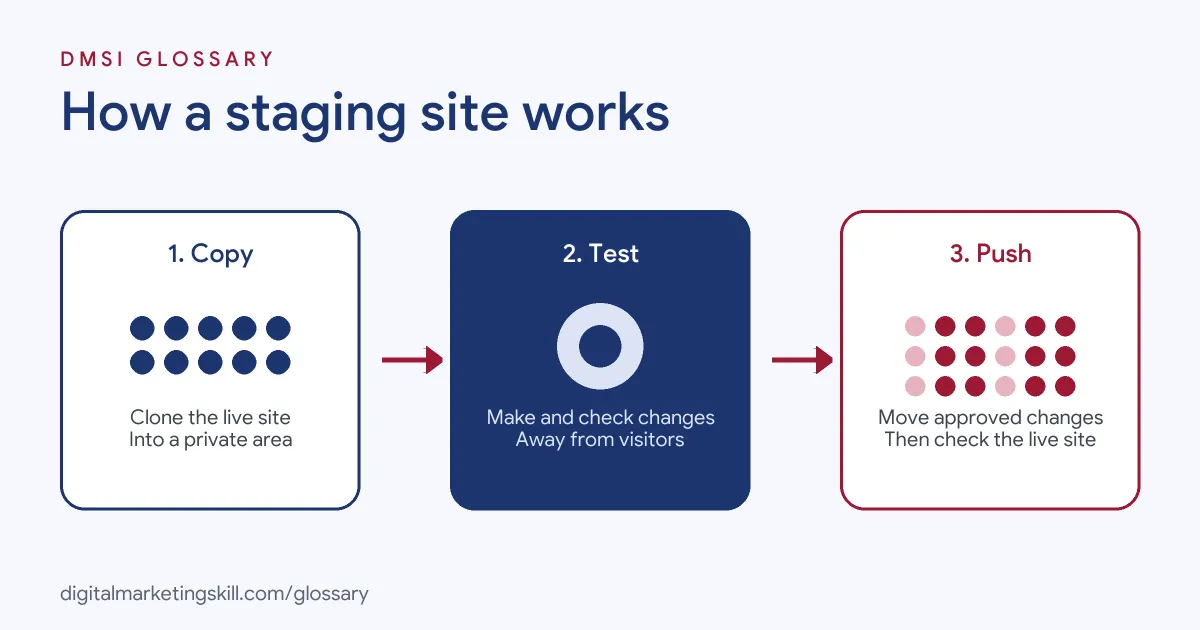
The workflow has three steps. First, you copy the live site into the test area. Next, you make and test your changes there. Finally, when you are happy, you push the changes to the live site and check it again.
Environment Types
Developers often talk about environments. WordPress lists four possible values for its environment type: “local”, “development”, “staging” and “production.” If none is set, it defaults to production. Local usually means a copy on your own computer. Development is a shared test area for building features. Staging is the final check before release, and production is the live site.
The WordPress developer documentation adds that “all hosts that support setting up staging environments are requested to set this feature to staging on those staging environments.” This lets plugins and themes behave differently on test copies. For example, a plugin might stop sending real emails from a test site.
Keeping It Private
A test copy should not appear in Google. Otherwise, people may land on half-finished pages, and the copy may compete with your real site. Google’s advice on private content is clear: “you need to password protect it to ensure only authorized users can access it.” It adds that this “will also prevent that content from appearing in Google Search.”
A noindex tag can help too. However, Google warns that for noindex to work, the page “must not be blocked by a robots.txt file.” So password protection is usually the safest first step.
Pushing Changes Live
When tests pass, you move the changes to production. Many hosts offer a “push to live” button. However, be careful with the database. If the live site took new orders or comments while you worked, overwriting its database would lose them. So many teams push only files, or only the specific changes, for busy sites.
Staging Site Examples
Here are three made-up examples of a test copy in action:
- Plugin update: A shop tests a major update to its payment plugin on its test copy. The checkout breaks there, so the owner waits for a fix before updating the live site.
- Redesign: A charity builds a new theme in private over several weeks. Staff review every page, then the developer launches it in one evening.
- New feature: A training provider adds an online booking form. It tests bookings and confirmation emails in private before customers can use it.
In each case, problems surfaced where no customer could see them.
Staging vs Local vs Production
| Environment | Where it runs | Used for |
|---|---|---|
| Local | Your own computer | Early building and experiments |
| Development | A shared test server | Building and reviewing features as a team |
| Staging | A private copy on the host | Final tests in a setting like the live site |
| Production | The live server | The site real visitors use |
Small sites often skip development and use only local or staging, plus production. That is fine, as long as changes are tested before they go live.
How to Set Up a Staging Site
- Check your host. Many managed WordPress hosts include a staging tool in the control panel.
- Take a backup. Save a full copy of the live site before you start.
- Create the copy. Use the host’s tool or a trusted plugin to clone the site.
- Protect it. Add a password and confirm that search engines cannot reach it.
- Turn off live actions. Stop real emails, payments and tracking from the test copy.
- Test your changes. Check key pages, forms, checkout and mobile layout.
- Push carefully. Move only what you changed, then test the live site straight away.
Best Practices for a Staging Site
- Refresh it often. A copy that is months old may not reflect the real site.
- Exclude it from analytics. Test visits should not mix with real traffic data.
- Write a test checklist. Use the same list each time, so nothing is missed.
- Keep the live database safe. Avoid overwriting new orders, sign-ups or comments.
- Make it part of upkeep. Build testing into your website maintenance routine and back up before every push.
Common Mistakes to Avoid
First, teams leave the test copy open, and Google indexes it. Second, they forget to stop emails, so customers receive test messages. Third, they push the whole database and wipe out recent orders. Finally, they test on an old copy that no longer matches the live site. Each problem is simple to prevent with a short checklist.
What to Test Before Going Live
A good test session follows the visitor’s path. Start with the home page and main menu. Next, open your top landing pages, especially any linked from live ads or emails. Then submit every form and check that the messages arrive in the right inbox. If you run a shop, place a test order using your payment provider’s test mode. After that, check the site on a phone as well as a laptop. Finally, confirm that tracking tags still fire, so your analytics stay accurate after launch.
Write these checks down once and reuse them. Over time, the list becomes a quick routine that anyone on the team can follow.
Why It Matters for Marketing
Campaigns depend on a working website. If an update breaks the landing page on launch day, every ad and email sends people to an error. A test copy lets marketers and developers check new pages, forms and tracking before money is spent driving traffic. It also makes big changes, such as a redesign, far less risky.
Where You’ll Use a Staging Site at Work
Test environments appear in many web roles. For example, remote job listings ask candidates to:
- “Track every code change, get it reviewed, and test it on a staging site before it goes live on a client’s site.” (SEO Automation Engineer).
- “Administer WordPress environments across development, staging, and production.” (PHP and WordPress Websites Webmaster).
So if you plan to work as a WordPress Developer or Website Manager, you will use a staging site for most changes. SEO Specialists also use it to test technical fixes before launch.
Learn It in the WordPress and SEO Track
You can practise safe, professional WordPress workflows in the AI-Powered WordPress and SEO Specialist track. Your portfolio project is a WordPress site or store that you rank with an SEO content plan. The track is about 90% hands-on, with unlimited 1-on-1 mentoring and a U.S. Project Internship from day one.
If you are just getting started, read our guide on how to build a WordPress website.
Frequently Asked Questions
What is a staging site in simple terms?
It is a private copy of your website where you test changes before they go live. Visitors never see it.
Do I need a staging site for a small website?
It is wise for any site that earns money or collects leads. Even small sites can break after a plugin or theme update.
Will Google index my staging site?
It can if the copy is public. Protect it with a password, which Google says keeps content out of its search results.
What is the difference between staging and production?
Staging is the private test copy. Production is the live site that real visitors use.
Can I edit content on staging and push it live?
You can, but be careful with the database. Pushing an old database can overwrite new orders, comments or sign-ups on the live site.
Sources: WordPress Developer Resources: wp_get_environment_type(); Google Search Central: Control what you share with Google; Google Search Central: Block indexing with noindex; remote job listings on Himalayas.