
A Customer Data Platform (CDP) is software that collects customer data from many sources and joins it into one lasting profile for each person, which other tools can then use. Most businesses hold customer data in many places, such as the website, the email tool, the shop and the CRM. As a result, no single team sees the whole customer. A CDP fixes that, so your ads, emails and reports all work from the same picture.
Key Takeaways
- A CDP builds one unified profile per customer from many data sources.
- It links records that belong to the same person, a step called identity resolution.
- Other tools, such as ad platforms and email software, can use the profiles it builds.
- A CDP mainly runs on first-party data that your business collects itself.
- It differs from a CRM, which mostly stores sales and service contacts.
What Is a Customer Data Platform?
Every time a customer visits your site, opens an email or buys something, they leave data behind. However, each of those actions often lands in a different tool. So the website knows what they viewed, but the email tool only knows what they clicked. Meanwhile, the shop only knows what they bought.
A CDP pulls all of that together. First, it gathers the data. Then it works out which records belong to the same person. Finally, it stores one profile that grows over time and shares it with your other tools.
Think of a hotel guest. At check-in, the front desk knows their name. Later, the restaurant knows they are vegetarian, and the spa knows they booked a massage. A CDP is like a shared guest file that every team can read. So the next time that guest books, each team already knows what they like.
The CDP Institute, an industry body, defines a CDP as “software that creates and maintains a persistent, unified customer record that is accessible to other systems.” Similarly, Twilio Segment calls it “a piece of software that combines data from multiple tools.” In short, a CDP is the central home for your first-party data.
Why It Matters
Why should a marketer care? Because better data leads to better targeting and better reporting. For example, you can stop showing ads to people who have already bought. Also, you can send a message that matches what someone did on your site yesterday. In addition, browser privacy changes make third-party data harder to use. So data you own and can join together becomes more valuable for personalisation and measurement.
How a Customer Data Platform Works
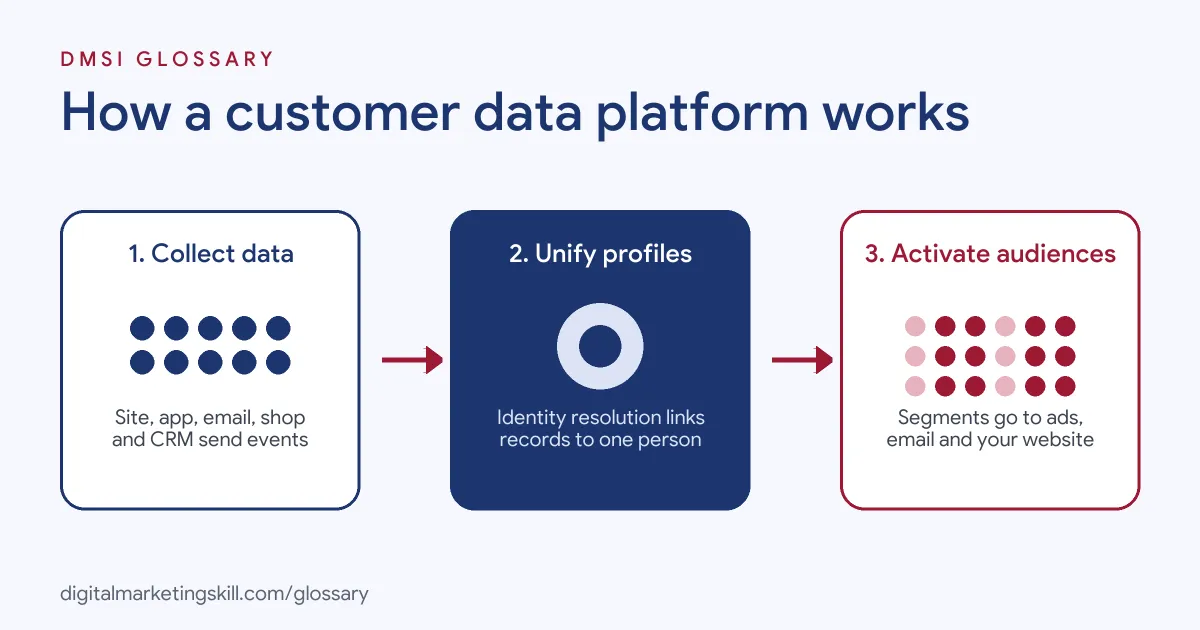
A CDP works in three main stages. First it collects data, then it unifies it into profiles, and finally it activates those profiles in other tools. Each stage needs care, so it helps to understand them one by one.
Stage 1: Collect
To begin with, the CDP connects to your data sources. These can include your website, app, email platform, online shop, point-of-sale system and CRM. Usually, a small tracking script or a ready-made connector sends events into the CDP. For example, an event might be “viewed product”, “added to cart” or “opened email”. Offline data, such as in-store purchases, can also be uploaded.
Stage 2: Unify
Next, the CDP runs identity resolution. This means it matches records that belong to the same person. For instance, it may link an email address, a phone number and a device ID to one profile. Segment describes this step as one that “Unifies user history across devices and channels into a single customer view for each user.” After that, the CDP can add extra values, such as total spend or a likely-to-buy score.
Stage 3: Activate
Then the profiles go to work. You build audiences, such as “bought twice in the last quarter” or “browsed but never bought”. After that, the CDP sends those audiences to your ad platforms, email tool or website. The CDP Institute notes that “Access methods typically include APIs, database queries, and file extracts.” So other systems can pull the data in whichever way suits them.
Consent and Governance
Finally, a good CDP tracks consent. It records what each person agreed to, so you only use their data in allowed ways. This matters under laws such as GDPR. As a result, the CDP becomes the place where you control who can use which data and why.
Examples of a Customer Data Platform in Use
- An online fashion shop. The shop joins website browsing, email clicks and order history into one profile. Then it builds an audience of people who viewed a jacket but didn’t buy it. After that, it sends a reminder email and a matching ad to just that group.
- A subscription software company. The company links free-trial sign-ups with in-app activity. So the sales team can see which trial users are most active. Also, the marketing team can exclude paying customers from trial ads.
- A restaurant chain with an app. The chain joins app orders with in-store loyalty card scans. As a result, it can spot regular guests who have stopped visiting. It then sends them a “we miss you” offer through the app.
Customer Data Platform vs CRM vs DMP
| Point | CDP | CRM | DMP |
|---|---|---|---|
| Main purpose | One unified profile per customer for all tools | Manage sales and service contacts | Build ad audiences |
| Main data type | First-party, known and anonymous | First-party, mostly known contacts | Mostly anonymous, often third-party |
| Data kept | Long term, detailed history | Long term, contact records | Often short term |
| Main users | Marketing, data and analytics teams | Sales and service teams | Media buyers |
In practice, many businesses use a CDP alongside a CRM. The CRM handles the sales process, while the CDP feeds richer data into it.
How to Set Up a Customer Data Platform
- Start with use cases. List two or three clear goals, such as cutting wasted ad spend or sending better emails. Then you know which data you need.
- Map your data sources. Write down every tool that holds customer data. Also, note who owns each one.
- Agree a tracking plan. Decide which events and fields to collect, and give them consistent names.
- Connect the sources. Add the tracking script and connectors. After that, check that events arrive correctly.
- Set identity rules. Choose which IDs, such as email or customer number, join records together.
- Build your first audiences. Start with one simple segmentation rule and test it.
- Activate and measure. Send the audience to one channel, such as Google Ads through Customer Match. Then compare results against a control group.
Best Practices for a Customer Data Platform
- Begin small. Launch with one use case, prove it works, then add more.
- Keep data clean. Use the same event names and formats across every source.
- Respect consent. Only collect and share data that people have agreed to.
- Involve the right people. Bring in marketing, data, legal and IT teams from the start.
- Document everything. Keep a shared tracking plan, so new team members know what each field means.
- Review audiences often. Check that segments still match your goals and remove ones nobody uses.
Common Mistakes to Avoid
- Buying the tool before the plan. Without clear use cases, a CDP can turn into an expensive data store.
- Feeding in messy data. If events are named differently in each tool, profiles will not join up properly.
- Ignoring consent. Sharing data without permission can break privacy laws and lose customer trust.
- Treating it as a CRM. A CDP supports sales teams, but it is not built to manage deals.
- Never measuring impact. If you don’t test against a control group, you can’t prove the CDP is helping.
Where You’ll Use a Customer Data Platform at Work
CDP skills show up in marketing technology, data and analytics roles. For example, real remote job listings ask for people who can:
- “Work with customer data platforms (CDPs) and related technologies to support customer data management and activation initiatives.” (Integration Engineer – Customer Data Platform).
- “Design and implement a robust, scalable Customer Data Platform (CDP) to centralize and unify customer data from multiple sources (CRM, ERP, web, mobile, etc.).” (Sr Data Integration Engineer).
- “translate business goals into scalable CDP use cases that enable audience activation, personalization, and cross-channel engagement.” (CDP Consultant).
Learn It in the Google Ads and Analytics Track
You can learn how customer data feeds audiences and reporting in the AI-Powered Google Specialist track. Every track includes a U.S. Project Internship from day one, with unlimited 1-on-1 mentoring.
Frequently Asked Questions
What does CDP stand for?
CDP stands for Customer Data Platform. It is software that joins customer data from many sources into one profile per person.
Is a CDP the same as a CRM?
No. A CRM mainly manages sales and service contacts. By contrast, a CDP joins data from many tools, including anonymous website visits, and shares it with other systems.
What is identity resolution?
It is the step where a CDP matches records that belong to the same person. For example, it links an email address and a device ID to one profile.
Do small businesses need a CDP?
Not always. If you only use a few tools, your email platform or CRM may be enough. However, a CDP becomes useful as your data sources grow.
Can a CDP send data to Google Ads?
Yes, many CDPs can. They often send audience lists to Google Ads for Customer Match, as long as people have given consent.
Sources: CDP Institute: What is a CDP?; Twilio Segment: What is a Customer Data Platform? CDPs Explained; Google Ads Help: About Customer Match; remote job listings on Himalayas, Himalayas and Himalayas.