
In marketing, personalisation means tailoring a message, offer or piece of content to the person receiving it, using what you know about them. It can be as simple as a first name in an email or as rich as product picks based on past purchases. It matters because people expect relevant messages, and relevant messages tend to get more opens, clicks and sales.
Key Takeaways
- McKinsey found that 71% of consumers expect personalised interactions, and 76% get frustrated when they don’t get them.
- It ranges from merge tags, such as a first name, to whole blocks of content that change for each reader.
- Email tools insert data using tags. Always set a default value, so blank fields don’t show as gaps.
- Good tailoring relies on accurate data and clear segments.
- Relevance beats cleverness. Using data people don’t expect you to have can feel intrusive.
What Is Personalisation?
Without it, everyone on your list gets the same message. With it, each person gets a version that reflects who they are or what they’ve done. The data might come from a sign-up form, a purchase, a page someone viewed or a preference they chose.
The results can be significant. McKinsey reports that personalisation “most often drives 10 to 15 percent revenue lift”. It also found that faster-growing companies drive 40% more of their revenue from it than slower-growing peers.
For example, a bookshop sends a monthly email. Without tailoring, everyone sees the same ten titles. With it, crime fans see new crime novels, cooks see new recipe books, and anyone who bought a series sees the next book in it.
How Personalisation Works
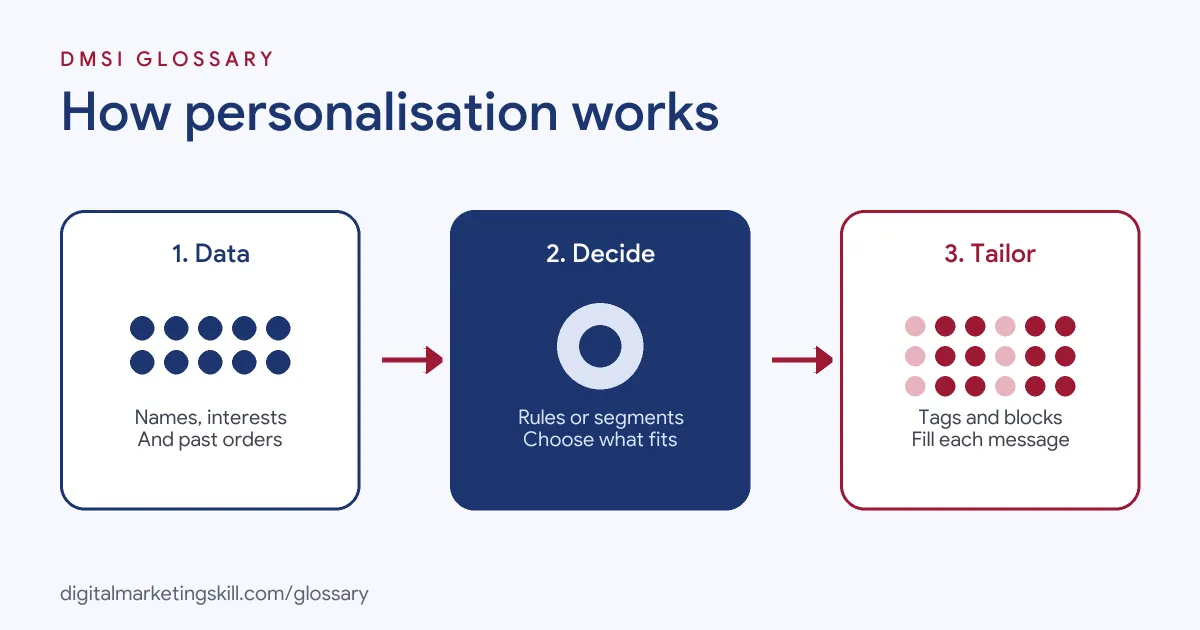
Every tailored message needs three things. First, data about the person. Second, a rule or model that decides what to show. Third, a template that can change based on that decision.
Merge Tags and Personalisation Tags
The simplest method is a tag that pulls in a value from each contact’s profile. In Mailchimp, the first-name tag is *|FNAME|*. In Klaviyo, it’s {{ first_name }}. When the email sends, each tag is replaced with that person’s data. Klaviyo notes that these tags work in emails, including the subject line, as well as SMS and push notifications.
Both tools let you set a fallback. Klaviyo’s default filter “sets a default value to appear if a message recipient doesn’t have that property set.” Mailchimp shows the same idea: with a default of “customer”, a contact with no first name sees “Dear customer”. Without a default, Mailchimp leaves a blank space instead.
Dynamic Content
The next step up is content that changes for each segment. One email template might show a different image, product block or offer depending on the reader’s interests or location. As a result, you write one campaign but send many versions.
Behaviour-Based Messages
Finally, some messages are triggered by what people do. Abandoned basket emails, browse reminders and post-purchase tips all respond to a specific action. Because they arrive at the right moment, they often feel helpful rather than salesy. They also run on their own once set up, so one good flow can serve thousands of customers.
Levels of Personalisation
Here is a simple way to think about how far you go:
| Level | What changes | Example |
|---|---|---|
| Basic | Names and simple details | “Hi Sam, your order has shipped” |
| Segment-based | Content for each group | Different offers for new and loyal customers |
| Behaviour-based | Messages triggered by actions | A reminder about items left in the basket |
| Predictive | Choices made by AI models | Products a customer is likely to buy next |
Most teams start at the basic level and move up as their data improves. There’s no need to jump straight to predictions.
Personalisation Examples
Here are three made-up examples:
- Subject line: A gym sends “Sam, your free class is booked for Thursday”. The name and class come from the booking data.
- Location: A coffee chain shows each subscriber the opening hours of their nearest shop.
- Replenishment: A pet food brand emails customers when their last bag is likely to run out, based on bag size and order date.
In each case, the message uses data the customer knowingly shared, so it feels useful rather than strange.
How to Get Started With Personalisation
- Decide what you want to improve, such as open rates, repeat orders or sign-ups.
- Check what data you already collect. Make sure key fields, such as first name and interests, are filled in correctly.
- Add simple tags with sensible defaults, such as a first name with “there” as the fallback.
- Build two or three segments, then create one content block for each.
- Set up one triggered email, such as a welcome or abandoned basket message.
- Preview every version with test profiles, including ones with missing data.
- Compare results with a non-tailored version, then expand what works.
Test Before You Send
Broken tags are one of the most visible mistakes in email. So always preview your message as several different contacts. Check what happens when a field is blank, when a name is unusually long and when a contact belongs to more than one segment. Mailchimp, for instance, lets you preview live merge tag data or send a real email to a small test segment.
Personalisation and Privacy
Tailored messages rely on personal data, so the usual data protection rules apply. The UK ICO says you should clearly explain to people how you plan to use their information. It also stresses that people have “an absolute right to object to or opt out of direct marketing at any time.”
In practice, this means three things. First, tell people at sign-up what you will send and why. Second, only use data you have a fair reason to hold. Third, make it easy to update preferences or unsubscribe. Done well, this builds trust. Customers who feel in control are more willing to share the details that make your emails better.
Best Practices for Personalisation
- Always set defaults. A blank or broken tag looks worse than no tag at all.
- Use data people expect you to have. Purchase history feels fine; guessing someone’s private life doesn’t.
- Go beyond the first name. The biggest gains come from relevant content, not just a greeting.
- Keep data fresh. Let people update their preferences easily, from a link in every email.
- Measure the lift. Test tailored emails against a standard version.
Common Personalisation Mistakes
The classic mistake is a broken tag, such as “Hi *|FNAME|*” or “Hi ,” in the inbox. Another is using old data, such as recommending a product someone already bought. Some brands use details that feel too personal, which can put people off. Others stop at the first name and never tailor the content itself. Finally, many forget to test with missing data, so errors only appear after the email has gone out.
Where You’ll Use Personalisation at Work
Email and CRM roles often list this skill by name. For example, recent remote job listings ask candidates to:
- “Build, test, dynamically personalize, and deploy complex lifecycle email campaigns, automated programs, and transactional emails using Braze” (Associate Marketing Production Manager).
- “Define audience criteria, suppression logic, eligibility rules, and personalization requirements” (CRM Data Manager).
- Show “Solid technical aptitude with practical experience working with HTML, CSS, and dynamic personalization logic” (Associate Marketing Production Manager).
So if you want to work as an Email Marketing Specialist or Marketing Automation Specialist, expect to set up tags, build dynamic content and test every version.
Learn It in the Lead Generation and Email Track
You can learn to tailor emails in the AI-Powered Lead Generation and Email Automation track. It covers AI fundamentals, lead generation, and email marketing and automation. Your portfolio project is a lead magnet and an automated email sequence that converts. You also get unlimited 1-on-1 mentoring and a U.S. Project Internship from day one.
Next, read our guides to personalised marketing and email marketing strategy. You may also like our glossary entries on segmentation and AI personalisation.
Frequently Asked Questions
What is personalisation in email marketing?
It is changing parts of an email, such as the name, products or offer, so each reader gets content that fits them.
What is a merge tag?
A merge tag is a placeholder in an email, such as *|FNAME|* in Mailchimp, that is replaced with each contact’s data when the email sends.
Does adding a first name really help?
It can, but the bigger gains usually come from relevant content, such as products or offers based on what people have done.
What happens if a contact has no first name?
If you set a default, the email shows that instead, such as “Dear customer”. Without one, some tools leave a blank space.
How is this different from AI personalisation?
Basic tailoring follows rules and data you set. AI personalisation uses models to predict what each person wants.
Sources: McKinsey: The value of getting personalisation right; Klaviyo Help: Message personalisation reference; Mailchimp: Getting started with merge tags; ICO: Direct marketing guidance; remote job listings on Himalayas.