
A re-engagement campaign is a series of emails or messages sent to subscribers or customers who have gone quiet, to win back their interest or confirm they still want to hear from you. It usually targets people who haven’t opened, clicked or bought for a set period. It matters because winning back a contact is often cheaper than finding a new one, and it keeps your list healthy.
Key Takeaways
- A re-engagement campaign targets inactive contacts, defined by a time window that suits how often you send.
- Mailchimp notes that “it’s often less expensive to target a current contact than it is to find a new one.”
- A good series offers a reason to come back, such as useful content or an exclusive offer, and an easy way to opt out.
- Yahoo suggests sending a reconfirmation email to inactive subscribers from time to time.
- People who still don’t respond should be archived or removed, which protects deliverability and can cut costs.
What Is a Re-engagement Campaign?
Every list has people who stop paying attention. Some changed jobs. Others got busy, or your emails drifted from what they signed up for. If you keep sending to them, they drag down your results and may start marking your emails as spam.
This kind of campaign tries to fix that. It sends a short, focused series to inactive contacts. The goal is simple: get a response. That response might be a click, a purchase, a preference update or a clear “no thanks”.
Mailchimp’s help centre puts the case plainly. When contacts stop interacting, “it’s a good idea to try to win them back with a re-engagement strategy.” It adds that winning back inactive subscribers “helps you make the most of your Mailchimp audience.”
It’s also a key part of list hygiene. In other words, it gives quiet subscribers one last chance before you clean them from your list.
How a Re-engagement Campaign Works
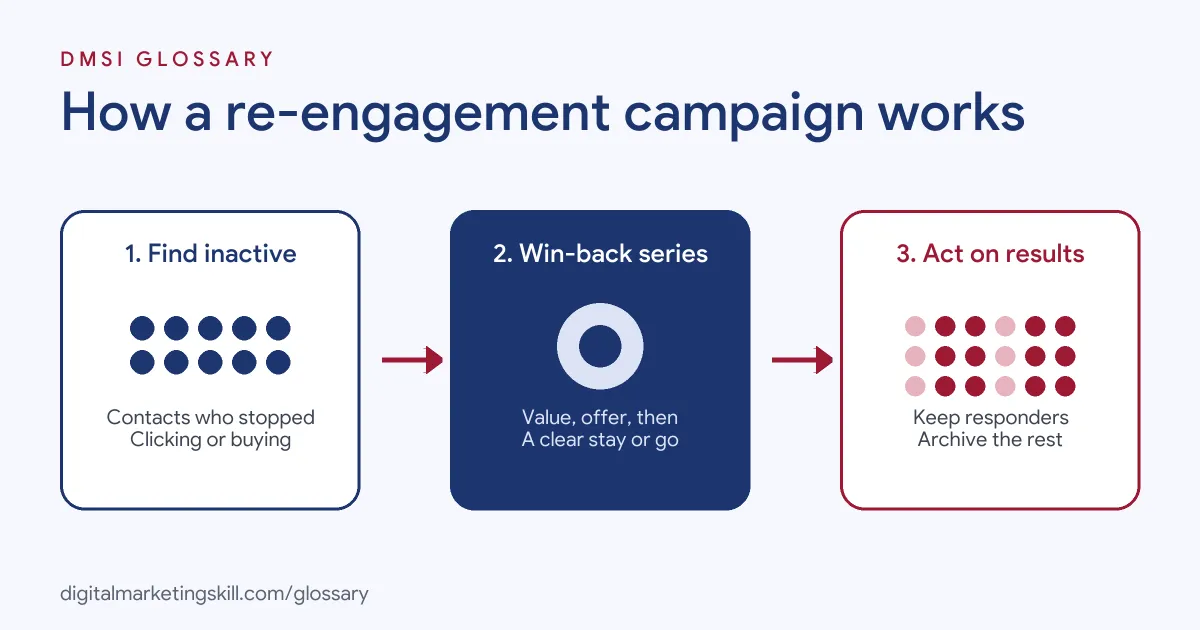
Most campaigns follow three steps. First, you find the inactive contacts. Next, you send them a short series with a reason to return. Finally, you sort them by what they did: keep the ones who engaged, and archive or remove the rest.
Finding Inactive Contacts
Start by deciding what “inactive” means for you. A brand that emails daily might use a shorter window than one that emails monthly. Mailchimp suggests creating a segment “based on email activity or contact rating” to find your least engaged subscribers.
Be careful with open data. Google’s sender guidelines say Google doesn’t track open rates and can’t verify open rates reported by third parties. So, where possible, use clicks, purchases and other actions as well.
The Win-back Series
Next, you send a short series, often two to four emails. Mailchimp advises that a successful re-engagement email “uses relevant content as an incentive for subscribers to interact with your brand again.” For an online store, it gives the example of “exclusive coupons or discount codes.”
A typical series moves from friendly to direct. The first email reminds people of the value. Then the second offers something extra. Finally, the last asks plainly whether they want to stay.
What Happens Next
Finally, you act on the results. People who click or buy go back into your normal emails. People who don’t respond get archived or removed. Mailchimp notes that “removing inactive subscribers can lower your subscriber count and costs.” Meanwhile, Yahoo recommends that senders “monitor hard and soft bounces as well as inactive recipients.”
Re-engagement Campaign Examples
Here are three made-up examples:
- Example 1, fashion shop: A shop emails customers who haven’t bought in a long time. The first email shows new arrivals, the second offers free delivery, and the third asks, “Should we stop emailing you?”
- Example 2, online course provider: A school targets subscribers who downloaded a guide but never clicked again. It sends a short video lesson, then a link to update their interests.
- Example 3, software company: A start-up contacts users who stopped logging in. It highlights one new feature and offers a 15-minute call to help them get set up.
Re-engagement vs Win-back vs Reconfirmation
These terms overlap, but each has a slightly different aim:
| Type | Who it targets | Main goal |
|---|---|---|
| Re-engagement | Subscribers who stopped opening or clicking | Restore interest in your emails |
| Win-back | Customers who stopped buying | Earn another purchase |
| Reconfirmation | Long-term inactive subscribers | Check they still want emails, then clean the list |
In practice, many teams combine them into one automated flow.
How to Create a Re-engagement Campaign
- Define inactivity. Choose a time window and the actions that count, such as clicks or purchases.
- Build the segment. Use your email platform’s activity data to group inactive contacts.
- Plan two to four emails. For instance: a reminder, an incentive and a final “stay or go” message.
- Write a clear subject line. Be honest and simple. For example, “Still want to hear from us?”
- Make opting out easy. Include a visible unsubscribe link and, where possible, a preference centre.
- Space the emails out. Leave a few days between each one, so people have time to respond.
- Act on the results. Move responders back to your main list. Then archive or remove the rest.
- Automate it. Finally, turn the series into an email sequence that runs whenever someone becomes inactive.
A Sample Three-Email Series
Here is a made-up re-engagement campaign for a homeware brand. Email one, sent on day one, has the subject “We’ve added a few things you might like” and shows best sellers. A few days later, email two offers free delivery on the next order for a short time. Email three, sent a few days after that, says “Should we stop emailing you?” with two big buttons: “Keep me subscribed” and “Unsubscribe”. Anyone who clicks neither is archived a week later.
How to Measure Success
Measure the share of contacts who took an action during the series, such as a click or purchase. Then track how many stayed active afterwards, since a single click doesn’t always mean lasting interest. Also, watch your spam complaints and unsubscribes. Finally, check whether your overall engagement and inbox results improve once you’ve cleaned out the non-responders.
Best Practices for a Re-engagement Campaign
- Lead with value. Remind people why they signed up before you offer a discount.
- Keep it short. A few emails are enough. Long series annoy people who’ve already lost interest.
- Personalise where you can. Mention the guide they downloaded or the product they bought.
- Offer a preference choice. Some people want fewer emails, not none.
- Run it on a schedule. Automate it, so it runs all the time rather than once a year.
Common Mistakes to Avoid
A common mistake is waiting too long, until most inactive contacts have stopped reading altogether. Another is leading with a big discount, which trains people to wait for offers. Some teams also hide the unsubscribe link, which pushes annoyed readers to press “spam”. Others never remove non-responders, so the list stays unhealthy. Lastly, many judge success by opens alone.
Where You’ll Use a Re-engagement Campaign at Work
Lifecycle and email roles often list this work directly. For example, remote job listings mention:
- The need to “Execute nurture, re-engagement, abandoned inquiry, and expansion campaigns” (Lifecycle Marketing Specialist, B2B and B2C).
- A role “focused on re-engagement, retention, and maximizing long-term customer value (LTV)” (Senior Growth Manager, Re-engagement).
- The task to “Run Klaviyo retention: welcome, abandoned cart, post-purchase and win-back flows, plus weekly sends” (Growth Marketing Manager, Paid Media and Klaviyo).
So if you want to work as an Email Marketing Specialist or Marketing Automation Specialist, expect to build and run win-back flows.
Learn It in the Lead Generation and Email Track
You can learn to build automated email flows in the AI-Powered Lead Generation and Email Automation track. There, you build a lead magnet and an automated email sequence that converts. You also get unlimited 1-on-1 mentoring and a U.S. Project Internship from day one.
For more ideas, read our guide to customer win-back strategies and our tips on email open rates.
Frequently Asked Questions
What is a re-engagement campaign in simple terms?
It is a short series of emails sent to quiet subscribers, to win back their interest or confirm they still want your emails.
When should I send a re-engagement campaign?
Send it once a contact passes your inactivity window, which depends on how often you email. Many teams automate it.
How many emails should it include?
Most use two to four. That’s enough to remind, offer and ask, without annoying people.
What should I do with people who don’t respond?
Archive or remove them. Mailchimp notes this can lower your subscriber count and costs, and it helps keep your list healthy.
Is a re-engagement campaign the same as a win-back campaign?
They are close. Re-engagement usually focuses on email activity, while win-back usually focuses on customers who stopped buying.
Sources: Mailchimp Help: Re-engage inactive subscribed contacts; Yahoo Sender Hub: Best practices; Google Workspace Admin Help: Email sender guidelines; remote job listings on Himalayas.