
Upwork is an online work marketplace where businesses hire freelancers for projects, from one-off tasks to long-term contracts. Clients post jobs, freelancers send proposals, and both sides agree terms, track work and handle payment through the platform. For digital marketers, it is one of the most common places to find first clients and build a track record. As a result, knowing how it works can help you win remote work more quickly.
Key Takeaways
- Upwork connects businesses with freelancers for hourly and fixed-price work.
- Freelancers use Connects to submit proposals to jobs.
- Your profile, proposals and Job Success Score shape how many clients you win.
- Upwork offers payment protection on work done through its contracts.
- Upwork charges freelancers a service fee, so check the current rate before you price your work.
What Is Upwork?
Upwork is a website and app that matches clients with independent professionals. Clients include start-ups, small firms and large companies. Meanwhile, freelancers offer skills such as copywriting, SEO, paid ads, design and development.
Upwork describes its marketplace this way: it “connects businesses with on-demand access to highly skilled talent across the globe.” In other words, a client in one country can hire a marketer in another, and the platform handles the contract and the payment.
Think of it like a busy job board and an invoicing tool in one. For example, a bakery chain needs someone to run its social media for three months. It posts the job, reviews proposals and hires a freelancer. Then the freelancer logs hours or completes milestones, and Upwork releases the payment.
Why It Matters
For new marketers, the hardest step is often the first paid project. Upwork lowers that barrier, because clients come to the platform looking for help. In addition, reviews and a public work history build trust over time. So each finished job makes the next one easier to win. Upwork also suits remote work, since you can work with clients in many countries from home. However, the competition is strong. That’s why a clear offer and a strong profile matter so much.
How Upwork Works
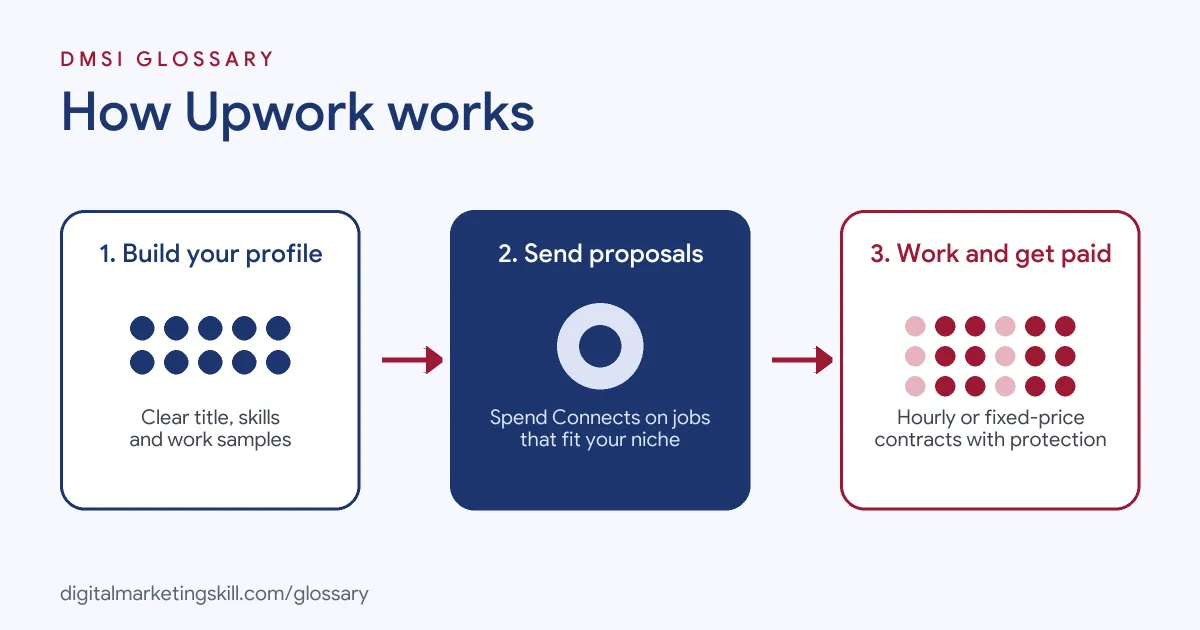
In practice, Upwork follows a simple cycle. First, you build a profile. Then you find a job and send a proposal. Finally, you agree a contract, do the work and get paid through the platform.
Your Profile
In short, your profile is your shop window. Upwork advises that “An eye-catching title and client-focused overview help us match you to the work you want.” So write a clear headline, such as “Google Ads Specialist for Ecommerce Brands”. Also, add skills, samples and a professional photo.
Finding Work and Proposals
Next, you search for jobs that match your skills. Upwork tells freelancers to “Submit a proposal, set your rate, and show how great you’ll be.” To apply, you spend Connects. In Upwork’s words, “Connects are what you’ll use to submit proposals to jobs.” You get some free Connects each month and can buy more. So choose jobs carefully, rather than applying to everything.
Contracts and Payment
Once a client hires you, you start a contract. It can be hourly or fixed-price. For hourly work, you track time. By contrast, for fixed-price work, the client funds milestones and releases payment when each one is done. Upwork says that “all the work you complete comes with payment protection” when you are paid through its contracts. In return, Upwork takes a service fee from your earnings.
Reputation and Job Success Score
Finally, clients leave feedback when a contract ends. Upwork then calculates your Job Success Score. It describes this as “a measure of your client’s satisfaction with your work and success on Upwork.” Over time, a high score helps you stand out in search and win better-paid jobs.
Examples of Upwork in Marketing
- A new SEO freelancer. She builds a profile focused on local SEO for trades businesses. Then she sends a few tailored proposals each week and wins a small audit job. After good feedback, she lands a monthly contract.
- A small online shop. The owner needs Meta ads set up before a product launch. So he posts a fixed-price job with three milestones: research, campaign build and first-month report.
- A marketing agency. The agency uses Upwork to find overflow work. As a result, its business developers search daily for jobs that fit the team’s skills and rates.
Upwork vs Fiverr vs Direct Clients
| Point | Upwork | Fiverr-style gig sites | Direct clients |
|---|---|---|---|
| How work starts | Clients post jobs and freelancers send proposals | Freelancers list fixed packages and buyers order | You find clients through networking or outreach |
| Payment | Handled by the platform | Handled by the platform | You invoice and chase payment |
| Fees | Service fee on earnings | Service fee on earnings | No platform fee |
| Best for | Custom and ongoing projects | Small, repeatable tasks | Long-term, higher-value work |
Many freelancers use more than one route. For instance, they start on Upwork, then win referrals and direct clients as their reputation grows.
How to Get Started on Upwork
- Choose a niche. First, pick one service and one type of client, such as email marketing for online shops.
- Build your profile. Write a clear title and an overview that speaks to the client’s problem, not just your skills.
- Add proof. Next, upload samples, a short case study or results from practice projects.
- Set a fair rate. Look at similar profiles. Then factor in the service fee, so you know what you’ll take home.
- Search smartly. Save searches for your niche and check them often, because early proposals tend to get seen first.
- Write tailored proposals. Open with the client’s goal, explain your plan in a few lines and ask one useful question.
- Deliver and communicate. Then meet deadlines, send short updates and ask for feedback when the job ends.
- Grow your relationships. Offer ongoing support to happy clients, such as a monthly retainer.
Writing a Winning Proposal
Your proposal is often the first thing a client reads, so make it count. First, read the job post twice and note the client’s main goal. Then open with one line that repeats that goal in your own words. Next, explain in two or three sentences how you would tackle it. For example, an ads freelancer might mention checking conversion tracking before changing any bids. After that, link one relevant sample, not your whole portfolio. Also, ask one smart question about the project. This shows you are thinking about their business and invites a reply. Finally, keep it short. In most cases, a clear and specific proposal beats a long one. As a result, clients can see quickly why you are a good fit.
Best Practices for Upwork
- Lead with the client’s problem. Clients scan proposals fast, so show you understand their goal in the first line.
- Keep work on the platform. Contracts and payments through Upwork keep you covered by its payment protection.
- Use milestones. Also, break fixed-price work into clear stages, so both sides know what “done” looks like.
- Protect your score. Only accept jobs you can deliver well, because poor outcomes hurt your Job Success Score.
- Build your brand. A consistent personal brand across Upwork and LinkedIn builds trust.
- Read the rules. Check Upwork’s terms and fees pages, because they can change.
Common Mistakes to Avoid
- Copy-paste proposals. Clearly, generic messages are easy to spot and rarely win.
- Applying to everything. As a result, you waste Connects on jobs you are unlikely to win.
- Pricing too low for too long. Low rates can help at first. However, raise them as reviews grow.
- Vague scope. Often, unclear deliverables lead to extra work and unhappy clients.
- Taking payment off the platform. Above all, this can break Upwork’s terms and removes your protection.
- Ignoring your profile. Also, an old or unfocused profile sends good clients elsewhere.
Where You’ll Use Upwork at Work
Upwork matters to freelance digital marketers and to agencies that win clients on the platform. In fact, some roles focus on Upwork sales alone. For example, real remote job listings ask you to:
- “Find new projects on Upwork that fit our skills and rates” (Junior IT Sales Manager).
- “We are hiring a Business Development Executive (Remote) with strong experience in Upwork bidding and lead generation.” (Business Developer).
- “find and qualify relevant projects on Upwork.” (Upwork Bidder).
Learn It in the Full Stack Track
Freelance clients often want more than one skill, so Full Stack covers all four tracks: social media, lead generation, Google and SEO. Every track includes a U.S. Project Internship from day one, with unlimited 1-on-1 mentoring.
Frequently Asked Questions
Is Upwork free to join?
Yes, creating a freelancer profile is free. However, you need Connects to send proposals, and Upwork takes a service fee from your earnings.
What are Connects on Upwork?
Connects are credits you spend to submit proposals. In addition, you get some free each month and can buy more.
What is a Job Success Score?
It is Upwork’s measure of client satisfaction with your work. Specifically, it is based on your contract history and feedback.
Can beginners find work on Upwork?
Yes, but it takes effort. A focused niche, strong samples and tailored proposals improve your chances. There is no guarantee of work or income.
Should I take clients off Upwork?
No. Instead, keep contracts and payments on the platform, both for payment protection and to follow Upwork’s terms.
Sources: Upwork: How it works for freelancers; Upwork Help: Job Success Score; Upwork Investor Relations; remote job listings on Himalayas, Himalayas, Himalayas and Himalayas.