
A Website Migration is any major change to a site’s domain, URLs, platform, hosting or structure that can affect how search engines find and rank it. Common examples are moving to a new domain, switching from HTTP to HTTPS or rebuilding a site on WordPress. If you plan it well, visitors and rankings follow you to the new set-up. However, a rushed move can break links, lose traffic and confuse search engines for months.
Key Takeaways
- A website migration changes where or how a site lives, such as its domain, URLs or platform.
- The biggest risk is losing search traffic when old URLs stop working.
- A full URL map and permanent 301 redirects are the core of most migrations.
- Google Search Console helps you submit sitemaps, use Change of Address and watch for errors.
- Rankings often move up and down for a while, so monitor closely after launch.
What Is a Website Migration?
A website migration is a big change to your site that search engines need to notice. Some migrations change the URLs. For example, you might move from oldbrand.com to newbrand.com. Others keep the URLs but change what sits behind them, such as a new host or a new content system.
Here is an everyday comparison. Moving house is easy if you tell the post office your new address. Then your letters reach you without a gap. On the other hand, if you forget, letters keep going to the old house and get lost. A website migration works the same way. Redirects are your forwarding address for both people and search engines.
Google gives clear advice for moves with URL changes. It says, “We recommend server side permanent redirects from the old URLs to the new URLs.” Also, it warns you to “Avoid chaining redirects” where you can. So each old URL should point straight to its final new home.
Types of Website Migration
Most migrations fall into a few groups. First, a domain migration moves the site to a new domain name. Second, a protocol migration moves the site from HTTP to HTTPS. Third, a platform migration moves it to a new system, such as from a site builder to WordPress. Also, a structure migration changes URL paths or merges sections. Finally, a hosting migration moves files to a new server. Often, one project mixes several of these at once.
Why It Matters
Why does this matter so much? Because your rankings are tied to your URLs. For instance, a page with strong backlinks has earned trust at its current address. If that address breaks, the trust can fade. As a result, a careless migration can wipe out years of SEO work. A careful one, by contrast, keeps that value and gives you a cleaner site.
How a Website Migration Works
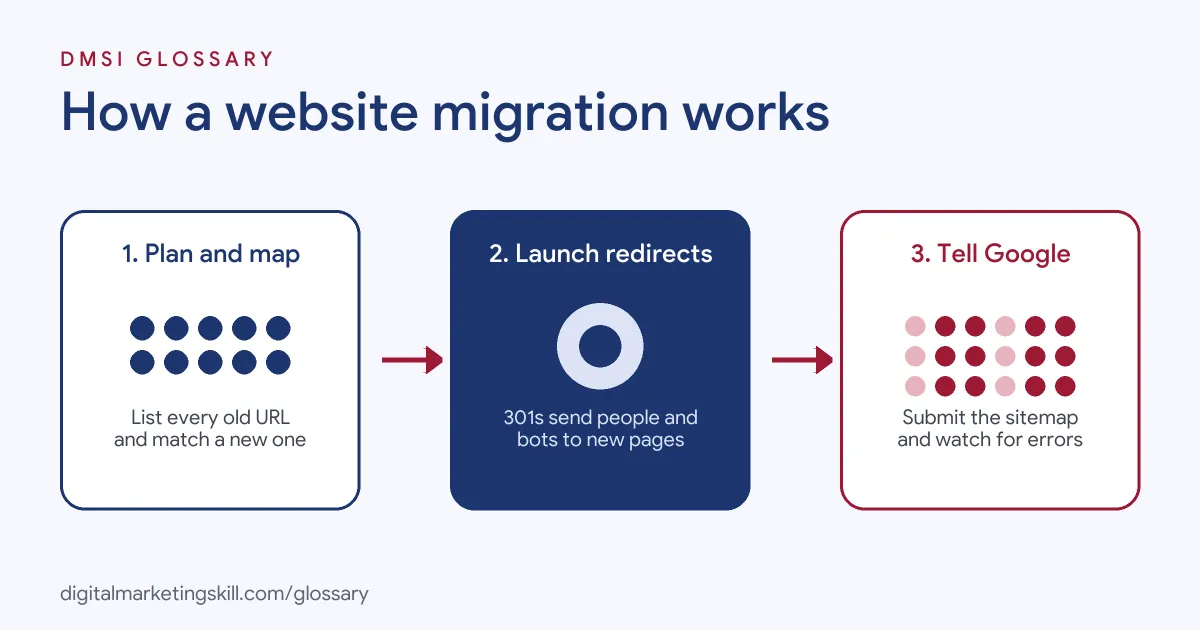
A website migration usually runs in three phases. First, you plan and prepare. Then you launch the move with redirects in place. Finally, you monitor the results and fix any problems.
Phase 1: Plan and Map
Start with a list of every important URL on the old site. Google suggests you begin with your sitemaps, top-traffic pages and server logs. Next, map each old URL to its best new match. Also, test the new site on a staging site before launch. In addition, take a full website backup, so you can roll back if needed.
Phase 2: Launch and Redirect
On launch day, switch on your redirects. Each old URL should send a 301 redirect to its new match. Google calls a permanent server-side redirect “the best way to ensure that Google Search and people are directed to the correct page.” Then update your canonical tags and internal links to the new URLs.
Phase 3: Tell Google and Monitor
Next, submit your new XML sitemap in Google Search Console. If you changed domain, use the Change of Address tool. Google says to “Use this tool after you’ve moved and redirected your site.” After that, watch your reports for errors and traffic changes.
How Long It Takes
Search engines need time to process a move. Google notes that “a small to medium-sized website can take a few weeks for most pages to move, and larger sites take longer.” So expect some ups and downs. Also, keep your redirects live for at least a year, and ideally longer.
What to Watch After Launch
The first weeks after launch need close attention. For example, check the page indexing report in Search Console for new errors. Also, look at your server logs to see if Googlebot is crawling the new URLs. In a healthy move, traffic to the old site falls while traffic to the new site rises. On the other hand, a sudden drop on both sites points to a problem, such as broken redirects or a blocked page.
Then compare your key pages with the benchmark you took before the move. If a top page has lost traffic, check its redirect, title and content first. In addition, test a sample of old URLs by hand each week. So you catch small issues before they grow into big ones.
Examples of Website Migration
- A rebrand for a law firm. The firm changes its name and domain. So the team maps every page, sets up 301 redirects and uses the Change of Address tool in Search Console.
- An online shop moving to WooCommerce. The store leaves a hosted platform for WordPress. Product URLs change, so the team builds a redirect list and checks that each product keeps its title and description.
- A blog merging two sites. A publisher folds a smaller blog into its main site. Then each old post redirects to the matching post, not to the home page.
Website Migration vs Redesign and Hosting Move
| Point | Website Migration | Redesign Only | Hosting Move Only |
|---|---|---|---|
| What changes | Domain, URLs, platform or structure | Look and layout | The server the site runs on |
| URLs change? | Often yes | Usually no | No |
| Redirects needed? | Yes, for every changed URL | Only if URLs change | No |
| SEO risk | High | Low to medium | Low, if downtime is short |
How to Plan a Website Migration
- Set clear goals. Write down why you are moving and what success looks like.
- Benchmark the old site. Record traffic, rankings and top pages. As a result, you can compare after launch.
- Crawl the old site. Use a crawler to list every URL, title and status code.
- Build the URL map. Match each old URL to the best new URL in a spreadsheet.
- Test on staging. Check pages, forms, tracking and redirects before going live.
- Check robots.txt and noindex. Make sure the live site is not blocked from search.
- Launch and redirect. Turn on 301 redirects and update internal links.
- Submit and monitor. Send the new sitemap to Google Search Console. Then watch errors and traffic for several weeks.
Best Practices for Website Migration
- Redirect one to one. Send each old page to its closest new page, not to the home page.
- Avoid redirect chains. Point old URLs straight to the final address.
- Keep content the same at first. Change one big thing at a time, so you can trace any problems.
- Pick a quiet time. Launch when traffic is low, not before a big sale.
- Keep the old domain. Renew it, so your redirects keep working.
- Check tracking. Make sure analytics and ads tags work on the new site from day one.
Common Mistakes to Avoid
- No URL map. Without one, many pages end up as a 404 error.
- Leaving staging blocks live. A forgotten noindex tag can hide the whole site.
- Using temporary redirects. A permanent move needs permanent redirects.
- Removing redirects too soon. Old links and bookmarks still need them.
- Forgetting images and files. PDFs and images have URLs too, so map them.
- Not watching after launch. Problems are cheaper to fix in the first days.
Where You’ll Use Website Migration at Work
Website migrations show up in SEO, WordPress and web developer roles. For example, real remote job listings ask for:
- “Perform website migrations, backups, staging deployments, domain changes, and production launches.” (Full Stack WordPress Developer).
- “Migrations: You have experience supporting website migrations, including organizing and mapping large sets of content.” (Webflow Developer).
- “Support enterprise and non-enterprise projects, including large-scale website migrations and other Digital initiatives.” (Digital Implementation Specialist).
Learn It in the WordPress and SEO Track
You can learn to plan and run website migrations in the AI-Powered WordPress and SEO Specialist track. Every track includes a U.S. Project Internship from day one, with unlimited 1-on-1 mentoring.
Frequently Asked Questions
Will a website migration hurt my SEO?
It can, if it is rushed. However, with a full URL map and 301 redirects, most sites keep their rankings after a short settling period.
How long should I keep redirects?
Google advises keeping them for at least a year, and ideally longer. So keep the old domain renewed too.
Do I need the Change of Address tool?
Only when you move to a new domain or subdomain. It is not meant for HTTP to HTTPS moves or path changes on the same site.
What is a URL map?
It is a list that pairs each old URL with its new URL. Then you use it to set up your redirects.
When is the best time to migrate?
Pick a quiet period for your business. Also, avoid launching right before a big campaign or sale.
Sources: Google Search Central: Site moves with URL changes; Google Search Central: Redirects and Google Search; Search Console Help: Change of Address tool; remote job listings on Himalayas, Himalayas and Himalayas.