
Zero-Shot Prompting is a way of asking an AI model to do a task using only instructions, without giving it any examples of the answer you want. You simply describe the task, and the model relies on what it already learned in training. As a result, it’s the fastest way to get work done with tools like ChatGPT, Claude or Gemini. However, knowing when it works and when to add examples is a key skill for any marketer who uses AI.
Key Takeaways
- Zero-shot prompting gives the AI a task with no examples in the prompt.
- It works because modern models are trained to follow instructions.
- It’s best for simple, common tasks like summaries, rewrites and basic sorting.
- Clear, specific instructions make zero-shot prompts far more reliable.
- If results are off, add examples and switch to few-shot prompting.
What Is Zero-Shot Prompting?
A prompt is the text you give an AI tool. In a zero-shot prompt, that text holds only the instruction and the input. So there are no sample answers.
The Prompt Engineering Guide puts it plainly: “Zero-shot prompting means that the prompt used to interact with the model won’t contain examples or demonstrations.” In other words, “zero” refers to the number of examples, or “shots”, you include.
Here is an everyday example. Say you ask a new colleague, “Write a short thank-you email to a customer who just placed an order.” You don’t show them a sample first. Still, they can do it, because they know what a thank-you email looks like. Zero-shot prompting works in the same way with a large language model.
A classic test is sentiment sorting. For example, you might write: “Classify the text into neutral, negative or positive. Text: I think the vacation is okay.” The model replies “Neutral” without seeing a single labelled example.
Why It Matters
Most of the prompts you write each day are zero-shot. So getting better at them saves time on almost every AI task. For instance, writing a meta description, summarising a report or brainstorming subject lines often needs no examples at all.
Also, zero-shot prompts are short. That means they’re quick to write, easy to reuse and cheaper to run at scale. On the other hand, they give the model less guidance. So you need to know their limits and when to add more help.
Finally, zero-shot prompting is a great way to learn how a model thinks. When you see what it does with a bare instruction, you learn what it already knows. Then you can decide what extra detail it needs. Over time, this makes you faster and more confident with any generative AI tool.
How Zero-Shot Prompting Works
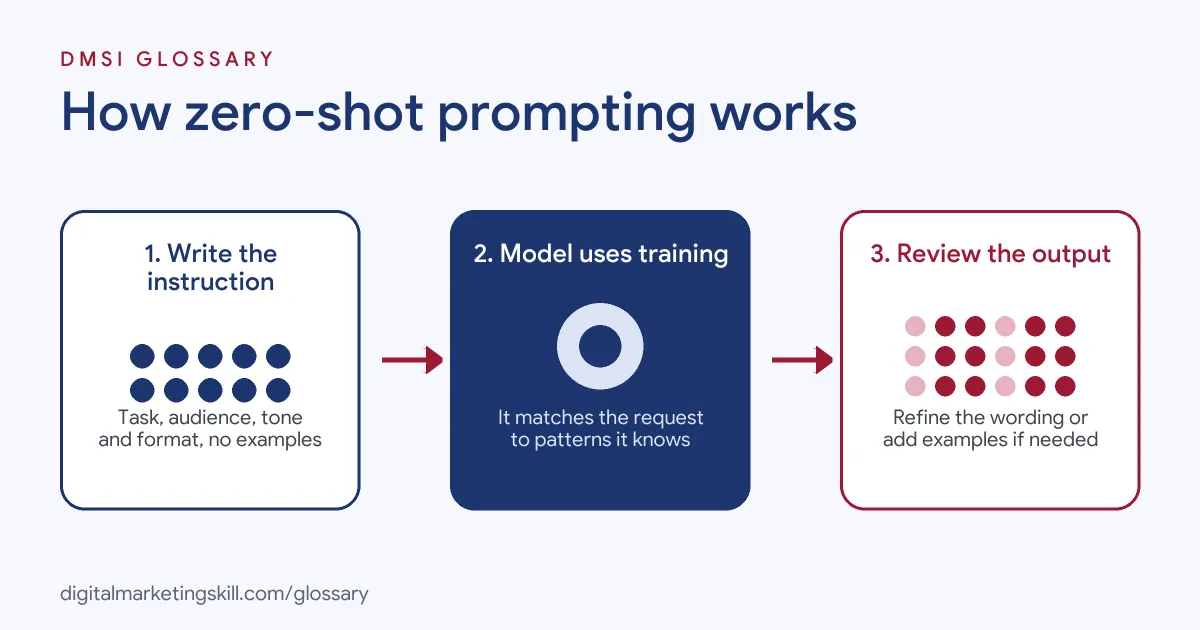
A zero-shot prompt works because the model has already seen huge amounts of text in training. Then it was tuned to follow instructions. So when you describe a task, it can match your request to patterns it already knows.
Instruction Tuning
Raw language models only predict the next word. However, modern models go through extra training on tasks written as instructions. The Prompt Engineering Guide notes that “Instruction tuning has been shown to improve zero-shot learning.” As a result, modern chat tools are much better at following plain requests than early models were.
Human Feedback
In addition, many models are trained with human feedback. First, people rate answers, and then the model learns which ones they prefer. As a result, it gives useful, on-topic replies to simple instructions, even with no examples.
Clear Instructions Do the Work
Because there are no examples, your words carry all the weight. Google’s Gemini guide says “An effective and efficient way to customize model behavior is to provide it with clear and specific instructions.” So you should state the task, the audience, the tone and the format. For example, “Write three subject lines under 50 characters for a spring sale email aimed at busy parents” works far better than “Write subject lines”.
Zero-Shot Reasoning
Sometimes, a short phrase can improve results on harder tasks. A well-known research paper found that “LLMs are decent zero-shot reasoners by simply adding “Let’s think step by step” before each answer.” This idea led to chain-of-thought prompting.
When Zero-Shot Falls Short
Zero-shot prompting is not always enough. For example, the model may not know your brand voice, your product names or the exact format your team uses. In those cases, it has to guess. As a result, outputs can feel generic or drift from what you need.
Google’s own guidance leans towards examples. Its Gemini guide warns that “Prompts without few-shot examples are likely to be less effective.” So for important or repeated tasks, it’s worth testing both styles. Then you keep the one that gives the best results for the least effort.
A good rule is to start simple. First, try a clear zero-shot prompt. If the answer is close, refine your instructions. However, if the model keeps missing the pattern, add one or two short examples. That small change often fixes format problems straight away.
Examples of Zero-Shot Prompting
- A content team summarising research. The writer pastes a long industry report and asks for five key points in plain English. As a result, the AI gives a clear summary with no examples needed.
- A social media manager sorting comments. The manager asks the AI to label each comment as a question, complaint or praise. Then they pass complaints to the support team first.
- An online shop writing product copy. The marketer gives product details and asks for a 60-word description in a friendly tone. After that, they edit the draft to match the brand voice.
Zero-Shot vs Few-Shot vs Chain-of-Thought Prompting
| Point | Zero-shot | Few-shot | Chain-of-thought |
|---|---|---|---|
| Examples in the prompt | None | A few worked examples | Optional |
| Main idea | Instructions only | Show the pattern you want | Ask the model to reason step by step |
| Best for | Simple, common tasks | Fixed formats and brand style | Logic, maths and multi-step tasks |
| Prompt length | Short | Longer | Medium |
| Effort to write | Low | Medium | Low to medium |
In short, start with zero-shot. Then move to few-shot prompting when you need a very specific output.
How to Write a Zero-Shot Prompt
- Start with the task. Use a clear verb, such as write, summarise, classify or translate.
- Give context. Say who the output is for and why. For example, “for first-time buyers of running shoes”.
- Set the format. Ask for a list, table, word count or number of options.
- Define the tone. Say whether you want friendly, formal, playful or direct.
- Add limits. Mention what to avoid, such as jargon, prices or claims you can’t prove.
- Paste the input. Then add the text or data the model should work on, clearly separated from the instruction.
- Review and refine. If the answer misses the mark, adjust the wording or add an example.
Best Practices for Zero-Shot Prompting
- Be specific. Vague prompts get vague answers, so name the audience, goal and format.
- Use one task per prompt. Splitting big jobs into smaller steps gives cleaner results.
- Put instructions first. Then add your input below, so the model knows what to do with it.
- Reuse what works. Save strong prompts as templates, or add them to a system prompt.
- Check facts. Always review outputs, since models can still make things up.
- Know when to switch. If the format keeps drifting, add one or two examples.
Common Mistakes to Avoid
- Being too short. “Write a post” gives the model almost nothing to work with.
- Asking for too much at once. Long lists of tasks in one prompt often get mixed up.
- Trusting every answer. Zero-shot outputs can include an AI hallucination, so check names, numbers and claims.
- Forcing zero-shot on niche tasks. For unusual formats or a strict brand style, examples work better.
- Leaving out the audience. Without it, the tone may not fit your readers.
- Never testing. Instead, try a few versions of the prompt and compare the results.
Where You’ll Use Zero-Shot Prompting at Work
You’ll use zero-shot prompting in almost any marketing role that uses AI tools. For example, content writers use it for drafts and outlines. Similarly, social media managers use it for caption ideas and comment sorting. Also, SEO specialists use it for meta descriptions, while email marketers use it for subject lines. Meanwhile, prompt engineers and AI specialists compare zero-shot and few-shot set-ups to find the most reliable one for each task. For instance, a team might test a zero-shot prompt for product descriptions on twenty items. Then they compare it with a few-shot version and keep the one that needs fewer edits. In fact, job ads often list this skill under prompt engineering.
Learn It in the Full Stack Track
You can practise zero-shot prompting across SEO, ads, social and email in the Full Stack programme, which covers all four tracks. Every track includes a U.S. Project Internship from day one, with unlimited 1-on-1 mentoring.
Frequently Asked Questions
What does “zero-shot” mean?
It means the prompt includes zero examples. The model gets only the instruction and the input.
Is zero-shot prompting good enough for marketing?
Often, yes. For simple tasks like summaries and rewrites, a clear zero-shot prompt usually works well.
When should I use few-shot prompting instead?
Use it when you need a fixed format, a specific style or labels the model doesn’t know. In that case, a few examples guide it better.
Does zero-shot prompting work in ChatGPT, Claude and Gemini?
Yes. All major chat tools follow instructions, so zero-shot prompts work in each of them.
How can I make a zero-shot prompt better?
Add the audience, goal, tone, format and limits. Then review the result and refine your wording.
Sources: Prompt Engineering Guide: Zero-Shot Prompting; Google AI for Developers: Prompt design strategies; arXiv: Large Language Models are Zero-Shot Reasoners.