
Google AdSense pays a site for showing ads, not simply for having traffic. The rate depends on your topic, your audience and how fast your pages load. Understand those levers and AdSense moves from a mystery number to a system you can actually improve, one page at a time.
Key Takeaways
- Google requires a balance of at least $10 before it begins identity verification, the first real step toward getting paid (Google AdSense Help).
- Once your balance reaches the payment threshold by month end, Google issues payment between the 21st and 26th of the following month; below threshold, the balance simply rolls over (Google AdSense Help).
- CPM rates are driven mainly by niche, geography, device type, ad viewability and ad unit size, not by how many ads you run (AdPushup).
- Google’s own Core Web Vitals thresholds, a page load (LCP) within 2.5 seconds, interactivity (INP) of 200 milliseconds or less, and layout stability (CLS) of 0.1 or less, directly affect whether ads are even seen (Google web.dev).
- Articles of 7,000+ words draw close to 4 times the traffic of average-length posts, which matters because more qualified traffic is what actually raises AdSense earnings, not more ad units (Semrush).
In this guide
- Why Google AdSense Confuses Beginners
- How Google AdSense Actually Works
- What Actually Changes Your Google AdSense Rate
- How To Improve Each Factor
- Measuring Whether Google AdSense Is Working
- The One Decision Rule For Google AdSense
- A Worked Example: Fixing Speed Before Adding Ads
- Why Content Quality Still Decides Google AdSense Earnings
- Common Google AdSense Mistakes
- Frequently Asked Questions About Google AdSense
- Build The Traffic That Makes Google AdSense Worth Running
Why Google AdSense Confuses Beginners
Most new publishers judge Google AdSense by one number: total earnings. That number hides almost everything useful. Two sites with identical traffic can earn wildly different amounts. Earnings depend on niche, audience location, device mix and page experience. Traffic alone decides almost nothing.
The confusion gets worse because AdSense pays through an auction, not a fixed rate card. Advertisers bid for each impression in real time. Google’s own payment documentation confirms the mechanics are tied to a running balance rather than a per-post rate. A post earning very little today can earn more next month with no changes at all. Advertiser demand simply shifted underneath it.
Ground rule for this guide: every number below is either a verified Google policy figure or clearly labelled as an illustrative, invented example. In the spirit of Google’s own guidance on helpful, people-first content, the content itself still comes first. Google AdSense can be a meaningful part of a content business. No honest guide promises a specific income, though. For a fuller picture of how the Institute frames income claims, see the earnings disclaimer.
How Google AdSense Actually Works
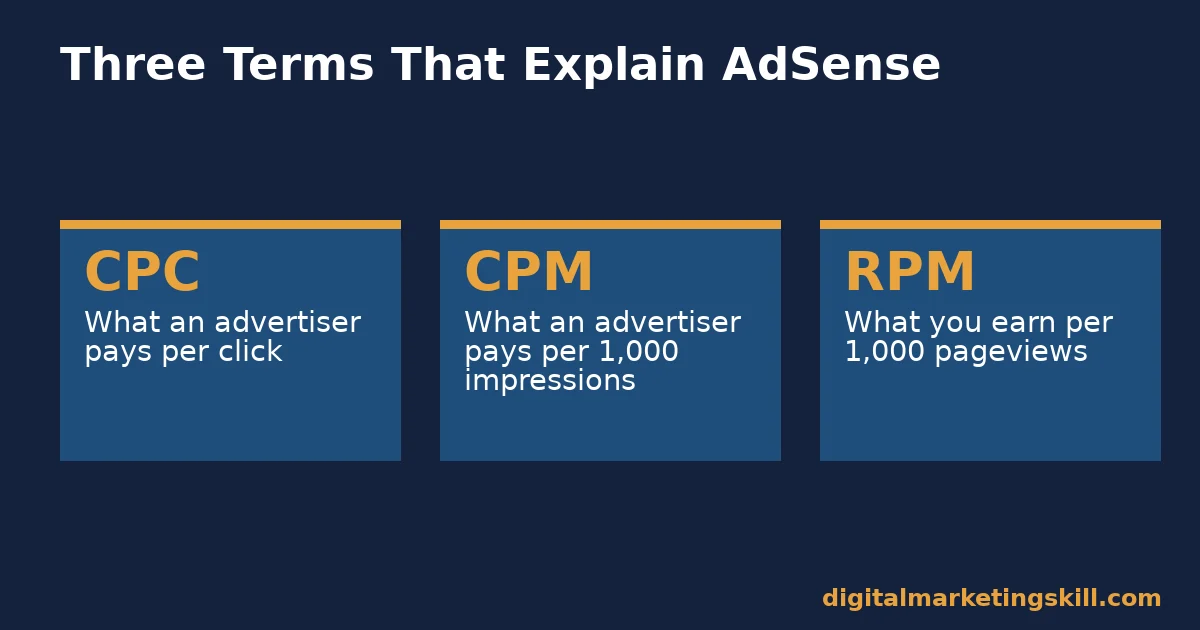
Three terms explain almost everything: CPC, CPM and RPM. CPC is cost per click. It is what an advertiser pays when someone clicks their ad. CPM is cost per thousand impressions. It is what an advertiser pays for every 1,000 times their ad is shown. RPM is revenue per thousand impressions. It is what you actually earn per 1,000 pageviews, after Google’s share.
Every time a visitor loads a page with an ad slot, Google runs a live auction among advertisers interested in reaching that specific visitor. The winning bid is not always the highest one. AdPushup’s analysis of CPM factors notes that relevance and ad quality weigh into the outcome too. The ad that wins loads instantly. You earn based on the outcome, whatever it was.
Getting paid depends on a running balance, not a per-post payout. Google requires a balance of at least $10 before it even begins identity verification. Once verified, and once your balance clears the payment threshold by the end of a month, payment goes out. That window falls between the 21st and 26th of the following month. Below the threshold, the balance simply carries forward.
What Actually Changes Your Google AdSense Rate
Three factors do almost all the work in determining whether Google AdSense earns a little or a lot from the same traffic. Here is what each one actually does.
Niche And Geography: Built For Advertiser Demand
DataReportal and We Are Social’s research puts the global online audience at 5.79 billion social media user identities alone. Even a narrow niche can still reach a meaningful pool of readers. Advertisers bid higher to reach audiences they can convert profitably. A finance or technology audience in a high-advertiser-demand country draws more competitive bids than a general-interest audience elsewhere. That is why two sites with equal traffic can post very different RPMs. This is a demand effect, not a quality judgment on the content itself.
Ad Placement And Viewability: Built For Being Seen
An ad that nobody actually sees earns little, no matter how well it targets the right advertiser. Viewability is the share of ad impressions that were actually visible on screen. AdPushup’s research names it as a direct driver of CPM. Placement above the fold, inside natural reading breaks, tends to outperform placement a visitor never scrolls to. Test placements one at a time, so you can actually tell which change moved the number.
Site Speed And User Experience: Built For Qualifying The Impression
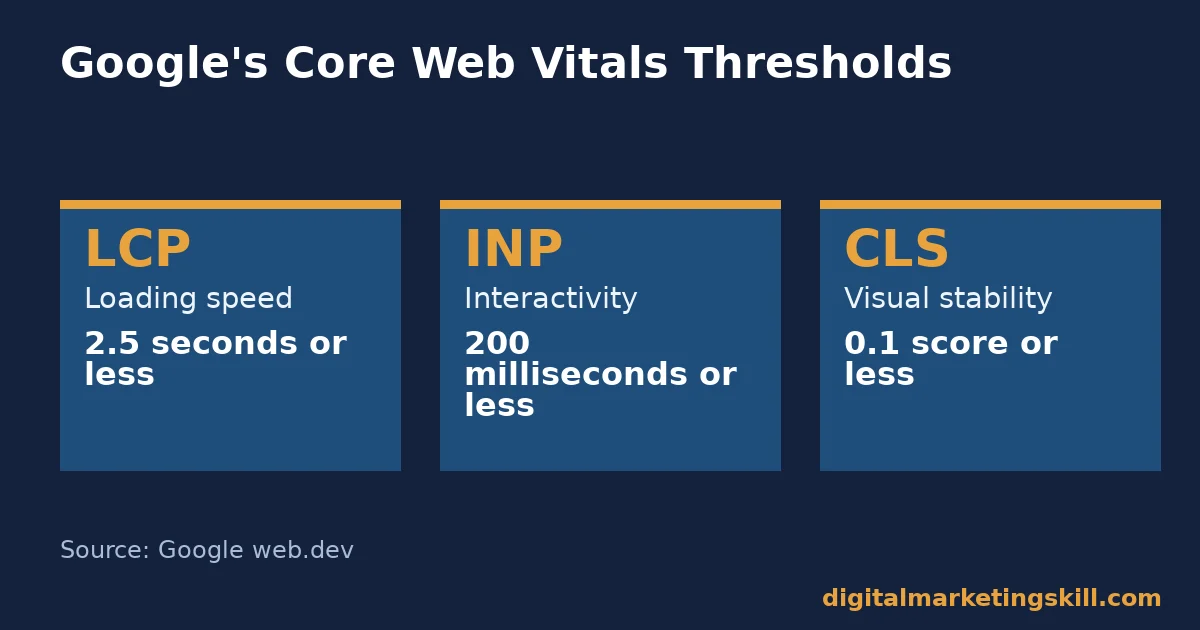
A slow page can lose a visitor before an ad ever finishes loading. That turns a potential impression into nothing. Google’s own Core Web Vitals thresholds set the bar. Largest contentful paint should land within 2.5 seconds. Interactivity should sit at 200 milliseconds or less. Layout shift should stay at 0.1 or less. Missing those thresholds does not just hurt search rankings. It quietly reduces how many ad impressions actually complete.
Ad Format And Unit Size: Built For Advertiser Fit
Larger, more standard ad formats tend to attract more bidders than small or unusual sizes, simply because more advertiser creative already exists in those common dimensions. A responsive unit that adapts to the available space usually outperforms a fixed, oddly sized one, because it can accept a wider range of competing bids.
How To Improve Each Factor
Knowing what drives Google AdSense earnings only helps once you have a starting move for each factor. These three approaches mirror the drivers above.
Niche And Geography: Narrow Toward High-Demand Topics
Within whatever broad subject you already cover, look for the specific angle that overlaps with a high-advertiser-demand topic, such as software tools, financial decisions or B2B services, instead of chasing a completely new niche. A narrower, more specific angle usually earns a better rate than a broad, generic one, even at similar traffic. Write the angle a specific reader actually needs, not the broadest version of the topic.
Ad Placement And Viewability: Prioritize Positions Readers Actually See
Place ads inside the content a reader is already scrolling through, not only at the very top or bottom of a page. This site’s guide to increasing blog traffic covers how reading patterns actually move down a page, which is the same pattern worth designing ad placement around. A placement that matches where attention already goes earns more than one that fights for a visitor’s eyes.
Site Speed And User Experience: Meet The Core Web Vitals Thresholds
Test your key pages against Google’s own LCP, INP and CLS thresholds, and fix whichever one fails first. A single oversized image or an ad script that blocks rendering is often responsible for missing the 2.5-second LCP target, and fixing that one issue can measurably lift completed ad impressions.
Ad Format And Unit Size: Favor Responsive, Standard Sizes
Default to responsive ad units wherever your layout allows it, rather than locking in one fixed size. Review which formats are actually filling with competitive bids, and retire the ones that consistently sit empty or earn far below your site average. A unit that never fills is not helping anyone, including the reader looking at an empty box.
Measuring Whether Google AdSense Is Working
A change to Google AdSense is only worth keeping once a number confirms it helped. These are the metrics worth checking before you add or move an ad unit. Each one answers a different question, so no single metric tells the whole story on its own.
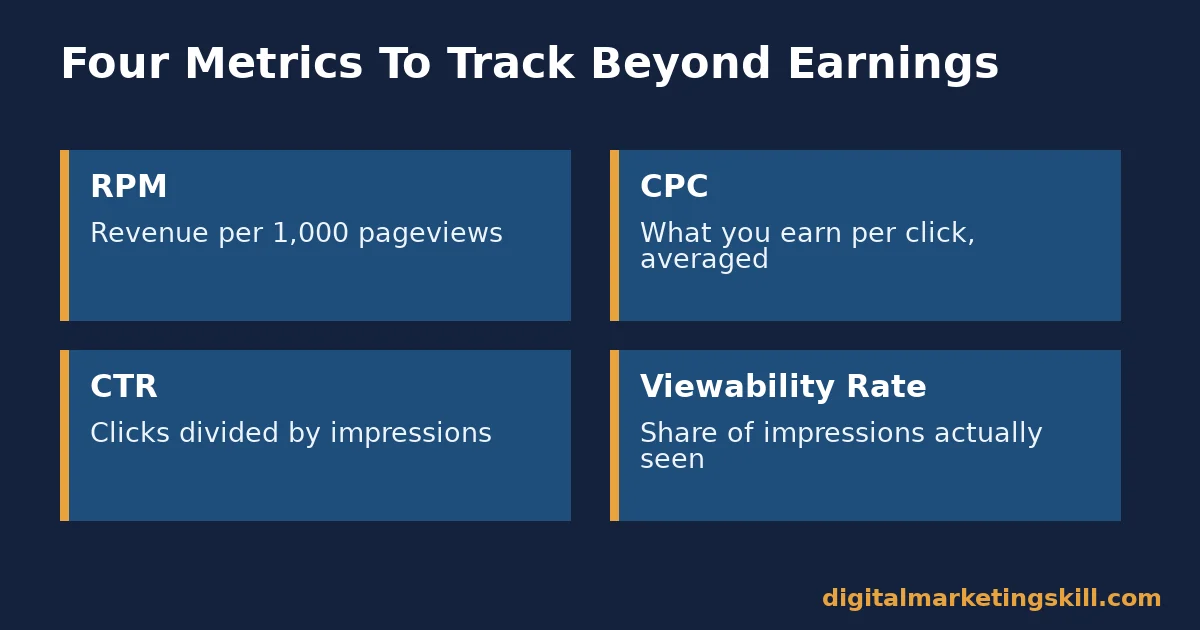
RPM is revenue per 1,000 pageviews. It is the single best number for comparing performance across pages or time periods, because it is normalized for traffic volume.
CPC is what you earn per click, averaged across your ads. A rising CPC with flat traffic usually means your audience or placement improved, not that you got lucky.
CTR is clicks divided by impressions. A very high CTR can be a warning sign of accidental clicks from poor placement, which risks a policy violation, not a win.
Viewability rate is the share of ad impressions that were actually visible on screen. A low viewability rate usually points back to placement or page speed, not to the ad network itself.
Track all four together, not one in isolation. A page can look healthy on CTR while quietly losing money on RPM, if the clicks it earns are low-value ones. Review the full set monthly, not just whichever number happened to move. A spreadsheet with all four tracked side by side, even a simple one, beats checking each metric in a different tab.
The One Decision Rule For Google AdSense
If you only take one rule from this guide, take this one: optimize for RPM, not for the number of ads on a page. Adding more ad units can raise short-term impressions while quietly lowering viewability, page speed and reader experience, which drags RPM down over time.
Illustrative, invented numbers, not a real result: imagine a page earning an RPM of $8 with three ad units. Adding two more units pushes impressions up, but viewability drops and page speed slips past the Core Web Vitals thresholds. RPM falls from $8 to $6, even though raw ad impressions rose. The extra units cost more than they earned. Removing them and improving load speed instead would be the better move under this rule. The same logic applies to almost any AdSense change: judge it by RPM over a few weeks, not by a single day’s raw impression count. A single good or bad day rarely means anything on its own.
A Worked Example: Fixing Speed Before Adding Ads
Illustrative, invented numbers, not a real company’s figures: a blog with steady traffic and a modest Google AdSense RPM runs a Core Web Vitals check and finds its LCP sits well past 2.5 seconds on most posts, mainly due to an oversized header image. The team compresses that image and defers a non-essential script instead of adding more ad units. LCP drops under the threshold. Viewability rate rises noticeably over the following weeks, because more visitors stay on the page long enough for ads to fully render.
The limits of this case matter: it describes one hypothetical site, not a controlled study, and results vary by niche, audience and existing site speed. Even so, the order of operations is worth testing broadly. Fix what is already broken before adding anything new. A faster, more usable page tends to help every metric at once, not just the one you were targeting.
Why Content Quality Still Decides Google AdSense Earnings
It is tempting to treat Google AdSense as a technical problem: pick the right ad sizes, place them in the right spots, meet the right speed thresholds. All of that matters. None of it replaces genuinely useful content.
A thin, generic page rarely holds a visitor’s attention long enough for an ad to finish loading, let alone to earn a click an advertiser actually values. Someone who leaves in seconds never gives an ad the chance to do its job. A specific, well-researched page does both. It keeps a reader on the page longer. That raises the odds an ad impression completes. It also tends to attract a more engaged, more valuable audience in the first place.
This is one reason why the length and depth data cited earlier matters well beyond search rankings alone. Longer, more thorough articles do not just rank better. They hold attention longer. Attention is exactly what an ad auction is bidding on. Treat content quality as the foundation Google AdSense sits on top of, not as a separate project running alongside it. Every other fix in this guide works better once that foundation is solid.
Common Google AdSense Mistakes
A handful of mistakes show up repeatedly among new publishers, regardless of niche. None of them require a bigger site to fix.
The first is clicking your own ads, even once, even by accident while testing. Google’s policies treat this seriously, and it can put an account at risk. Use the official preview tools instead of visiting your live site to check how ads look.
The second is stacking too many ad units above the fold. It feels like it should raise earnings, since more impressions seem like more opportunity. In practice it often lowers viewability and slows the page, which drags RPM down instead of up, exactly as the decision rule above describes.
The third is ignoring policy emails from Google. A policy warning almost always names the specific page or issue involved. Fixing it quickly protects the whole account, while ignoring it risks a much larger problem later. Treat every policy notice as urgent, even on a site that otherwise earns very little.
A fourth, quieter mistake is checking earnings daily and reacting to normal noise. RPM moves naturally from day to day as advertiser demand shifts. Judge any change over at least a few weeks, not a single day’s swing.
Frequently Asked Questions About Google AdSense
How much does Google AdSense pay per click?
It varies enormously by niche, geography, device and ad quality, so there is no single honest answer. Track your own CPC and RPM over time instead of comparing against a number from another site. A number quoted elsewhere rarely transfers to a different audience or niche.
How long does it take to get approved for Google AdSense?
Google does not publish a fixed timeline, and it depends on site readiness and review volume. A site with clear, original content and working navigation is in a better position than one still under construction.
Does adding more ads increase Google AdSense earnings?
Not reliably. Past a certain point, extra ad units reduce viewability and slow the page, which can lower RPM even as raw impressions go up. Fewer, well-placed ads often outperform many poorly placed ones.
Why did my Google AdSense balance not get paid this month?
Most often because the balance had not yet reached the payment threshold by month end. Below threshold, Google rolls the balance into the next month automatically; nothing is lost. Check your account’s payment history page to confirm exactly where the balance stands before assuming anything is wrong.
Does site speed really affect Google AdSense revenue?
Yes, indirectly but meaningfully. A slow page can lose a visitor before an ad finishes loading, which turns a potential impression into nothing. Meeting Google’s own Core Web Vitals thresholds helps protect the impressions you already have.
Is Google AdSense a reliable way to earn a full income from a blog?
For some publishers with significant, well-targeted traffic, it can be one meaningful income source among several. For most new sites, though, it starts small and grows slowly alongside real traffic. No guide can honestly promise a specific income, and the Institute’s own earnings disclaimer, linked earlier in this guide, explains why.
What is the difference between CPC, CPM and RPM?
CPC is what an advertiser pays per click. CPM is what an advertiser pays per 1,000 impressions. RPM is what you, the publisher, actually earn per 1,000 pageviews, after Google’s share. It is the number worth tracking most closely, since it reflects everything else happening upstream.
Can a brand-new blog realistically earn from Google AdSense right away?
It can be approved quickly in some cases, but meaningful earnings usually follow meaningful, qualified traffic. Growing genuine traffic to a specific, well-served audience tends to matter more than tweaking ad settings on a near-empty site.
Should I click my own Google AdSense ads to see how they look?
No. Use Google’s official preview tools instead. Clicking your own ads, even by accident, risks a policy violation that can affect your whole account.
Why does Google AdSense RPM vary so much month to month?
Advertiser demand shifts constantly, along with your own traffic mix. A change in audience location, device type or seasonal advertiser spending can move RPM even when nothing on your site changed at all.
Does Google AdSense work the same way on mobile and desktop?
Not exactly. Advertiser demand and ad formats differ by device, which is one reason RPM can shift simply because your audience’s device mix changed, even with identical content and traffic volume.
Build The Traffic That Makes Google AdSense Worth Running
Google AdSense rewards sites that already do the fundamentals well: a clear niche, fast pages and real traffic. Building that foundation is a skill, not luck. If you want to build it properly, the Digital Marketing Skill Institute’s Master Diploma in Digital & AI Marketing can help.
It includes an AI-Powered WordPress and SEO Specialist track focused on exactly this kind of site and content work, inside four AI-powered tracks totalling ten courses, with a Full Stack option for completing all four.
The program pairs unlimited 1-on-1 coaching and mentoring with a U.S. Project Internship and a verified U.S. Work Reference Letter. It is dual US and UK accredited and recognised in more than 100 countries, 100% online, so you can study from anywhere in your country.
Explore the full Master Diploma in Digital & AI Marketing program, browse more guides on the digital marketing blog, and read real outcomes on the reviews page. When you are ready, apply here. Learn more about the Institute at digitalmarketingskill.com, wherever you live, and start building a site worth monetizing anywhere in the world at digitalmarketingskill.com.
Every figure in this guide was checked against its original source before publication. Figures marked as illustrative are invented examples, not real results.
![9 Amazing Digital Marketing Skills to Make Money Online [With Proof]](https://digitalmarketingskill.com/wp-content/uploads/2019/07/9-Amazing-Digital-Marketing-Skills-to-Make-Money-Online-With-Proof-17.png)






