
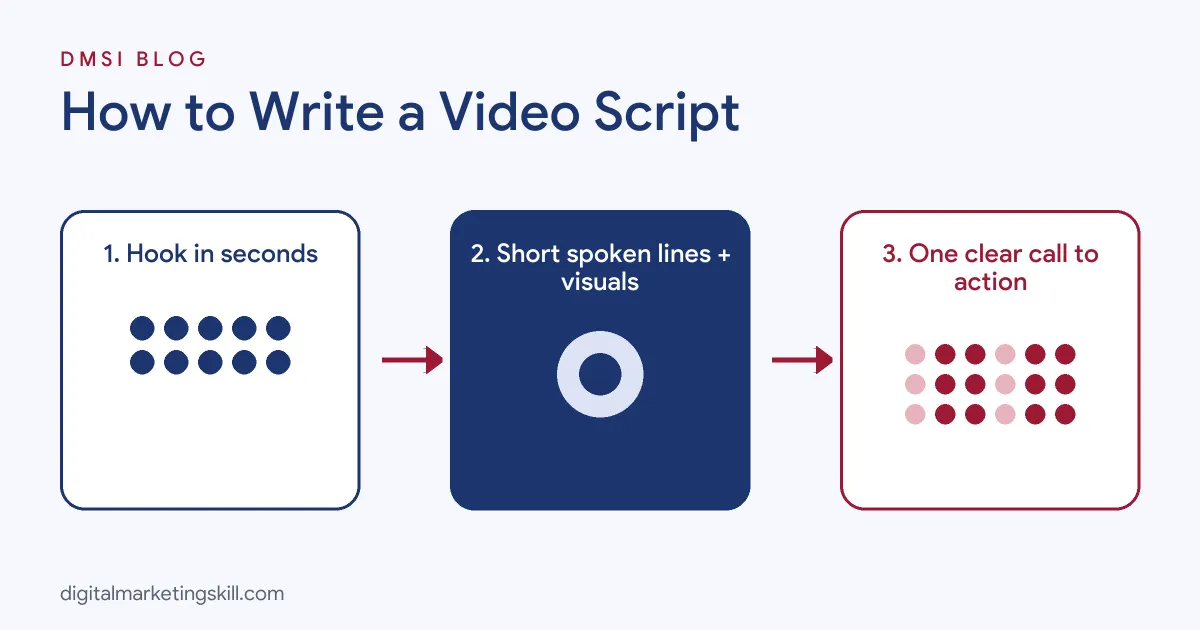
To write a video script, start with one goal and one viewer, outline the video in three parts (hook, main content, call to action), then write the spoken words in short, conversational sentences with notes for what appears on screen. Read the script aloud, time it, cut anything that does not serve the goal, and only then record. A good script makes filming faster, keeps videos tight and helps viewers stay to the end.
This guide walks through the full process step by step, shows the two main script formats, gives ready-to-use templates for explainer, social, ad, tutorial and talking-head videos, and covers hooks, timing, editing and how to use AI without sounding generic.
Key Takeaways
- HubSpot’s process for writing a video script runs from choosing a target audience and setting a goal to writing a brief, outlining, drafting section by section, editing and doing a verbal run-through off camera (HubSpot).
- Roboneo recommends a simple two-column layout for beginners, with spoken lines on one side and scene, B-roll, timing and caption notes on the other (Roboneo).
- Blare Media lists writing a strong hook, a conversational tone, visual and audio cues and a clear call to action among the core parts of a compelling script (Blare Media).
- What Most Scriptwriting Guides Miss
- What a Video Script Includes
- Script Formats
- How to Write a Video Script: 9 Steps
- Writing Hooks That Work
- Video Script Templates
- Timing and Length
- Using AI to Help
- Common Mistakes
- FAQ
What Most Scriptwriting Guides Miss
Most guides explain the steps of writing a script, and many offer a template. Few explain the single most important difference between a script and an essay: a script is written for the ear and the eye, not for the page. Viewers cannot reread a sentence they missed, so lines must be short, spoken naturally and supported by what is on screen. If a script reads well silently but sounds stiff aloud, it will not work.
The other gap is format. A script for a 30-second vertical video, a 10-minute YouTube explainer and a product ad look very different. Short-form videos need a hook in the first second or two and often rely on on-screen text because many people watch with the sound off. Longer videos need structure that keeps people watching through the middle. This guide covers both, with templates for each.
What a Video Script Includes
A video script is the written plan for everything a viewer hears and sees. It usually includes:
- Spoken lines: narration, voiceover or dialogue.
- Visual notes: what is on screen, such as the presenter, B-roll footage, screen recordings, product shots or graphics.
- On-screen text and captions: titles, key points and subtitles.
- Audio cues: music, sound effects and pauses.
- Timing: rough timestamps or durations for each section.
- Call to action: what the viewer should do next.
Script vs outline vs storyboard
An outline is a list of the main points in order. A script turns those points into the exact words and visual notes. A storyboard shows each shot as a sketch or image. For most marketing and social videos, an outline plus a script is enough. Storyboards help for ads, animations and anything with many planned shots.
Do you always need a full script?
Not always. Some experienced creators work from bullet points so they sound natural. But a full script helps beginners, short videos where every second counts, videos with several people or locations, ads, and anything that needs approval from a client or manager. Even if you do not read it word for word, writing it forces you to clarify what you want to say.
Video Script Formats
Single-column script
The spoken words are written as paragraphs, with visual notes in brackets or bold. This suits talking-head videos, vlogs, podcasts and simple social videos.
[Presenter to camera, office background]
Most small businesses post on Instagram every day and still struggle to get sales. Here is the reason, and three fixes you can try this week.
[On-screen text: 3 fixes for Instagram sales]
Two-column (audio-visual) script
The left column describes visuals and the right column contains audio, or the other way round. Roboneo recommends this layout for beginners because it keeps narration and visuals aligned. It suits explainers, tutorials, product videos and ads.
| Visual | Audio |
|---|---|
| Close-up of a phone showing a notification | VO: Ever missed a customer message because it got buried? |
| Screen recording of the inbox dashboard | VO: Here is how to see every message in one place. |
| Logo and website address | VO: Try it free today. Link below. |
Screenplay format
Used for films, scripted series and narrative ads with characters and scenes. It follows strict formatting rules for scene headings, action, character names and dialogue. Most marketing videos do not need it.
How to Write a Video Script: 9 Steps
Step 1: Define one goal
Decide what the video must achieve. Examples include explaining a feature, getting sign-ups for a webinar, building trust with a customer story or teaching a skill. One video should have one main goal. If you have three goals, you probably have three videos.
Step 2: Know the viewer
Write down who will watch, what they already know, what problem they have and where they will watch: a phone feed, YouTube on a laptop, a sales call or a website page. HubSpot puts choosing the target audience first in its process for a reason; the audience decides the tone, length and language.
Step 3: Write a short brief
A brief keeps everyone aligned, especially if a client, manager or editor is involved. Include:
- goal and audience;
- key message in one sentence;
- platform, format and target length;
- tone of voice;
- call to action;
- who appears on camera and any assets available.
Step 4: Outline the structure
Most effective marketing videos follow a simple shape:
- Hook: grab attention and show why the viewer should keep watching.
- Problem or context: what the viewer is struggling with or curious about.
- Main content: the solution, steps, story or demonstration, ideally in three points.
- Proof: an example, result, demonstration or testimonial, if you have one.
- Call to action: one clear next step.
Write the outline as bullet points before writing any full sentences.
Step 5: Write the hook
The opening lines decide whether people stay. Write several versions and pick the strongest. The section on hooks below gives formulas.
Step 6: Draft the script section by section
HubSpot recommends writing the script section by section from your outline. Write how you speak:
- Use short sentences and everyday words.
- Use “you” and speak to one person.
- Use contractions such as “you’re” and “it’s” so it sounds natural.
- Put one idea in each sentence.
- Avoid jargon unless your audience uses it.
Step 7: Add visual, text and audio notes
For every line, ask what the viewer will see. Note B-roll, screen recordings, graphics, product shots and on-screen text. Plan captions, because many viewers watch on mute. HubSpot suggests supporting B-roll with callouts in the narration so visuals and words reinforce each other.
Step 8: Edit ruthlessly
Cut anything that does not serve the goal. Remove repeated points, long introductions and filler words. Check that each section leads naturally to the next and that the call to action is clear.
Step 9: Read it aloud and time it
HubSpot recommends a verbal run-through off camera. Read the script at a natural pace, time it and mark any lines that are hard to say. Rewrite those until they flow. If possible, have someone else read it too; they will stumble where the script is unclear.
How to Write a Strong Hook
The hook is the first one to five seconds on short-form platforms, and roughly the first 15 to 30 seconds on longer videos. Blare Media lists crafting a strong hook among the essentials of a compelling script. Hook formulas that work across many topics:
- The problem: “If your ads get clicks but no sales, this is probably why.”
- The result: “This is how we cut our email writing time in half.”
- The question: “Do you know what recruiters look at first on your CV?”
- The surprise: “Posting more often might be hurting your reach.”
- The mistake: “Stop starting your videos with ‘Hi guys, welcome back’.”
- The list: “Three settings to change in Google Ads today.”
- The story: “Last year, a bakery owner sent us one message that changed how we write ads.”
Pair the spoken hook with a strong first visual and on-screen text that states the promise. Then deliver on it quickly; viewers leave if the hook overpromises.
Writing for the Ear: Style Tips
- Keep sentences short. Aim for lines that can be said in one breath.
- Use the rule of three. People remember ideas grouped in threes, such as three steps or three benefits.
- Repeat the key point. Say the main message near the start and again near the end.
- Use signposts. Phrases such as “first”, “next” and “the last thing” help viewers follow along.
- Show, do not just tell. If you can show it, describe less and point to the screen more.
- Write numbers as they are spoken. Write “about two thousand” rather than “2,000+” if the presenter will read it aloud.
- Leave space for pauses. Mark pauses where you want a point to land.
A useful check is the three Cs: is the script clear, concise and compelling? If any line fails one of those, rewrite or cut it.
Video Script Templates
Copy these templates and fill in the brackets. Each one follows the hook, content and call-to-action structure.
1. Short-form social video (15 to 45 seconds)
Hook (0 to 3 seconds): [Bold statement, question or result.] On-screen text: [same promise in a few words].
Point 1 (3 to 12 seconds): [First tip or step.] Visual: [demo or example].
Point 2 (12 to 22 seconds): [Second tip.]
Point 3 (22 to 32 seconds): [Third tip.]
Call to action (last 3 to 5 seconds): [Follow for more, save this, comment a word, visit the link.]
Short videos work best with captions, fast cuts and one idea. For more on short-form reach, see our guide to going viral on TikTok.
2. YouTube explainer (5 to 12 minutes)
Hook (0:00 to 0:20): [The question or problem, and what viewers will learn.]
Credibility (0:20 to 0:40): [Why you can help, briefly.]
Context: [Why this matters and common misunderstandings.]
Main content: [Three to five sections, each with a clear heading spoken aloud.]
Example or demonstration: [Show it working.]
Recap: [The key points in one breath.]
Call to action: [Subscribe, watch the next video, download a resource.]
Chapters, a clear title and a good description help explainers get found. Our guide to YouTube SEO for beginners explains how.
3. Product or service ad (15 to 60 seconds)
Hook: [Customer problem, in their words.]
Agitate: [What happens if it is not solved.]
Solution: [Your product, shown in use.]
Benefits: [Two or three outcomes, not features.]
Proof: [A real review, rating or result you have permission to use.]
Offer and call to action: [What to do now.]
4. Tutorial or how-to
Intro: [What you will make or achieve, and what you need.]
Step 1, Step 2, Step 3: [Each step with the action and the screen or hands shown.]
Common mistake: [One thing to avoid.]
Result: [Show the finished outcome.]
Next step: [Related tutorial or resource.]
5. Customer story or testimonial
Before: [The customer’s situation and challenge, in their words.]
Turning point: [Why they chose you.]
After: [What changed, with honest specifics.]
Advice: [What they would tell others.]
Call to action: [Learn more or get started.]
For testimonials, plan questions rather than writing lines for the customer, and only use real quotes with their consent.
6. Talking-head or thought leadership
Hook: [A strong opinion or observation.]
Why it matters: [Who it affects.]
Three points: [Each with an example.]
Takeaway: [One sentence viewers should remember.]
Call to action: [Comment, share or follow.]
Script Length and Timing
A common rule of thumb is that people speak at roughly 130 to 160 words per minute in a natural, clear delivery. That means:
| Video length | Approximate script length |
|---|---|
| 15 seconds | about 35 to 40 words |
| 30 seconds | about 65 to 80 words |
| 60 seconds | about 130 to 160 words |
| 3 minutes | about 400 to 480 words |
| 10 minutes | about 1,300 to 1,600 words |
Your own pace may be faster or slower, so time yourself reading a paragraph and adjust. Leave room for pauses, demonstrations and visuals with no speech.
Using AI to Help Write Video Scripts
AI tools can speed up scriptwriting, but they tend to produce generic, overly formal scripts if you give them vague prompts. Use AI for:
- brainstorming hooks and angles;
- turning a blog post or notes into a first outline;
- suggesting shorter versions of long lines;
- creating variations for testing different ads.
Give the tool your audience, goal, platform, length, tone and key points, and ask for a two-column script. Then rewrite the result in your own voice and read it aloud. Check every fact and claim yourself, because AI can state things confidently that are not true.
Preparing to Record
- Use a teleprompter app or put the script on a screen near the lens so you keep eye contact.
- Practise two or three times so you sound natural rather than read.
- Record in sections. It is easier to redo one section than the whole video.
- Allow small changes. If a different phrasing sounds better on camera, use it.
- Create a shot list from the visual column so nothing is forgotten.
A Full Example Video Script
Here is a complete 60-second script for a small business explainer, written in a two-column style. It is an illustrative example, not a real business.
| Visual | Audio |
|---|---|
| Owner at a cafe counter, looking at phone. Text: “Why your Google listing is losing you customers” | If people search for a cafe near them and do not find you, you are losing customers every day. |
| Phone screen showing a search for cafes nearby | Most people check Google before visiting somewhere new. Here are three quick fixes for your business profile. |
| Text: “1. Add real photos” | One: add real, recent photos of your food, your space and your team. |
| Text: “2. Update your hours” | Two: keep your opening hours accurate, especially on holidays. |
| Text: “3. Reply to reviews” | Three: reply to every review, good or bad, politely and quickly. |
| Owner smiling, holding a coffee | Do these three things this week and you will look more trustworthy to every customer who searches. |
| Text: “Follow for more local marketing tips” | Follow for more simple marketing tips for local businesses. |
The script is about 120 words, so it fits comfortably in under a minute with pauses and visuals.
Common Mistakes
- Starting slowly. Long greetings and introductions lose viewers before the value arrives.
- Writing for reading, not speaking. Long sentences and formal words sound stiff on camera.
- Trying to say everything. Too many points make the message forgettable.
- Ignoring visuals. A script without visual notes leads to dull footage or a scramble in editing.
- No clear call to action. Viewers need to be told what to do next.
- Forgetting sound-off viewers. Without captions or on-screen text, many people miss the message.
- Skipping the read-aloud. Problems that are invisible on the page become obvious when spoken.
One Rule to Remember
Write for one viewer, one goal and the ear: hook them fast, give them one clear message in short spoken lines matched to visuals, and end with one action.
Example: a freelance marketer in Nairobi is asked to make a 45-second Instagram Reel for a local gym. She writes a brief, outlines a hook about “the five-minute warm-up most people skip”, writes three short tips with on-screen text for each, adds a call to book a free trial session, reads it aloud and trims it from 140 to 105 words. Filming takes 20 minutes because every shot is planned. This example is illustrative and not a real person.
Video Scripting as a Marketing Skill
Video is central to social media, ads and content marketing, and brands need people who can plan and script videos that hold attention and drive action. Scriptwriting combines copywriting, storytelling and an understanding of each platform. If you are in your country, building a portfolio of short scripts and the videos made from them can help you win remote content, social media and video marketing work with brands around the world. Learn more about the wider field in our glossary entry on video marketing.
Frequently Asked Questions
How do you start a video script?
Start with a hook that states a problem, result, question or surprising fact, paired with a strong first visual. Avoid long introductions.
How many words is a 60-second script?
Roughly 130 to 160 words at a natural speaking pace, fewer if the video includes demonstrations or pauses.
What is the easiest video script format?
A two-column script, with visuals on one side and spoken words on the other, is easy to follow and keeps narration and footage aligned.
Should I write a script for a YouTube video?
Usually yes, at least a detailed outline. A script keeps videos focused, saves editing time and helps you hit your key points.
What is the rule of three in scriptwriting?
Grouping ideas in threes, such as three tips or three benefits, makes them easier to follow and remember.
What are the three Cs of a good script?
A common version is clear, concise and compelling: every line should be easy to understand, as short as possible and interesting enough to keep people watching.
Can AI write a video script?
AI can help with ideas and first drafts, but you should rewrite in your own voice, check facts and read it aloud before recording.
Do video scripts need scene notes?
Yes for anything with B-roll, screen recordings or several shots. Scene notes make filming and editing much faster.
How do I make a script sound natural?
Write the way you speak, use contractions and short sentences, read it aloud several times and allow yourself small changes while recording.
Can you provide an example of a script?
Yes. The 60-second example above shows a complete two-column script for a short business explainer.
Your Next Step
Scripting short videos that hold attention is one of the most useful content skills for social media and ads. The Master Diploma in Digital & AI Marketing at Digital Marketing Skill Institute covers AI-powered Social Media Management and Advertising, Lead Generation and Email Automation, Google, and a WordPress and SEO track where you build and rank a real website.
From day one, you work on a real U.S. company’s project through the U.S. Project Internship, so you finish with real results and a verified U.S. work reference letter. You also get unlimited one-on-one coaching. The program carries dual US and UK accreditation, is recognised in more than 100 countries, and runs 100% online over three months.
You can build those skills wherever you live, anywhere in your country. Read student reviews, then apply for the 65% partial scholarship to see if you qualify.
Sources checked November 2026: HubSpot, Roboneo and Blare Media. We have no connection with these companies.