
Link building analytics means proving which specific backlinks actually move traffic, rankings and revenue. It is not just counting how many links you got. Most marketing teams track link volume and stop right there. This guide covers three measurable channels: referral traffic, keyword rankings, and social signals, each paired with the exact report to pull.
Key Takeaways
- Pages gaining new referring domains fastest tend to rank higher. Ahrefs found #1 pages gain followed referring domains at 5-14.5% a month, in a study of 200,000 pages across 10,000 SERPs.
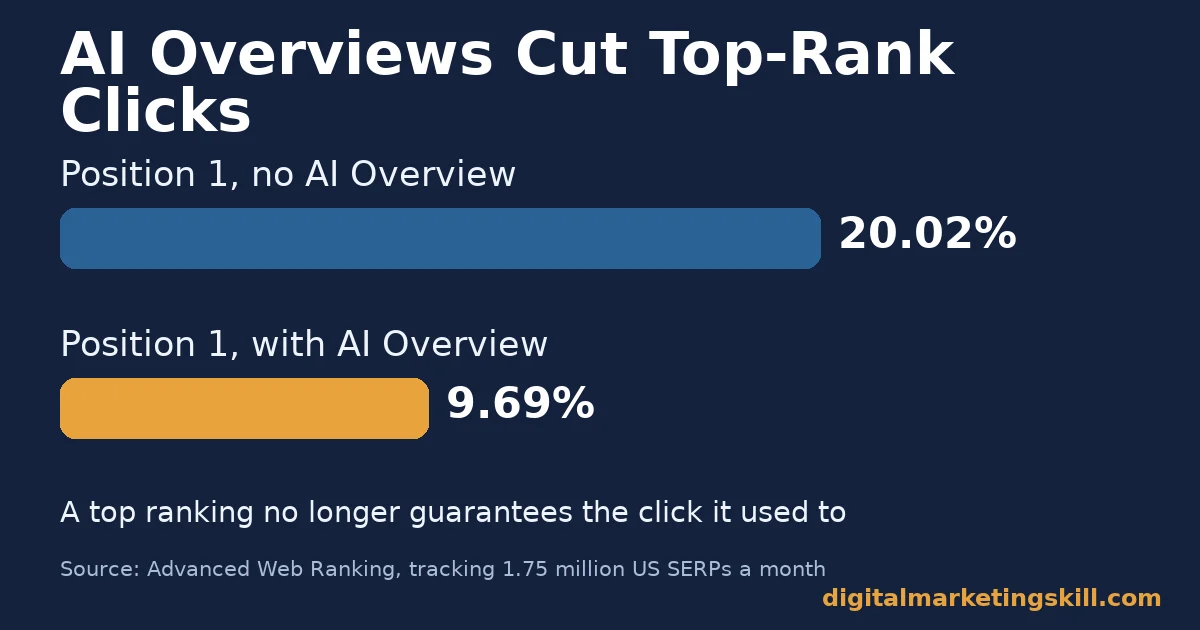
- Rank position does not guarantee clicks anymore. Position 1 averages a 20.02% click-through rate. But an AI Overview on the page can cut that by about 52%, per Advanced Web Ranking’s tracking of 1.75 million US SERPs a month.
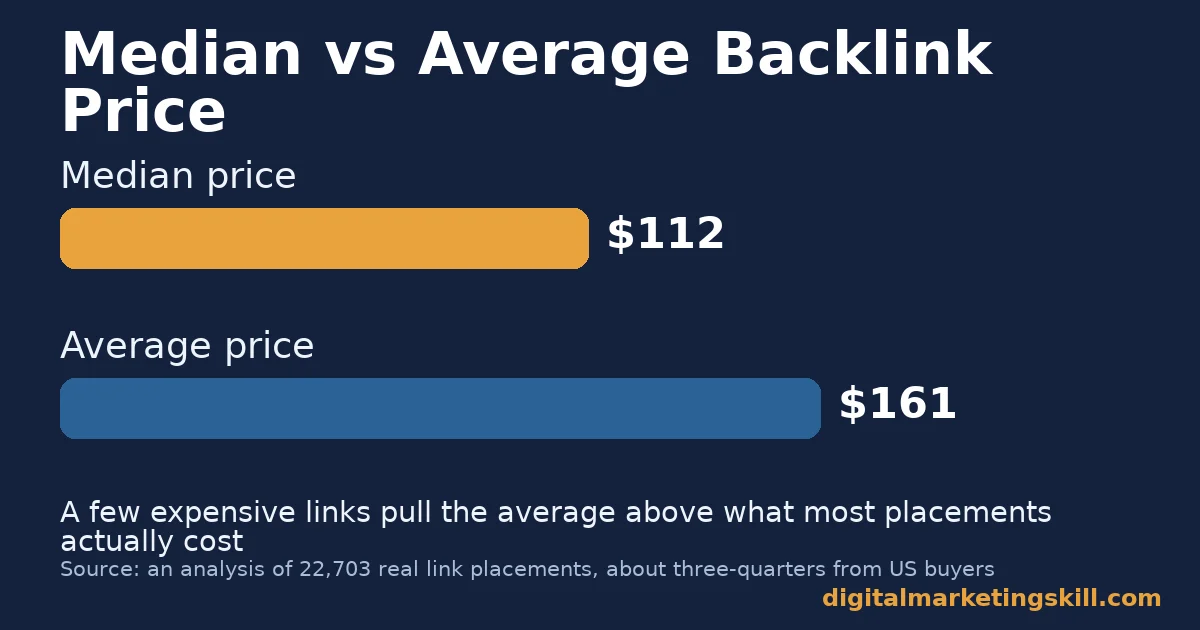
- A typical backlink placement costs a median of $112, based on an analysis of 22,703 real placements. The average price is higher, at $161.25, because a small number of expensive links pull the mean up.
- UTM tagging is the only reliable way to separate link-driven traffic from other referral traffic. Untagged links often get bucketed as generic “referral,” with no campaign detail at all.
- 518 SEO professionals surveyed said the acceptable cost for one high-quality link averages $508.95. That is well above the $112 median placement price, showing real willingness to pay for quality over volume.
In this guide
- What Most Link Building ROI Advice Still Gets Wrong
- How Link Building Analytics Actually Works
- Link Building Analytics Differs by Channel
- How to Lead With Each Channel’s Strength
- How to Measure Link Building Analytics
- The One Decision Rule for Where to Measure First
- A Real Case: Learning the SEO That Supports Link Building
- Frequently Asked Questions About Link Building Analytics
- Turn Link Building Analytics Into a Marketable Skill
What Most Link Building ROI Advice Still Gets Wrong
Most older guides walk through Universal Analytics menus that no longer exist. Google retired Universal Analytics, so those steps fail the moment a reader tries them. This guide uses GA4 and Search Console instead, the tools that run today.
The menu names changed, but the underlying questions did not. You still want to know which links sent visitors, which links supported a ranking gain, and which links were worth the price you paid. GA4 and Search Console just answer those questions differently than the old interface did.
Here are the ground rules. The figures below come from named studies of real pages and real transactions, not lab tests. Treat them as a snapshot, not a permanent ranking, since link markets and SERP layouts shift constantly. Most of the pricing data also skews toward US buyers, so treat dollar figures as a reference point, not a universal rate card.
Correlation is not causation, either. A page with more links often ranks higher. That does not prove the links alone caused the ranking; content quality, site authority and search intent match all play a role too.
There is also a measurement trap worth naming early. Counting backlinks tells you activity happened. It does not tell you whether that activity moved traffic, rankings or revenue. A dashboard full of backlink counts can look busy while actually proving nothing about return on spend. The rest of this guide closes that gap, channel by channel.
How Link Building Analytics Actually Works
Link building analytics only matters once the underlying SEO fundamentals are in place. A backlink can move the needle three separate ways, and each needs its own report.
It can send direct referral traffic when someone clicks it. It can support a ranking gain over weeks or months. Or it can create a social signal that shows up nowhere near the link itself.
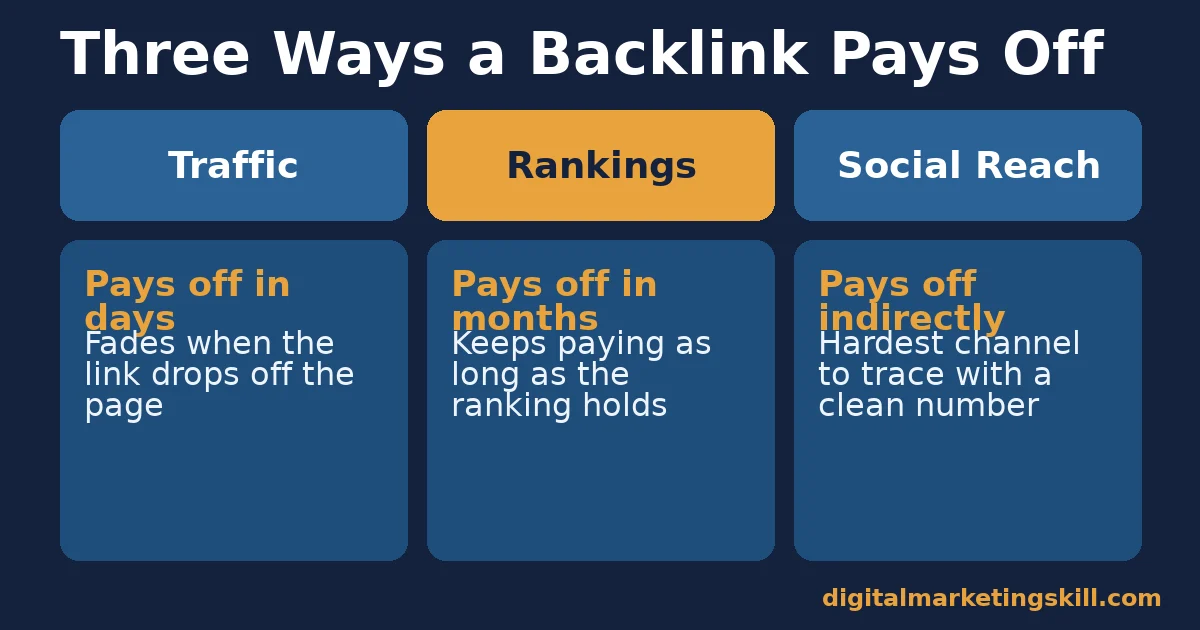
Direct referral traffic is the easiest to prove. GA4’s traffic acquisition report shows sessions by source, and a UTM-tagged link makes that source specific. Ranking support is slower and noisier, because Google uses hundreds of signals, not just links. Social signals are the hardest to trace, since people often screenshot or paraphrase content instead of clicking the original link.
So a single “link building ROI” number is misleading. One link that sends ten direct visitors and another that quietly supports a big ranking gain can look identical in a plain backlink count. Separating the three channels is what turns tracking into analytics.
Link Building Analytics Differs by Channel
Three channels carry almost all measurable link building value: direct traffic, search rankings, and social or referral signals. Each needs a different report, and a different amount of patience.
Pick your priority channel based on your actual goal, not habit. A launch campaign that needs visitors this week should prioritize direct traffic. Playing a longer game for a competitive keyword, by contrast, should prioritize ranking support instead, since that channel compounds over months rather than days.
Traffic: Built For Speed, Not Durability
A link that sends direct clicks proves its value within days, inside GA4’s traffic acquisition report. The tradeoff is durability. Once the content that linked to you drops off a homepage or newsletter, that traffic usually fades, unless the link sits on an evergreen, high-traffic page.
This is the easiest channel to oversell in a report, because the number arrives fast and looks impressive. A single viral mention can spike a traffic chart for a day and then vanish completely. Treat a traffic spike as a one-time event unless it repeats, rather than as proof that your link building strategy is working long term.
Repeat spikes are the real signal. If three separate links each produce a short burst of traffic over a quarter, that pattern says more about your outreach quality than any single spike does on its own.
Rankings: Built For Durability, Not Speed
Rankings reward a different kind of link. One that supports a ranking gain keeps paying off as long as the ranking holds, often for years. The tradeoff is speed. Ahrefs’ backlink growth study found top-ranking pages gain new referring domains gradually, at 5-14.5% a month, not in one traceable spike. You rarely see a single link cause a single ranking jump.
That gradual pace is exactly why link building analytics needs a longer measurement window for rankings than for traffic. A report pulled one week after a campaign ends usually just shows noise, not the real effect. Give a ranking push at least a full quarter before judging it against your baseline. Patience here is not optional. It is the actual mechanism.
Social and Referral Signals: Built For Reach, Not Precision
A link mentioned or shared on social media can reach people who never click through at all. That reach is real, but it is the hardest channel to measure precisely. Shares, screenshots and paraphrases leave no backlink for your tools to count.
This channel rewards patience over precision. You will rarely get a clean number for it, so treat any proxy metric as directional, not exact. It still matters for link building analytics, because a mention that never gets clicked can still build the trust that makes someone click your next link. Do not drop this channel from your reporting just because it resists a clean number.
How to Lead With Each Channel’s Strength
Once you know what a channel is built for, pull the report that actually proves it, instead of eyeballing a backlink count. These link building strategies are a reasonable starting list if you still need tactics to generate the links themselves.
None of the fixes below require a paid tool. GA4 and Search Console cover every channel in this guide, and both are free to any site owner who verifies ownership.
Traffic: Lead With UTM Tags and GA4
Tag every link you control with UTM parameters, using Google’s Campaign URL Builder. That lets GA4’s traffic acquisition report isolate that exact link’s sessions. Use a consistent naming pattern for utm_campaign across every placement, so you can filter and compare them later without guessing which tag belongs to which outreach effort.
For links you do not control, such as earned press mentions, check GA4’s referral traffic by source instead. It will still show the domain, even without a tag. Keep a simple spreadsheet mapping each UTM campaign to the specific outreach email or placement that produced it, so a spike in traffic always traces back to a cause.
Rankings: Lead With Search Console Position Tracking
Filter Search Console’s performance report down to the specific page you built links toward, not your whole site, so an unrelated page’s swings do not hide your actual result. It shows impressions, clicks and average position by query, before and after a link building push.
Record your target keywords’ positions before you start. Then check again on a fixed schedule, such as every two weeks, so normal ranking noise does not look like a false signal. Pick those keywords with a keyword research tool rather than guessing which terms matter.
Social and Referral: Lead With Branded Search Volume
Since social shares rarely leave a trackable link, watch branded search volume instead, inside Search Console’s queries report. A rise in people searching your brand name after a mention is a reasonable proxy for reach you cannot otherwise measure.
Note the date of the mention, then watch branded query volume for a few weeks afterward to see whether it moved. A small, sustained lift is more meaningful than one noisy day.
None of this needs new tools. GA4 and Search Console are both free. Together they cover all three channels.
How to Measure Link Building Analytics
Four numbers, pulled from GA4 or Search Console, tell you whether link building analytics is working.
- New referring domains per month is the count of distinct websites linking to you for the first time. Ahrefs’ data suggests top pages gain these at roughly 5-14.5% of their total each month.
- UTM-tagged sessions is the traffic GA4 can directly attribute to a specific link, rather than a generic “referral” bucket with no detail.
Two more numbers complete the picture, both pulled from Search Console rather than GA4.
- Average position by target keyword is the ranking Search Console reports for a query over a chosen date range. Track it before and after a link push, not just once.
- Click-through rate by position is the share of people who click after seeing your result. Treat a sudden drop as a signal to check for an AI Overview, not automatically a ranking problem.
Cost per link justifies the budget. A median placement runs about $112, based on an analysis of 22,703 real placements, roughly three-quarters from US buyers. Treat that figure as a US-leaning benchmark, not a global price.
Put these four numbers on one simple dashboard. Seeing them side by side shows which channel is actually earning its budget.
The One Decision Rule for Where to Measure First
If you only have time to set up one report this month, set up Search Console position tracking first. Rankings are the channel most link building spend actually targets. It is also the one report that works for every link, tagged or not.
Here is an illustrative, invented example. A site tracking ten target keywords at an average position of 18 runs a link building push for three months.
If new referring domains grow in the 5-14.5% monthly range Ahrefs found typical of top pages, positions could plausibly improve into the top 10 for several keywords. That is an estimate to show the mechanism, not a guaranteed outcome for any specific site.
Three Mistakes That Undo Good Link Building Analytics
The most common mistake is checking rankings once, right after a campaign ends, and judging success from that single snapshot. Rankings move on their own normal noise. Check on a fixed schedule instead, and compare several checks against your baseline.
A second common mistake is giving up on a link campaign after four or five weeks because rankings have not moved yet. Ahrefs’ own data shows the referring-domain gains behind a ranking climb build up gradually, not instantly, so a short campaign window often ends before the effect has had time to show.
A third mistake is comparing your own results directly against someone else’s case study. Starting position, competition and content quality all differ. Use published benchmarks to set expectations, not as a promise of what your specific site will do.
Update your dashboard on the same day each month, not only when results look good. A fixed schedule stops good months from getting more attention than disappointing ones, which quietly biases how you read your own data over time.
A Real Case: Learning the SEO That Supports Link Building
Abimbola Fafiolu, a Digital Marketing Skill Institute graduate, describes building a working, ranking website in Google using skills learned directly from the program’s coursework. The SEO module stood out as the course’s best lecture for her, as published on the Institute’s reviews page.
The case shows SEO fundamentals turning into a ranking website, the foundation link building analytics is built to measure. A site that does not rank has nothing for a backlink to support, no matter how well you track it. For the writing side of that foundation, see this guide to SEO writing, which pairs naturally with the measurement habits in this guide.
Results are self-reported and vary by market and effort. See the Institute’s earnings disclaimer before treating any single case as typical. Link building analytics only becomes useful once there is a ranking website behind it worth measuring in the first place, which is exactly the fundamental this case illustrates.
Frequently Asked Questions About Link Building Analytics
Which Google Analytics report shows link building results?
GA4’s traffic acquisition report, filtered by source and UTM campaign, shows direct traffic from links you tagged. For ranking impact, use Search Console’s performance report instead. GA4 does not track search position, which surprises many people switching over from Universal Analytics. Keep both reports open side by side when you review a campaign, rather than checking one and assuming the other agrees.
How long before a backlink affects rankings?
There is no fixed timeline. Ahrefs’ data on top-ranking pages shows referring domains accumulating gradually, around 5-14.5% a month. That suggests ranking support builds over weeks to months, not instantly. Judging a single link’s effect inside a few days almost always misreads normal ranking noise as a result.
What is a reasonable price to pay for one backlink?
An analysis of over 22,000 real placements found a median price of $112, though quality and niche shift that number significantly. A separate survey of SEO professionals put the acceptable cost for a high-quality link closer to $509. Niches like finance and casino commanded some of the highest average prices in that same placement data.
Does a higher ranking always mean more clicks?
Not anymore. Position 1 still averages the highest click-through rate. But AI Overviews can cut that by about half on affected queries, per Advanced Web Ranking’s tracking data, which tracked 1.75 million US SERPs a month to reach that figure. Check your actual CTR rather than assuming rank alone.
How do I track links I do not control, like press mentions?
Check GA4’s referral traffic by source for the domain that mentioned you, since you cannot add a UTM tag to a link you do not own. Branded search volume in Search Console is a useful secondary signal for that reach. Neither report gives you a precise number, but together they confirm whether the mention actually moved anything.
Is link building analytics different from basic SEO reporting?
Yes. Basic SEO reporting often stops at keyword rankings. Link building analytics specifically isolates which backlinks drove which traffic, rankings or referral signal, so you know where to repeat the effort. That extra step is what turns a monthly report into a decision tool rather than a status update you glance at and forget.
Should I measure every single backlink individually?
Not every single one deserves its own report. Prioritize backlinks from pages with real, meaningful traffic of their own. Those are the links most likely to send direct visits or support a genuinely measurable ranking change over time. A low-traffic directory listing rarely justifies the time it takes to track closely, even if it still counts toward your total link count.
GA4 replaced Universal Analytics for traffic reporting, and Search Console still handles rankings as it always has. The report names changed, but the same three channels in this guide still apply.
Is the median or average backlink price more useful for budgeting?
Use the median. The survey of 518 SEO professionals found opinions on acceptable cost vary widely, and a few expensive links can pull the average far above what most placements actually cost. A median of $112 against an average of $161.25 tells you the typical placement, not the rare outlier, which is the number that should drive your actual budget.
Turn Link Building Analytics Into a Marketable Skill
Link building analytics is one piece of a larger SEO and AI marketing skill set. Employers pay for this skill set directly, not just the links themselves.
Knowing how to prove a campaign’s worth in GA4 and Search Console is often what separates a paid specialist from someone who just builds links without ever proving they worked.
The Digital Marketing Skill Institute’s Master Diploma in Digital & AI Marketing is built around four AI-powered tracks across ten courses. One of them, the AI-Powered Google Specialist track, covers exactly the SEO and analytics skills in this guide. A Full Stack option covers all four tracks together.
Every track includes unlimited 1-on-1 coaching and mentoring, plus a U.S. Project Internship with a verified U.S. Work Reference Letter. The program carries dual US and UK accreditation, recognised in more than 100 countries. You study 100% online, from anywhere in your country or beyond.
Review the full Master Diploma program for the complete curriculum, and browse more guides on the digital marketing blog. When you are ready, apply here.
Start with Search Console position tracking. Measure it against the benchmarks above. Then add UTM-tagged traffic reporting next. Learn more at digitalmarketingskill.com, wherever in your country you are working from, and come back to digitalmarketingskill.com for the next guide in this series.
Every figure in this guide was checked against its original source before publication. Figures marked as illustrative are invented examples, not real results.
![9 Amazing Digital Marketing Skills to Make Money Online [With Proof]](https://digitalmarketingskill.com/wp-content/uploads/2019/07/9-Amazing-Digital-Marketing-Skills-to-Make-Money-Online-With-Proof-17.png)






