
A LinkedIn job search works when the right people can find your profile and your messages earn a reply. Recruiters scan profiles in seconds, and cold applications rarely beat a direct, relevant message. This guide shows what to fix first, in what order, and how to measure whether it works.
Key Takeaways
- Recruiters decide fast. TheLadders’ eye-tracking study found recruiters spent about 7.4 seconds on an initial resume or profile scan, so the first line has to prove relevance immediately.
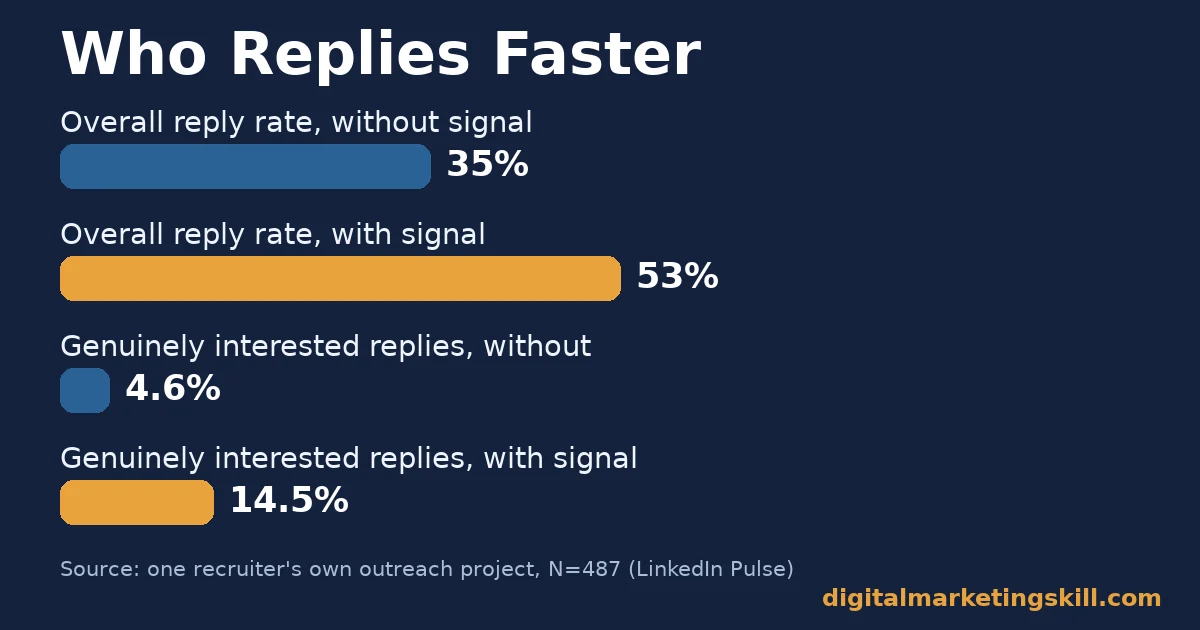
- A signal beats silence. In one recruiter’s own outreach project of 487 candidates, turning on Open to Work raised the overall reply rate from 35% to 53%, and genuinely interested replies from 4.6% to 14.5%.
- A finished profile shows up more. LinkedIn states that a complete, “All-Star” profile is up to 40 times more likely to surface in search and recruiter results than an incomplete one.
- Most adults are not even on LinkedIn. Pew Research Center found only 28% of US adults use LinkedIn at all, rising to 53% among those with a bachelor’s degree or higher, so a LinkedIn job search cannot be your only channel.
- Online research works; people still matter. Pew Research Center also found 90% of recent US job seekers researched jobs online and 84% applied online, while referrals made up just over 10% of hires in SHRM’s own benchmarking.
In this guide
- What Most LinkedIn Job Search Advice Gets Wrong
- How Recruiters Actually Decide Who to Contact
- A LinkedIn Job Search Runs on Two Different Paths
- How to Win Each Path
- Five Reasons a LinkedIn Job Search Stalls
- How to Measure a LinkedIn Job Search
- The Most Useful Rule: Fix Discovery Before You Send More Messages
- A Four-Week Plan for Your LinkedIn Job Search
- A Real Case: What One Recruiter’s Own Data Showed
- Frequently Asked Questions About LinkedIn Job Search
- Start With Your Profile, Then Expand
What Most LinkedIn Job Search Advice Gets Wrong
Most LinkedIn job search advice says the same three things: post more, connect with everyone, and apply to everything you see. None of that is wrong, but it skips the moment that actually decides outcomes. In a few seconds, a stranger decides whether your profile shows what you do and why you fit the role.
This guide focuses on that moment. It also covers the two ways people actually get hired through LinkedIn: a recruiter finds you, or you find the role yourself. It shows what changes for each path and how to track whether your effort is paying off.
Ground rules first. The eye-tracking and outreach figures below come from named studies and one recruiter’s own project, each with a small or dated sample, so read them as evidence, not guarantees. The two-path model is an informed way of organising that evidence, not a settled fact. Treat every number here as a snapshot, not a permanent ranking, and never as a promise of a specific outcome.
How Recruiters Actually Decide Who to Contact
A recruiter’s decision happens in a few quick steps. First, a search or an algorithm surfaces your profile among many others. Next, they glance at the headline and current role. Then they skim for a signal that you are actually available and relevant. Only then, if at all, do they open a message.
What Happens in the First Few Seconds
TheLadders’ eye-tracking study tracked recruiters as they scanned resumes and profiles. It found an average first look of about 7.4 seconds. That leaves barely enough time to read a headline and one line of context, let alone a full work history.
So the headline and the first line of your “About” section carry almost all the weight. A headline that only repeats your job title (“Marketing Manager”) wastes that scan. A headline that names what you actually do and for whom gives a recruiter a reason to keep reading.
Why a Signal Beats General Activity
It is tempting to think that posting often or connecting widely drives a LinkedIn job search. But recruiters are not browsing your feed; they are searching for specific terms and specific signals, chief among them whether you look open to a move at all.
That is where the Open to Work setting matters. It does not replace a strong profile, but it removes the guesswork for a recruiter deciding who is worth a message. The data on this, covered below, is one of the clearest LinkedIn job search signals available, and it costs nothing but a few seconds to turn on.
A LinkedIn Job Search Runs on Two Different Paths
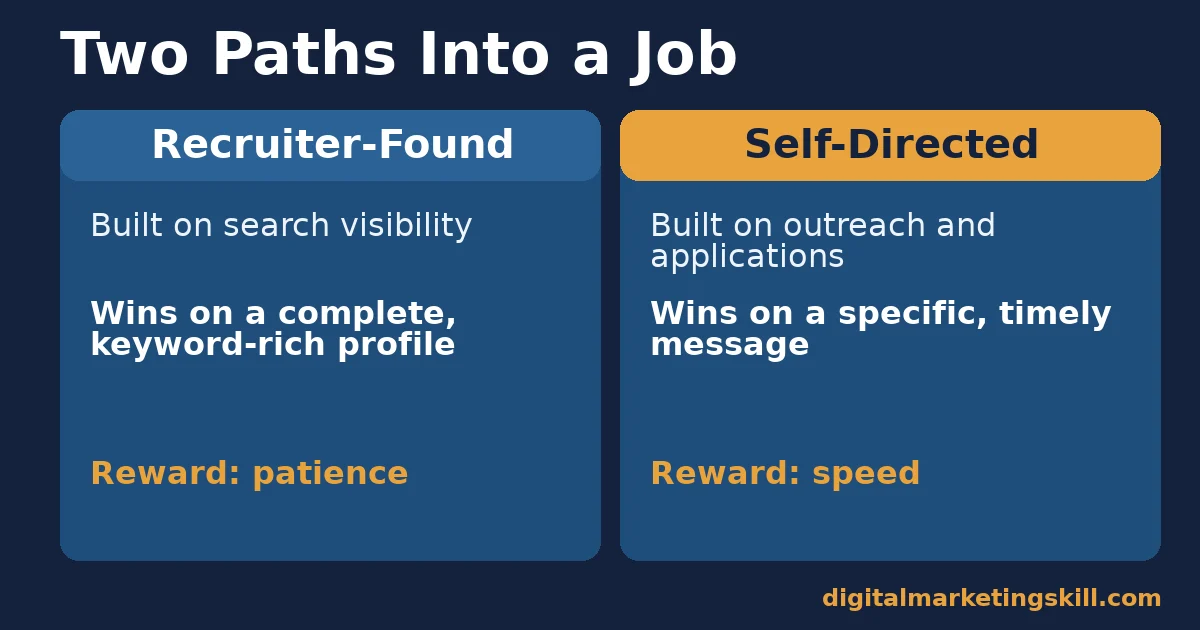
Not everyone lands a job the same way. A recruiter finds some people while searching for a skill set. Others find and win a role through their own outreach and applications. Each path rewards a different set of actions, so treating them the same wastes effort.
Recruiter-Found: Built on Search Visibility
This path depends on being discoverable. Recruiters search LinkedIn the way anyone searches a database: by role, skill, location and sometimes industry keywords. If your profile does not contain the terms they search for, it will not surface, no matter how impressive your actual experience is.
Discoverability also depends on completeness. LinkedIn calls a fully filled-in profile an “All-Star” profile, and says this status makes a profile up to 40 times more likely to appear in search and recruiter results. A half-finished profile stays close to invisible on this path.
This path rewards patience more than speed. A recruiter might search the same role twice, weeks apart, and your profile only needs to be ready once. That makes it worth getting right rather than rushing, since the effort keeps paying off long after you make the changes.
Self-Directed: Built on Outreach and Applications
This path depends on you finding the opening and acting first, whether that means applying directly, messaging a hiring manager, or asking a connection for an introduction. Pew Research Center’s survey of recent US job seekers found that 90% had used the internet to research jobs and 84% had applied online. This path is already crowded.
Because it is crowded, generic effort blends in. A short, specific message that names the role and one real reason you fit it will almost always outperform a long list of blanket applications sent without changes. A warm introduction still helps too: SHRM’s own hiring data found referrals made up just over 10% of its hires, a smaller but still meaningful share next to direct applications.
This path rewards speed and precision instead of patience. A role that is open today may close within days, so a good message sent quickly beats a perfect one sent late. Keep a short list of saved searches so new postings reach you the same day they go live, and set an alert for the specific titles you want.
How to Win Each Path
Each path needs a different first move. Work on whichever one already brings you more opportunities today, because improving it compounds faster than starting a new approach from zero.
Recruiter-Found: Lead With a Searchable Profile
Rewrite your headline to name your role, your specialism and who you help, not just your job title. Use the exact words recruiters would search for in your headline, About section and most recent role, because LinkedIn’s search weighs those fields heavily.
Then finish every section LinkedIn asks for: a photo, a summary, your current and past roles with real detail, and at least five skills. An unfinished profile loses the visibility a complete one gets, no matter how strong your actual experience is.
Self-Directed: Lead With a Targeted Message
Write a short message, not a form letter. Name the role, say why you are reaching out to that person specifically, and mention one concrete thing you could help with. Recruiters and hiring managers get many generic messages a week, and a specific one stands out immediately.
Apply to fewer roles with more care rather than many with none. Two guides help with the written half of this: our guide to the digital marketing cover letter, and our guide to writing a resume that passes both the software and the human screen.
Five Reasons a LinkedIn Job Search Stalls
When a LinkedIn job search goes quiet, the cause is usually one of five problems. Check your own profile and recent activity against each one.
- The headline only states a job title. “Marketing Manager” tells a recruiter nothing searchable. Name the specialism and the audience you serve instead.
- The profile is unfinished. Missing sections mean missing visibility: LinkedIn’s own guidance ties completeness directly to how often recruiters find a profile.
- Nobody knows you are looking. Without the Open to Work signal or a direct message to say so, even a strong profile sits idle.
- Every application is identical. A message that could go to any employer reads as effort without thought, and recruiters treat it that way.
- There is no follow-up. A single message or application with no second touch disappears into a busy inbox within a day.
Which Problem to Fix First
Start with whichever problem matches your evidence. If recruiters rarely view your profile, your visibility is the issue, so fix the headline and completeness first. If people view your profile but do not message you, add the Open to Work signal. And if you are applying but hearing nothing back, the message itself needs work before you send more of them.
If you are earlier in your career and unsure which skills to lead with at all, read our guide to getting your first digital marketing job without experience. It covers how to build a credible profile from a thin work history.
How to Measure a LinkedIn Job Search
Treat your LinkedIn job search like any other process with inputs and outputs. The list below defines each metric in one sentence and explains how to read it.
Five Numbers Worth Tracking
- Profile views. How many people viewed your profile in a given week, visible under “Who viewed your profile.” Rising views without rising messages points to a visibility problem, not a messaging one.
- Search appearances. How often you showed up in LinkedIn searches that week. This is the clearest signal that your keywords are working.
- Response rate. The share of messages or applications that get any reply at all. Track it weekly, in a simple spreadsheet, so a quiet week does not feel like a verdict.
- Positive response rate. The share of replies that are genuinely interested, not a polite no. This is the number that actually predicts interviews.
- Interview rate. The share of applications or conversations that reach an actual interview. This is the final test of everything above it.
How to Read Them Together
Read the numbers in order. Low profile views and search appearances mean a discoverability problem, so fix the headline and completeness. Good views but a low response rate mean the message itself needs work. And a reasonable response rate with few interviews usually means the roles you are targeting do not match your actual experience yet.
Compare four-week windows, not single days. A LinkedIn job search has natural quiet periods, and judging it day to day will make a working strategy look broken.
Write the numbers down somewhere simple, even a single spreadsheet column per week. Memory is unreliable here, and a written record is the only way to tell whether a change actually helped or whether a quiet week just happened to follow it.
The Most Useful Rule: Fix Discovery Before You Send More Messages
If you take one decision rule from this guide, make it this one. Before you send another batch of messages or applications, confirm that a recruiter can find and understand your profile in the few seconds they give it. More outreach built on a weak profile only multiplies the same problem.
Here is an illustrative example, with invented numbers. Someone sends 40 cold messages a week from a profile with a generic headline and gets two replies. They pause, rewrite the headline to name their specialism, finish every profile section and turn on Open to Work. The following month, from the same 40 messages a week, replies rise to eleven, and three turn into real conversations.
The lesson is about order. Messaging volume did not change; what the recruiter saw before deciding to reply did. Fixing discovery first makes every message afterward work harder.
A Four-Week Plan for Your LinkedIn Job Search
You do not need a full weekend to fix a LinkedIn job search. This plan spreads the work over four short sessions, each built on the one before it.
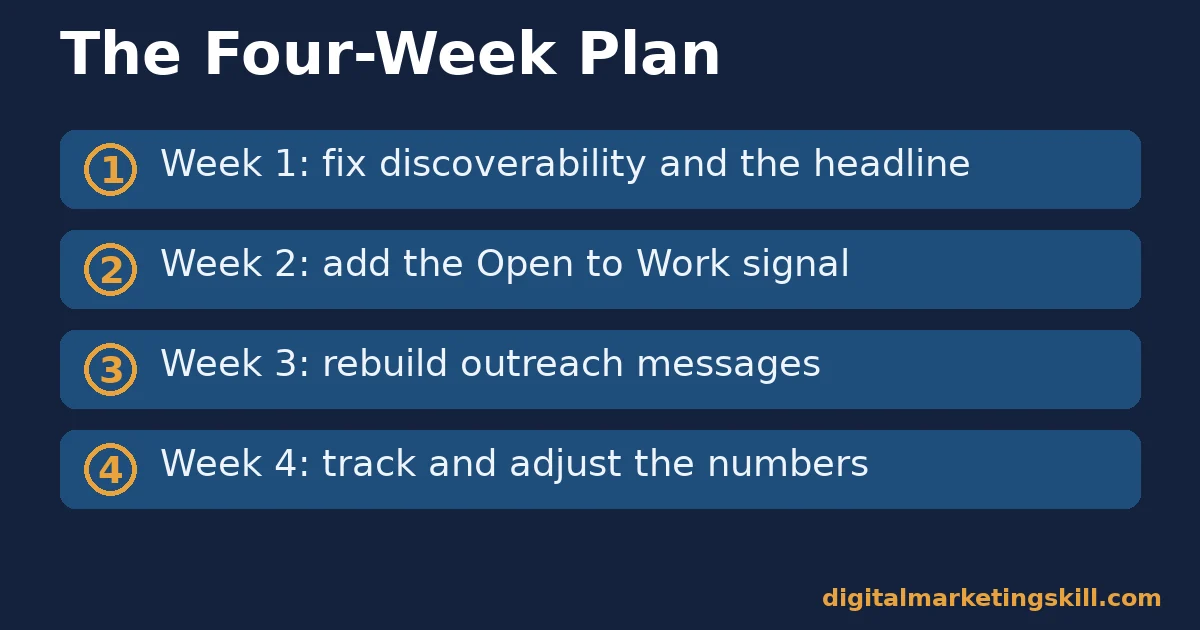
- Week one: fix discoverability. Rewrite your headline to name your specialism and the audience you serve. Finish every profile section LinkedIn asks for until it reaches All-Star status, and list at least five relevant skills.
- Week two: add the signal. Turn on Open to Work, in public or recruiter-only form depending on your situation. Ask two people you have worked with for a short, specific recommendation.
- Week three: rebuild your outreach. Replace any generic message template with one that names the role and one concrete reason you fit it. Send it to a short, well-chosen list rather than a long, generic one.
- Week four: track and adjust. Record profile views, search appearances and response rate for the month. Keep whatever moved those numbers, drop what did not, and repeat the cycle with the next batch of roles.
Each step builds on the last, so resist skipping ahead to outreach before the profile itself is ready. A strong message sent to a weak, hard-to-find profile still under-performs a plain message sent to a complete one. Four weeks is enough time to see whether the changes are working, without so much time passing that you lose track of what you changed and why.
A Real Case: What One Recruiter’s Own Data Showed
A recruiter named Jan Bernhart ran his own test rather than relying on general advice. Reaching out with a similar message and a similar strategy, he compared replies from candidates who had turned on Open to Work against those who had not, across 487 contacts.
According to his published analysis, candidates signalling Open to Work had an overall reply rate of 53%, against 35% for those without it. More tellingly, the positive reply rate, meaning replies that were actually interested rather than a polite decline, was 14.5% against 4.6%.
Treat this as one recruiter’s own project, not a peer-reviewed study: the sample is modest and the method is self-reported. But it is a named, checkable result, and it points the same way as LinkedIn’s own guidance: a visible signal that you are looking changes how recruiters respond, far more than most people expect.
Frequently Asked Questions About LinkedIn Job Search
Does turning on Open to Work actually help?
The clearest evidence available is one recruiter’s own outreach project, where candidates with the Open to Work signal on had a 53% overall reply rate against 35% without it. It is not a guarantee, but it is a real, measurable difference.
How long does a recruiter actually look at my profile?
TheLadders’ eye-tracking study found recruiters spent about 7.4 seconds on an initial scan. Your headline and the first line of your About section need to carry the weight of that short window.
Should I use the public Open to Work photo frame?
That depends on your situation; a visible frame can reach more recruiters but also signals to your current employer that you are looking. The private “recruiter-only” version of the setting gives a similar signal without the public frame.
Is LinkedIn enough on its own for a job search?
No. Pew Research Center’s tracking data shows only 28% of US adults use LinkedIn at all, so relying on it exclusively excludes other channels. Combine a strong LinkedIn presence with direct applications and your own network.
Do LinkedIn connections matter as much as the profile itself?
A larger, relevant network widens who can see and share your activity, but it does not fix an unfinished or hard-to-search profile. Fix discoverability first, then grow the network around it.
What is the single highest-leverage change to make first?
Finishing your profile and rewriting your headline to name your specialism in searchable terms. LinkedIn states a complete profile is up to 40 times more likely to show up in results. That one change speeds up every path to getting hired.
How many LinkedIn connections do I actually need?
There is no fixed number. A smaller network of people in your field who would actually reply to a message is more useful than a large one of strangers. Grow it gradually, around people you have worked with, studied with, or hope to work with next.
Should I ask for recommendations before I start a LinkedIn job search?
Yes, and early. A short, specific recommendation from someone you worked with adds credibility that your own summary cannot. Ask while the work is still fresh in that person’s memory, not months later when you need it. Offer to write a draft for them to edit; most people are glad to accept.
Start With Your Profile, Then Expand
A LinkedIn job search improves fastest when you fix what a recruiter actually sees first. Finish your profile, rewrite your headline around a specific, searchable specialism, and turn on an availability signal before you send another round of messages. Then track your response rate for a few weeks before changing anything else.
Our guide on using AI to help you land your next job covers the application side further. And if interviews do not land right away, our guide on handling rejection during a job search can help you keep going.
If you want guided practice building the kind of skills employers actually search for, Digital Marketing Skill Institute teaches them hands-on. The Master Diploma in Digital & AI Marketing offers four AI-powered tracks, including AI-Powered Social Media Management and Advertising and AI-Powered Google Specialist. Together they total ten courses, with a Full Stack option for completing all four.
It includes unlimited 1-on-1 mentoring and a U.S. Project Internship with a verified U.S. Work Reference Letter, and is dual US and UK accredited in more than 100 countries.
Study from anywhere in your country. Find more guides on the Digital Marketing Skill Institute blog, see real outcomes on the reviews page, and when ready, apply for the Master Diploma or start from the Digital Marketing Skill Institute homepage.
Every figure in this guide was checked against its original source before publication. Figures marked as illustrative are invented examples, not real results.
![9 Amazing Digital Marketing Skills to Make Money Online [With Proof]](https://digitalmarketingskill.com/wp-content/uploads/2019/07/9-Amazing-Digital-Marketing-Skills-to-Make-Money-Online-With-Proof-17.png)






