
Remote work tools are the apps a distributed team uses to talk, manage projects, create content and track results. The right set cuts meetings and duplicated work. The wrong set just adds more tabs. This guide ranks tools by job, not hype. It also shows how to tell if yours are actually working.
Key Takeaways
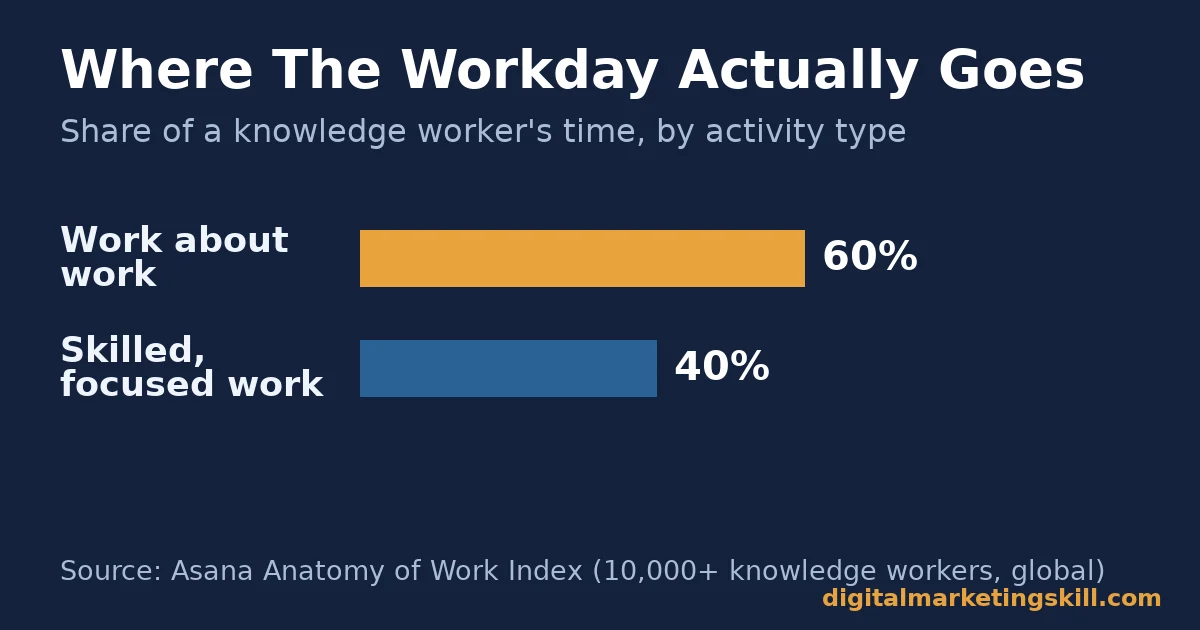
- Knowledge workers lose 60% of the workday to “work about work,” not focused tasks. That is according to Asana’s Anatomy of Work Index, a survey of more than 10,000 knowledge workers globally.
- Teams waste 209 hours a year rebuilding work that already existed, per the same Asana research. Often the real bottleneck is the workflow, not the remote work tools around it.
- Only 9% of workers are fully remote today, per Owl Labs’ State of Hybrid Work survey of 2,000 full-time US workers. Most remote work tools decisions are really hybrid decisions.
- Enterprise license utilization rose from only 47% to 54% in one year, per Zylo’s SaaS Management Index. Productiv’s research, cited by JumpCloud, finds under half of licensed users open their paid apps at all.
- 40% of workers say they would start job hunting if flexible work disappeared, per Owl Labs. The right remote work tools are a retention lever, not just a productivity one.
In this guide
- Most Remote Work Tools Lists Skip the Part That Matters
- How a Remote Work Tools Stack Actually Works
- What Differs By Category In Remote Work Tools
- What To Lead With In Each Category
- Budget Mistakes That Inflate A Remote Work Tools Stack
- How To Measure Whether Your Remote Work Tools Are Working
- The One Rule: Buy For The Friction, Not The Feature List
- What Doing This Right Looks Like
- Frequently Asked Questions About Remote Work Tools
- Build A Remote Work Tools Stack That Fits The Work
Most Remote Work Tools Lists Skip the Part That Matters
Search for remote work tools and you get the same result: a directory of forty logos. Each one carries three bullet points lifted from the vendor’s homepage. None of it tells you which tool fits a five-person team, versus a two-hundred-person one. None of it says what happens after you buy it.
The missing piece is selection criteria and proof of use. A tool only earns a place in your stack if it removes a specific kind of friction. That friction might be unclear ownership, slow handoffs, duplicated work or silent meetings. This guide starts from that friction, then names the tools that fix it.
Any single list like this one is a snapshot, not a permanent ranking, because tools ship constantly. The right stack depends on team size and budget more than brand reputation, which is also why a scattered martech stack causes the same kind of waste described below. Treat every recommendation here as a starting shortlist to test against your own friction, not a fixed answer.
How a Remote Work Tools Stack Actually Works
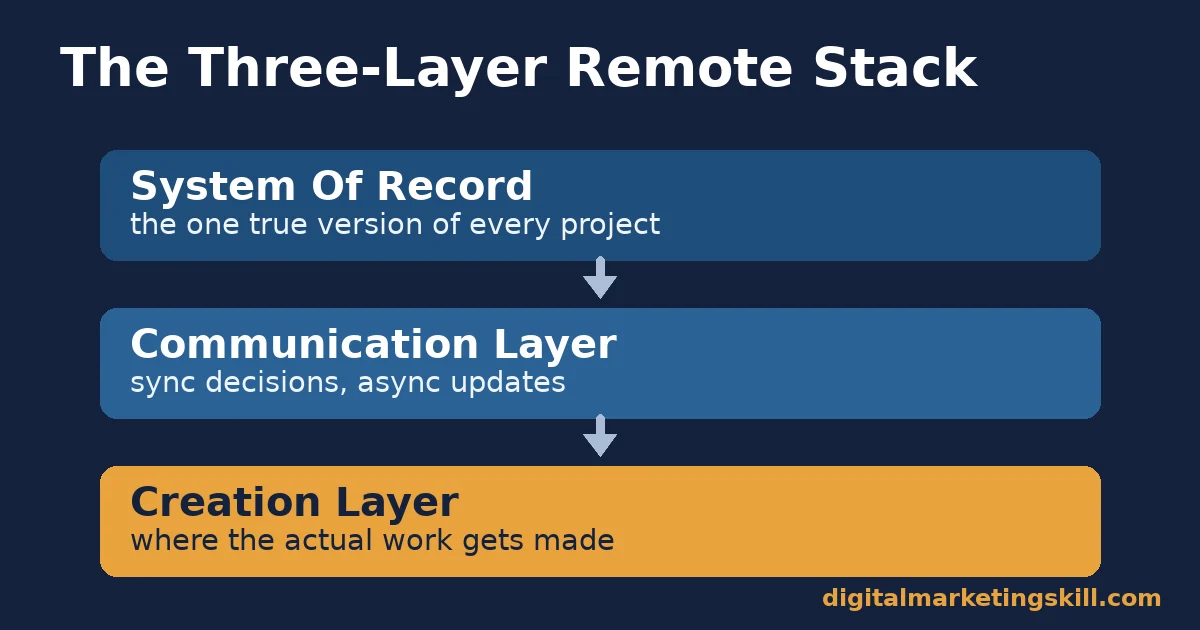
A working stack has three layers. A system of record holds the real, current version of a project. Sync decisions and async updates run through the communication layer. Actual work gets made in the creation layer. Most teams build this backwards. They add a chat app first, because it is visible, then wonder why nothing is ever “done” anywhere else.
Run a Fast Audit Before Adding Anything New
A quick audit exposes the backwards order fast. List every paid tool, then write the one friction each was bought to fix next to it. A tool with no clear friction, or one that duplicates another tool’s job, is a candidate to cut.
Run this audit before researching a single new tool, not after. That order means new budget closes a real gap instead of stacking a fourth chat app on top of three existing ones.
Synchronous tools demand everyone’s attention at once: video calls, live chat, screen shares. Asynchronous tools let people respond on their own time: recorded video, shared docs, project boards, comment threads.
Asana’s Anatomy of Work Index found that 60% of a knowledge worker’s time already goes to work about work. That means communicating about work, hunting for information, and switching between apps, instead of doing the work itself. A stack leaning too heavily on synchronous tools makes that number worse. Every decision ends up needing a meeting instead of a comment.
Why Video Calls Drain A Team Faster Than Chat
Video fatigue is not just a feeling. Stanford’s Virtual Human Interaction Lab, led by Jeremy Bailenson, traces video-call exhaustion to a specific mechanism: nonverbal overload. Constant close-up eye contact, seeing your own face on screen, and feeling physically “trapped” in frame all add up.
So does the extra effort of producing and reading cues through a webcam, compared with a face-to-face conversation where none of that is conscious work. The fix is not fewer video tools. It is fewer video calls that didn’t need to be calls in the first place.
What Differs By Category In Remote Work Tools
Four categories cover almost every remote work tools decision: communication and meetings, project and workflow management, content and creative production, and performance tracking. Each one solves a different kind of friction. Picking one tool to do all four jobs is the most common, and most expensive, mistake a team makes, because a tool built for one job, like chat, is rarely good at another, like holding the single current version of a project plan.
Communication Tools: Built For Keeping Decisions Out Of Inboxes
Slack and similar chat tools exist to replace email for short, time-sensitive exchanges. They also give a team a searchable record of who decided what. Zoom and other video tools exist for conversations that genuinely need tone and body language: negotiations, difficult feedback, first client meetings. Calendly and shared calendars exist to remove the ten-message back-and-forth it takes to book any of the above.
The trap: using chat for anything that needs a durable decision. A choice buried in a scrolling channel disappears within a week. If a message changes what someone builds, it belongs in a doc or a task, not a chat thread.
Project Management Tools: Built For One Place Nothing Gets Lost
Board-and-task tools, the kanban-style project trackers, answer one question at a glance: what is everyone working on, and what is blocking it. Shared calendars layer deadlines across people without a status meeting. Time-tracking add-ons catch scope creep before it becomes a billing dispute, which matters more for freelancers and agencies than in-house teams.
The trap: running the board as a reporting exercise, not a working one. If people update it once a week for a meeting, it is a report, not a system of record. The team will default back to asking each other directly instead.
Content and Creative Tools: Built For Producing Without A Studio
Design tools like Canva let non-designers ship on-brand visuals without waiting on a designer for every graphic. Writing assistants like Grammarly catch errors a tired writer misses at the end of a long day. AI writing and research tools compress the first-draft stage; they do not replace editing. Video tools like Loom turn a ten-minute status meeting into a five-minute recording someone can watch at double speed.
The trap: letting an AI tool’s draft go out unedited. Every AI-assisted draft still needs a human check for accuracy, voice and specific claims before it reaches a client or a reader.
SEO and Analytics Tools: Built For Proving The Work Worked
Tools like Semrush and Ahrefs show what is actually ranking, and why, instead of guessing. Google Analytics and Google Search Console show what readers do after they arrive, something a ranking tool can’t answer alone. Keyword and content-optimization tools, alongside a solid set of free SEO tools, catch gaps between what a piece covers and what the top-ranking pages already cover.
The trap: tracking rankings without tracking outcomes. A keyword in position three that drives no clicks or conversions is a vanity metric, not a return on investment.
What To Lead With In Each Category
Knowing what a category is built for is the easy part. Leading with the right one, in the right order, is what actually changes a team’s output.
Communication: Lead With A Written Decision Rule, Not A New App
Before adding another chat or video tool, write one sentence everyone follows: decisions that affect more than one person go in the doc, not the thread. Async-first teams that enforce a rule like this report far fewer meetings than teams that just add more channels. The tool matters less than the rule that governs how it gets used.
Project Management: Lead With One Board, Not Five
Pick a single system of record for active work. Retire the spreadsheet, the sticky notes and the parallel tracker that only one person updates. Asana’s research found teams lose 209 hours a year to duplicated work, much of it because two systems both claimed to be “the real one.” One board, visible to everyone, removes that duplication at the source.
Content Production: Lead With A Template, Not A Tool
A design or writing tool speeds up execution. A reusable template, for a social graphic, a client report or a blog outline, is what actually saves hours every week, because it removes the blank-page decision every time. Buy the tool after the template exists, not before. A documented content marketing plan is what that template should come from.
SEO and Analytics: Lead With The Question You’re Answering
Open an analytics or SEO tool with a specific question, such as which page lost traffic last quarter and why. Don’t just browse the dashboard. A tool opened without a question turns into fifteen minutes of scrolling and zero decisions. Define the question first, then let the tool answer it.
Budget Mistakes That Inflate A Remote Work Tools Stack
Three habits quietly inflate a remote work tools budget beyond what the team actually needs. Catching them usually pays for the next real tool on the list.
- Buying annual plans before testing fit. Annual billing looks cheaper per seat, but it locks in a tool before anyone knows if the team will actually adopt it. Start monthly, confirm adoption past a full project cycle, then switch to annual if the usage holds.
- Keeping seats for people who changed roles. A seat assigned to someone who moved teams or left is pure waste until someone remembers to cancel it. A quarterly seat review catches this faster than waiting for a renewal invoice to surface it.
- Letting two tools cover the same category. This happens most in project management and chat, where a merger, a new hire’s old habit, or a free trial that never got cancelled leaves two systems claiming to be the real one. Pick one, migrate fully, and shut the other down on a set date.
None of these fixes require new software. They require someone to own the stack the way a system of record is supposed to be owned: one list, one owner, reviewed on a schedule instead of only at renewal time.
How To Measure Whether Your Remote Work Tools Are Working
A remote work tool stack is only as good as what it changes. Four numbers tell you if it is working:
- Meeting hours per person per week. Track this before and after adding an async-first rule. A falling number, without decisions getting slower, means the stack is doing its job.
- Tool adoption rate. The share of the team actually using a paid seat, not just holding a license. Productiv’s research found fewer than half of licensed SaaS users open the apps they’re paying for. A low adoption rate is a spend problem before it is a productivity one.
- Duplicated-work incidents. How often two people redo work because neither could see the other had started it. This should trend toward zero once a single system of record is enforced.
- Time-to-decision. How long a flagged question sits unanswered. Async-heavy teams should see this fall, because a written question doesn’t wait for a meeting slot.
None of these numbers need a new dashboard. A monthly fifteen-minute review of calendar hours, license reports and project-board timestamps covers all four.
The One Rule: Buy For The Friction, Not The Feature List
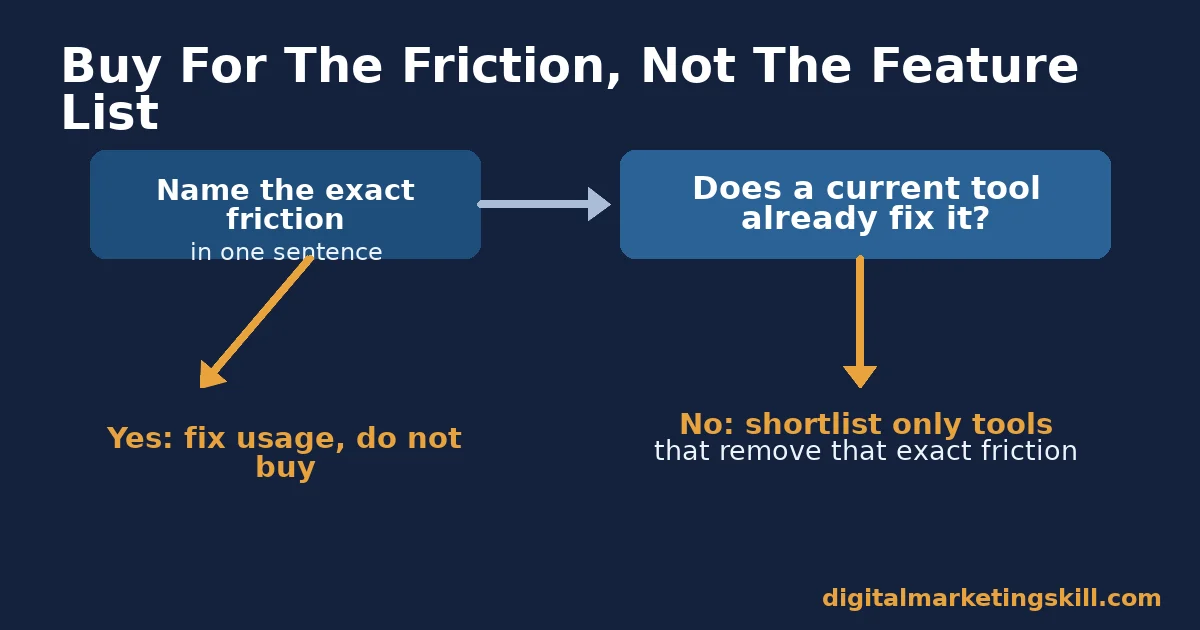
Here is the single most useful filter before adding any remote work tool. Name the exact friction it removes, in one sentence, before you look at its feature list. If you can’t name the friction, the tool is a want, not a need. It will become one of the idle licenses Productiv’s and G2’s research both flag as common SaaS waste.
Illustrative, invented example: a six-person content team adds a video-recording tool because status meetings were eating four hours a week. The friction was “synchronous updates on asynchronous work.” After switching routine updates to recorded video, the team cut weekly meeting time roughly in half.
They reinvested the freed hours in drafting, because the fix matched the actual friction, not a trending app. Had the real friction instead been unclear task ownership, the same budget spent on a video tool would have done nothing. That is exactly why naming the friction has to come before the purchase, never after it.
What Doing This Right Looks Like
Whether a fully remote setup or a hybrid one fits your situation is its own decision. See this comparison of remote versus in-office work for the tradeoffs before you build a stack around either one.
Real outcomes from a distributed, tool-driven workflow show up in hiring, not just internal metrics. Kofi B., a Digital Marketing Skill Institute graduate, credits remote-ready AI marketing skills for a cross-border hire. “What won me the remote role was my AI marketing knowledge. I could do the work of a three-person team. My location became irrelevant,” as published on the Institute’s reviews page.
The result came from running analytics, content and campaign tools well enough to cover more than one role, not from any single app. That is the practical version of this guide’s whole argument: the tool is only as valuable as the skill behind it, and a skilled operator with three tools can outperform an unskilled team with thirty.
The limit worth stating plainly: this is one published testimonial, not a guarantee of outcome for every learner. The Institute makes no income or employment promises; see its earnings disclaimer for the full context.
Frequently Asked Questions About Remote Work Tools
What are remote work tools?
Remote work tools are software applications built to let separated teams communicate, manage projects, create content and track performance without sharing a location. They range from simple chat apps to full project-management systems, and the best ones replace a specific habit, such as a status meeting or a shared spreadsheet, rather than adding a new habit on top.
How many remote work tools does a small team actually need?
Most small teams need one tool from each of four categories: communication, project management, content creation and analytics. Adding more than one per category is usually where SaaS sprawl and idle licenses start.
Are free remote work tools good enough for a small business?
Many are, especially under ten people. The limit is usually storage, integrations or user seats, not core features. Check those limits against your team size before assuming you need a paid plan.
Do remote work tools actually reduce meetings?
They can, but only when paired with a written rule about what belongs in a meeting versus a message. The tool creates the option for async work. A team norm is what makes people actually use it.
How do I know if my team has too many tools?
Check license usage against seats purchased. If less than half the team opens a paid tool in a given month, per the adoption patterns Productiv’s research describes, it is a candidate to cut or merge.
Can AI writing tools replace a content team?
No. They compress drafting time, but every AI-assisted draft still needs a human editor to check facts, tone and claims before it reaches a client or goes live.
What is the biggest mistake teams make when building a remote stack?
Buying the communication tool first, because it is the most visible, then layering project management and content tools on top of a habit that already defaults to live meetings instead of written, async work. The second most common mistake is treating the first mistake as a tooling problem, when it is really a decision-rule problem that no new app will fix on its own.
Should a fully in-office team still use remote work tools?
Yes, for the same reason a fully remote team benefits from an occasional live call: the categories solve coordination problems that exist at any distance. An in-office team just leans more heavily on synchronous tools and less on async ones, which is fine as long as a written record still exists for decisions that matter later.
Build A Remote Work Tools Stack That Fits The Work
A remote work tool stack earns its budget when it removes a named friction and a tracked number improves. Start with one category. Name the friction it should fix. Measure the four numbers above for a month, then expand.
Good tools only help once you are actually in a remote seat. See what it takes to land one in our guide to remote digital marketing jobs.
Skills that make these tools genuinely productive, from AI-assisted content and SEO to campaign analytics, are what the Digital Marketing Skill Institute’s Master Diploma in Digital & AI Marketing is built to teach. That includes the AI-Powered WordPress and SEO Specialist track and the AI-Powered Lead Generation and Email Automation track, with a Full Stack option to complete all four tracks.
The program includes unlimited 1-on-1 coaching, a U.S. Project Internship with a verified U.S. Work Reference Letter, and dual US and UK accreditation recognised in more than 100 countries. It runs entirely online, so you can build and prove these skills anywhere in your country, on whatever stack your team already runs, through digitalmarketingskill.com.
Explore the full program at the Master Diploma in Digital & AI Marketing, browse more guides on the digitalmarketingskill.com blog, read outcomes like Kofi’s on the reviews page, or apply to start building a remote-ready skill set at digitalmarketingskill.com today.
Every figure in this guide was checked against its original source before publication. Figures marked as illustrative are invented examples, not real results.
