
Choosing the right social media graphics tools comes down to one trade-off: speed against pixel-level control. Template tools with a locked brand kit cut turnaround time by double digits in published case studies. Custom design software still wins for a small number of flagship assets. Most teams need both, used for different jobs.
Key Takeaways
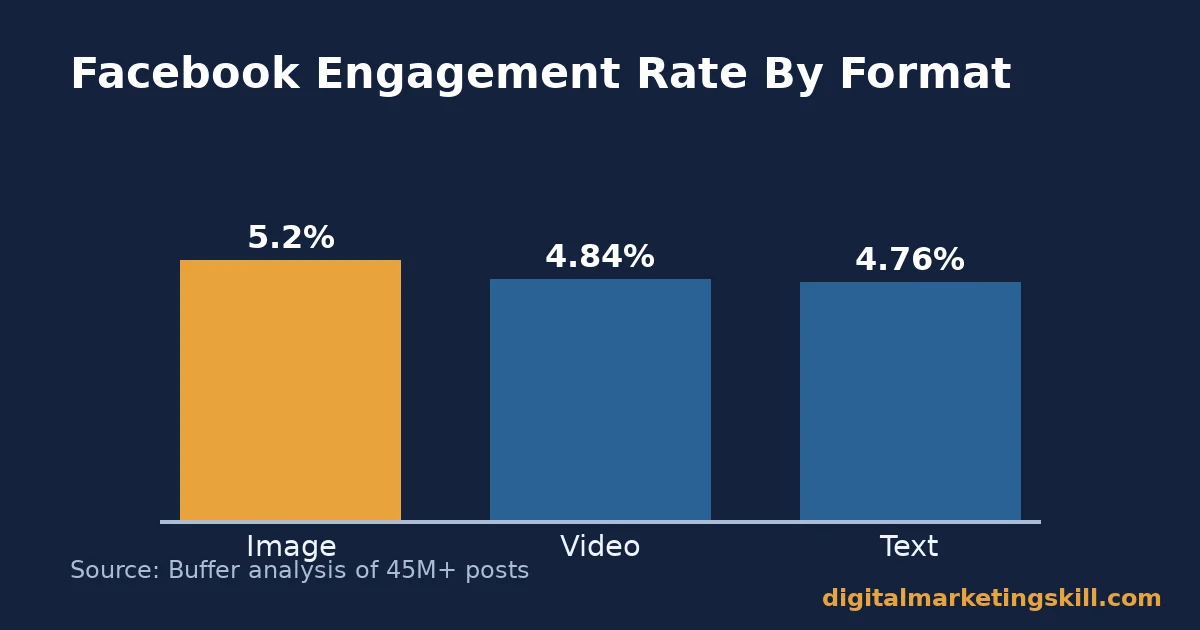
- Facebook image posts earn a 5.2% median engagement rate, ahead of video at 4.84% and text at 4.76%, in Buffer’s analysis of more than 45 million posts.
- LinkedIn carousel graphics post a 21.77% median engagement rate, 196% higher than video on the same platform, per the same Buffer analysis.
- 56.2% of marketers call visual content “very important” to their strategy, yet only 21.9% say more than three-quarters of their output is visual, according to Venngage’s survey of 105 marketers.
- Arch Amenities Group cut turnaround time on a single design asset by 87% after moving from one-off design requests to a template-based workflow, per Canva’s published case study.
- 45.71% of marketers put 20 to 50% of their marketing budget toward visual content, and most of that share goes to tools and software rather than freelance design fees, per Venngage.
In this guide
- The Real Bottleneck Behind Social Media Graphics Tools
- Why the Right Tool Changes the Outcome, Not Just the Look
- How the Two Main Social Media Graphics Tools Differ
- Fix the Weak Spot In Each Approach
- Measure What the Graphic Is Actually Doing
- The One Decision Rule For Choosing Social Media Graphics Tools
- A Real Case: Arch Amenities Group
- Frequently Asked Questions About Social Media Graphics Tools
- Build the Skills Behind Every Graphics Decision
The Real Bottleneck Behind Social Media Graphics Tools
Most teams do not lack good ideas for social posts. They lack a fast way to turn an idea into a finished graphic. A caption written in minutes can sit for a day or two. It waits on a designer, a stock photo search, or a round of size exports for five platforms. By the time the graphic is ready, the moment the post was meant to catch has usually already slipped by, and the team moves on to the next idea instead of publishing the last one.
This is an informed inference from published workflow data, not a settled fact about every team. Your own bottleneck might be approvals, not design time. So check your own process before assuming templates are the fix. Engagement benchmarks are also a snapshot, not a permanent ranking. The figures below come from large samples, but platform algorithms and audience habits shift over time. Because of that, treat every number here as a reference point, not a rule to follow blindly.
The practical question is narrower than “which app is best.” It is this: which social media graphics tools match how often you publish? How many platforms do you cover? And how much brand control does each post actually need? Answer those three questions first, and the right tool usually becomes obvious. A team posting daily across three platforms needs a very different answer than a team publishing one careful campaign asset a month, even if both call the output “a social graphic.”
Why the Right Tool Changes the Outcome, Not Just the Look
A graphic is not just decoration on a caption. It is the first thing a feed algorithm reacts to, and the first thing a scrolling thumb notices. The format behind it changes both reach and engagement in measurable ways.
The Platform-by-Platform Pattern
On Facebook, image posts take the top engagement spot. They earn a 5.2% median rate. Video follows close behind at 4.84%. Text sits at 4.76%. These figures come from Buffer’s analysis of over 45 million posts across major platforms.
On Instagram, the pattern flips. Carousels earn 109% more engagement per person reached than Reels. However, Reels still reach 2.25 times more people than a single image. So the two formats solve different problems, rather than competing head-to-head. On TikTok, video wins decisively at a 3.39% median rate. Photo carousels trail at 1.92%, a 77% gap that favours motion over static design. On Pinterest, the same pattern holds: video earns a 5.75% median rate against 3.15% for still images, an 83% gap. On X, the result flips again, with text posts at 3.56% narrowly ahead of images at 3.40%, which shows that no single format wins everywhere.
The Mechanism Behind the Difference
The mechanism behind these differences is fairly simple once you see it. Each platform’s algorithm rewards the behaviour its own interface makes easiest. A swipeable carousel invites a second interaction. A short video invites a longer watch time, which the algorithm also rewards. Any format that holds attention for an extra two or three seconds earns a small ranking boost. That boost then compounds across a feed of millions of posts. Your social media graphics tools matter for exactly this reason. They decide how quickly you can produce the format each platform rewards, not just whether a single image looks polished.
This is also why a tool choice is a performance decision, not just an aesthetic one. HubSpot’s State of Marketing report found that visual assets, including images, videos, and colours, rank as the top things marketers test when optimising performance. In other words, format is not a style choice. It is a variable worth testing, the same way price or headline copy gets tested. The tool behind it simply decides how fast you can run that test, and how many versions you can afford to try.
How the Two Main Social Media Graphics Tools Differ
Template-Based Tools: Built For Speed At Scale
Browser-based template tools such as Canva, Adobe Express, and VistaCreate give a non-designer a finished layout. They include a stock photo library and preset export sizes for every platform. The job becomes filling in text and swapping a photo, not building a layout from a blank canvas.
Venngage’s survey of 105 marketers found that 46.67% already use stock photos as a core visual content type. It also found that 42% publish between five and ten visual pieces a week. That pace is hard to sustain without a template workflow behind it. A blank canvas and a stock photo search both take time a daily posting schedule does not have.
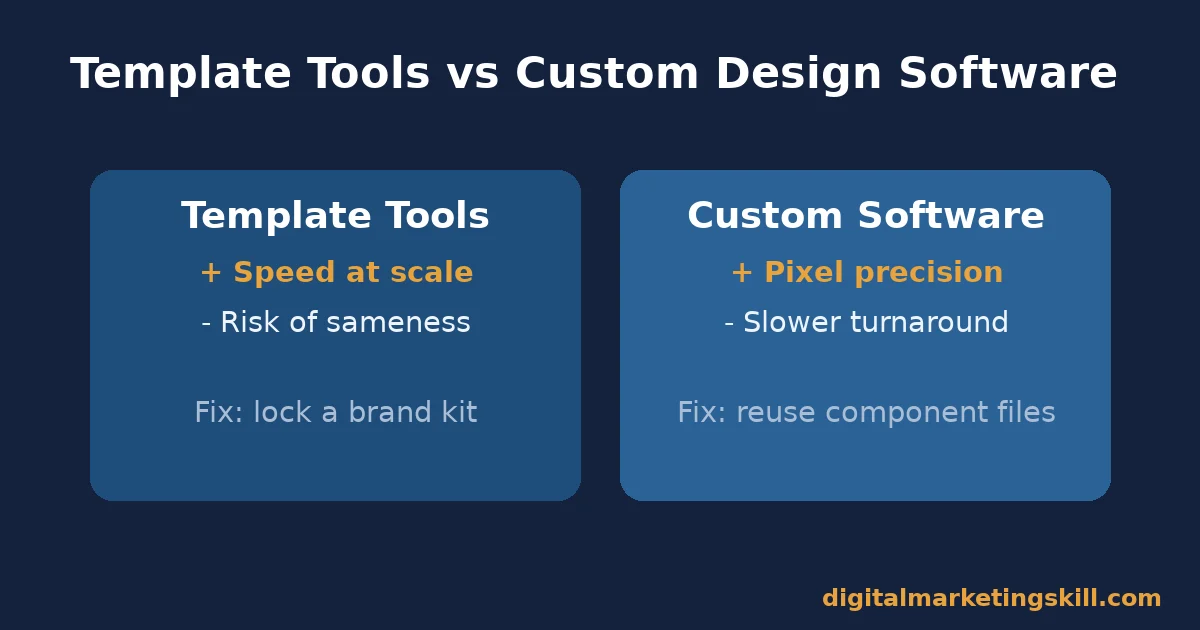
The trade-off is customisation depth. A template that is easy to recognise is also easy to overuse. Heavily templated accounts can start to look interchangeable with every other business using the same library. That sameness can weaken brand recall, even when each individual graphic looks fine on its own. Speed is the strength here; sameness is the risk that comes with it.
Custom Design Software: Built For Brand Precision
Tools such as Adobe Photoshop and Illustrator, used by a trained designer, give full control over every pixel. They allow custom typography, original illustration, and layered effects a template editor cannot match. As a result, there is no real ceiling on how distinctive the output can look.
The trade-off here is turnaround time and skill. A single flagship graphic can take hours, not minutes. Every element gets built from scratch rather than pulled from a library. The file is also rarely reusable by someone outside the design team. It depends on software most marketers never open. Precision is the strength here; speed is the risk that comes with it.
Fix the Weak Spot In Each Approach
Template-Based Tools: Lead With A Locked Brand Kit
The sameness risk in template tools has a direct fix. Lock your fonts, colours, and logo placement into a saved brand kit before anyone touches a template. Most template platforms support this natively. Once it is locked, every graphic a team member makes carries your identity automatically. It stops resembling every other account using the same library.
Pair the brand kit with two or three go-to layouts per platform. Resist the urge to browse the full template library every time a post is due. Fewer choices, applied consistently, read as more deliberate than an endless variety of one-off designs. Over a few weeks, that repetition becomes a visual shorthand. Your audience starts to recognise it instantly in a crowded feed.
Custom Design Software: Lead With Reusable Component Files
The turnaround risk in custom software has a matching fix. Build a small library of reusable component files: background panels, icon sets, and a title-card layout. A designer then edits a saved file, instead of starting from a blank canvas every time. This converts a chunk of “custom” work back into something closer to a template. It does so without losing the pixel-level control that makes custom software worth using in the first place.
In practice, most teams that scale well run a hybrid approach, instead of picking one tool forever. Template tools handle the daily volume, since speed matters most there. Meanwhile, the component-file library inside the custom software handles the handful of flagship assets. A product launch graphic or a conference banner are good examples. Those assets justify the extra time. Neither tool has to do every job alone, and most teams save money by splitting the work this way instead of outsourcing everything to one side.
Measure What the Graphic Is Actually Doing
Three KPIs For Any Social Media Graphics Tools Workflow
Three numbers tell you whether a social media graphic is working. Each one measures a different stage of the same journey, so none of them is useful on its own.
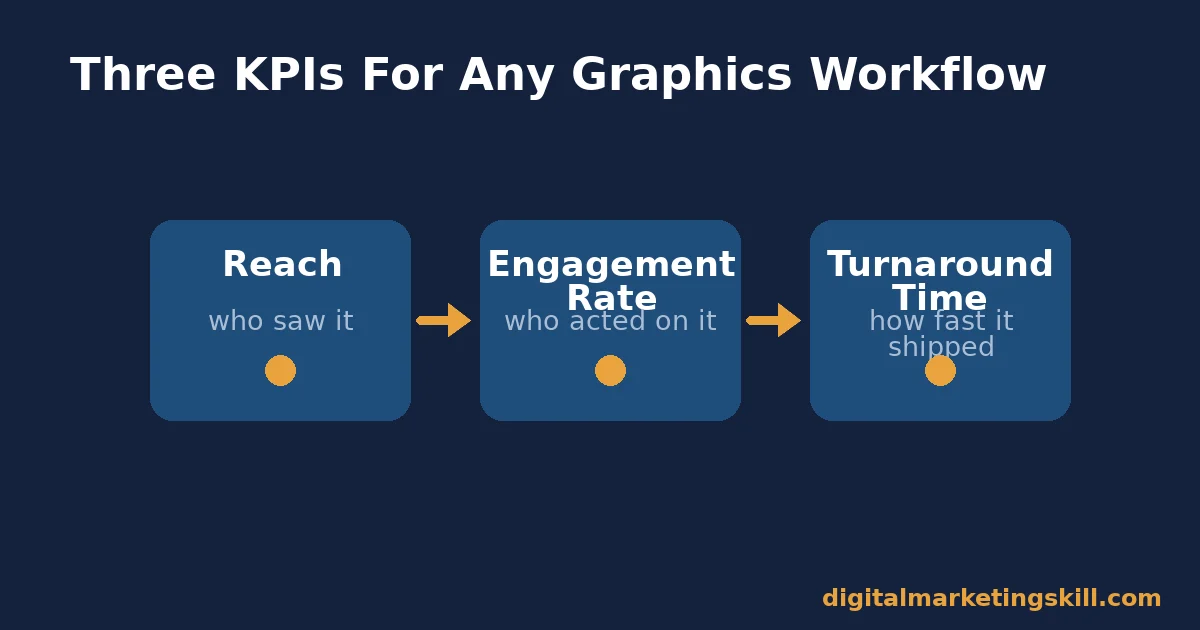
Reach is the number of accounts that saw the post at all, whether they engaged with it or not. A graphic can be excellent and still post a low reach number. That happens because distribution, not design, is often the real bottleneck.
Engagement rate is the share of people who saw the post and then liked, commented, shared, or saved it. Social Insider’s benchmark analysis of over 70 million posts puts typical platform-wide engagement rates far lower than the format-specific figures above. That is because it averages every post on a platform, instead of isolating one format. So the gap is a useful reminder. Always compare your own numbers against a benchmark that used a similar method, not just the most impressive number you can find.
Turnaround Time and File Weight
Turnaround time is how long it takes from “we need a graphic” to “it is published.” This is the number template tools and brand kits move the most. It is also the easiest one for a small team to track. A shared spreadsheet works fine, and no special software is required.
Track all three together, because each one catches a different failure. A graphic with strong engagement but a three-day turnaround time still missed its moment. A graphic published in minutes with almost no reach has a distribution problem design alone cannot fix. File weight matters too, especially on mobile connections. Web.dev’s guidance on image formats recommends WebP over older formats where possible. A smaller file simply loads faster on the connection most of your audience is actually using, which protects the reach you worked to earn in the first place.
The One Decision Rule For Choosing Social Media Graphics Tools
If you publish more than roughly five social graphics a week, default to a template tool with a locked brand kit. Reserve custom design software for assets tied to a single major campaign or launch. Below that volume, the time template tools save matters less. A slower, fully custom process is easier to justify for every asset.
Illustrative, invented numbers: imagine a team publishing 20 graphics a week. At three hours each with custom software, that is 60 hours of design time. The Arch Amenities Group case study below reports an 87% turnaround cut after switching to templates. Applied to the same 20 graphics, that cut brings the total down to roughly 8 hours instead. A handful of assets each month, maybe three or four, genuinely need custom precision. A seasonal campaign hero image is a good example. Those can absorb the slower process, because they are the exception, not the weekly routine.
A Real Case: Arch Amenities Group
Arch Amenities Group provides wellness-focused amenities management for commercial and residential properties. The company moved its marketing output from one-off design requests to a template-based workflow, as documented in Canva’s published case study. It reports cutting turnaround time on a single design asset by 87%. One flyer example dropped from roughly four hours to about 30 minutes. The company also reduced creative editing time by 90% overall.
The published case study does not state an independent verification method. It also does not give a precise measurement window beyond the company’s own account of its workflow. The figures are self-reported by the company to the tool vendor whose product it was promoting. So treat the specific percentages as a single company’s result, not a guaranteed outcome for every team. The direction, templates removing repeat design work, still matches the mechanism described earlier in this guide. It is also a useful sanity check: a team weighing social media graphics tools against a fully custom process should expect a meaningful turnaround gain, even if the exact number differs from this one case.
Frequently Asked Questions About Social Media Graphics Tools
Do I need different social media graphics tools for different platforms?
Not usually. Most template-based tools export the same base design into Instagram, Facebook, and LinkedIn sizes from a single layout. That is faster than switching software per platform. You only need a second tool when a platform needs a format, like short vertical video, that the first tool cannot produce.
Are free social media graphics tools good enough for a small business?
Often, yes, for daily posts. Free tiers of most template platforms include enough stock photos and layouts to cover routine content. Paid tiers earn their cost mainly through larger media libraries, brand-kit features, and team collaboration. These matter more once output volume or team size grows.
How many templates does a small team actually need?
Fewer than most people assume. Two or three well-chosen layouts per platform, applied consistently with a locked brand kit, usually outperform a large, rarely reused template library. Consistency reads as intentional design, not a grab-bag of looks. A large template library is still useful as a starting point while you find your two or three favourites, but it should not stay the daily default.
Does using templates hurt a brand’s originality?
It can, if the brand kit step is skipped. A templated graphic with your fonts, colours, and logo locked in reads as branded content, not a generic template. The originality risk comes from using a template’s default look untouched, not from using a template at all.
Should a growing business eventually move away from templates entirely?
Rarely all at once. Most growing teams keep templates for routine, high-volume posts. They add custom design software only for a handful of flagship assets, such as a major announcement or a seasonal campaign, where the extra time is worth it.
What is the biggest mistake teams make when picking social media graphics tools?
Choosing based on the size of the template library, instead of how often the team will actually publish. A tool with millions of templates does not help if the real bottleneck is approval time or a missing brand kit, not a shortage of layout options. A smaller tool with a fast export flow and a locked brand kit will usually beat a bigger tool that nobody on the team has set up properly.
Do social media graphics tools replace the need for a designer?
No, they change what a designer spends time on. A trained designer still builds the brand kit, the component files, and the flagship assets. Template tools simply take the daily, repetitive graphics off that person’s plate. Their time then goes toward work only a designer can do well.
Can a solo marketer run a full content calendar on template-based social media graphics tools alone?
In most cases, yes. A solo marketer rarely has the hours for custom design software on a daily basis. A locked brand kit and two or three templates per platform cover routine posting needs well. Custom software becomes worth learning only once output grows past a handful of flagship campaigns a year.
Build the Skills Behind Every Graphics Decision
Picking the right social media graphics tools is one piece of a much broader skill set, taught across the Digital Marketing Skill Institute’s Master Diploma in Digital & AI Marketing.
The program is built from four AI-powered tracks: AI-Powered Social Media Management and Advertising, AI-Powered Lead Generation and Email Automation, AI-Powered Google Specialist, and AI-Powered WordPress and SEO Specialist. Together, these total ten courses, with a Full Stack option for students who complete all four.
Every track includes unlimited 1-on-1 coaching and mentoring, a U.S. Project Internship with a verified U.S. Work Reference Letter, and dual US and UK accreditation recognised in more than 100 countries. The program runs 100% online, so you can build these skills from anywhere in your country.
Put these ideas to work alongside a wider plan in this social media marketing guide, compare more platform tools in this tools roundup, or keep the ideas flowing with this content ideas process. See how a locked brand kit supports a bigger branding strategy, and pick the right format first with this Instagram strategy guide. Read real outcomes on the reviews page, or go straight to the application page. Learn more about the Institute at digitalmarketingskill.com, wherever you live, or start your own program search from the homepage at any time.
Every figure in this guide was checked against its original source before publication. Figures marked as illustrative are invented examples, not real results.
![9 Amazing Digital Marketing Skills to Make Money Online [With Proof]](https://digitalmarketingskill.com/wp-content/uploads/2019/07/9-Amazing-Digital-Marketing-Skills-to-Make-Money-Online-With-Proof-17.png)





