
Website essentials are the handful of elements that decide whether a visitor stays, trusts you and acts, or leaves within seconds. Most checklists list ten vague items with no evidence behind them. This guide ranks the essentials by what research shows actually moves the needle, then gives you a short audit to run today.
Key Takeaways
- Speed is the first essential, measured in seconds. Google’s mobile benchmark study found 53% of mobile visitors leave a page that takes longer than three seconds to load.
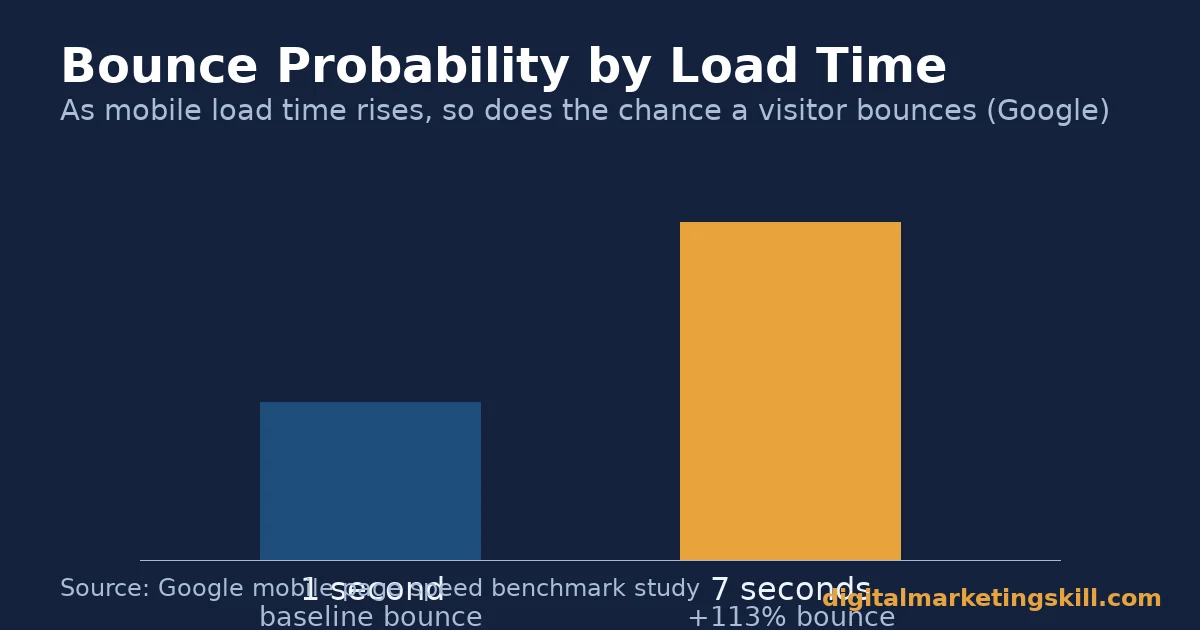
- Slow pages compound. The same study found the probability of a mobile visitor bouncing increases 113% as load time goes from one second to seven seconds.
- Simplicity beats clutter. As the number of page elements goes from 400 to 6,000, Google’s analysis found the probability of conversion drops 95%.
- Hidden navigation costs discoverability. Nielsen Norman Group found sites with hidden navigation saw a more than 20% drop in content discoverability compared with visible navigation, across 179 participants and 6 sites.
- A website itself is a trust signal. BrightLocal’s consumer survey found only 40% of local businesses have a dedicated website, even though 54% of consumers visit a business’s website after reading positive reviews.
In this guide
- What Most Website Essentials Lists Get Wrong
- Why Websites Lose Visitors Before They Convert
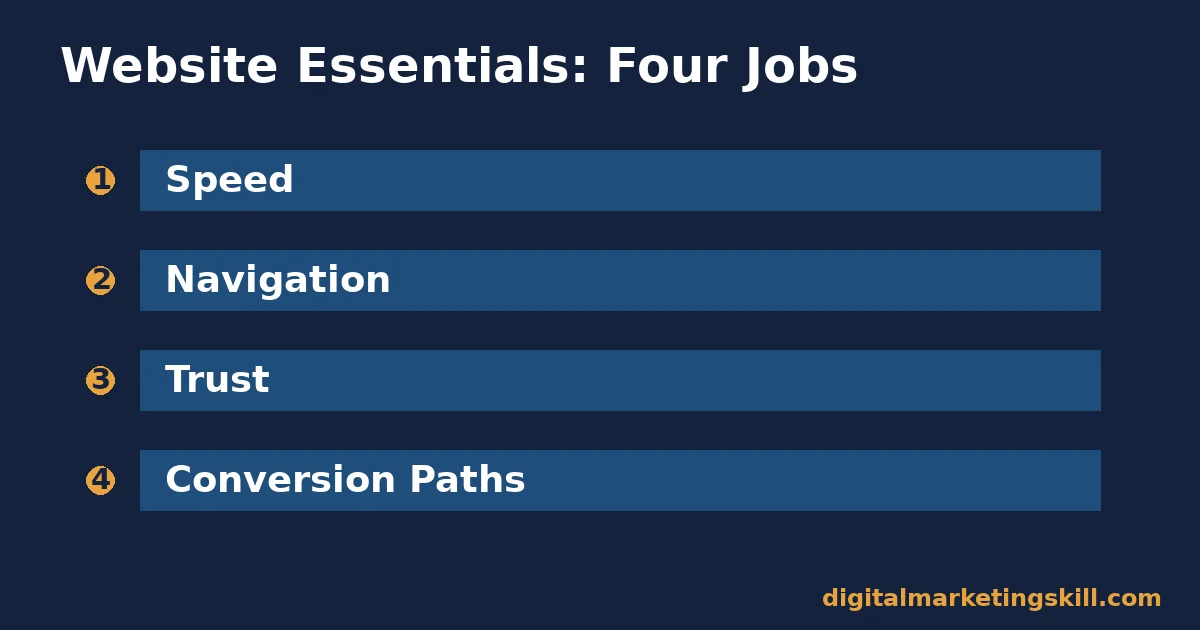
- Website Essentials Fall Into Four Jobs
- The Exact Fixes for Each Job
- Three Mistakes That Undo Good Website Essentials
- How to Measure Whether Your Fixes Worked
- The One Fix to Make Before Any Other
- A Real Case: Credibility Pays Off in What Clients Will Pay
- Frequently Asked Questions About Website Essentials
- Start With a Three-Second Mobile Test
What Most Website Essentials Lists Get Wrong
Search for website essentials and you get the same list everywhere. Clear value proposition. Navigation. Contact info. Testimonials. Mobile-friendly design. None of these items are wrong. What is missing is evidence for why each one matters. Also missing: what specifically breaks when an item is skipped or done badly.
This guide groups the essentials into four jobs. Those jobs are speed, navigation, trust and conversion paths. Each section names the research behind it. Each one also names the specific failure it prevents, plus the fix to apply this week. None of the fixes require a full rebuild. Most take an afternoon, not a project plan.
A few ground rules first. The Google figures come from an aggregate mobile analysis. Treat them as directional for your own site, not a guarantee. The BrightLocal figures are a recent survey of US consumers. They may read differently in other markets. Everything else here is a practical framework built from that evidence, which makes it an informed approach rather than a settled formula.
Why Websites Lose Visitors Before They Convert
A website rarely loses a visitor because of one dramatic mistake. It loses them through a chain of small frictions. A slow load. An unclear headline. A navigation menu that hides the page they need. No visible way to get in touch. Each friction only costs a few visitors. Stacked together, they cost most of them, and missing website essentials are usually the cause.
Most of today’s visitors arrive on a phone, not a desktop. StatCounter’s global traffic data puts mobile at almost 59% of worldwide web page views, against roughly 39% for desktop. Any missing website essential is judged first, and most harshly, on that small screen.
Search engines judge the same way. Google’s own mobile-first indexing documentation states that Google primarily uses the mobile version of a site’s content for ranking and indexing. A website essential that only works properly on desktop is invisible to both the majority of visitors and the search engine deciding whether to send them there.
Speed Is the First Filter, Not a Technical Afterthought
Visitors judge a site before they read a word of it. Google’s mobile page speed research is drawn from millions of mobile ad landing pages. It found that 53% of visitors leave a page that takes longer than three seconds to load. The average mobile landing page in that study took 22 seconds to fully load. That gap shows how far most sites sit from the three-second bar.
The drop-off is not linear. As load time increases from one second to seven seconds, the same research found the probability of a visitor bouncing increases 113%. A site that feels “a bit slow” is not losing a few visitors. It is losing most of them before the headline even renders. That is why speed sits at the top of any honest list of website essentials.
A Website Is Itself a Trust Signal
Having a dedicated website at all is a credibility test many businesses still fail. BrightLocal’s Local Consumer Review Survey polled 1,002 US consumers. It found only 40% of local businesses have a dedicated website. Meanwhile, 54% of consumers now visit a business’s website after reading positive reviews, a share that keeps climbing each year BrightLocal runs the survey.
That gap is an opportunity. A visitor who reads a strong review and then finds no website, or a thin one, often treats the business as less credible. That holds no matter how good the reviews were. Fixing that gap is one of the cheapest website essentials to act on, since it needs no redesign, only a page that exists.
Website Essentials Fall Into Four Jobs
Every genuine website essential protects one of four things: how fast the page appears, how easily visitors find what they need, how much they trust what they see, and how clearly they can act. Miss one, and a specific, measurable failure shows up in your analytics within weeks, usually before anyone on the team notices why traffic looks fine but sales do not.
Illustrative, invented numbers: imagine a site getting 1,000 mobile visitors a month. At a 53% abandonment rate for slow pages alone, that is roughly 530 people who never see the offer, before navigation, trust or conversion paths even enter the picture. Fixing the speed essential first is not a preference. It is where the largest, earliest loss usually sits.
Speed: Built to Stop Silent Abandonment
Speed problems rarely show up as complaints. Visitors do not email you to say your site was slow. They simply leave. That silence is exactly why speed is the website essential most businesses underestimate. Every extra second of delay is a measurable chunk of visitors who never even saw your offer.
Navigation: Built to Stop Visitors Guessing
Navigation questions exist because a visitor who cannot find a page within a few seconds assumes it does not exist. Nielsen Norman Group’s study tracked 179 participants across 6 sites. It found desktop users were at least 39% slower at completing tasks when navigation was hidden, compared with visible or combination navigation.
Trust: Built to Stop Hesitation at the Decision Point
Trust signals exist because visitors who are not sure a business is real or reachable simply do not convert. Stanford’s Web Credibility Project is built on research involving more than 4,500 people. It lists a visible physical address and accessible contact details among the clearest ways to show a real organisation stands behind a site.
Conversion Paths: Built to Stop Dead Ends
Conversion-path questions exist because a visitor who is ready to act and cannot find how is a wasted visit. Every important page needs one obvious next step, not three competing ones splitting attention and intent.
The Exact Fixes for Each Job
Knowing the four jobs matters less than knowing exactly what to check and fix inside each one. Here is the specific action for each job, plus what to check when the first fix is not enough to move the numbers.
Speed: Cut Elements Before You Chase Milliseconds
Start with page weight, not server tweaks. Google’s benchmark analysis found that conversion probability drops 95% as page elements go from 400 to 6,000. Before optimising code, cut unnecessary scripts first. Remove oversized images and redundant plugins too.
Then test load time on an actual mobile connection, not a desktop broadband line, since the two can show very different results. Choosing a faster website hosting plan is often the single biggest lever if your current host is the bottleneck, before any code-level work even starts.
Navigation: Keep Four or Fewer Items Visible
Nielsen Norman Group’s research found visible or combination navigation consistently outperformed fully hidden menus. This held true on both desktop and mobile. If your site has four or fewer top-level sections, show them as visible links. Do not hide them behind a menu icon. If you have more than four, keep the most-used ones visible and group the rest under one clearly labelled “more” link.
Trust: Put Contact Details on Every Page
Stanford’s guidelines are specific here. List a physical address, a phone number and an email address. Make them easy to find, not buried three clicks deep in a footer menu. Put at least one contact method in the header or footer of every page. Do not limit contact details to a standalone contact page visitors may never reach.
Conversion Paths: One Clear Action Per Page
Audit every important page and ask what single action you actually want a visitor to take. If a page offers three competing buttons with equal visual weight, visitors often take none of them. Pick one primary action. Make every other link visually secondary. If conversion rate itself is the bottleneck rather than traffic, a dedicated website conversion rate review goes deeper than this section can.
A One-Page Audit Template
Illustrative, invented numbers: a workable audit needs five short lines, one per essential area. Speed: “mobile load time measured at 4.2 seconds, target under 3.” Navigation: “7 top-level items, cut to 4 visible plus a grouped link.” Trust: “phone number added to the footer on every page.”
Conversion: “homepage had 3 competing buttons, reduced to 1 primary and 2 secondary.” Next review: “recheck all four areas in 30 days.” Five lines like these, filled in honestly from your own site, do more work than a fifty-point checklist nobody finishes reading.
Three Mistakes That Undo Good Website Essentials
Even a site that gets the big four right can still underperform if these three mistakes creep in. Each one is easy to fix once you can name it, and none of them require a developer or a budget to correct, only a regular habit of checking.
Testing Only on Desktop
A site that loads fast on office broadband can still fail the three-second test on a real mobile connection. Since mobile accounts for almost 59% of worldwide traffic according to StatCounter, a desktop-only test is checking the wrong device for most visitors. Test every page on an actual phone, on a normal mobile connection, not just a fast office Wi-Fi network.
Letting Trust Signals Go Stale
An old phone number, a dead contact form or a testimonial from a client who left years ago all quietly undercut Stanford’s core guideline: show that honest, reachable people stand behind the site. Recheck every trust signal at least twice a year, not only when something visibly breaks.
Adding a New Call to Action Without Removing an Old One
Conversion paths degrade slowly, one well-meaning addition at a time. A new banner here, a new popup there, and the one clear action from the conversion-path fix quietly becomes three again. Before adding any new button or link to a key page, remove one that competes with it.
How to Measure Whether Your Fixes Worked
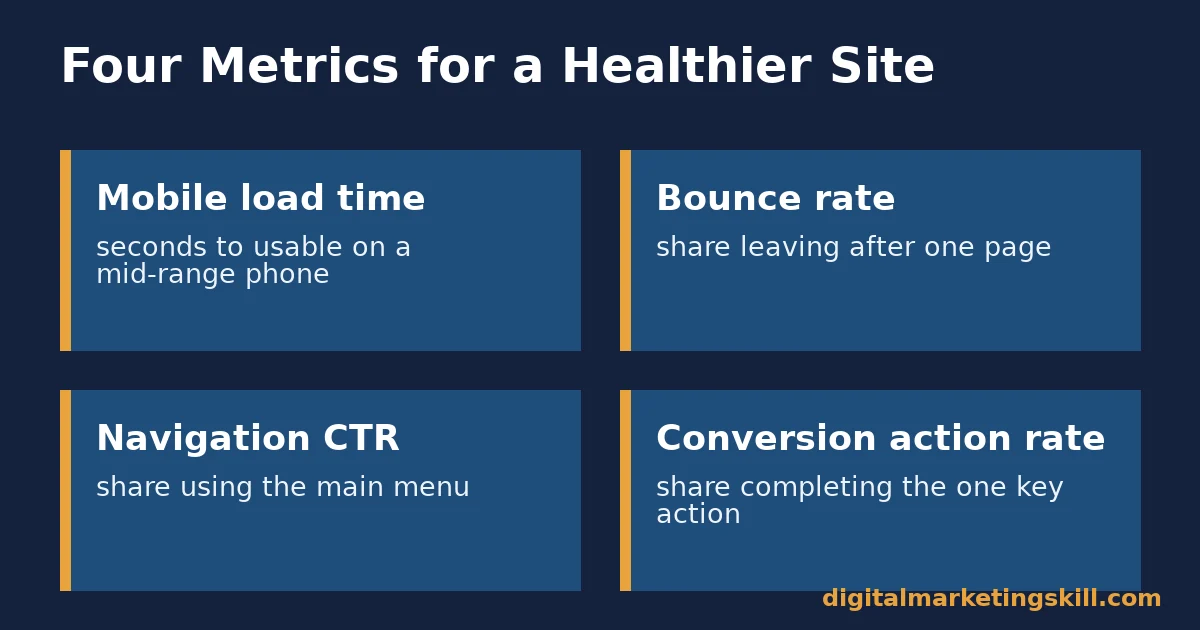
Fixing these website essentials is only half the job. The other half is checking, with numbers, that the fixes actually reduced the frictions they targeted. That is the same discipline you would apply to any website optimisation project. Four metrics show this clearly across a site.
Four Metrics That Show a Healthier Website
Mobile load time is the number of seconds your key landing pages take to become usable on a mid-range mobile connection. Bounce rate on entry pages is the share of visitors who leave after viewing only one page. It should fall as speed and clarity improve.
Navigation click-through rate tracks how often visitors use your main navigation at all. It should rise once navigation is visible and clearly labelled. Conversion action rate is the share of visitors who complete your one primary action per page, such as a form submission or a call click.
How to Read These Numbers Together
Read these four metrics together, not alone. A fast site with a high bounce rate often means the content itself, not the speed, is the problem. A low navigation click-through rate paired with strong direct conversions can simply mean visitors already knew what they wanted. Navigation mattered less for them than it does for first-time visitors.
When all four numbers move the right way after a fix, you have evidence the website essential actually mattered for your specific audience, not only in general research. Track them monthly, in the same spreadsheet or dashboard, so a slow drift is visible long before it becomes a crisis.
The One Fix to Make Before Any Other
If you only have time to fix one website essential, make it this: get your mobile load time under three seconds. Every other essential, from navigation to trust signals, only gets evaluated by visitors who stayed long enough to see it. The 53% who leave a slow page never do.
As a worked example: a service business measures its homepage at 5.8 seconds on mobile. It compresses images and removes two tracking scripts. Load time drops to 2.9 seconds. Based on Google’s benchmark curve, that single change is the one most likely to move overall conversions, before any other item on this list is even touched.
A Real Case: Credibility Pays Off in What Clients Will Pay
Getting the fundamentals right changes how much a business can charge, not only how it looks. Digital Marketing Skill Institute student Damola Akanbi reported charging $1,500 per client to run digital marketing campaigns. He credits learning to present his work credibly before pitching new clients.
That figure is one student’s self-reported result, not a guaranteed income. Results vary by market, niche and client type. See the earnings disclaimer for full context. The lesson stays directional, not universal: a credible, fundamentals-first presentation tends to support higher prices than a thin or unclear one, whether that presentation is a website or a pitch deck.
The same logic applies in reverse. A prospective client who visits a slow, cluttered or contact-free website before a sales call often arrives already skeptical, no matter how strong the pitch turns out to be. Website essentials are not just a visitor-facing concern. They shape the first impression a potential client or employer forms before any conversation starts.
Frequently Asked Questions About Website Essentials
What is the single most important website essential to fix first?
Mobile load time. Google’s mobile benchmark study found 53% of visitors leave a page that takes longer than three seconds to load, so every other website essential only matters to the visitors who stay.
How many navigation items should a business website show?
Four or fewer, shown as visible top-level links. Nielsen Norman Group’s research found hidden navigation reduced content discoverability by more than 20% compared with visible options.
What trust signals matter most for a new or small business website?
A visible physical address, phone number and email address. Stanford’s Web Credibility Project, built on research involving more than 4,500 people, lists these among the clearest signals that a real organisation stands behind a site.
Do customer reviews belong on the website itself, or only on review platforms?
Both. BrightLocal’s survey found 54% of consumers now visit a business’s website after reading positive reviews elsewhere, so the website needs to confirm, not contradict, what they just read about you.
Can too many elements on a page actually hurt conversions?
Yes. Google’s benchmark analysis found that conversion probability drops 95% as page elements go from 400 to 6,000, which makes page weight a conversion issue, not only a speed issue.
Does fixing these website essentials require a full redesign?
Rarely. Most fixes here, such as compressing images, simplifying navigation or adding contact details to the footer, can be made without rebuilding the site from scratch.
How often should a business re-audit its website essentials?
At least twice a year, and after any major content or design change. Load times and navigation patterns drift as pages, plugins and tracking scripts get added over time without anyone noticing.
Why does mobile matter more than desktop for website essentials?
Because most visitors are already there. StatCounter’s global traffic data puts mobile at almost 59% of worldwide web page views, and Google’s own documentation confirms it primarily uses the mobile version of a site for ranking. A website essential that only works on desktop misses both the audience and the search engine sending it to them.
Start With a Three-Second Mobile Test
Load your own homepage on a mobile connection and time it with a stopwatch. If it takes longer than three seconds, that is your first fix. Handle it before navigation, trust signals or anything else on this list of website essentials. If your site still needs rebuilding from the ground up, start with the core steps for how to build a WordPress website the right way.
If you want structured practice auditing and fixing sites like this, the Digital Marketing Skill Institute’s Master Diploma in Digital & AI Marketing includes AI-Powered WordPress Website & SEO among its ten execution-first courses across four AI-powered tracks. It covers exactly this kind of site audit and fix work on live client projects.
The program also includes unlimited 1-on-1 coaching and mentoring, and a project-based internship with a U.S. company that comes with a verified U.S. Work Reference Letter. It is dual US and UK accredited, recognised in more than 100 countries, and 100% online, so you can study from anywhere in your country.
Browse the digital marketing blog for more practical guides, check real outcomes on the reviews page, or go straight to the application page to get started. Wherever you live, these website essentials cost little to fix and save far more traffic and revenue than they cost. Visit Digital Marketing Skill Institute to learn more, or start today at digitalmarketingskill.com.
Every figure in this guide was checked against its original source before publication. Figures marked as illustrative are invented examples, not real results.
![9 Amazing Digital Marketing Skills to Make Money Online [With Proof]](https://digitalmarketingskill.com/wp-content/uploads/2019/07/9-Amazing-Digital-Marketing-Skills-to-Make-Money-Online-With-Proof-17.png)






