
Website optimization means making a site faster, easier to navigate and more relevant. Do that well, and search engines rank it higher while real visitors convert on it. The three fixes that matter most are page speed, clear navigation and content that stays current.
Key Takeaways
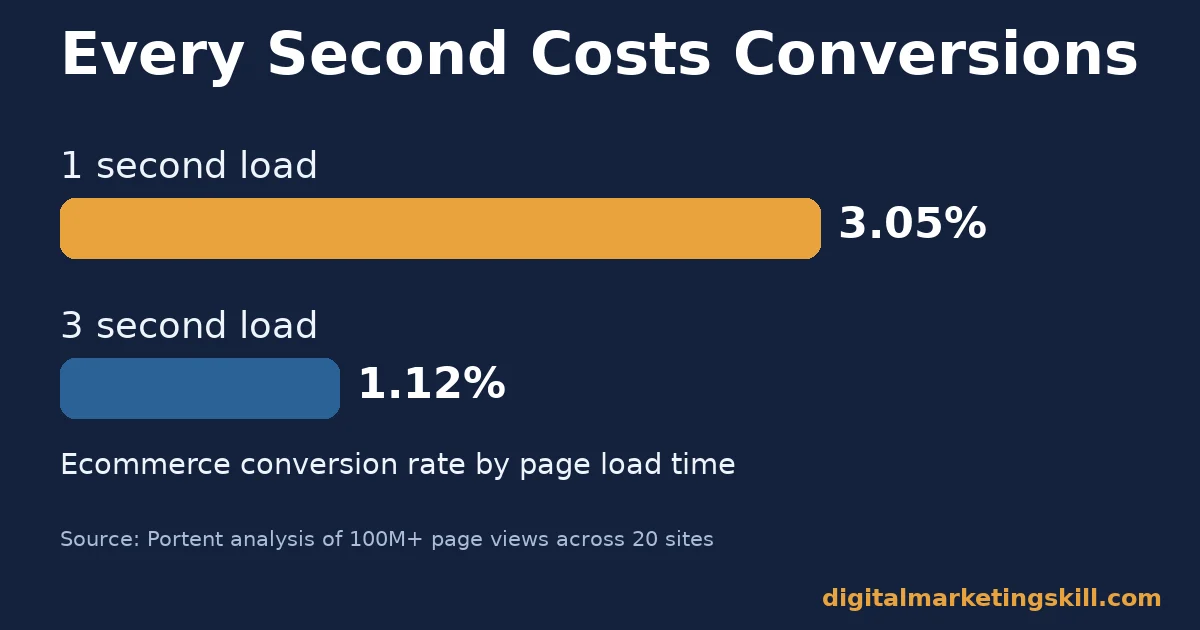
- Speed decides conversions directly. Ecommerce sites that load in one second convert at 3.05%, against 1.12% at three seconds, in Portent’s analysis of over 100 million page views across 20 sites.
- Tiny speed gains compound. A 0.1-second improvement lifted retail conversions 8.4% and average order value 9.2% in a Google, Deloitte Digital and fifty-five study of 30 million mobile sessions.
- Most mobile visitors leave within seconds. Think with Google found that 53% of mobile visits are abandoned once a page takes longer than three seconds to load.
- Navigation fails more often than it works. Baymard Institute’s review of e-commerce sites rated 58% of desktop and 67% of mobile homepage and category navigation as mediocre to poor.
- Refreshing beats publishing more. HubSpot’s own historical-optimization program lifted average organic views 106% on updated posts. And 92% of its monthly blog leads already came from older posts before any rewrite.
In this guide
- What Most Website Optimization Advice Misses
- How Website Optimization Actually Works
- What Differs by Optimization Lever
- How to Fix Each Lever
- How to Measure Website Optimization
- The One Rule: Fix the Slowest High-Traffic Page First
- A Real Case: HubSpot’s Historical Optimization Program
- Frequently Asked Questions About Website Optimization
- Start With Your Busiest Page, Then Expand
What Most Website Optimization Advice Misses
Most website optimization checklists read the same way. Compress your images. Write better content. Add a few internal links. Tidy the menu. None of that is wrong. But it treats a site as one pile of tasks, not three separate systems that each decide something different.
This guide splits website optimization into three levers: speed, navigation and content. It explains what each lever changes, how to fix it, and how to measure the fix. Treat the three-lever split as a useful way to organize the work. It is this guide’s framework, not a law every expert follows.
A word on the ground rules first. The speed figures below come from named studies with a stated sample size. Read them as evidence from those specific sites, not a universal promise for yours. The navigation figures are Baymard’s own usability scoring, a considered judgment rather than a lab measurement. Treat every number here as a snapshot, not a permanent ranking of the web.
One more ground rule matters before the detail. Website optimization is never finished. A site that passes every check this month can fail next month, because a new image, a new plugin or a new competitor can change the picture. Treat the checks below as a routine, not a one-time audit you tick off and forget.
How Website Optimization Actually Works
Search engines and human visitors judge a page for different reasons. But they measure remarkably similar things. A visitor decides in seconds whether a page feels fast and clear enough to trust. Google’s page-experience signals, described in its Search Central documentation, turn that same instinct into something it can measure at scale.
The clearest signals are the Core Web Vitals. Google’s web.dev guidance names three. Largest Contentful Paint should land within 2.5 seconds. Interaction to Next Paint should be 200 milliseconds or less.
Cumulative Layout Shift should stay at 0.1 or below. Check these at the 75th percentile of real visits, per Google’s own advice. Check mobile and desktop on their own. A few fast visits can hide a slow majority.
Why the Three Levers Feed Each Other
The three levers rarely fail on their own. A page loaded with unoptimized images is slow. It also pushes the main content below the fold. That makes navigation harder to use and content harder to scan. Fix one lever alone, and the bottleneck just moves to the next one.
This is also why a site can rank well yet still convert poorly. Or load fast yet still lose visitors. Search engines weigh content relevance heavily. A well-written page can rank even with a clumsy menu. A human visitor is less forgiving.
They will tolerate a plain design. They will not tolerate confusion about where to click next. Website optimization has to satisfy both audiences at once. That is exactly why treating it as three separate levers, rather than one blended task, makes the fixes easier to prioritize and easier to assign to the right person on a small team.
What Differs by Optimization Lever
Each lever fails in a different way. Each one needs a different first move. This section names what each lever is built to do. The next section mirrors it with the fix.
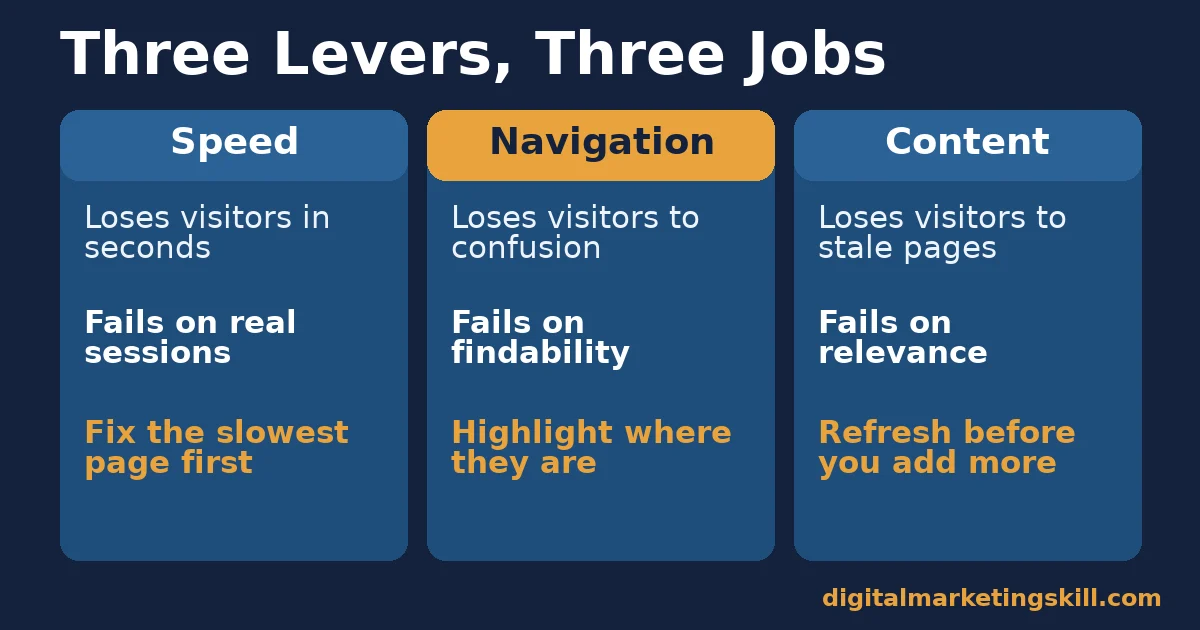
Speed: Built to Convert Within Seconds
Speed has the clearest cause-and-effect evidence attached to it. Portent’s analysis of real sessions found that ecommerce conversion rate drops by roughly a third of a point for every extra second of load time. Lead-generation sites follow a similar curve: about 40% conversion at one second, falling toward 29% at three seconds.
The effect also compounds at the margins. Google’s own “Milliseconds Make Millions” case study, run with Deloitte Digital and fifty-five, measured 30 million mobile sessions across 37 brands. It found that a 0.1-second improvement raised retail conversions by 8.4%. Average order value rose 9.2% for the same tiny gain, and travel conversions rose 10.1%.
Navigation: Built to Guide, Not Decorate
Navigation is judged by whether a visitor finds what they came for. It is not judged by how the menu looks. Baymard Institute’s usability research, scored across thousands of reviewed navigation elements, rated 58% of desktop sites and 67% of mobile sites as mediocre-to-poor on this point.
One failure shows up almost everywhere. Baymard found that 95% of the e-commerce sites it tested never highlight a visitor’s current location in the main navigation. People lose track of where they are the moment they click past the homepage. A visitor who cannot tell where they are tends to leave rather than dig deeper.
Content: Built to Stay Relevant, Not Just Present
Content is the lever most advice focuses on. Yet it is also where “more” quietly becomes the enemy of “better.” Heavy, unoptimized images are a direct cause: images already make up roughly 39-40% of a typical page’s total weight, per the HTTP Archive’s Web Almanac page-weight analysis. So a site’s content choices are also its biggest speed liability.
Content also ages quietly. A post that was accurate when written can fall behind newer competing pages. Rankings and reader trust shift before anyone notices the traffic drop.
How to Fix Each Lever
These three sections mirror the ones above. Start with whichever lever your own data points to. A fix there moves the most visitors fastest.
Speed: Fix the Biggest Delay First
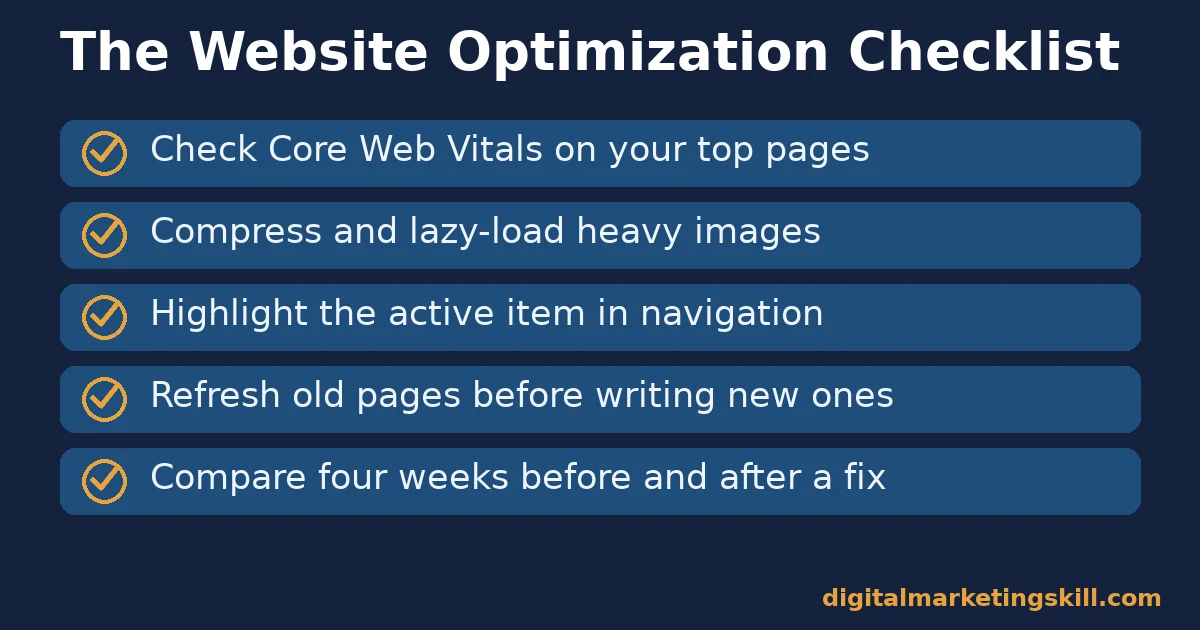
Measure before you guess. Run your most-visited pages through a free Core Web Vitals checker. Note which metric fails on each one: loading, interactivity or layout stability. Images are the heaviest single asset on most pages. Compressing and lazy-loading them below the fold is usually the fastest win, and it targets Largest Contentful Paint directly.
Our guide on how to increase website page speed covers the technical steps in more depth, from image formats to server response time. Fix your highest-traffic pages first. A small gain there reaches the most visitors.
Two more checks are worth a few minutes each. First, look at how many separate scripts and fonts a page loads; a template built up over years often carries tools nobody uses anymore, and removing them is pure upside. Second, check image dimensions against the space they actually fill on the page, since a 3,000-pixel-wide photo squeezed into a 600-pixel box wastes bandwidth for no visible gain.
Navigation: Lead With Clear, Highlighted Categories
Give every main navigation item a visible “you are here” state. Baymard’s research shows this single fix addresses the most common navigation failure on the web. Keep top-level categories to the handful a visitor would actually guess, rather than mirroring your internal department structure.
Then test it the simple way. Hand the site to someone unfamiliar with it. Ask them to find three specific things. Where they hesitate is where navigation is failing, no matter how it looks in a design file. Pair this check with a look at where visitors drop off. A high bounce rate on category or landing pages is often a navigation problem wearing a content disguise.
Search boxes deserve the same attention as menus. If your site has one, check what it returns for a handful of real customer questions, not just product names. A search box that returns nothing useful sends visitors straight to a competitor’s results page instead.
Content: Lead With a Refresh Schedule, Not Just New Posts
Before writing something new, check whether an existing page already covers it. Often it just needs updating. HubSpot’s own program of refreshing, rather than only publishing, is the clearest evidence that this works. It also costs less, because the page may already have links and rankings to build on.
Set a simple rule. Review your ten most-visited pages every few months. Remove anything outdated, add anything genuinely new, and compress any image nobody ever optimized. For a wider view of where a content program breaks down, see our guide to content marketing challenges and how to fix each one.
How to Measure Website Optimization
Measure each lever with its own metric. A single blended score hides which lever is actually broken. Each metric below is defined in one sentence, with a note on how to read it.
Five Metrics Worth Tracking
- Largest Contentful Paint (LCP). The time until the biggest visible element finishes loading. Google calls 2.5 seconds or less good, measured at the 75th percentile of real visits.
- Interaction to Next Paint (INP). The delay between a visitor’s action, like a tap, and the page’s visible response. 200 milliseconds or less is the good threshold.
- Cumulative Layout Shift (CLS). How much visible content moves unexpectedly while a page loads. A score of 0.1 or below counts as stable.
- Bounce or engagement rate. The share of visits that leave without any meaningful interaction. Compare it by page template, since a high rate on category pages usually points to a navigation problem.
- Conversion rate by page. The share of visits on a page that complete your goal action. Track your fastest and slowest pages separately to see if speed fixes are moving the number.
How to Read These Numbers Together
Read Core Web Vitals first. A page failing them is usually also failing on bounce rate and conversion rate, for the same underlying reason. If Core Web Vitals pass but bounce rate stays high, look at navigation and the first screen of content next.
Track one change at a time. Compare four weeks of data against the four weeks before it. Change speed, navigation and content in the same week, and you will never know which fix actually moved the numbers.
Free tools cover most of this without a budget. A browser-based Core Web Vitals checker reports LCP, INP and CLS for any public page. Your analytics platform already reports bounce or engagement rate and conversion rate by page, once you know which pages to compare.
Search Console shows whether search impressions are rising on a page you just refreshed. None of this requires new software, only a habit of checking the same handful of numbers on a schedule. Put the check on a calendar, the same way you would a backup or a security update, so it survives busy weeks instead of quietly dropping off the list.
The One Rule: Fix the Slowest High-Traffic Page First
If you take one decision rule from this guide, make it this one. Rank your pages by traffic, then by Core Web Vitals performance. Start with whichever page is both popular and failing. That single page reaches more real visitors than a dozen small fixes spread across pages nobody visits.
Here is an illustrative example, with invented numbers. A mid-sized services site has one landing page bringing in 4,000 visits a month. Its LCP is 4.8 seconds and its bounce rate is 68%. The team compresses the hero image, removes an unused script, and lazy-loads everything below the fold. LCP drops to 2.3 seconds. Bounce rate falls to 49% within a month, with no other page touched.
The leverage logic matches the content lever, too. A page that already has visitors multiplies the value of any fix. A brand-new page has to earn its traffic from nothing first.
This also explains why website optimization rewards patience over bursts of activity. A single big push can fix every obvious problem on a site. But new problems appear as soon as a theme updates, a plugin changes or a new batch of content gets added.
The sites that stay fast and easy to use are the ones that recheck these three levers on a routine. They are not the ones that fixed everything once and moved on.
A Real Case: HubSpot’s Historical Optimization Program
HubSpot built a program around the content lever specifically. Instead of only publishing new posts, it systematically reviewed and updated posts that already ranked and already converted. Its own account on the HubSpot blog describes the method and results in detail.
The headline numbers are specific. Before the program, 92% of HubSpot’s monthly blog leads already came from posts published in a prior month. 76% of monthly blog views came from that same older content. After historical optimization, updated posts saw an average 106% increase in monthly organic search views. Posts that were both updated and republished with conversion fixes saw leads triple.
Keep the limits in mind. This is one company’s internal program, reported by that company, on a blog with a large existing archive to draw from. A smaller site with fewer existing pages may not see the same multiplier. Treat it as strong evidence that the content lever rewards revisiting old pages, not as a guaranteed percentage for any specific site.
The case also explains why the decision rule above leads with traffic. HubSpot did not refresh posts at random. It prioritized pages that already had visitors and already ranked, because those pages had the most to gain from a smaller fix. A page with no traffic and no ranking has far less to lose, and far less to gain, from the same hour of editing work.
Frequently Asked Questions About Website Optimization
What is website optimization?
Website optimization is the ongoing process of improving a site’s speed, navigation and content. The goal is better search rankings and more conversions from the visitors a site already gets. It is broader than search engine optimization alone, because it also covers load speed and ease of use.
What is the single biggest website optimization win?
For most sites, fixing page speed on the highest-traffic page gives the fastest measurable result. Speed affects every visitor to that page at once. Start there, then move to navigation and content.
How often should I update old content as part of website optimization?
Review your most-visited pages every few months, rather than leaving them untouched for years. HubSpot’s own data shows that most blog leads tend to come from older posts. Those are the pages worth revisiting first.
Do Core Web Vitals really affect search rankings?
Google’s own documentation confirms that page-experience signals, including Core Web Vitals, are used by its ranking systems. Content relevance and search intent still carry more weight. Treat Core Web Vitals as a baseline to clear, not the main lever for ranking higher.
Is a slow website really losing me customers?
Very likely, yes. Independent studies of real sessions found ecommerce conversion rates falling as load time rises. Mobile visitors abandon pages in large numbers once load time passes three seconds. The exact size of the loss varies by site, but the direction is consistent across every study cited here.
How do I know if my website’s navigation is the problem?
Watch for a high bounce or exit rate on category and landing pages specifically, not the whole site. If visitors arrive but leave from the pages meant to guide them deeper, navigation is a likely cause. It is especially likely if your current page is never marked in the main menu.
Should I focus on new content or website optimization of existing pages?
Do both. But do not let new content replace maintaining what you already have. A page that already ranks and already gets visits multiplies the value of a fix far faster than a new page starting from zero.
How long does website optimization take to show results?
Speed and navigation fixes can show up in analytics within a few weeks, because they change behavior on visits that are already happening. Content and ranking changes usually take longer, often a few months, because search engines need time to recrawl and re-rank a page. Judge speed and navigation fixes on weeks, and content fixes on months.
Does website optimization matter more on mobile than desktop?
Mobile usually needs the closer attention, since connection speeds vary more and screens leave less room for a cluttered menu. Check Core Web Vitals and navigation on mobile and desktop separately, because a page that passes on one device can still fail on the other.
Start With Your Busiest Page, Then Expand
Website optimization works best as a habit, not a one-time project. Pick your single busiest page. Run it through a Core Web Vitals check. Fix whichever lever is weakest, then measure the change for a month before you move to the next page.
If you want to build these skills properly, Digital Marketing Skill Institute teaches website optimization, SEO and conversion work hands-on. The Master Diploma in Digital & AI Marketing includes nine practical courses, among them AI-powered SEO and content marketing and AI-powered Google Analytics.
It comes with unlimited 1-on-1 coaching and mentoring, plus real project work inside a U.S. company. The diploma is dual US and UK accredited. It is recognized in more than 100 countries.
The program is fully online, so you can study from anywhere in your country. Browse more guides on the Digital Marketing Skill Institute blog, check our beginner’s guide to SEO for the ranking side of this work, and when you are ready, apply for the Master Diploma or start from the Digital Marketing Skill Institute homepage.
Every figure in this guide was checked against its original source before publication. Figures marked as illustrative are invented examples, not real results.
![9 Amazing Digital Marketing Skills to Make Money Online [With Proof]](https://digitalmarketingskill.com/wp-content/uploads/2019/07/9-Amazing-Digital-Marketing-Skills-to-Make-Money-Online-With-Proof-17.png)






