
The on-page SEO tips that matter most are not the ones on every checklist. Ahrefs found that 96.55% of pages get zero traffic from Google. Weak on-page basics are usually why, not bad luck. This guide covers the on-page SEO tips that actually move rankings, with the evidence behind each one, so you can fix the highest-leverage problem first instead of guessing.
Key Takeaways
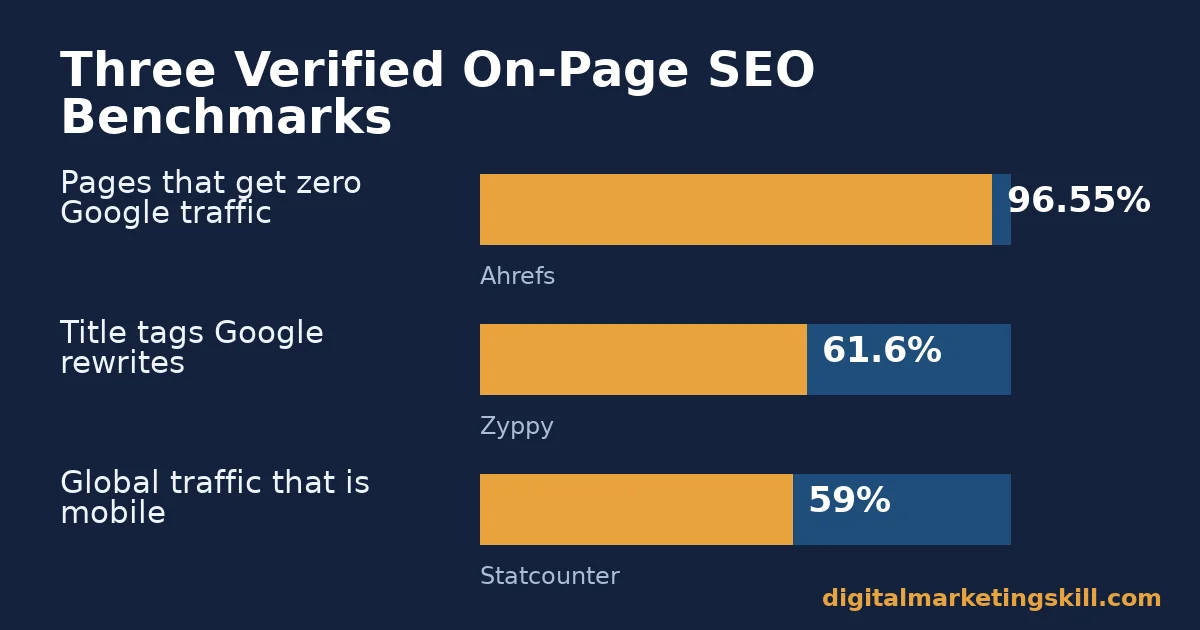
- 96.55% of pages in Ahrefs’ index get zero traffic from Google, and another 1.94% get fewer than 10 visits a month, according to Ahrefs’ own traffic study.
- The average word count of a Google top-10 result is 1,447 words, per Backlinko’s analysis of 11.8 million search results.
- Google rewrites 61.6% of title tags it displays, but titles between 51-60 characters have the lowest rewrite rate, per Zyppy’s study of 80,959 title tags.
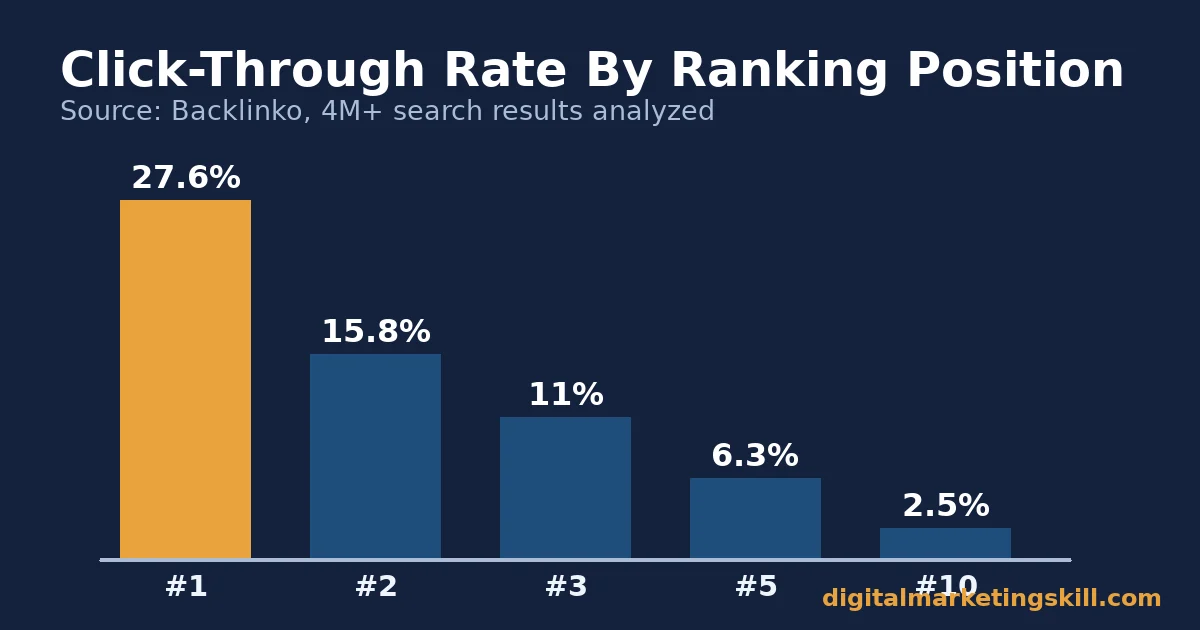
- The #1 organic result earns an average 27.6% click-through rate, roughly 10x the rate of the #10 result, per Backlinko’s analysis of over 4 million search results.
- Mobile devices drive roughly 59% of global website traffic, per Statcounter, so a page that is not mobile-friendly loses before it even gets to rank.
In this guide
- Why Most On-Page SEO Tips Lists Fall Short
- What On-Page SEO Actually Controls
- Nine On-Page SEO Tips That Actually Move Rankings
- 1. Match Content Depth To What Already Ranks
- 2. Write Title Tags Google Won’t Rewrite
- 3. Treat The Meta Description As An Ad, Not A Ranking Lever
- 4. Use Headings To Signal Structure, Not To Stuff Keywords
- 5. Link Related Pages Together On Purpose
- 6. Optimize Images For Both Users And Image Search
- 7. Fix Page Speed And Core Web Vitals
- 8. Design For Mobile First, Not As An Afterthought
- 9. Show Real Expertise, Not Just Keywords
- How To Measure Whether Your On-Page SEO Tips Are Working
- The One Decision Rule: Fix The Weakest Link First
- A Real Case: G2’s On-Page And Content Overhaul
- Frequently Asked Questions About On-Page SEO Tips
- Turn These On-Page SEO Tips Into A Repeatable Skill
Why Most On-Page SEO Tips Lists Fall Short
Most on-page SEO tips lists read like a checklist. Add alt text. Write a meta description. Use your keyword. Done. But Ahrefs’ own research found that the overwhelming majority of published pages never earn any Google traffic at all. The checklist items are not wrong. They are just not sufficient on their own.
Two ground rules. Every benchmark below is an average across many sites and search results. Your page’s actual performance depends on competition and execution, not just whether you technically completed each tip.
Second, on-page SEO is necessary but not sufficient. It makes a page eligible to rank. It does not guarantee a ranking by itself. Backlinks, competition, and search intent still decide the final outcome, which is why a page can follow every on-page SEO tip here and still land on page two if a handful of stronger, better-linked pages already dominate that search term.
This guide is written for a worldwide audience. These on-page SEO tips apply the same way to a website anywhere in your country, since search engines rank pages on the same core signals everywhere.
What On-Page SEO Actually Controls
On-page SEO covers everything you can directly change on your own page. That includes the title tag, the body content, the headings, the images, the internal links, and the page’s technical speed and mobile behavior. It sits apart from off-page SEO, which covers signals like backlinks from other sites that you can influence but not directly control.
Search engines use on-page signals to answer two questions about your page: what is it about, and is it good enough to show someone. Weak on-page SEO fails the first question. Thin or unoriginal content fails the second, even on a page with a perfect title tag. You need both answered well to earn a durable ranking, not a brief one.
Both questions have to be answered well. A page that nails the first but skips the second often ranks briefly. It then slides back down once the search engine gathers enough user data to notice people are not satisfied with the result.
That split explains why checklist-only SEO underperforms. A page can tick every on-page box and still lose to a page that answers the search query more completely. The tips below are ordered by how much each one typically affects both questions.
Think of these nine tips as a stack, not a list. Skipping one does not usually sink a page on its own. Skipping several at once usually does.
Nine On-Page SEO Tips That Actually Move Rankings
1. Match Content Depth To What Already Ranks
Backlinko’s analysis of 11.8 million Google results found the average top-10 result runs about 1,447 words. That is not a target to hit by padding. It is a signal that short, surface-level pages usually lose to pages that cover a topic more completely.
Before writing, open the current top 5-10 results for your target phrase. Note what they cover that a shorter page would miss. Write to match or exceed that coverage, not to hit a word count.
A page that pads filler words to reach 1,447 words performs worse than a focused page at 900 words that actually answers the question. For example, if every top result includes a worked example or a comparison table and your draft does not, that gap is usually a bigger problem than being a few hundred words short.
2. Write Title Tags Google Won’t Rewrite
Google rewrites the majority of title tags it displays in search results. Zyppy’s study of nearly 81,000 title tags found 61.6% were rewritten. The same study found titles between 51 and 60 characters had the lowest rewrite rate, roughly 39-42%.
Put your target phrase first. Keep the title between 50 and 60 characters. Make it read like a real sentence a person would click, not a string of keywords. Also avoid stacking your brand name and a generic descriptor at the end; that is one of the most common reasons Google decides to rewrite a title for a better match to the query.
3. Treat The Meta Description As An Ad, Not A Ranking Lever
Meta descriptions are not a direct ranking factor, but they shape whether someone clicks your result once it appears. Write one meta description per page. Include the exact phrase you are targeting.
State the specific benefit of clicking, in roughly 120-156 characters so it is not cut off. Treat it the way you would a one-line ad: name the problem and hint at the solution. That is what actually earns the click once the ranking has already done its job.
4. Use Headings To Signal Structure, Not To Stuff Keywords
Headings tell both readers and search engines how a page is organized. Use one H1 per page, then H2s for major sections and H3s for subsections. Each heading should describe what that section actually covers.
A heading that exists only to repeat your target phrase adds clutter without adding signal. A reader skimming only the headings should still understand the shape of the whole page. If they cannot, the headings are not doing their job, regardless of how many keywords they contain.
5. Link Related Pages Together On Purpose
Internal links help search engines find and understand every page on your site, not just your homepage. Link to related, already-published pages using descriptive anchor text that names what the linked page is about, rather than generic text like “click here.”
Our guide to earning quality backlinks covers the off-page side of this same principle. A simple starting point is to scan your five highest-traffic pages. Add one relevant internal link from each to a page that needs more support.
A page with no internal links pointing to it is harder for a search engine to discover and rank, even if the content itself is strong. Because of this, a quick monthly audit of your most important pages, checking how many internal links point to each one, is often more productive than writing another new page.
6. Optimize Images For Both Users And Image Search
Google’s own documentation calls alt text “the most important attribute when it comes to providing more metadata for an image,” and confirms it is a ranking factor for image search specifically, not for general page rankings. Write alt text that describes what the image actually shows, in context of the surrounding content, never a list of keywords.
Compress and correctly size every image too. A bloated image slows the whole page down, which affects the next tip. As a rule of thumb, a single hero image rarely needs to be larger than a few hundred kilobytes once properly compressed, and modern formats like WebP typically shrink a file significantly without a visible quality loss.
7. Fix Page Speed And Core Web Vitals
Google’s own documentation confirms Core Web Vitals are part of its core ranking systems, alongside other page experience signals. The three metrics measure loading speed, interactivity, and visual stability.
None of them guarantees a top ranking alone. But a page that fails them badly is working against itself on every other tip on this list. Our mobile SEO guide covers the fixes for the mobile side of page speed in more detail.
8. Design For Mobile First, Not As An Afterthought
Mobile devices generate roughly 59% of global website traffic, according to Statcounter, and Google crawls and ranks most sites using the mobile version of the page. A page that looks fine on desktop but breaks, overlaps, or scrolls sideways on a phone is failing the majority of its potential visitors before it ever gets to the content.
Test your most important pages on an actual phone, not just a resized browser window. Emulators miss real touch-target and loading issues that only show up on a real device. Also check that buttons and links are large enough to tap accurately, since a frustrating mobile experience drives visitors away before they ever read the content you worked hard on.
9. Show Real Expertise, Not Just Keywords
Search engines increasingly reward content that shows real experience and expertise on a topic, not just correct keyword usage. Name a real source for every claim. Correct any outdated information. Write from direct knowledge where you have it.
A page that reads like it was written by someone who has actually done the thing tends to earn more trust. That trust comes from readers and from search engines alike. Our content marketing strategy framework goes deeper on building that kind of credibility across a whole site.
Finally, remove anything outdated the moment you spot it. A page with one stale fact standing next to nine accurate ones still reads as less trustworthy than one with zero errors.
How To Measure Whether Your On-Page SEO Tips Are Working
Check these numbers monthly, not daily. On-page changes take time to show up in rankings, so daily checks mostly show noise. Pick one page you recently changed and track its numbers for at least six weeks before deciding whether the change worked.
- Organic sessions per page: the clearest sign a page is both ranking and being found. Falling sessions on a page that used to rank well is often a sign something broke, not that the topic died.
- Click-through rate (CTR): the share of people who see your result and click it. A high ranking with a low CTR usually points to a weak title or meta description, not the content itself.
- Average position: your typical ranking spot for a given phrase, tracked over time. A page stuck just outside the top 10 often needs more content depth or more internal links, not a rewrite.
- Core Web Vitals pass rate: the share of your pages that pass Google’s speed and stability thresholds. A sitewide problem here caps the ceiling for every page’s on-page work.
- Bounce or engagement rate: whether visitors stay once they arrive. A page that ranks but bounces fast is usually mismatched to what the visitor actually wanted.
None of these numbers matters in isolation. A rising position with a falling CTR, for example, usually means the ranking improved but the title stopped matching what people expected to find.
The One Decision Rule: Fix The Weakest Link First
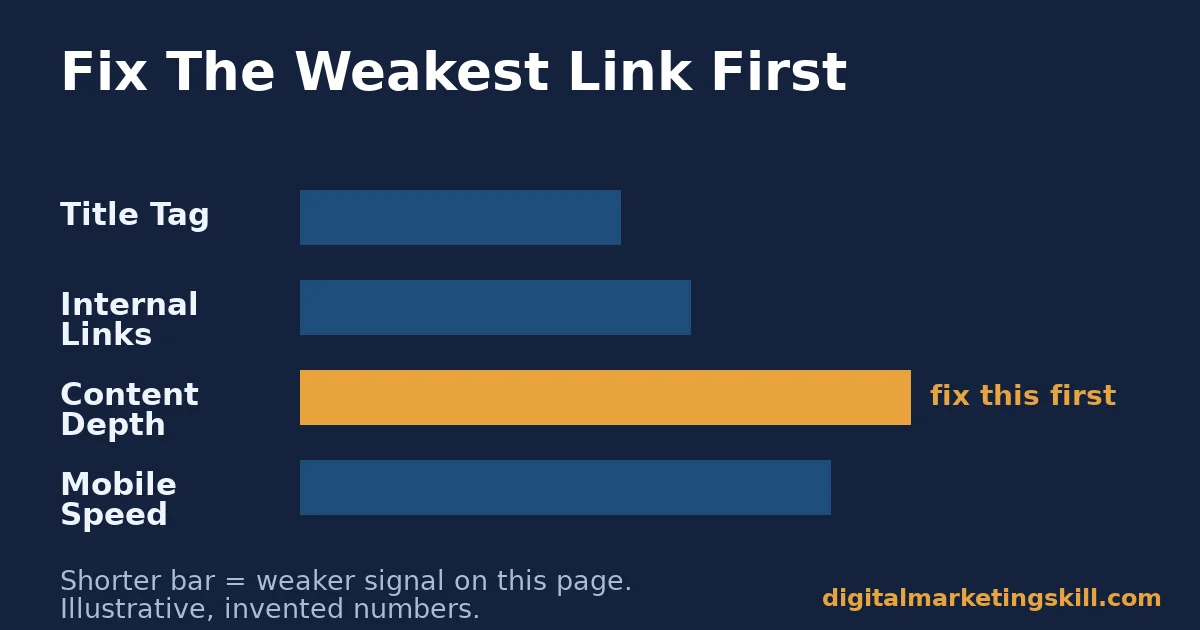
Do not try to perfect every on-page SEO tip on a page at once. Find the single weakest signal on your lowest-performing page. Fix that one thing first, then re-check in a month. Trying to fix everything simultaneously makes it impossible to tell which change actually helped, and it spreads limited time across nine problems instead of solving one completely.
Illustrative, invented numbers: imagine a page ranks at position 14 for its target phrase. It has thin content, 400 words against a 1,500-word average for the top 10, and a slow mobile load time.
Fixing the thin content first, before touching anything else, is the higher-leverage move, because content depth is usually the larger gap. Once that page moves into the top 10, revisit speed and internal links to push it higher. These numbers are invented to illustrate the approach, not a guarantee of your results.
A Real Case: G2’s On-Page And Content Overhaul
G2’s Learning Hub publicly documented growing its blog’s organic traffic from roughly 3,000-5,000 monthly sessions to just under 1 million organic sessions in about two years.
Alongside link building, the team’s own write-up credits consistent on-page basics applied to every single post: proper headers, alt text, and meta descriptions. They also organized articles into single-topic clusters of 20-40 pieces, instead of scattered coverage.
Limits worth naming: this is one company’s self-reported case study, not an independent audit. G2 had a large team and years of runway. A smaller site will not match these exact numbers on the same timeline, but the on-page habits themselves apply at any size.
In other words, the specific growth curve is not replicable on demand. The underlying discipline of applying the same on-page basics to every single post is.
Frequently Asked Questions About On-Page SEO Tips
What are the most important on-page SEO tips for beginners?
Start with content depth, a clear title tag, and basic mobile-friendliness. These three affect the most pages and are the easiest to audit quickly. The more technical tips, like Core Web Vitals, matter more once the content and structure are solid.
How is on-page SEO different from technical SEO?
On-page SEO usually refers to content-facing elements: titles, headings, body content, images, and internal links. Technical SEO covers the underlying infrastructure, like site speed, crawlability, and mobile rendering. In practice the two overlap, since a technical problem like slow load time directly undermines on-page work.
Does keyword density still matter for on-page SEO?
Not in the way it used to. Modern search engines understand related terms and context, not just exact keyword repetition. Use your target phrase naturally where it fits, in the title, opening, and a handful of subheadings, rather than repeating it at a fixed percentage throughout the page.
How long does it take for on-page SEO changes to affect rankings?
It varies by site and by how significant the change is. A title tag or meta description change can show up in click-through data within days. Content and structural changes typically take weeks to months to fully reflect in rankings, since search engines need to recrawl and reassess the page.
Can I fix on-page SEO myself without a developer?
Most on-page SEO tips, like content depth, headings, alt text, and internal links, can be done directly in your CMS without a developer. Core Web Vitals and some technical speed fixes often do need developer help, especially on older or heavily customized sites.
A good rule is to fix everything you can yourself first. Then bring a developer a short, specific list instead of a vague request to “make it faster.”
Is alt text the same as an image caption?
No. Alt text is read by screen readers and search engines when the image itself cannot be seen or understood. A caption is visible text below the image for every reader.
A page can have both, and they often serve different purposes, even when they describe the same image. Skipping alt text to rely on a caption alone still leaves screen reader users and image search without the information they need.
Do on-page SEO tips work the same for every type of website?
The core principles apply broadly, but the weighting changes. A content-heavy blog leans more on content depth. It also leans more on internal linking. An e-commerce product page depends more on structured data, image quality, and page speed, since shoppers are less patient than readers. A local service page leans more heavily on accurate business information and clear calls to action than on long-form content.
What’s the difference between on-page SEO tips and a full SEO strategy?
On-page SEO tips fix what is within your direct control on a single page. A full SEO strategy also covers off-page work like backlinks, keyword research across your whole site, and ongoing measurement. Our complete guide to search engine optimization covers how all three fit together.
Reading a list of tips gets you only partway there. Applying them to a real page, then measuring what changed, is what actually builds the skill.
Turn These On-Page SEO Tips Into A Repeatable Skill
Content depth, title tags, internal linking, and Core Web Vitals are skills. They improve with structured practice on real projects, not a one-time checklist.
The Digital Marketing Skill Institute’s Master Diploma in Digital & AI Marketing includes an AI-Powered WordPress and SEO Specialist track built around exactly this kind of on-page and technical work, alongside an AI-Powered Google Specialist track for the search side of the picture.
The program’s four AI-powered tracks total ten courses, with a Full Stack option for anyone who wants all four. It includes unlimited 1-on-1 coaching and mentoring, a U.S. Project Internship with a verified U.S. Work Reference Letter, and dual US and UK accreditation recognised in more than 100 countries.
It is 100% online, so you can apply these on-page SEO tips to a real site from wherever you are in your country.
See real course outcomes on our reviews page, read the full program breakdown on the Master Diploma page, and browse more guides like this on the digital marketing blog. When you’re ready, apply here. Whether you are starting out or sharpening an existing site, wherever you live, Digital Marketing Skill Institute is built to meet you there. Learn more at digitalmarketingskill.com.
Every figure in this guide was checked against its original source before publication. Figures marked as illustrative are invented examples, not real results.
![9 Amazing Digital Marketing Skills to Make Money Online [With Proof]](https://digitalmarketingskill.com/wp-content/uploads/2019/07/9-Amazing-Digital-Marketing-Skills-to-Make-Money-Online-With-Proof-17.png)






