
A double opt-in is a sign-up process where a new subscriber must confirm their email address or phone number, usually by clicking a link, before you add them to your list. It turns one step (“I signed up”) into two (“I signed up, and yes, that was really me”). It matters because it keeps fake, mistyped and bot sign-ups off your list, which helps your emails reach real inboxes.
Key Takeaways
- With a double opt-in, people only join your list after they click a link in a confirmation message.
- Single opt-in adds people straight away, with no check.
- The extra step blocks spam bots and invalid addresses, which protects deliverability.
- It also gives you clear proof that the person asked to join.
- Klaviyo says you “should always use double opt-in for SMS lists.”
What Is a Double Opt-In?
Klaviyo describes it as “a process through which a new subscriber must confirm their subscription” before they join a list. Mailchimp calls it “an extra confirmation step that checks each email address or phone number.”
Here is what that looks like. A visitor types their email into your newsletter form and clicks Subscribe. Seconds later, they get an email that says “Please confirm your subscription.” They click the button, and only then do they join your list. If they never click, they never join.
In other words, this method asks for consent twice. The first step shows interest, and the second proves the address is real and belongs to the person who signed up. That matters because anyone can type any email address into a form, including someone else’s. Without a check, you could end up emailing people who never asked to hear from you, which annoys them and harms your sender reputation.
How a Double Opt-In Works
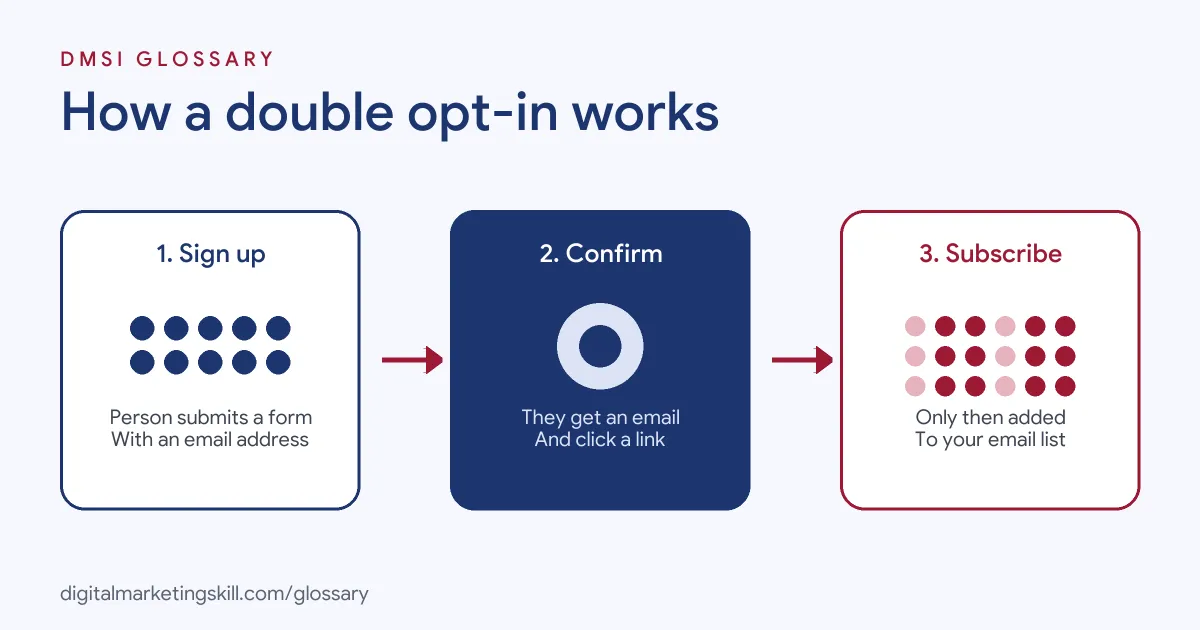
Every confirmed sign-up follows three steps. First, the person submits a form. Next, your email platform sends a confirmation message with a unique link. Finally, the person clicks the link, and the platform adds them as a subscribed contact.
The Confirmation Email
The confirmation email does one job: it asks the person to click. Mailchimp explains that the email “includes a unique URL”, and the subscriber must click it before joining your audience. You can usually change the text and design, so it matches your brand.
So keep it short. Say what they signed up for, show one clear button, and explain what happens next.
What Happens After the Click
Once the person confirms, they become a full subscriber. In Klaviyo, only people who confirm join the list and enter any welcome series. As a result, your welcome emails go only to real, interested people.
Email and SMS
The same idea works for text messages. Klaviyo says “single opt-in is not recommended for SMS”, partly because some mobile carriers require double opt-in. Mailchimp adds that double opt-in is required for abandoned cart texts. In Klaviyo, new SMS lists use this method by default.
Why It Helps Deliverability
Inbox providers watch how people react to your emails. Klaviyo explains that major email clients track engagement and use it to judge whether your mail is spam. So a list full of fake or mistyped addresses drags your results down. Those emails bounce or go unread, and providers notice.
A confirmation step removes most of that waste before it starts. Mailchimp says the method “can help improve open rates” for email contacts. It also uses a reCAPTCHA step that “keeps spambots from adding fake data to your audience.” As a result, the people you email are real, and they asked to hear from you.
There is a trade-off, though. Some people never open the confirmation email, so your list grows a little more slowly. For most brands, a smaller list of real readers is still worth more than a big list that never opens anything.
Examples in Practice
- Newsletter: A food blog uses a confirmation email that says “One more step: tap below to get your weekly recipes.” Bots that fill in the form never click, so they never join.
- Online shop: A clothing brand collects phone numbers for text offers. A confirmation text asks people to reply to confirm, so only real, willing customers get offers.
- Lead magnet: A software firm offers a free template. It sends the download link inside the confirmation email. So people must confirm to get the file, and the address is checked at the same time.
Single Opt-In vs Double Opt-In
| Single opt-in | Double opt-in | |
|---|---|---|
| How people join | Added as soon as they submit the form | Added only after they click a confirmation link |
| List size | Grows faster | Grows a little slower, because some people never confirm |
| List quality | Can include typos, fake addresses and bots | Filters out invalid and unwanted sign-ups |
| Proof of consent | A form submission | A form submission plus a confirmation click |
In short, single opt-in favours speed, while the confirmed method favours quality. Klaviyo notes that single opt-in “doesn’t filter out invalid or unwanted sign-ups”, which can hurt deliverability.
How to Set Up a Double Opt-In
Most email platforms make this a simple setting. In general, the steps look like this:
- Open your audience or list settings in your email platform.
- Find the opt-in or consent section and choose Double opt-in.
- Edit the confirmation email. Add your logo, a clear subject line and one button.
- Set the page people see after they confirm. A thank-you page with a next step works well.
- Test it yourself with a fresh email address, on mobile and desktop.
- Check that confirmed contacts enter your welcome series.
In Klaviyo, for example, the setting sits under Audience, then Lists & segments, then the list’s Settings and Consent. In Mailchimp, you can switch it on when you create an audience or later in the audience settings.
Best Practices
- Tell people to check their inbox. Show a message after sign-up that says “Check your email to confirm.”
- Write a clear subject line. For instance, “Confirm your subscription to [Brand]”.
- Keep one call to action. The only job of the email is the click.
- Avoid double confirmations. Klaviyo warns that if a third-party form already uses this method, people can get “multiple opt-in confirmation messages.”
- Keep the records. The ICO says “you must be able to demonstrate that someone has consented”, and a confirmation click is strong evidence.
Want to fix delivery problems too? Read our guide to email campaign optimisation and deliverability.
Common Mistakes to Avoid
Many beginners send a plain, unbranded confirmation email that looks like spam, so people ignore it. Others forget to tell people to check their inbox, and sign-ups never confirm. Some turn on the setting in both their form tool and their email platform, which sends two emails. Finally, many never test the flow. A broken link means nobody joins, and you may not notice for weeks. So add a test sign-up to your regular checks.
Where You’ll Use Double Opt-In at Work
The job listings we checked rarely name this setting directly. However, email and lifecycle roles regularly ask for the consent skills behind it. For example, recent remote listings ask for:
- “Working knowledge of email deliverability, consent management, suppression practices, and compliance requirements” (Lifecycle Marketing Manager).
- The ability to “monitor deliverability, list hygiene, consent states, and WhatsApp/SMS opt-in quality” (CRM Marketing Specialist).
So if you want to work as an Email Marketing Specialist or Marketing Automation Specialist, you will need to set up sign-up flows, manage consent and keep lists clean.
Learn It in the Lead Generation Track
You can learn to build confirmed sign-up flows in the AI-Powered Lead Generation and Email Automation track. There, you build a lead magnet and an automated email sequence that converts, so you finish with work you can show an employer. You also join a U.S. Project Internship from day one, with unlimited 1-on-1 mentoring.
New to consent? Start with our glossary entry on opt-in.
Frequently Asked Questions
What does double opt-in mean?
It means a new subscriber must confirm their sign-up, usually by clicking a link in an email, before you add them to your list.
Is double opt-in required by law?
UK rules require valid consent and records that prove it, but they don’t name this method. Many businesses use it because it gives clear proof. Some platforms and carriers require it for SMS.
Does a confirmation step reduce list size?
It can, because some people never click the confirmation link. However, the people who do confirm are real and interested.
What is the difference between single and double opt-in?
Single opt-in adds people straight away. The double version adds them only after they confirm.
What should a confirmation email say?
Keep it short. Say what they signed up for, add one clear button to confirm, and explain what they will get next.
Sources: Mailchimp Help: About double opt-in; Klaviyo Help: Single vs double opt-in; ICO: What is valid consent?; remote job listings on Himalayas.