
Maximise conversions is a Google Ads bid strategy that automatically sets your bids to get as many conversions as possible while spending your budget. You don’t set a cost goal. Instead, Google uses AI to bid higher when a click looks likely to convert and lower when it doesn’t. It matters because it is often the simplest way to start automated bidding, especially for new campaigns that need to build conversion data.
Key Takeaways
- Google spells it “Maximize conversions”. It aims to get the most conversions for your budget.
- It needs conversion tracking. Without it, the strategy has nothing to optimise for.
- It tries to spend your whole budget, so set a budget you’re comfortable spending.
- If you have a specific cost goal, Google points you to Target CPA instead.
- Count only actions that matter, or the strategy will chase cheap but useless conversions.
What Is Maximise Conversions?
Google describes it this way: “Maximize conversions uses Google’s AI to set bids to help get the most conversions for your campaign while spending your budget.” It is one of Google’s Smart Bidding strategies, alongside Target CPA, Target ROAS and Maximise conversion value.
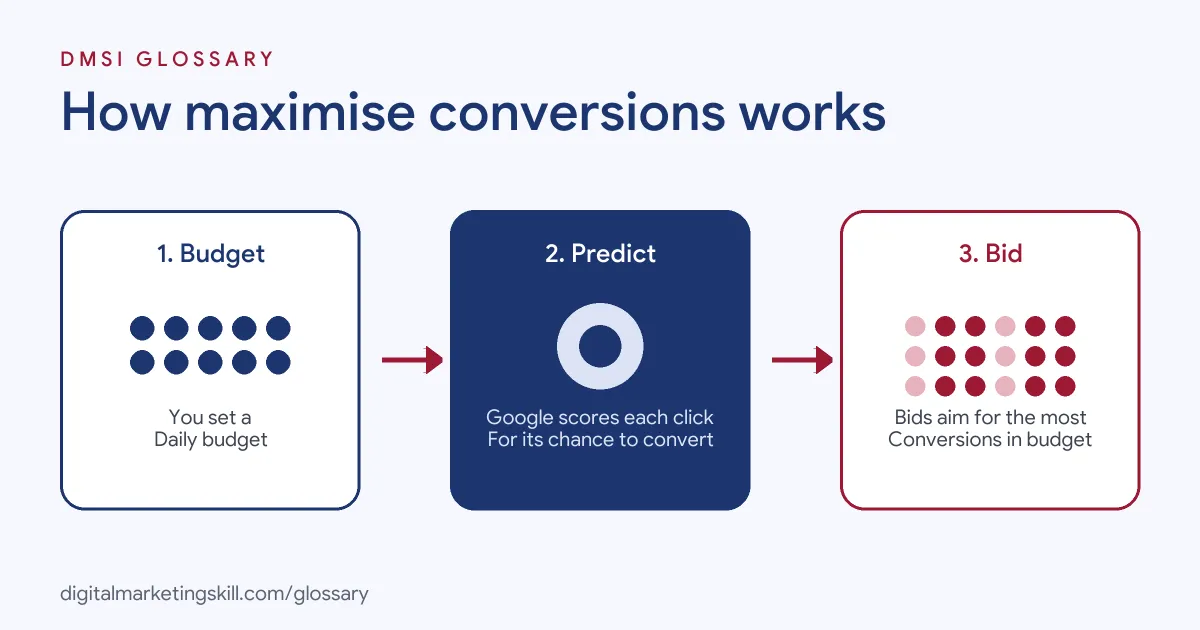
The key idea is that your budget is the only limit. You tell Google how much to spend each day, and it tries to get as many conversions as it can for that amount. It doesn’t try to hit a set cost per conversion. That makes it easy to start with, because there is only one number to choose: how much you want to spend.
For example, a dog-walking business sets a £20 daily budget on a Search campaign. It counts booking form submissions as conversions. Google then bids more on searches like “dog walker near me” at times when people tend to book, and less on searches that rarely lead to enquiries.
How Maximise Conversions Works
The strategy uses what Google calls auction-time bidding. That means it sets a fresh bid for every single auction, rather than using one fixed bid for a keyword.
The Signals Behind Each Bid
Google looks at signals about the person and their context at the moment of the search. These include device and location, along with other signals that only Smart Bidding can use. It then estimates how likely the click is to lead to a conversion and bids to match.
Why the Budget Matters With Maximise Conversions
Because the goal is the most conversions within your budget, Google says it will “aim to spend your budget to maximize conversions for your campaigns.” So your average cost per conversion can rise or fall as Google spends more or less in each auction. To understand whether more budget could bring more results, Google recommends tools such as the budget simulator and impression share metrics.
Adding a Target CPA
You can also set an optional target cost per action. Google has since relabelled that option: “Maximize conversions with a Target CPA” now appears as “Target CPA”. The bidding behaviour is the same. In short, use this strategy without a target when you want volume, and add a target when cost per result matters most.
Maximise Conversions Examples
Here are three made-up examples of when it fits:
- New campaign: A tutoring company launches its first Search campaign. With no conversion history, it uses this strategy to gather data quickly.
- Fixed monthly budget: A charity has £600 a month for ads and wants as many newsletter sign-ups as possible. A budget-led strategy suits it.
- Stepping stone: A software firm runs this strategy for a few weeks. Once it has steady conversions and a clear average cost, it switches to Target CPA.
Maximise Conversions vs Other Bid Strategies
Here is how it compares with nearby options:
| Strategy | Your main control | When to use it |
|---|---|---|
| Manual CPC | The bid for each keyword | You want full control and can manage bids yourself |
| Maximise conversions | Daily budget only | You want as many conversions as your budget allows |
| Target CPA | Average cost per conversion | You know what a conversion is worth and want to hold that cost |
| Maximise conversion value | Daily budget, optimised for value | Conversions have different values, such as order totals |
Google itself points out the key choice: “If you have a specific ROI goal, use the Target CPA bid strategy.”
How to Set Up Maximise Conversions
- Set up conversion tracking. Google says you “must set up conversion tracking to use this strategy.”
- Choose which conversion actions count. Pick the ones that matter, such as purchases or qualified leads.
- Set a daily budget you are happy to spend in full.
- In your campaign settings, open Bidding and choose to focus on conversions.
- Leave the target cost per action blank for this strategy.
- Let it run for a few weeks before judging results.
- Check cost per conversion, conversion volume and the search terms report.
- Once results are steady, decide whether to add a target or keep going.
A Worked Example
Here is a made-up example. A campaign spends £30 a day, or about £900 a month. In its first month, it records 36 enquiries. That’s an average cost per conversion of £25. The business knows each enquiry is worth about £60 to it, so the result is profitable. Next, it can either raise the budget to get more enquiries or set a Target CPA of around £25 to hold that cost steady as it grows.
Reading the Results
When you review a campaign that uses maximise conversions, look at three numbers together. First, total conversions, since volume is the goal. Second, cost per conversion, to check each result is still worth having. Third, the quality of those conversions, such as how many leads became customers. If volume rises but quality falls, tighten what counts as a conversion. If both are healthy, you can test a higher budget.
Best Practices
- Track meaningful actions. If a page view counts as a conversion, the strategy will chase page views.
- Set a sensible budget. The strategy aims to spend it, so only set what you’re happy to use.
- Be patient. Automated bidding needs time and data to learn, so avoid big changes early on.
- Watch your search terms. Add negative keywords for irrelevant searches.
- Use budget tools. The budget simulator shows whether extra spend could bring more conversions.
Common Mistakes
A common mistake is using it without reliable conversion tracking, so the system learns from bad data. Another is counting low-value actions, such as clicks on a phone number that never ring. Some advertisers panic when the cost per conversion rises after a budget increase, forgetting that the goal is volume. Others change budgets and settings every few days, which keeps the system relearning. Finally, many stay on this strategy for ever, even when a cost target would give them more control.
Where You’ll Use It at Work
Job listings rarely name this one strategy, but they do ask for strong automated bidding skills. For example, recent remote listings ask candidates to:
- “Manage and fine-tune automated bidding strategies (specifically tROAS and Maximize Conversion Value)” (Paid Search Manager).
- “know automated bidding well: tROAS, tCPA, value-based bidding, PMax” (Paid Ads Specialist, Google and Meta).
- Handle Google Ads setup “including creating ad groups, uploading assets, setting targeting parameters, budgets, and bidding strategies” (Generative AI Content and YouTube Advertising Specialist).
So if you want to work as a Google Ads Specialist or PPC Specialist, expect to choose bid strategies, set budgets and explain the results.
Learn It in the Google Specialist Track
You can learn to choose and manage bid strategies in the AI-Powered Google Specialist track. It covers Google Ads across Search, Display, Discovery, Gmail and YouTube, plus Google Analytics. Your portfolio project is a Google Ads campaign you launch and measure with conversion tracking. You also get unlimited 1-on-1 mentoring and a U.S. Project Internship from day one.
Next, read our guides to Google Ads for small businesses and common Google Ads mistakes. You may also like our glossary entries on Smart Bidding and Target CPA.
Frequently Asked Questions
What does maximise conversions do in Google Ads?
It sets bids automatically to get as many conversions as possible within your daily budget, using signals from each auction.
Do I need conversion tracking?
Yes. Google says you must set up conversion tracking to use this strategy.
Will it spend my whole budget?
It aims to. That’s why you should only set a budget you’re happy to spend in full.
When should I switch to Target CPA?
When you have steady conversion data and a clear cost per conversion you want to hold. Google recommends Target CPA if you have a specific ROI goal.
Is it good for new campaigns?
Often, yes. It can help a new campaign gather conversions quickly, as long as tracking is set up correctly.
Sources: Google Ads Help: About Maximize conversions bidding; Google Ads Help: About Smart Bidding; Google Ads Help: About Target CPA bidding; remote job listings on Himalayas.