
In web analytics, users are the unique people, or more exactly the unique devices and signed-in IDs, that visit your website or app in a given period. Google Analytics 4 counts them in several ways, such as total users, new users, active users and returning users. Users matter because they tell you how many people you actually reach, which is different from how many visits or clicks you get.
Key Takeaways
- Google defines total users as “the number of unique users who triggered any event in the specified date range.”
- Active users are those who engaged with your site or app. New users are those who logged a first_visit or first_open event.
- One person can show up as more than one user if they switch devices or browsers without signing in.
- GA4’s reporting identity can combine User-ID, device ID and modelling to reduce duplicate counting.
- Always compare users with sessions and key events, because reach alone doesn’t show results.
What Are Users in Analytics?
Every analytics tool tries to answer one basic question: how many people came? Analytics tools give that number a name, but they can’t see people directly. Instead, they see browsers, devices and, sometimes, signed-in accounts.
On a website, GA4 usually recognises a returning visitor through a device ID. Google explains that “on websites, the device ID gets its value from the client ID,” which is stored in the browser. If the same person visits on a phone and a laptop, GA4 may count two users, unless it has another way to link them.
This metric sits at the top of a simple structure. Each person can have many sessions, and each session can contain many events. So this count tells you about reach, sessions about visits, and events about actions.
How Users Work in GA4
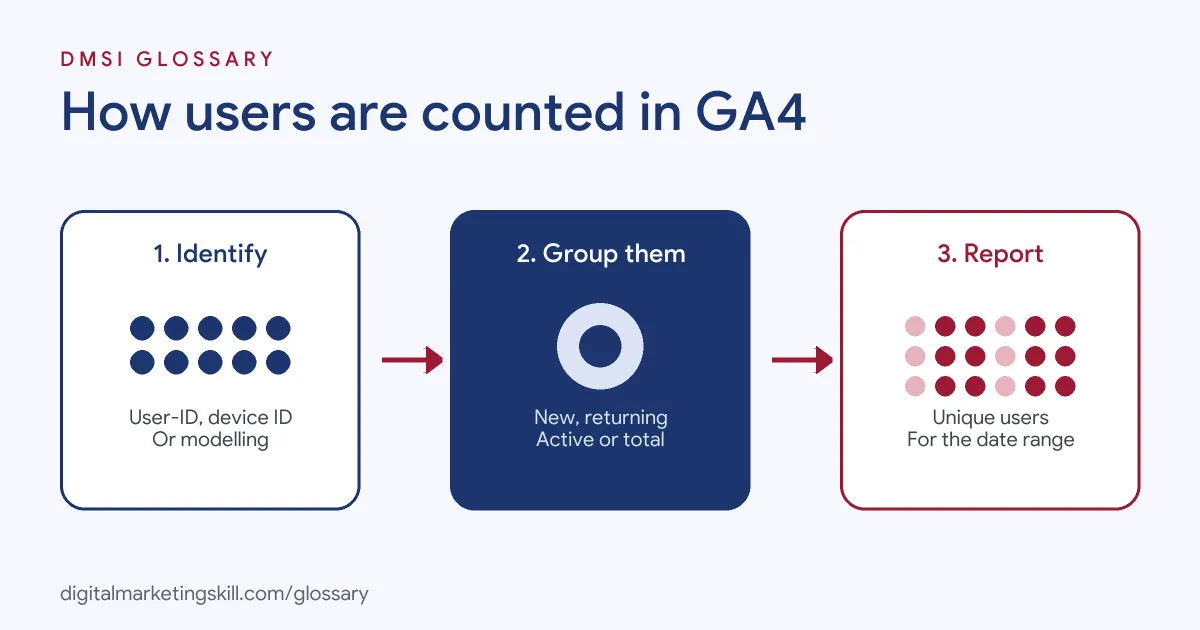
GA4 counts people in three steps. First, it identifies each visitor with the best ID it has. Next, it decides which group they belong to, such as new or returning. Finally, it reports the totals for the date range you choose.
Types of Users
Google’s help centre defines four main metrics:
- Total users: “the number of unique users who triggered any event in the specified date range.”
- New users: “the number of new unique users who logged the first_open or first_visit event.”
- Active users: “the number of unique users who engaged with your site or app in the specified date range.”
- Returning users: unique users “who initiated at least one previous session,” whether or not that earlier session was engaged.
How GA4 Identifies Users
GA4 uses what Google calls identity spaces. The first is User-ID, which you send when people sign in. Google calls it “the most accurate identity space, because it uses data you collect to identify your users.” The second is the device ID, which comes from the browser or app. The third is modelling. When people decline cookies, Google says “Analytics fills this gap by using the data of similar users who do accept cookies from the same property.”
Reporting Identity
You choose how GA4 combines these in a setting called reporting identity. There are three options:
- Blended: uses User-ID first, then device ID, then modelling.
- Observed: uses User-ID, then device ID, without modelling.
- Device-based: uses only the device ID and ignores other IDs.
Google notes that the chosen identity applies across all reports, which helps remove duplicates across devices.
Users Examples
Here are three made-up examples of how GA4 counts people:
- One person, two devices: Amira reads a blog post on her phone, then later visits on her laptop. Without sign-in, GA4 may count her twice.
- Signed-in shopper: Tom logs in on both his phone and tablet. Because the shop sends User-ID, GA4 can link his visits and count him once.
- Returning reader: Leah visits on Monday and again on Friday from the same browser. In a weekly report, she counts once, with two sessions.
Users vs Sessions vs Page Views
These three measures are easy to confuse:
| Measure | What it counts | Best for |
|---|---|---|
| Users | Unique people, devices or signed-in IDs | Understanding reach and audience size |
| Sessions | Separate visits by those users | Understanding visit volume by channel |
| Page views | Each time a page loads | Understanding which pages get the most attention |
For example, 1,000 people might create 1,500 sessions and 4,000 page views in the same week. Each number answers a different question.
How to Analyse Users in GA4
- Pick the right metric. Decide whether you need total, active, new or returning users for your question.
- Set a sensible date range. These counts don’t simply add up across days, so compare like with like.
- Split new and returning. See how many people are first-time visitors and how many come back.
- Look by channel. Check which sources bring the most first-time visitors, and which bring people who return.
- Add outcomes. Compare reach with key events, such as leads or purchases, to see the share who act.
- Review your identity settings. Check your reporting identity, and send User-ID if people sign in.
- Note any changes. Finally, record when you change settings, because they can shift your figures.
Why User Counts Don’t Add Up
Here’s a common surprise. If you add up daily figures for a week, the total is usually higher than the weekly figure. That’s because the same person can visit on several days. The weekly report counts them once, while each daily report counts them again. So always pull the numbers for the exact period you want, rather than adding smaller periods together.
What the New and Returning Mix Tells You
The balance between first-time and returning visitors says a lot about a site. A blog that relies on search may see mostly new visitors, which is normal. In contrast, a shop or software tool usually wants a strong base of people who come back. If returning visitors fall while new ones rise, check whether your emails, content or product are giving people a reason to return. Then look at which channels bring visitors who stay.
Best Practices for Users Data
- Use User-ID where you can. Signed-in data gives the most accurate counts across devices.
- Focus on active people. They show visitors who actually engaged, not just loaded a page.
- Watch the new-to-returning mix. A healthy site usually needs both.
- Segment by audience. Compare users by country, device or channel to spot patterns.
- Pair reach with results. Growth in reach only matters if more people take key actions.
Common Mistakes to Avoid
A common mistake is treating each count as one real person, when people often switch devices. Another is adding daily counts together, which double-counts returning visitors. Some teams also compare total users in one report with active users in another. Others celebrate a rise in reach without checking engagement or key events. Lastly, many forget that cookie choices and identity settings affect the numbers.
Where You’ll Use Users at Work
Job listings rarely name this metric on its own. Instead, they ask for the skills to read and explain audience data. For example, remote listings mention:
- The need to “interpret web traffic, user behavior, search performance, and other digital insights” (Web Manager, Web Strategy and Operations).
- The task to “Analyze funnel performance, customer behavior, conversion metrics, retention, churn, and LTV to drive product decisions” (Technical Product Manager).
- Using “event tracking, segmentation, and audiences to create detailed customer journey analysis” (GA4 Specialist).
So if you want to work as a Web Analytics Specialist, Google Ads Specialist or PPC Specialist, you’ll report on audience numbers and explain what they mean.
Learn It in the Google Specialist Track
You can learn GA4 reporting in the AI-Powered Google Specialist track. It covers Google Ads and Google Analytics, and you launch and measure a Google Ads campaign with conversion tracking. You also get unlimited 1-on-1 mentoring and a U.S. Project Internship from day one.
For more, read our Google Analytics for beginners guide and our round-up of web analytics tools.
Frequently Asked Questions
What are users in Google Analytics?
They are the unique people, devices or signed-in IDs that visit your site or app in a set period.
What is the difference between total users and active users?
The total counts anyone who triggered any event. The active count only includes people who engaged, so it is usually the more useful measure.
What counts as a new user?
Google counts a new user when someone logs a first_visit event on a website, or a first_open event in an app.
Why does one person show up as two users?
If they use different devices or browsers without signing in, GA4 may see two device IDs. Sending a sign-in ID helps link them.
Are users the same as sessions?
No. Users are the people who visit. Sessions are the visits they make, so one user can create many sessions.
Sources: Analytics Help: User metrics; Analytics Help: Reporting identity; Analytics Help: About Analytics sessions; remote job listings on Himalayas.