
GoHighLevel is an all-in-one marketing and sales platform, often called HighLevel or GHL, that combines a CRM, funnels, email and text automation, booking calendars and reviews in one place. It is built mainly for marketing agencies, which can run each client in a separate sub-account and even rebrand the software as their own. It matters because many agencies and small businesses use it to capture, follow up and close leads, so it appears often in remote marketing job ads.
Key Takeaways
- HighLevel describes itself as an “AI-powered business operating system” for capturing, nurturing and closing leads.
- It brings together a CRM, sales pipelines, websites and funnels, forms, workflows, calendars and review requests.
- Agencies subscribe at the agency level, then host a “sub-account” for each client.
- White-labelling lets agencies use their own logo, colours and domain, so clients may see it as the agency’s own tool.
- Job ads often ask for GoHighLevel experience in automation, CRM and funnel roles.
What Is GoHighLevel?
Many small businesses use one tool for email, another for booking, another for landing pages and another for texts. GoHighLevel puts these jobs into a single platform. Its website says it offers “all the tools you need to capture, nurture and close new leads into bookings, sales, reviews and repeat customers”.
The platform is aimed at agencies as much as at businesses. HighLevel’s developer docs say that agencies sign up at the agency level, and “each agency account can host multiple sub-accounts”. Often, there is one per client.
For example, a small agency might manage ten local clinics. Each clinic gets its own sub-account with its own contacts, pipeline, calendar and automations. The agency builds one set of templates, then reuses them across every clinic.
How GoHighLevel Works
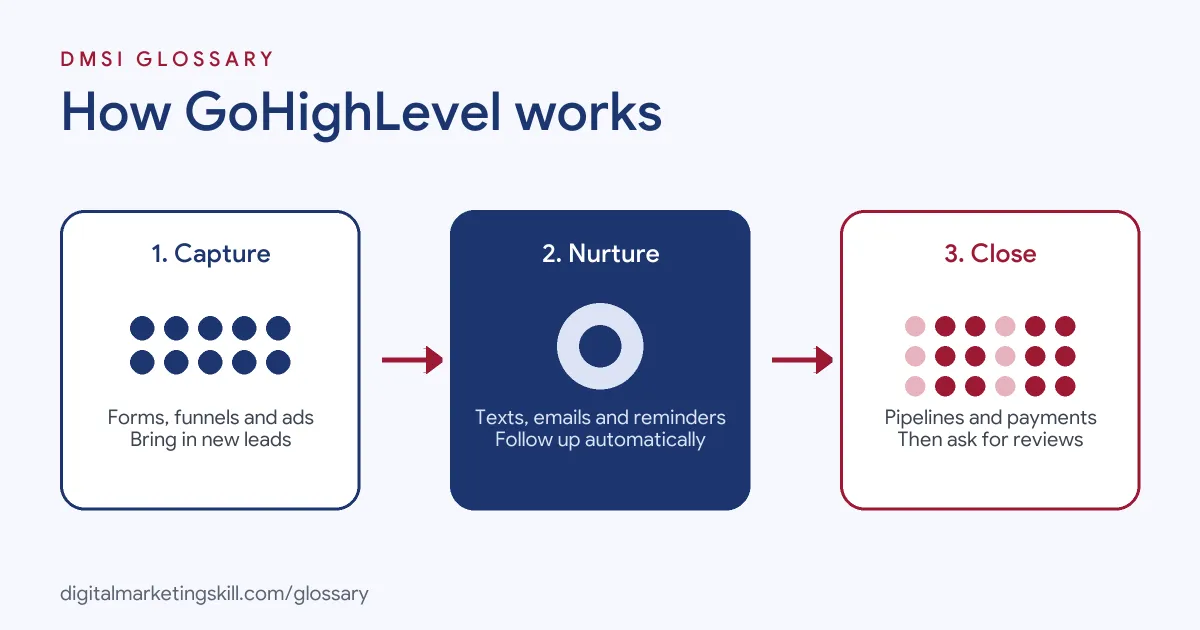
HighLevel groups its tools around the customer journey. First, you capture leads with forms, funnels and ads. Next, you nurture them with automated texts, emails and reminders. Finally, you close the sale with pipelines, proposals and payments, then ask for reviews.
Capture
The capture tools listed on HighLevel’s website include a CRM, forms, surveys and quizzes, websites, funnels and landing pages, webinar funnels, a chat widget and call tracking. It also lists a social planner and an ad manager for Google and Facebook ads.
Nurture
To follow up, it lists workflows, calendars, reminders and sales pipelines. It also offers a single conversation stream that brings together SMS, Messenger, Instagram DMs, WhatsApp and live chat. As a result, a team can reply to every channel from one inbox.
Close and Review
For sales, the website lists lead scoring, estimates and proposals, invoicing, payment integrations and order forms. After the sale, review requests help turn happy customers into reviews and referrals.
GoHighLevel Examples
Here are three made-up examples of how businesses might use the platform:
- Dental clinic: A new patient fills in a form on a landing page. The system adds them to the CRM, texts a booking link and sends a reminder the day before.
- Marketing agency: An agency rebrands the platform with its own logo and domain. Each client logs in to what looks like the agency’s own software.
- Coach: A business coach runs a webinar funnel. Attendees who book a call move through a sales pipeline, and the coach sends a proposal from the same tool.
In each case, the business saves time by keeping leads, messages and sales in one place.
A Day in the Tool: A Simple Example
Here is a made-up day for a small gym that uses the platform. At 9 a.m., a man sees an ad and fills in a short form. He wants a free first class. Right away, he gets a text with a link to book. He picks a time for the next day. The night before, he gets a reminder. He comes in, and the coach marks him as a lead who showed up. A week later, he buys a plan. The system then sends him a short note to ask for a review. He leaves five stars. The gym owner did not send any of those messages by hand. She set up the steps once, and they now run for every new lead. That is the main idea behind tools like this: set it up well once, then let it work for you each day.
GoHighLevel vs Separate Tools
Here is how an all-in-one platform compares with a stack of separate tools:
| Question | All-in-one platform | Separate tools |
|---|---|---|
| Set-up | One login, one contact database | Several logins that need connecting |
| Data | Contacts, chats and deals in one place | Data spread across tools unless synced |
| Flexibility | Good range of features in one system | Best-in-class tools for each job |
| Agency use | Sub-accounts and white-labelling for clients | Usually one account per client per tool |
Neither approach is always better. In short, an all-in-one platform trades some depth for speed and simplicity.
How to Get Started With GoHighLevel
If you are learning the platform, follow these steps:
- Start a trial. HighLevel’s website offers a 14-day free trial.
- Create a sub-account. Set one up for a practice business or a real client.
- Import contacts. Add a small test list to the CRM.
- Build a simple funnel. Create a landing page with a form that adds contacts to the CRM.
- Set up a workflow. For example, send a welcome text and email when someone fills in the form.
- Add a pipeline. Create stages that match your sales process.
- Test everything. Fill in your own form and check that every step fires.
After that, document what you built. Screenshots of a working funnel and workflow make strong portfolio pieces.
Best Practices for GoHighLevel
- Build reusable templates. Agencies save hours by copying proven funnels and workflows into new sub-accounts.
- Keep consent records. Texts and emails need proper opt-in, so store how each contact agreed.
- Name things clearly. Clear names for workflows and pipeline stages help the whole team.
- Test automations often. A broken trigger can stop follow-ups without anyone noticing.
- Brand it carefully. If you white-label, check your logo, domain and sender details before clients log in.
Common Mistakes to Avoid
A common mistake is switching on every feature at once. As a result, workflows overlap and contacts get too many messages. Another is texting contacts who never agreed to receive texts. Some users also skip testing, so a form fails to add leads to the pipeline. Finally, many agencies forget to train clients. Even the best set-up fails if the client does not answer the leads it brings in.
How White-Labelling Works
White-labelling is a big reason agencies choose this platform. HighLevel’s developer docs say agencies can swap its logo and colours for their own. They can send emails and texts from their own branded domains, and map a custom domain, such as crm.agencyname.com. Footers, help links and login screens can be rebranded or removed too. The documentation notes that, as a result, clients “often believe they’re using the agency’s in-house platform”. So agencies keep control of the whole client relationship.
Where You’ll Use GoHighLevel at Work
GoHighLevel appears often in remote job ads for agencies and service businesses. For example, listings mention:
- “Experience with GoHighLevel (GHL) or other CRM platforms” (AI Implementation and Automation Engineer).
- “Maintain accurate account records, order status, and follow-up actions in GoHighLevel or a comparable CRM” (Account Manager).
- “Experience with CRM platforms, sales funnels and marketing automation, such as GoHighLevel, ActiveCampaign or similar” (AI Automation and Admin Specialist).
So if you want to work as a Marketing Automation Specialist, Lead Generation Specialist or Email Marketing Specialist, knowing your way around GoHighLevel can help you stand out.
Learn It in the Lead Generation Track
You can learn the skills that tools like GoHighLevel rely on in the AI-Powered Lead Generation and Email Automation track. You build a lead magnet and an automated email sequence that converts, which is the same logic you set up in any CRM. In addition, you get unlimited 1-on-1 mentoring and a U.S. Project Internship from day one.
For related reading, see our guides to CRM in digital marketing and lead generation tools. You can also learn how a sales pipeline works.
Frequently Asked Questions
What is GoHighLevel in simple terms?
It is one tool that does many jobs: contacts, funnels, emails, texts, bookings and reviews. Agencies and small firms use it most.
Is GoHighLevel the same as HighLevel?
Yes. The platform is called HighLevel, and many people also call it GoHighLevel or GHL.
What is a sub-account in GoHighLevel?
It is a separate workspace inside an agency account, often one per client, with its own contacts and automations.
Can agencies rebrand GoHighLevel?
Yes. HighLevel’s documentation says agencies can use their own logo, colours, domain and sender details.
Is there a free trial?
HighLevel’s website offers a 14-day free trial, which is a good way to practise before working on client accounts.
Sources: HighLevel: Platform overview; HighLevel Developer Docs: Agency vs sub-account; remote job listings on Himalayas and Himalayas.