
The Data Layer is a JavaScript object on a web page that holds information, such as events and product details, and passes it to tracking tags. Instead of each tag scraping the page for data, every tag reads from one tidy, shared source. As a result, your tracking becomes more accurate and much easier to manage. It also means a website redesign is less likely to break your analytics.
Key Takeaways
- The data layer is a JavaScript object that passes information from a website to tags.
- Google Tag Manager and the Google tag both read from it.
- You add data with
dataLayer.push()when something happens on the page. - A special key called
eventlets Tag Manager fire tags at the right moment. - The name
dataLayeris case-sensitive, so small typos break tracking.
What Is a Data Layer?
Most websites run several tracking tags. For example, you may have Google Analytics, a Google Ads conversion tag and a Meta Pixel. Each one needs facts about what the visitor did. So where do those facts come from?
Without a data layer, each tag has to dig through the page code. That works until a developer changes a button or a heading. Then the tracking quietly breaks. With a data layer, the website puts key facts in one place. After that, every tag reads the same values.
Google defines it simply: “The data layer is an object used by Google Tag Manager and gtag.js to pass information to tags.” In practice, it is a JavaScript array called dataLayer. The website adds small messages to it, and your tags pick them up.
Think of it like a noticeboard in an office. Instead of asking every colleague the same question, you pin the answer on the board. Then anyone who needs it reads the board. In the same way, the data layer is the noticeboard for your tags.
Why It Matters
Good tracking depends on clean data. However, scraping text from a page is fragile. A price might show as “£20” on one page and “20.00” on another. By contrast, the data layer can send the same clean value every time. So reports in Google Analytics 4 and your ad platforms match more closely. In addition, smart bidding in ad platforms relies on accurate conversion values. That makes the data layer a quiet but vital part of paid media.
How the Data Layer Works
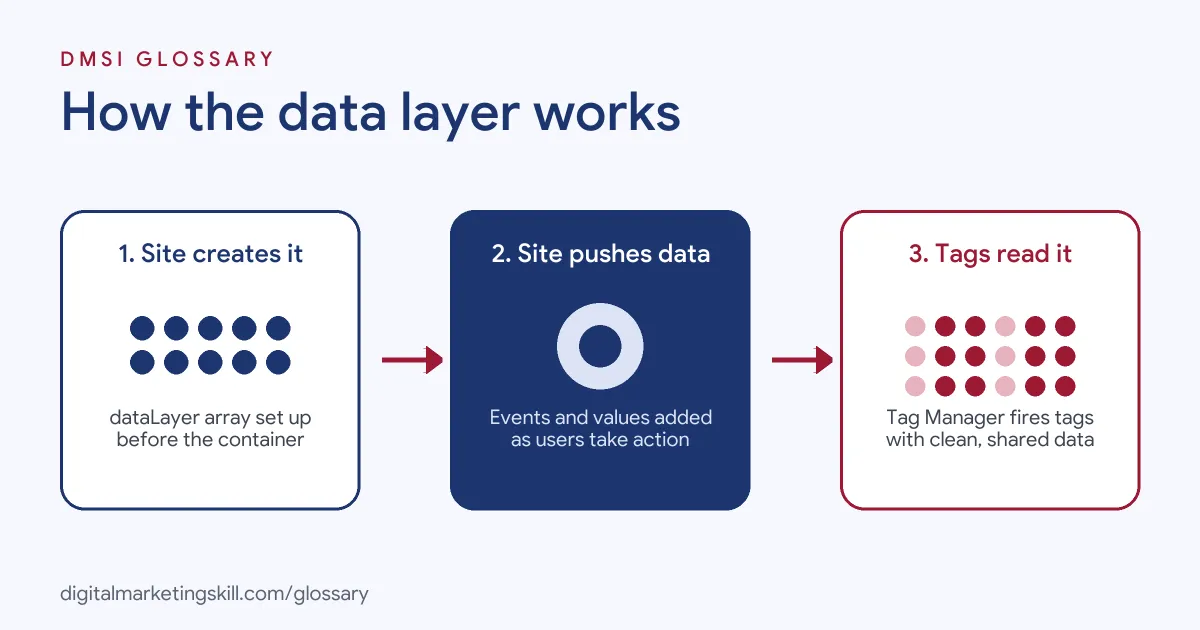
The data layer works as a simple message queue. First, the website creates the dataLayer array. Then it pushes messages into it as things happen. Finally, your tag manager reads each message in order and decides which tags to fire.
Step 1: Create the Data Layer
Before your Google Tag Manager container loads, the page sets up the array. Google’s code for this is window.dataLayer = window.dataLayer || [];. This line keeps any data that already exists. By contrast, writing dataLayer = [...] directly can wipe it. Google warns that doing so “will overwrite any existing values in the dataLayer”.
Step 2: Push Data When Something Happens
Next, the website adds a message each time a key action happens. Google says, “Use dataLayer.push() to send event data when an action occurs that you’d like to measure.” For example, after a login, the code runs dataLayer.push({'event': 'login'});. Similarly, a checkout page might push the order value and currency.
Step 3: Tags Read the Data
Then Tag Manager steps in. It watches for the special event key. Google notes that tags with Custom Event triggers listen for the value you give this key. In addition, you can create Data Layer Variables to read other values, such as a product ID. After that, those values flow into your GA4 events and ad tags.
Nested Values
Data can also be nested. For instance, an ecommerce object may hold an items list. In Tag Manager, Version 2 Data Layer Variables “interpret dots as nested values”. So a key like ecommerce.value reads the value inside the ecommerce object.
Ecommerce Data
Online shops use the data layer the most. For example, GA4 has recommended events such as view_item, add_to_cart and purchase. Each one carries details like the item name, price and quantity. So when the site pushes these events, Tag Manager can pass them to GA4 in the right format. Then your ecommerce reports fill up with real product data.
Examples of a Data Layer
- An online shop. After each purchase, the confirmation page pushes the order ID, total value and currency. Then Tag Manager sends that data to GA4 and the Google Ads conversion tag. As a result, both report the same revenue.
- A software company with a free trial. When a user signs up, the site pushes a
sign_upevent with the plan name. So the marketing team can see which plans each campaign brings in. - A lead generation site. The contact form pushes a
generate_leadevent after a successful submission, not on the button click. Therefore, failed submissions no longer count as leads.
Data Layer vs Tag Manager vs Tags
| Point | Data Layer | Tag Manager | Tags |
|---|---|---|---|
| What it is | A JavaScript object holding data | A tool that manages tags | Code snippets that send data to platforms |
| Main job | Store and pass information | Decide which tags fire and when | Send data to GA4, Google Ads, Meta and others |
| Who sets it up | Usually developers | Marketers or analysts | Marketers or analysts |
| Example | dataLayer.push({'event': 'purchase'}) |
A Custom Event trigger | A GA4 event tag |
How to Set Up a Data Layer
- List what you need to track. Start with your key business actions, such as purchases, sign-ups and leads.
- Write a tracking plan. For each action, note the event name and the values you need. Use clear, consistent names.
- Brief your developers. Share the plan and the exact
dataLayer.push()code for each event. - Add the set-up line first. Make sure the page creates the array before the Tag Manager container loads.
- Create triggers and variables. In Tag Manager, add Custom Event triggers and Data Layer Variables for each value.
- Connect your tags. Send the values to GA4, Google Ads and any other platforms.
- Test in Preview mode. Use Tag Assistant to check that each event and value appears as expected.
- Publish and monitor. After that, compare your reports to real orders or leads.
Best Practices for the Data Layer
- Plan before you build. A written tracking plan stops messy, mismatched event names later.
- Use consistent names. Pick one style, such as lowercase with underscores, and stick to it.
- Push, don’t overwrite. Always add data with
dataLayer.push(), so existing values stay safe. - Fire on success. Push conversion events only after an action truly completes, for accurate conversion tracking.
- Respect consent. Work with consent mode so tags behave in line with each user’s choices.
- Document everything. Keep a shared record of every event, so new team members can follow it.
Common Mistakes to Avoid
- Wrong capitalisation. Google stresses that “The dataLayer object name is case-sensitive”. So
datalayerwon’t work. - Overwriting the array. Redefining
dataLayerlater on the page can erase earlier data. - Loading the container first. If key data arrives too late, tags fire with empty values.
- Tracking clicks instead of results. A button click is not a completed purchase or lead.
- Skipping tests. Without Preview mode checks, small errors can go unnoticed for weeks.
- Sending personal data. Don’t push names, emails or phone numbers in plain text to analytics tools.
Where You’ll Use the Data Layer at Work
The data layer appears in Google Ads, analytics and performance marketing roles. For example, real remote job listings ask for:
- “A solid understanding of the dataLayer, with enough HTML and JavaScript knowledge to troubleshoot and implement tracking on more complex websites.” (Google Ads Specialist).
- “Hands-on experience with Google Tag Manager (GTM) implementation – including container setup, tags, triggers, variables, and dataLayer configuration.” (Cross Channel Performance Strategist).
- “Leading implementation and QA of tagging, event tracking, dataLayer requirements, UTM governance, and campaign taxonomy.” (Director, B2B Data Strategy & Revenue Analytics).
In short, the data layer sits where marketing meets development. So you will often be the person who writes the tracking plan. Then you check the developer’s work and fix gaps in Tag Manager. Also, agencies value people who can explain tracking clearly to clients.
Learn It in the Google Ads and Analytics Track
You can learn the data layer, Tag Manager and GA4 tracking in the AI-Powered Google Specialist track. Every track includes a U.S. Project Internship from day one, with unlimited 1-on-1 mentoring.
Frequently Asked Questions
Do I need a data layer to use Google Tag Manager?
Not strictly. Tag Manager creates a basic one for you. However, a planned data layer makes your tracking far more reliable.
Who builds the data layer?
Usually developers add the code to the website. Meanwhile, marketers and analysts write the tracking plan and set up the tags.
What is dataLayer.push?
It is the command that adds a new message to the data layer. For example, it can send an event name and values after a purchase.
Is the data layer only for Google tools?
No. It is built for Google Tag Manager and the Google tag. Still, through Tag Manager, you can pass its values to many other platforms.
How do I check my data layer?
Use Tag Manager’s Preview mode. It shows each message in the data layer and which tags fired.
Sources: Google Tag Platform: The data layer; Tag Manager Help: User-defined variable types; Google Analytics: Measure ecommerce; remote job listings on Himalayas, Himalayas and Himalayas.