
A Social Media Audit is a structured review of all your social media accounts that checks your profiles, content, results and audience so you can see what works and what to fix. It gives you a clear picture before you plan your next move. As a result, you stop guessing and start making choices based on real data. It also helps you spot old accounts, weak posts and gaps your competitors already fill.
Key Takeaways
- A social media audit reviews every account, post and metric across your social channels.
- It covers branding, content, performance, audience and account access.
- Competitor benchmarking shows where you lead and where you fall behind.
- Many social media teams run a full audit every quarter.
- The audit only adds value when it ends with clear goals and actions.
What Is a Social Media Audit?
A social media audit is a health check for your brand on social media. You list every account you own. Then you review how each one looks, what it posts and how it performs. Finally, you decide what to keep, change or stop.
Think of it like a check-up at the dentist. You might feel fine. However, a careful look can find small problems before they grow. In the same way, an audit can catch an outdated bio, a broken link or a channel that eats time but brings no results.
Social media tool makers describe it in similar terms. For example, Hootsuite calls it “a structured review of all your social media accounts.” Sprout Social calls it “a comprehensive review of your brand’s social media presence across all active platforms.” Socialinsider, by contrast, describes it as “a quick, recurring health-check of your brand’s social media presence.” So the size can vary, but the purpose stays the same.
An audit is a key part of social media marketing. It is also close to a content audit, but it looks at whole channels, not only posts.
Why It Matters
Why should you run one? First, social media changes quickly. For instance, a platform that worked well for you a while ago may now bring little reach. Second, teams often open accounts and then forget them. So old profiles with wrong details can confuse customers. In addition, an audit shows which posts drive real results, such as website visits or leads. As Socialinsider puts it, an audit helps “ensure you’re not just posting for the sake of it.”
How a Social Media Audit Works
A social media audit works in three broad stages. First, you collect facts about every account. Next, you analyse the numbers and compare them with competitors. Finally, you turn what you learn into goals and actions.
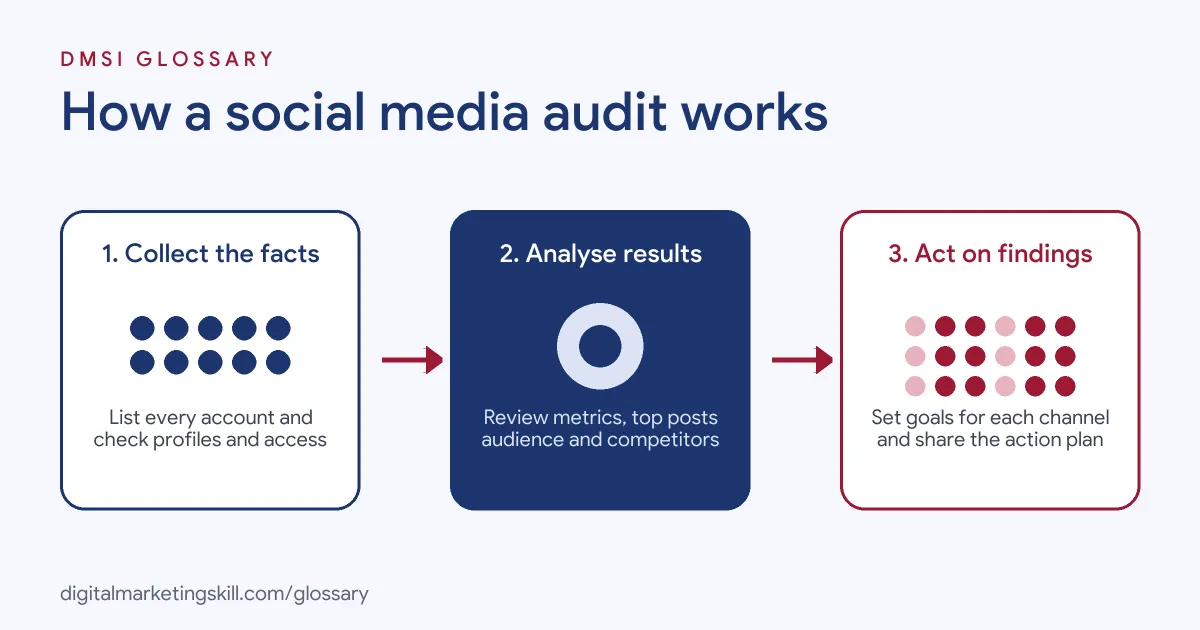
Collect the Facts
Start with a full list of your accounts. Sprout Social advises you to catalogue “every profile you own, active or dormant.” For each one, note the handle, link, owner and follower count. Also, check the bio, profile picture and links against your brand guidelines. Then record who has access, so you can remove old logins.
Analyse Performance
Next, gather data from each platform’s analytics. For example, look at reach, impressions, clicks and engagement rate. Then find your top posts and look for patterns. Do videos beat images? Do some topics always do well? Also, check your audience details, such as age and location. That way, you can see if you reach the target audience you want.
Compare and Decide
Then compare your results with a few competitors. For instance, note how often they post, what formats they use and how people respond. After that, set clear goals for each channel. Finally, write a short action list and share it with your team. Without that last step, the audit is just a report that sits in a folder.
Include Paid and Compliance Checks
Many audits focus only on organic posts. However, if you run ads, include them too. For example, check which campaigns brought the cheapest clicks or leads. Then compare them with your best organic posts. Often, the same themes work in both. In addition, review your compliance basics. Sprout Social suggests you “Review who has access to each profile, remove outdated permissions” as part of the audit. Also, check that sponsored posts are clearly labelled and that you follow each platform’s rules. Finally, make sure your team knows who to call if an account is hacked. These checks take little time, yet they can prevent serious problems later.
Examples of a Social Media Audit
- A local café. The owner finds an old second Facebook page with the wrong opening hours. So she merges it with the main page and updates every bio. After that, customers see one set of correct details.
- An online skincare brand. The team finds that short videos get far more engagement than photo posts. As a result, it shifts its content calendar toward more video.
- A B2B software company. The audit shows that LinkedIn brings most of its website visits. However, the team spends most of its time on another channel. So it moves effort to where its buyers are.
Social Media Audit vs Content Audit vs Social Listening
| Point | Social media audit | Content audit | Social listening |
|---|---|---|---|
| Main focus | Your social accounts and results | Your website and content pieces | What people say about you online |
| Data used | Platform analytics and profile details | Page traffic, rankings and quality | Mentions, keywords and sentiment |
| How often | Often quarterly | Often once or twice a year | Ongoing |
| Typical output | Goals and actions per channel | Keep, update or remove list | Alerts and trend reports |
How to Do a Social Media Audit
- List every account. Search each platform for your brand name, so you find old or unofficial profiles too.
- Set up a spreadsheet. Add one row per account and columns for handle, link, owner, followers and goals.
- Check branding. Make sure names, images, bios and links match across all profiles.
- Pull the numbers. Export reach, engagement, clicks and follower growth for the same period on each channel.
- Find your best posts. List the top posts on each channel and note what they have in common.
- Review your audience. Compare who follows you with the customers you want.
- Benchmark competitors. Pick three to five rivals and compare activity and response.
- Check access and security. Remove old users and turn on two-step login where you can.
- Set goals and actions. Write clear targets for each channel, then share the plan with your team.
Best Practices for a Social Media Audit
- Use the same date range. Compare every channel over the same period, so the numbers are fair.
- Tie metrics to goals. Choose a key performance indicator for each channel, such as leads or sales, not just likes.
- Track website visits. Use UTM parameters on links, so you can see which channel sends traffic.
- Keep one template. Reuse the same spreadsheet each time, so you can compare audits.
- Set a schedule. Many teams follow a quarterly rhythm. Hootsuite suggests you “Run a full audit quarterly at minimum.”
- Share the results. A short summary helps the whole team act on what you found.
Common Mistakes to Avoid
- Only counting followers. A large following means little if people don’t engage or buy.
- Forgetting old accounts. Dormant profiles can still show wrong details to customers.
- Skipping competitors. Without a benchmark, you can’t tell if your results are good.
- Mixing time periods. Comparing one channel’s month with another channel’s quarter gives a false picture.
- Ignoring access. Former staff with logins create a security risk.
- No action plan. An audit that doesn’t change anything wastes the effort.
Where You’ll Use a Social Media Audit at Work
You’ll use social media audits in many social roles, even when job listings don’t name them directly. For example, a social media manager often runs one when they join a new brand. Then they use it to build their first plan. Also, agency staff run audits as part of a pitch or a new client onboarding. In addition, community managers and paid social specialists use audit findings to choose content and channels.
Audits also link closely to social media analytics and competitor analysis. So if you can read the numbers and explain them clearly, you’ll find this skill useful in almost any social media job.
Learn It in the Social Media and Paid Social Track
You can learn to run social media audits in the AI-Powered Social Media Management and Advertising track. Every track includes a U.S. Project Internship from day one, with unlimited 1-on-1 mentoring.
Frequently Asked Questions
How often should I do a social media audit?
Many teams run a full audit every quarter. Also, a quick check each month helps you catch problems early.
How long does a social media audit take?
It depends on how many accounts you have. A small business might finish in a few hours. However, a large brand with many channels may need several days.
What tools do I need?
You can start with a spreadsheet and each platform’s own analytics. Later, a social media management tool can save time by pulling data into one place.
Should I include competitors?
Yes. Comparing with a few rivals shows if your results are strong or weak. It also gives you ideas for content and formats.
What should happen after the audit?
You should set clear goals for each channel and agree on actions. Then review progress at your next audit.
Sources: Sprout Social: How to conduct a speedy social media audit; Hootsuite: How to do a social media audit; Socialinsider: How to Do a Social Media Audit: Checklist + Example.