
Semrush is an online marketing platform that helps you research keywords, audit websites, track rankings and study competitors, mainly to improve search visibility. Many SEO and content teams use it every day. So it often appears in job adverts for SEO, content and digital marketing roles. Learning its main tools helps you find growth ideas faster and back up your advice with data.
Key Takeaways
- Semrush is a paid marketing platform with a limited free account.
- Its SEO tools cover keyword research, site audits, rank tracking, backlinks and competitor research.
- It also offers toolkits for content, local, social, advertising, traffic and AI visibility.
- Semrush data is based on estimates, so you should check it against your own analytics.
- It works best alongside free Google tools, such as Search Console and Keyword Planner.
What Is Semrush?
Semrush is software you use in your web browser. You type in a website, a keyword or a competitor. Then it shows data such as search volume, rankings, traffic estimates and links. For example, you can see which keywords a rival site ranks for, and how hard each one is to win.
Semrush describes itself in its own getting-started guide as offering “solutions for more than just SEO.” So besides search tools, it groups features into toolkits. These cover content, local marketing, social media, advertising, traffic and market research, and AI visibility.
Here is an everyday comparison. Imagine you plan to open a café. Before you sign a lease, you walk the street, count passers-by and visit nearby cafés. Semrush does the same thing for search. It shows you how many people search for something and who already gets their visits.
Why It Matters
Why does this matter to you? Because good SEO decisions need data. For instance, a client may want to rank for a broad term that is very hard to win. With Semrush, you can show them easier keywords with real demand. Also, you can spot technical problems before they cost traffic. As a result, your advice becomes clearer and easier to trust.
Estimates, Not Exact Numbers
Semrush figures for traffic and search volume are estimates. They come from Semrush’s own data, not from your site’s analytics. However, they are useful for comparing keywords and competitors. So treat them as a guide, and confirm real performance in Google Search Console and your analytics tool.
Who Uses Semrush
Many kinds of marketers use Semrush. For example, SEO specialists use it for audits and rank tracking. Content writers, in turn, use it to find topics and questions people search for. Also, agencies use it to report on many clients from one place. In addition, paid search teams use its ad research to see which competitors bid on which terms.
You will also see it in small businesses. For instance, a shop owner might check a few keywords before writing product pages. Then they might run a quick audit once a month. So you don’t need to be an expert to get value from it. However, the more you understand SEO, the more useful the data becomes.
How Semrush Works
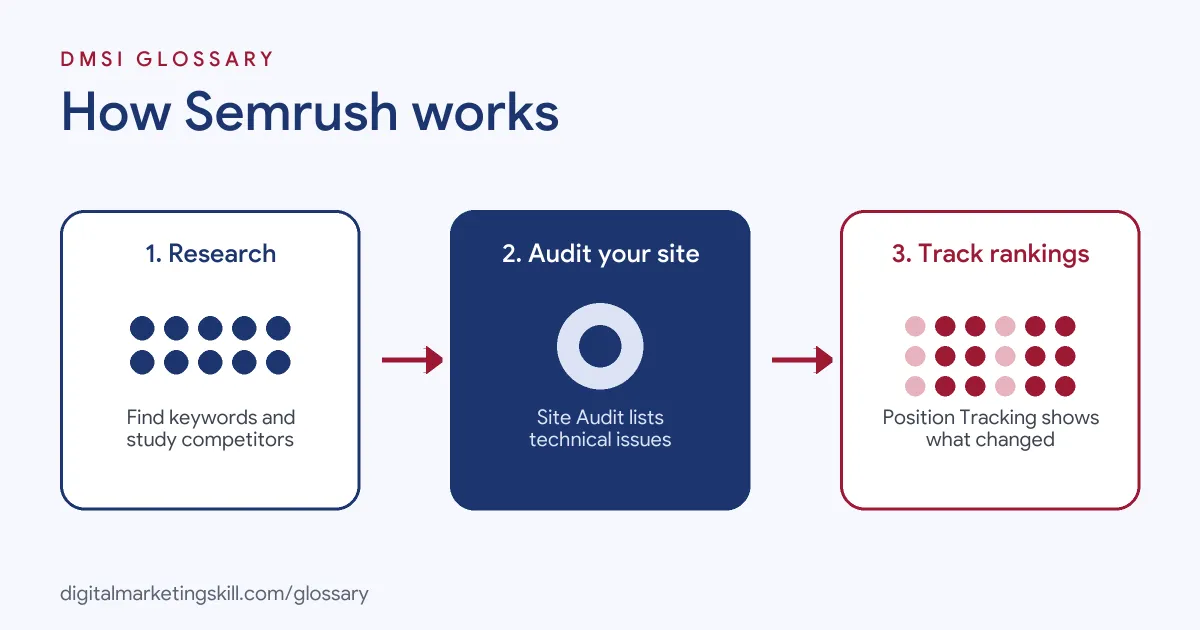
Most Semrush work follows three steps. First, you research keywords and competitors. Then you audit and improve your own site. Finally, you track rankings to see what changed.
Keyword and Competitor Research
The Keyword Magic Tool turns one seed keyword into a long list of related terms. In Semrush’s words, “You’ll see a list of related keywords that you can filter and assess for your strategy.” Each keyword shows data such as search volume, keyword difficulty and intent. In addition, Domain Overview shows a rival site’s estimated traffic and top keywords.
Site Audit
Next, Site Audit crawls your website and lists problems. Semrush says it runs “Over 140 on-page and technical SEO checks,” from “duplicate content and broken links” to HTTPS and hreflang. Then it gives your site a Site Health score and a list of issues to fix. This makes it a handy tool for technical SEO checks.
Position Tracking
Then Position Tracking follows your rankings for a set of keywords over time. You choose the search engine, device and location. For example, Semrush notes, “You can set up a campaign to track results specific to a country, state/region, city, or zip code.” However, it also warns that the original location and device type cannot be changed once the campaign is set up.
Backlinks and Other Toolkits
Semrush also has tools to study your backlinks and those of competitors. Beyond SEO, its other toolkits help with local listings, social posts, ad research and content planning. So one account can support several parts of a marketing plan.
Semrush also covers AI search. For example, its Position Tracking lets you pick ChatGPT and Google AI Mode as well as classic search engines. As a result, you can check how a brand appears in newer AI search results, too.
Examples of Semrush
- A dental clinic planning new pages. The marketer enters “teeth whitening” in the Keyword Magic Tool. Then they pick a few local, lower-difficulty terms and plan one page for each.
- An online shop after a redesign. The SEO runs Site Audit and finds broken links and missing titles. After that, the developer fixes the top issues first.
- A software company watching rivals. The team uses Domain Overview to see which topics a competitor ranks for. As a result, it finds gaps for new blog posts.
Semrush vs Google Search Console and Keyword Planner
| Point | Semrush | Google Search Console | Google Keyword Planner |
|---|---|---|---|
| Cost | Paid, with a limited free account | Free | Free with a Google Ads account |
| Data source | Semrush estimates | Google’s data for your own site | Google Ads keyword data |
| Competitor data | Yes | No | Limited |
| Main use | Research, audits, rank tracking | Real clicks, indexing and errors | Keyword ideas and ad planning |
In short, Semrush adds competitor views and audits. By contrast, Search Console shows what really happens on your own site. Many teams use both, plus the Keyword Planner.
How to Use Semrush
- Create an account. Start with a free account or trial, so you can learn the main reports.
- Set up a project. Add your domain. Then connect Google Analytics and Search Console if you can.
- Run a Site Audit. Fix the most serious issues first, such as broken pages.
- Research keywords. Use the Keyword Magic Tool for keyword research around your main topics.
- Check search intent. Next, make sure each keyword matches the page you plan to build.
- Study competitors. After that, use Domain Overview to see what rival sites rank for.
- Track rankings. Set up Position Tracking with the right location and device.
- Report and repeat. Review results each month and update your plan.
Best Practices for Semrush
- Start with a goal. Decide what you want to learn before you open a report.
- Check the database. Pick the right country, so data matches your audience.
- Compare, don’t trust blindly. Use estimates to compare options, then confirm with real data.
- Fix big issues first. First, sort audit issues by impact, not by count.
- Track a focused list. Then follow the keywords that matter to the business.
- Explain in plain words. Turn charts into clear actions for clients and managers.
Common Mistakes to Avoid
- Treating estimates as facts. Traffic numbers are a guide, not your real visits.
- Chasing volume only. High-volume keywords may be too hard or the wrong intent.
- Fixing every audit warning. In practice, some issues barely matter, so prioritise.
- Wrong location settings. Also, tracking the wrong country gives misleading rankings.
- Ignoring Google’s free tools. Search Console shows real clicks that Semrush can’t.
- Collecting data without action. Finally, reports only help when they lead to changes.
Where You’ll Use Semrush at Work
Semrush shows up in SEO, content and digital marketing roles, from interns to specialists. For example, real remote job listings ask you to:
- “Utilize SEMrush to conduct competitor analysis, backlink audits, and track rankings.” (SEO Internship).
- “Use tools like SEMrush and Google Analytics to track campaign performance and provide actionable insights.” (Digital Media Marketing Intern).
- “Radar Hire is looking for a highly skilled SEO Specialist with hands-on experience using Webflow, SEMrush, and Yext.” (SEO Specialist).
Learn It in the WordPress and SEO Track
You can learn Semrush alongside keyword research and technical SEO in the AI-Powered WordPress and SEO Specialist track. Every track includes a U.S. Project Internship from day one, with unlimited 1-on-1 mentoring.
Frequently Asked Questions
Is Semrush free?
Semrush has a free account with daily limits. However, most work needs a paid plan or a trial, so check its pricing page.
What is Semrush used for?
It is mainly used for keyword research, site audits, rank tracking and competitor research. Also, it has toolkits for content, local, social and ads.
Is Semrush data accurate?
Its traffic and volume figures are estimates. So use them to compare options, and check real results in your own analytics.
Do I need Semrush to do SEO?
No. You can start with free Google tools. However, Semrush saves time and adds competitor data.
How do beginners learn Semrush?
Start with one project on a real site. Then learn Site Audit, the Keyword Magic Tool and Position Tracking one at a time.
Sources: Semrush: Getting started guide; Semrush Knowledge Base: How does Site Audit work?; Semrush Knowledge Base: Configuring Position Tracking; remote job listings on Himalayas, Himalayas and Himalayas.