WordPress SEO works best when you fix the foundation before you add more plugins. WordPress already writes clean URLs, title tags and a sitemap. So most ranking problems come from three places: a hidden site, slow pages and thin content. Check them in that order, then match each fix to your type of site. Technical fixes support the content and link signals covered in this guide to Google ranking factors.
Technical SEO fixes matter less when the basic website essentials, like speed and clear navigation, are still missing.
The platform underneath those fixes matters too. See our wider guide to CMS marketing for how traditional, headless and hosted platforms compare.
Key Takeaways
- WordPress is the default platform. W3Techs reports that WordPress runs 40.1% of all websites and 58.6% of sites with a known content management system. Your competitors probably use the same tools you do.
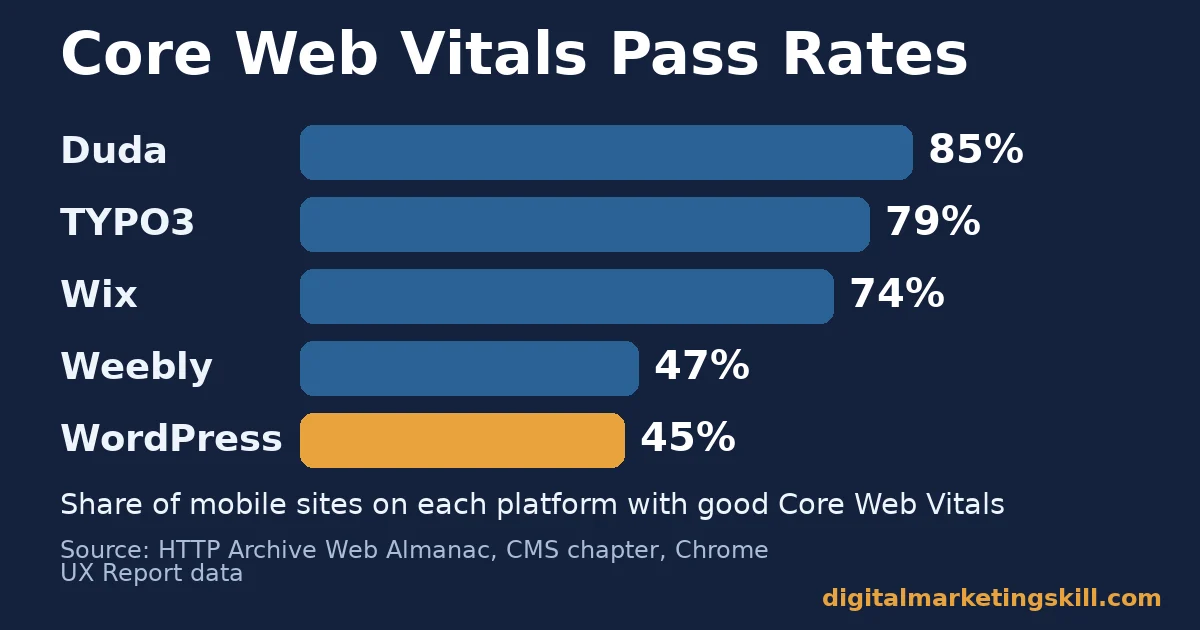
- Speed is the common weak spot. The HTTP Archive Web Almanac found that only 45% of mobile WordPress sites pass Core Web Vitals. Duda reached 85% and Wix 74%.
- A plugin levels the field; it does not tilt it. Yoast SEO alone lists 10+ million active installations on WordPress.org, so installing one puts you level with millions of sites rather than ahead of them.
- Google rewrites much of what you type. Google says it uses the title element for around 87% of title links. But an Ahrefs study of 20,000 keywords found Google rewrote meta descriptions 62.78% of the time.
- Most pages never earn search visits. Ahrefs studied about 14 billion pages and found that 96.55% get no traffic from Google. The usual causes are no search demand and no backlinks.
In this guide
- What Most WordPress SEO Guides Get Wrong
- How WordPress SEO Actually Works
- WordPress SEO Priorities Differ by Site Type
- How to Fix WordPress SEO for Each Site Type
- The WordPress SEO Settings to Check in Ten Minutes
- How to Measure WordPress SEO Progress
- The One Rule: Fix Indexing, Then Speed, Then Content
- What Faster Pages Did for Vodafone
- Frequently Asked Questions About WordPress SEO
- Start With One Report, Then Expand
What Most WordPress SEO Guides Get Wrong
Most WordPress SEO guides are plugin tours. They walk through every toggle in one plugin and then stop. What they miss is the order of work. That order changes for a blog, a service business and an online store. This guide fills that gap: what WordPress does on its own, what differs by site type and what to fix first.
First, the ground rules. Google does not publish its ranking formula, so any ranking advice here is an informed inference, not a settled fact. When we cite a study, we name who ran it and say what it does not show. Platform and speed figures are a snapshot, not a permanent ranking, because the data refreshes often. Also, no setting guarantees a ranking; settings only remove obstacles.
The base rate matters too. In its search traffic study of about 14 billion pages, Ahrefs found that 96.55% of pages get no traffic from Google. Ahrefs names three main causes: no search demand, no backlinks, or a poor match with what searchers want. Notice that none of those causes is a missing plugin setting.
How WordPress SEO Actually Works
Think of WordPress SEO as three layers. The core software handles the plumbing, and a plugin handles the labels. You handle what search engines actually rank: content, links and speed. Most wasted effort comes from polishing the middle layer while the other two leak.
The scale explains why this matters. According to W3Techs WordPress usage statistics, WordPress powers 40.1% of all websites. So the same defaults appear on millions of competing sites, which means defaults alone cannot set your WordPress SEO apart.
What WordPress Core Already Handles
WordPress core builds a title tag from your post title, creates readable permalinks and publishes an XML sitemap. A sitemap is simply a file that lists the URLs you want search engines to find. According to the WordPress core team’s sitemaps announcement, the sitemap index lives at /wp-sitemap.xml. Each sitemap holds up to 2,000 entries by default.
Permalinks need one decision from you. Google’s URL structure guidance recommends hyphens rather than underscores between words, because hyphens help people and search engines identify concepts. So choose the “Post name” structure under Settings, then Permalinks, and keep each slug short and descriptive.
Core also holds the most dangerous checkbox on the site. The WordPress documentation for the Reading screen explains that “Discourage search engines from indexing this site” adds a noindex, nofollow robots tag to your pages. Developers often tick it on a test copy and then forget it at launch. If a new site gets no impressions at all, check this box first.
What an SEO Plugin Adds and What It Cannot
An SEO plugin such as Yoast SEO, Rank Math or All in One SEO adds controls that core lacks. You get a custom SEO title and meta description per page, schema markup and noindex settings for thin archive pages. Schema markup is code that labels a page’s content, for example as an article or a product. That helps search engines read it reliably.
However, a plugin cannot write your content or earn your links. Yoast SEO alone shows 10+ million active installations on its WordPress.org plugin page. That means installing it puts you level with millions of competitors rather than ahead of them. Treat the plugin as a labelling tool, not as a ranking strategy.
Google also decides how much of your labelling it uses. In its Search Central post on how titles are generated, Google says it now uses the title element around 87% of the time. Meta descriptions fare worse. An Ahrefs meta description study of 20,000 keywords found Google rewrote them 62.78% of the time. So write both well, but expect the page itself to do the heavy lifting.
Where WordPress Sites Usually Break
Speed is where many WordPress sites lose ground. The HTTP Archive Web Almanac CMS chapter uses real Chrome user data from millions of sites. It found that only 45% of mobile WordPress sites pass Core Web Vitals. That places WordPress among the lowest of the major platforms, while Duda reached 85% and Wix 74%.
Core Web Vitals are Google’s three user-experience metrics. Largest Contentful Paint measures how fast the main content appears. Interaction to Next Paint measures how fast the page responds to a tap, and Cumulative Layout Shift measures how much the layout jumps. According to web.dev’s Web Vitals guide, a page is “good” at 2.5 seconds, 200 milliseconds and 0.1. Each is measured at the 75th percentile of visits.
The Web Almanac also points to a likely cause. It estimates that around 60% of WordPress sites use a page builder, and page builders tend to add extra code to every page. Our reading is that the flexibility that makes WordPress popular also makes it slow when nobody manages it. That is an inference, not a measured cause.
If speed work is new to you, our guide to website optimisation skills explains what to learn first. Part of that foundation is the host itself; see our guide to website hosting services for how to match hosting type to your traffic.
WordPress SEO Priorities Differ by Site Type
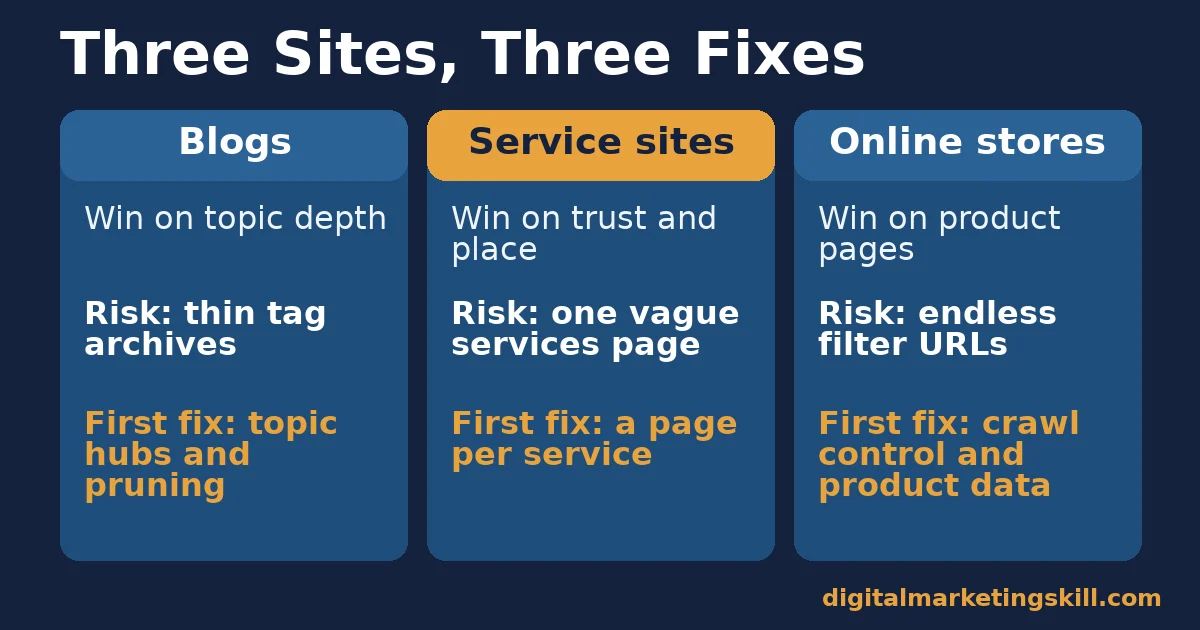
The same settings screen serves very different businesses. A recipe blog, a plumbing firm and a clothing store can all run WordPress. Yet each one wins search traffic in a different way. So before you change anything, decide which of the three models below fits your site best.
Blogs: Built on Topic Depth
A blog earns search traffic one question at a time. Each post targets a specific query. The site gains trust when many posts cover one topic well and link to each other. Its main risk is a long tail of posts nobody searches for. The Ahrefs figure above shows that this is the normal outcome, not the exception.
Blogs also pile up archive pages, a classic WordPress SEO trap. WordPress creates a listing page for every tag, category, author and date. As a result, a blog with 300 tags can expose 300 thin listing pages. Those pages compete with your real posts for attention and spread your internal links too thinly.
Service Sites: Built on Trust and Location
A service business, such as an accountant, a clinic or a builder, usually wins on local searches. Google’s Business Profile help page says local results are based mainly on relevance, distance and prominence. Your website feeds relevance and prominence. It tells Google what you do, and it helps you earn reviews, mentions and links.
Service sites are usually small, so each page carries more weight in your WordPress SEO. One vague “Services” page that lists everything tends to rank for nothing in particular. Meanwhile, a clear page for each service gives Google a precise match for each search.
Online Stores: Built on Clean Product Pages
An online store, usually WooCommerce on WordPress, wins on product and category searches. Its typical problem is the opposite of a service site’s: too many URLs. Google’s documentation on faceted navigation warns that filters for size, colour and price can create infinite URL spaces. That leads to overcrawling, which means search engines waste time on filter pages instead of your new products.
Stores also depend on product data. Google’s product structured data documentation says shoppers can see price, availability, review ratings and shipping details right in search results. Those details come from your product records, so incomplete data loses those richer results with any plugin. For a closer look at which plugin handles this best, see our guide to WordPress SEO plugins for an online store.
How to Fix WordPress SEO for Each Site Type
Each model above has one first move that matters more than the rest. Start with the move that matches your site, give it a few weeks, and then work down the list. If your site mixes two models, such as a store with a blog, fix the part that earns the most revenue first.
Blogs: Lead With Internal Links and Pruning
First, group your posts into topics and give each topic one detailed guide that links to every related post. Then make each related post link back to that guide with descriptive anchor text, so search engines can see how the pages fit together. For the basics inside each post, our guide on where to put keywords on a page covers titles, headings and the opening.
Next, prune. Set tag and date archives to noindex unless they work as hubs. Then find posts with no impressions in Search Console over several months, and either update them or merge them into a stronger post with a 301 redirect. A 301 redirect is a permanent forward from an old URL to a new one, so visitors and search engines land on the right page.
Service Sites: Lead With One Page per Service and Area
Build one page per service, and one page per area only where you genuinely serve that place. Each page should state the service, where you offer it, what it includes and how to book. Then add LocalBusiness schema with the same name, address and phone number that appear on your Business Profile, so your site and your profile tell the same story.
Next, earn prominence. Ask happy customers for reviews, list the business in relevant directories and publish answers to the questions people ask on the phone. Those answer pages also rank for long, specific searches. But avoid copying one area page twenty times with only the town name swapped, because thin near-duplicates rarely rank.
Online Stores: Lead With Crawl Control and Product Data
Start by controlling filters. Let search engines crawl category pages, but block or noindex the filter combinations nobody searches for, such as colour plus size plus price. Keep canonical tags on product variants, so one product does not appear as ten competing URLs. A canonical tag is a line of code that tells search engines which version of a page is the main one.
Then complete the product data. Fill in price, stock status, brand and reviews for every product, because structured data can only show what your catalogue holds. Write unique descriptions for your best sellers first, instead of the maker’s copy that many other stores also use. For speed fixes that lift sales on phones, see our guide to mobile conversion rate.
The WordPress SEO Settings to Check in Ten Minutes
Whatever your site type, these WordPress SEO checks take about ten minutes and catch the most expensive mistakes. Work through them in order, because each step assumes the one before it passed.
- Reading settings: confirm that “Discourage search engines from indexing this site” is unchecked.
- Permalinks: choose “Post name” so URLs read like /wordpress-seo/ rather than a string of numbers.
- HTTPS: confirm that both addresses under Settings, then General, start with https.
- Sitemap: open /wp-sitemap.xml or your plugin’s sitemap, then submit it in Google Search Console.
- Archives: set tag, date and author archives to noindex unless they help readers.
- Speed: run your three busiest pages through PageSpeed Insights and note whether each one passes Core Web Vitals.
- Images: give every meaningful image descriptive alt text, which Google’s image guidance calls the most important attribute for image metadata.
Google’s sitemap guidance adds a useful nuance. It says a site of about 500 pages or fewer that is well linked internally might not need a sitemap at all. Even so, submitting one costs nothing, and it unlocks the indexing report you will use in the next section.
How to Measure WordPress SEO Progress
Measure WordPress SEO in Google Search Console, which is free, and read the numbers as a chain. Each metric below answers one question, so a weak number points you to the layer that needs work.
- Indexed pages: the pages Google has stored and can show in results. If important pages are missing, fix settings and internal links before anything else.
- Impressions: how often any of your pages appeared in search results. Rising impressions mean Google sees your content as relevant to more searches.
- Click-through rate (CTR): clicks divided by impressions. A low CTR on pages with many impressions suggests the title or snippet does not match what searchers want.
- Average position: the average rank of your highest result for each search. Read it alongside impressions, because new rankings on page three can pull the average down while traffic grows.
- Core Web Vitals pass rate: the share of your URLs rated good in the Core Web Vitals report. Aim for every key template, such as posts, products and service pages, to pass.
- Organic conversions: enquiries, sign-ups or sales from organic search, tracked in your analytics tool. This is the number that pays for the work, so judge every other metric by whether it moves this one.
Review these numbers monthly rather than daily, since rankings shift every day and short swings are mostly noise. Also compare the same period year on year for seasonal businesses, so a quiet month does not look like a penalty.
The One Rule: Fix Indexing, Then Speed, Then Content
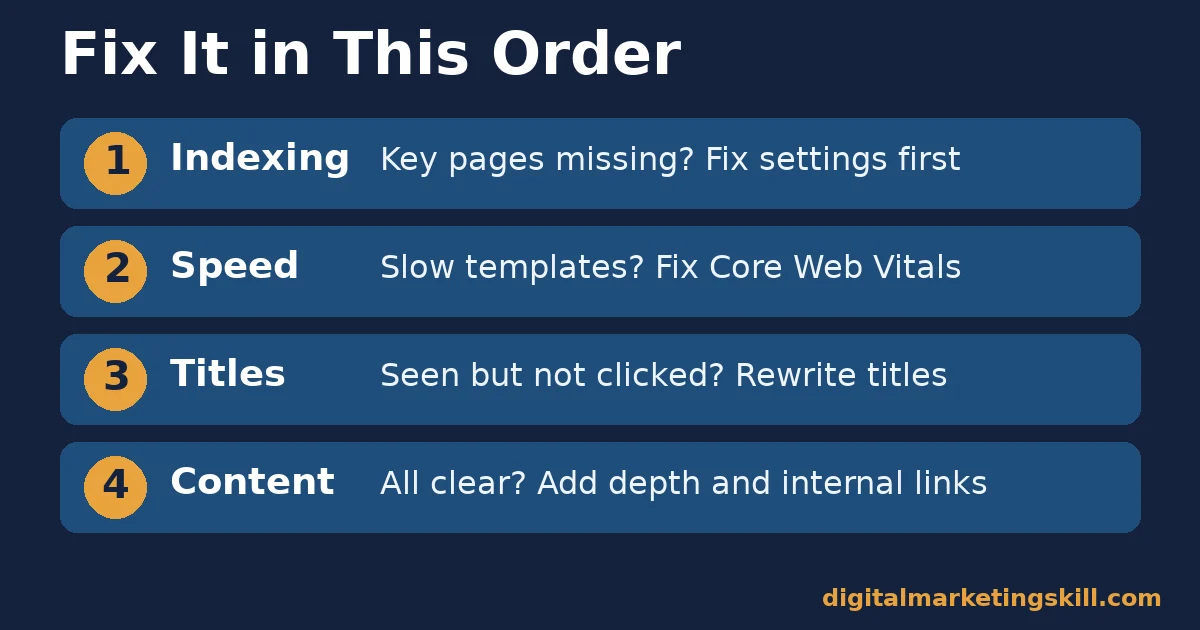
If you remember one thing from this guide, make it this order. Fix whatever stops Google from indexing a page first, then whatever makes the page slow, and only then the content and titles. Work in a later layer is wasted while an earlier layer is broken, because a perfect title on a noindexed page earns nothing.
Here is how the rule plays out on an imaginary site (illustrative, invented numbers). A small accounting firm’s WordPress site has 40 pages, but Search Console shows only 12 indexed. The cause is a leftover noindex setting on its service pages after a redesign. Fixing that one setting brings 35 pages into the index within a few weeks.
Next, the firm finds that its service template fails Core Web Vitals on mobile, with a Largest Contentful Paint of 4.1 seconds. Compressing the hero image and removing two unused page-builder widgets brings it down to 2.3 seconds. Only then does the firm rewrite its titles, which lifts click-through rate from 1.8% to 3.1% on pages that already had impressions.
Notice what the firm did not do with its WordPress SEO. It did not switch plugins, buy a new theme or publish twenty new posts. Each fix was cheap, because the order pointed straight to the real bottleneck.
What Faster Pages Did for Vodafone
Speed can sound abstract, so a real result helps, even outside WordPress SEO. In the Vodafone case study on web.dev, Google’s site for web developers, Vodafone ran an A/B test on a landing page. It split traffic 50/50 between the old page and an optimised version. The optimised version had a 31% better Largest Contentful Paint and produced 8% more sales.
The same test reported a 15% better lead-to-visit rate and an 11% better cart-to-visit rate. To get there, Vodafone moved a widget’s rendering to the server, which cut render-blocking JavaScript, and it optimised images, including resizing the hero image. Those are the same kinds of fixes many slow WordPress sites need.
Still, know the limits before you copy the result. This was one company and one landing page, the case study does not say which platform Vodafone used, and absolute visit numbers were not published.
A separate study commissioned by Google, Milliseconds Make Millions, found that a 0.1-second speed gain lifted retail conversions by 8.4% across 37 brand sites. Because Google paid for it, read both results as directional evidence rather than a forecast.
Frequently Asked Questions About WordPress SEO
Is WordPress good for SEO?
Yes, WordPress gives you clean URLs, a built-in sitemap and full control over titles and content, which covers the technical basics. Results still depend on content, links and speed, and the Web Almanac found that only 45% of mobile WordPress sites pass Core Web Vitals.
Do I need an SEO plugin for WordPress?
You do not strictly need one, but a plugin makes custom titles, meta descriptions, schema and noindex controls much easier. Install one well-supported plugin, set it up once and never run two SEO plugins together, since they can output duplicate tags.
Which SEO plugin is best for WordPress?
Yoast SEO, Rank Math and All in One SEO all cover the essentials, so the best choice is the one you will set up properly. The plugin matters far less than your content, internal links and page speed.
Why is my WordPress site not showing on Google?
Check Settings, then Reading, for the “Discourage search engines” box, and then use the URL Inspection tool in Google Search Console. A new site can also take days or weeks to be crawled, and submitting a sitemap helps Google find it.
How long does WordPress SEO take to show results?
Indexing fixes can show within days, but ranking gains for new content usually take months, and the timing depends on competition. Track impressions first, because they rise before clicks do.
Does page speed affect WordPress rankings?
Google says Core Web Vitals are used by its ranking systems, but relevance still comes first, so a slow page with the best answer can outrank a fast but weak one. Speed matters most for visitors, because faster pages tend to convert better.
Can I do WordPress SEO myself?
Yes, most of the work in this guide needs no developer: settings, titles, internal links and content. You may need help for deep speed work, such as replacing a heavy theme or page builder.
Start With One Report, Then Expand
WordPress SEO rewards order more than effort. Open Google Search Console, check how many of your pages are indexed, and fix whatever blocks the missing ones. Then test your three busiest templates for speed, and only after that rewrite titles and content for your site type.
If you are new to the field, our beginner’s guide to search engine optimization explains the wider discipline. And since SEO settings are only one part of a working site, our guide to business website essentials covers the rest, from page speed to trust signals. Our guide on how to become an SEO expert shows how to prove these skills to employers.
If you want guided practice, Digital Marketing Skill Institute teaches these skills hands-on. The Master Diploma in Digital & AI Marketing includes a WordPress & SEO track, with courses in AI-Powered WordPress Website & eCommerce Development and AI-Powered Search Engine Optimisation & Content Marketing.
The diploma comes with unlimited 1-on-1 mentoring and project-based work experience with the Institute’s U.S. partner company. It is dual US and UK accredited and recognised in more than 100 countries.
You can follow the programme from anywhere in your country. Browse more guides on the Digital Marketing Skill Institute blog and read student reviews. When you are ready, apply for the Master Diploma or start from the Digital Marketing Skill Institute homepage.
Every figure in this guide was checked against its original source before publication. Figures marked as illustrative are invented examples, not real results.